TL;DR

Turn quiet afternoons into listening time
- Thousands of audiobooks, podcasts and originals
- Listen on your phone, tablet or Echo — also offline
- Cancel anytime
Smart locks offer enhanced security and convenience, but they come with cyber and physical risks. Proper setup, awareness, and backup options help seniors enjoy their benefits safely.
Imagine unlocking your front door with a tap on your phone or a quick fingerprint scan. For many seniors, smart locks promise a new level of freedom and ease. But are these digital door guards truly safe? Or do they open new doors to risks?
This guide walks through what you need to know—real threats, clever features, and practical tips—so you can decide if smart locks fit your home and your peace of mind.
Choose a smart lock with strong encryption and backup options like physical keys.
Keep your device’s software updated and use unique, complex passwords.
Backup access methods are essential—store spare keys in a secure, hidden place.
Smart locks can be as secure as traditional locks when installed and used properly.
Combine smart locks with other home safety measures for maximum protection.
Senior Home Security Guide
Are Smart Locks Safe? What Seniors Should Know
TL;DR: Smart locks can add security and everyday convenience, but they also bring cyber, battery, privacy, and setup risks. The safest choice is not just the lock itself, but the habits around it: strong passwords, updates, backup access, and a sturdy door.
With encryption, biometric access, regular updates, and backup entry methods, smart locks can be as secure as traditional locks for most households.
PIN, phone app, or biometric access are the main choices seniors compare.
A physical key, keypad code, or lockbox prevents stressful lockouts.
When unique passwords, MFA, and firmware updates are used consistently.
Smart lock plus strong frame, lighting, window security, and alerts.
How Smart Locks Protect the Door
Smart locks are digital door guards. They can log who enters, send alerts, grant temporary caregiver access, and remove the need to fumble with keys. Their safety depends on choosing the right type and setting it up carefully.
PIN Code Locks
Easy for seniors who do not want to rely on a smartphone. Avoid simple codes like 1234 and change shared codes when needed.
Bluetooth or Wi-Fi
Useful for remote access, caregiver check-ins, and alerts. Secure the app with a unique password and multi-factor authentication.
Fingerprint Entry
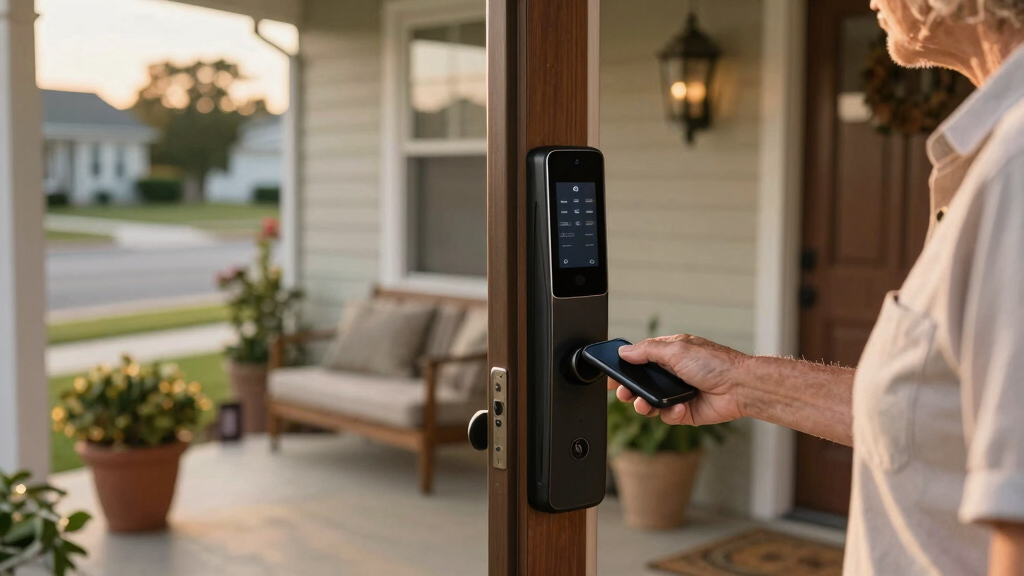
A strong option for quick access, especially for people with arthritis or limited dexterity. Keep a backup method ready.
Smart Lock Types Compared
No single lock is perfect for every senior. Match the technology to comfort level, mobility, caregiver needs, and the home’s existing door hardware.
| Type | How It Works | Best For | Senior-Friendly | Risk Watch |
|---|---|---|---|---|
| Keypad Lock | Enter a PIN code on the lock face. | No-smartphone households. | ✓ Simple daily use | ~ Shared or guessed codes |
| Bluetooth Lock | Unlocks through a nearby phone app. | People comfortable with phones. | ~ Needs phone nearby | ~ App security matters |
| Wi-Fi Lock | Allows remote access and alerts. | Caregivers and family monitoring. | ✓ Great for support | ~ Internet and password hygiene |
| Biometric Lock | Uses fingerprint or facial recognition. | Fast entry with less hand strain. | ✓ Very convenient | ~ Privacy and backup access |
| Traditional Lock | Mechanical key only. | Low-tech simplicity. | ✓ Familiar | ✗ No alerts or access logs |
Failure Planning Is Safety Planning
Power outages, Wi-Fi glitches, dead batteries, and forgotten phones should never mean being locked outside. A good smart lock setup includes a simple backup chain.
Low Battery Alert
Choose a model that warns early, then keep spare batteries in a visible place.
Backup Code
Use a memorable but uncommon PIN. Avoid birthdays, addresses, and repeated digits.
Physical Key
Keep a mechanical override key in a secure lockbox, not under a mat.
Trusted Contact
Give emergency access to one reliable person and review permissions regularly.
Support Plan
Save customer support details and know how to reset the lock before trouble starts.
Risk vs. Readiness
Smart locks become safer when setup choices match real life. The goal is not perfect technology; it is fewer weak spots and more ways to get help quickly.
Protection Layers
Ease of Use Spectrum
For many seniors, the safest option is the one they can use calmly every day. Large buttons, voice control, fingerprint entry, and clear alerts can reduce frustration and rushed mistakes.
Use a unique app password. Do not reuse banking, email, or shopping passwords.
Turn on multi-factor authentication. It adds a second check before access changes.
Install firmware updates. Updates patch security holes and improve reliability.
Limit shared codes. Give temporary access when possible and remove it afterward.
Traceability: From Lock to Safer Home
A smart lock works best as one piece of a layered safety system. The strongest setup connects access, alerts, backup entry, and physical protection.
Frequently Asked Questions
Are smart locks safer than traditional locks?
They can be equally secure or safer when they use encryption, strong authentication, updates, and backup access. They also require more maintenance.
What if Wi-Fi goes out?
Most quality smart locks still work with keypad codes, Bluetooth, physical keys, or mechanical override methods. Check this before buying.
Are smart locks easy for seniors?
Many are, especially models with large buttons, voice control, fingerprint entry, and simple alerts. Initial setup may be easier with help.
How do I prevent hacking?
Use unique passwords, enable multi-factor authentication, update firmware, buy reputable brands, and remove old access codes.
Bottom Line
Smart locks can be safe for seniors when convenience is paired with preparation. Choose a lock with strong encryption, simple daily access, low-battery alerts, and a real backup plan. Then reinforce the basics: a strong door, good lighting, careful code sharing, and regular updates.
How Smart Locks Keep Your Home Safe (Or Not)
Smart locks use advanced security measures—encryption, biometric ID, and remote control—to protect your home. They log who enters and when, giving you a digital record. But they can also be vulnerable if not set up properly.
For example, a senior homeowner in Florida installed a smart lock with a biometric scanner. When the batteries ran low, she knew immediately thanks to a low-battery alert, and she used a backup physical key to get in. That quick fix kept her safe without panic.
Popular right now

Ninja DualZone Smart XL Air Fryer, 10-Qt, 6-in-1, DZ950

Ninja Foodi Smart 6-in-1 Indoor Grill and Air Fryer, 4 Qt, FG551

Sony BRAVIA 5 85-Inch Mini LED 4K HDR Smart TV (K-85XR50)
As an affiliate, we earn on qualifying purchases.
The Types of Smart Locks Seniors Can Count On
Not all smart locks are created equal. Here’s what you’ll find:
| Type | How It Works | Best For |
|---|---|---|
| Keypad Locks | Enter a PIN code | Easy, no smartphone needed |
| Bluetooth/Wi-Fi Locks | Unlock via smartphone app | Remote access, tech-savvy seniors |
| Biometric Locks | Fingerprint or facial recognition | High security, quick access |
Choosing the right one depends on your comfort with technology and your security needs.
For instance, a senior with arthritis might prefer a fingerprint lock over fiddling with tiny PIN pads. Meanwhile, a caregiver might opt for remote control options for peace of mind.
3 Simple Ways to Keep Your Smart Lock Safe from Hackers
- Use strong, unique passwords for your app and lock.
- Keep firmware updated to patch vulnerabilities.
- Enable multi-factor authentication if available.
For example, a retired teacher in Ohio set her smart lock with a complex password and turned on automatic updates. She also linked her lock to her smart home system, which alerts her to any unusual activity.
These small steps are crucial because cybercriminals often target weak passwords or outdated software to gain unauthorized access. By actively managing these security layers, you significantly reduce the risk of hacking, making your smart lock a more resilient part of your home security system.
What To Do When Power or Internet Fail
Smart locks rely on batteries and internet connections. Power outages or Wi-Fi glitches won’t lock you out—if you plan ahead.
Many models include backup methods like physical keys or keypad codes. For example, a senior in Texas keeps a hidden physical key in a lockbox outside. When her Wi-Fi went down, she used the backup key to get in, avoiding frustration or lockouts.
Always check your device’s backup options and keep spare batteries handy. Being prepared with multiple access methods ensures you won’t be left stranded if technology fails, which is especially important for seniors who may have limited mobility or assistance options.
Are Smart Locks Really Safer Than Traditional Locks?
Smart locks can be more secure if they use encrypted connections, biometrics, and proper setup. They offer features like activity logs and remote control, which can enhance security by providing real-time alerts and access control. However, they also pose new risks—cyberattacks, hacking, or physical tampering—that traditional locks don’t face. This means that while they can be safer in some ways, they require diligent maintenance and security practices.
For example, a homeowner who neglects to change default passwords or fails to update firmware might inadvertently open a door to hackers. Conversely, a well-maintained smart lock with strong encryption and multi-factor authentication can deter intruders better than a simple lock. The key lies in understanding that the added convenience of smart locks comes with a responsibility to stay vigilant—regular updates, strong passwords, and monitoring activity logs are vital to maintaining their security advantages.
Choosing between traditional and smart locks depends on your comfort with technology, your home’s security needs, and your willingness to stay vigilant about updates and security practices.
The Best Tips for Safe, Easy Smart Lock Use
- Set strong, unique passwords. Avoid common PINs like 1234.
- Share access carefully—limit who gets codes or permissions.
- Regularly update your device’s software to patch security holes.
- Keep a physical backup key hidden safely outside.
- Use voice commands or larger buttons if available for easier access.
For example, a grandmother in California uses voice commands to open her smart lock, making it easier for her to manage without fumbling with small buttons. This approach not only simplifies daily use but also reduces frustration, especially for seniors with limited dexterity or vision issues. Incorporating user-friendly features like voice control or larger buttons can significantly improve safety and independence, ensuring that technology remains an accessible help rather than a hindrance.
How Smart Locks Fit into Your Overall Home Safety
Smart locks are part of a bigger safety picture. They work best with good lighting, secure windows, and a strong door frame. Think of your home as a fortress—each part matters.
For instance, adding a smart lock to a door with a shaky frame might not stop a determined intruder. Reinforcing the door and adding motion-activated lights complement your smart lock’s security, creating layered defenses that are more effective than any single measure alone. This holistic approach reduces vulnerabilities and provides peace of mind, especially for seniors who want to feel confident about their home safety.
By integrating multiple security measures, you create a more resilient environment that can better withstand attempts at intrusion or accidental lockouts, ensuring your home remains a safe haven.
Frequently Asked Questions
Are smart locks safer than traditional locks?
Smart locks can be equally secure, especially with strong encryption and biometric options. However, they introduce cyber risks, so proper setup and vigilance are essential. Traditional locks are simpler but less flexible.
What if my Wi-Fi or internet goes out?
Most smart locks include backup methods like physical keys or keypad codes. Keeping a spare key hidden outside or memorizing a code ensures you won’t get locked out during outages.
Are smart locks easy for seniors to use?
Many models feature larger buttons, voice control, or simple app controls designed with seniors in mind. Initial setup might require help, but daily use can be straightforward with the right choice.
How do I prevent hacking or unauthorized access?
Use strong, unique passwords, enable multi-factor authentication, keep firmware updated, and buy from reputable brands. These steps greatly reduce hacking risks.
What should I do if my smart lock malfunctions?
Always keep a physical backup key or alternative access method. Contact customer support promptly and follow troubleshooting steps to resolve issues quickly.
Conclusion
Smart locks can transform home security into a simple, modern experience—if you manage them wisely. Remember, technology is only as good as the care you give it. Think of your smart lock as a friendly guardian, not a foolproof fortress.
Stay informed, stay alert, and enjoy the freedom that smart home tech can bring. Your home, your peace of mind—made smarter.

![The GNU Emacs Architecture: Unlocking The Core [Pdf]](https://abstractblog.com/wp-content/uploads/2026/07/the-gnu-emacs-architecture-unlocking-the-core-pdf-featured-560x300.jpg)