TL;DR

Turn quiet afternoons into listening time
- Thousands of audiobooks, podcasts and originals
- Listen on your phone, tablet or Echo — also offline
- Cancel anytime
Simple music players for dementia make familiar songs easier to play by reducing menus, small controls, and unexpected interruptions. Start with a reliable one-button player or a familiar device set up by someone else, build a short playlist from the person’s own musical history, and watch for signs of comfort or distress. Music can support enjoyment and connection for some people, but it is not a treatment for dementia.
Start with songs from the listener’s own life; no single genre or generic playlist suits everyone.
Choose a player whose main controls are clear, playback is predictable, and volume is comfortable.
Begin with a small playlist, then keep or remove tracks based on the listener’s response.
Offer music as an invitation and stop if the listener seems uncomfortable.
Music may support enjoyment or connection for some people, but it is not a dementia treatment.
Make familiar music easier to reach One button, personal songs
A simple, predictable player can make listening easier. Let the person’s own musical history and their response guide what plays.
Choose controls that feel clear
The easiest option is one the listener can use comfortably, or a caregiver can set up without complicating daily listening.
| Option | What may help | What to check |
|---|---|---|
| One-button player | Large, clear control | How play, pause, and resume work |
| Radio or CD player | Familiar shape and selected music | Small controls and confusing modes |
| Phone or streaming app | Caregiver can choose from a large library | Menus, alerts, ads, and internet access |
| Portable speaker | Caregiver can manage playback elsewhere | Whether the listener depends on help |
Build a playlist from the person’s life
There is no single genre or generic playlist that works for everyone.
Gather favorite artists, dances, hymns, and songs linked to family or meaningful times.
Choose a manageable set of familiar songs instead of an endless library.
Notice singing, tapping, smiling, relaxing, turning away, or tension. Keep, remove, or revisit tracks based on the response.
Keep everyday listening predictable
A caregiver can handle setup while keeping the path from ready device to music simple.
Make the main action obvious
Check that the control starts and stops music as expected, without confusing menus or interruptions.
Set a comfortable volume
Keep music quiet enough for conversation and awareness of nearby sounds.
Check power and restart behavior
Make charging or battery care manageable, and see whether playback returns to a familiar starting point.
Why one familiar song can make a difficult day feel more connected
Simple music players for dementia can make familiar songs easier to start, which gives a person a chance to enjoy music without handling a screen or complicated menu. Music connected to someone’s life may prompt recognition, movement, conversation, or emotion, even when other communication feels difficult. The response is personal: a song can comfort one listener and upset another [1]. Think of a song like a key to a well-known room. It may open a pleasant memory, but you can’t predict what the room will feel like that day. A daughter might play the dance tune her father loved at family gatherings and see him tap the arm of his chair. That moment matters on its own; it does not prove he can recall the event or that music has changed the course of dementia. Music listening is a meaningful activity, not a treatment. Research suggests possible benefits for mood, engagement, and some behavioral symptoms, but results vary [1]. If you’re making care decisions, speak with a qualified health professional. Let the listener’s response guide the music: a smile, a relaxed posture, or a request for another song may invite you to continue. A tense expression, turning away, or agitation is a reason to pause.Popular right now

De'Longhi Magnifica Start Fully Automatic Espresso Machine with Milk Frother, Silver

De'Longhi Magnifica Duo Automatic Espresso Machine with Milk Frother – Silver

Dyson V15 Detect Cordless Vacuum
As an affiliate, we earn on qualifying purchases.
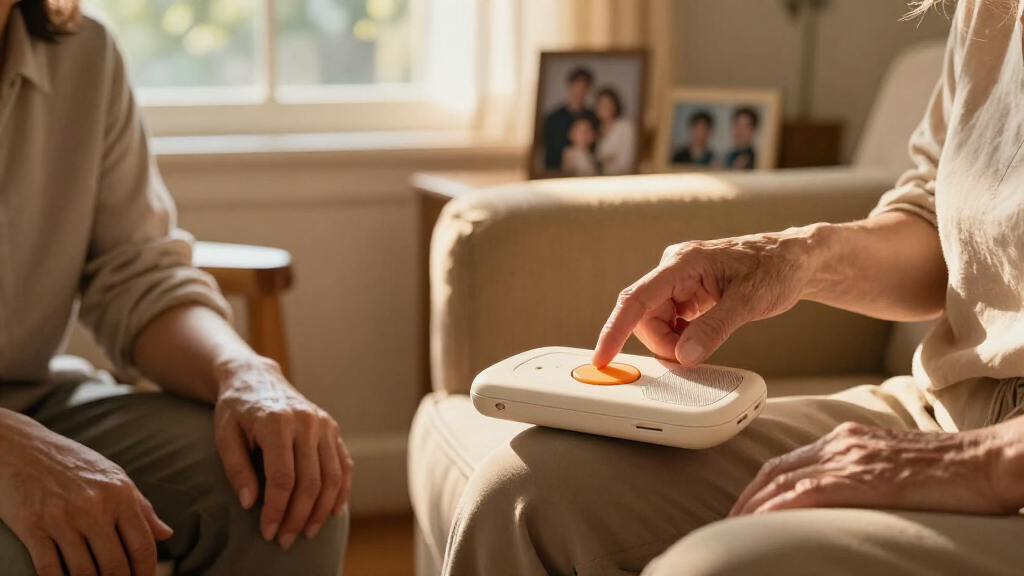
Which player makes it easiest to press play and stop
A dementia-friendly player makes its main action obvious and predictable: one large control starts music, and the listener can pause or stop it without searching through menus. A built-in speaker, comfortable volume control, and reliable playback can matter more than a long feature list. The simplest choice is the one that the person can use comfortably—or that a caregiver can set up without making daily use confusing. | Option | What may work well | What to check | |—|—|—| | One-button music player | A large, clear control can make starting music straightforward. | Confirm what the button does, how playback stops, and whether it resumes as expected. | | Modified radio or CD player | A familiar shape and a small collection of music can feel predictable. | Check for small controls, confusing modes, or discs that are hard to handle. | | Phone or streaming app | Someone else can set it up and choose from a large library. | Menus, ads, alerts, recommendations, and internet problems can interrupt listening. | | Portable speaker | A caregiver can start a playlist on another device and keep the listening controls simple. | The listener may still depend on someone else to manage the phone or speaker. | For example, if your mother can press a large button but finds a touchscreen slippery and crowded, a dedicated player may be easier. If she already enjoys asking a smart speaker to play a favorite artist, keep that familiar routine if it stays reliable. Product labels such as “senior-friendly” don’t guarantee ease of use. Try the actual controls before deciding, and check whether volume, charging, and track changes fit the person’s abilities.How to build a playlist that feels personal, not prescribed
To build a familiar playlist, start with songs from the listener’s own life, play a small selection, and change it based on their response. A personal collection is more useful than a generic playlist because people have different tastes, memories, cultures, and religious traditions. There is no single set of songs that works for everyone.- Ask people who know the listener. Invite family and friends to suggest favorite artists, dance music, hymns, songs sung at home, or tunes linked to a meaningful period. If someone cannot name a favorite, a relative may remember what played in the kitchen or on a family road trip.
- Start with a short collection. Choose a manageable group of songs rather than loading an endless library. A familiar recording can feel like an old photograph; too many choices can make finding it harder.
- Play and observe. Notice singing, tapping, smiling, relaxing, turning away, or becoming tense. For example, a caregiver might find that an upbeat song gets a gentle foot tap, while another track leads to a frown.
- Keep, remove, or revisit tracks. Add songs that seem welcome, remove ones that bring distress, and check again later. Preferences and responses can change.
How to set up a player without making daily use harder
A good setup keeps the everyday routine simple while leaving a caregiver in charge of the fiddly tasks, such as adding songs, charging the device, and setting volume. Aim for a predictable path from the device being ready to music playing. If the person must remember a password, dismiss pop-ups, or pick the right app, the setup may create more work than it removes. Try this practical setup sequence:- Load only the songs you’ve chosen, and check that they play in the intended order or repeat in a way that feels comfortable.
- Set a comfortable volume while you are present. Keep enough sound for listening without drowning out conversation or important sounds nearby.
- Show the main control once, then let the person try it. A quick demonstration is more helpful than a long explanation.
- Test what happens after the device is switched off, recharged, or accidentally paused. Check whether it returns to a familiar starting point.
- Keep charging or replacement batteries on a routine you can manage, so a quiet device isn’t mistaken for a broken one.
How to choose between a dedicated player, a phone, and a speaker
Choose the device that offers the most dependable, least confusing listening routine for this person. A dedicated player may keep everyday controls simple; a phone can offer a huge library when someone else handles it; a portable speaker can make shared listening easy. None is automatically best. The person’s preferences, comfort, and need for help matter more than a product category. Simple music players can help people with dementia listen to music they know without navigating an app, especially when playback begins with one clear button. Still, an ordinary device may work perfectly well when a caregiver sets it up and stays nearby. For example, a person who already recognizes a radio dial and enjoys a morning program may prefer that familiar routine to a new gadget. Another person may find a modified CD player easier because it holds a small, known collection. Streaming services offer a wide choice, but recommendations, advertisements, alerts, or internet outages can interrupt a song. A dedicated player tends to be more predictable, though someone must maintain it and update its music. Button devices and simple music boxes may suit some households, while a phone-controlled speaker may suit others. Before buying, check how the specific model starts, stops, adjusts volume, and handles power loss. Watch the listener try it in a calm setting if possible. A device advertised as designed for dementia still needs to fit the person using it.How to keep listening comfortable, safe, and respectful
Make listening an invitation, keep the volume comfortable, and stop the music if the person seems uneasy. The listener’s comfort comes first, even when you have spent time finding the songs or setting up the player. Music can bring pleasure, but it can also stir sadness or agitation; neither response should be treated as a failure [1]. A speaker is often the easiest starting point because it lets someone hear people and sounds around them. Headphones may work for a listener who accepts them and can remove them safely, but they can feel uncomfortable or isolating for someone else. Avoid leaving a person wearing headphones if they may need to hear an alarm, instructions, or another person calling. Keep the volume low enough for ordinary conversation and awareness of the room. Suppose you put on a song and see the listener’s shoulders rise, jaw tighten, or hand push the player away. Pause it. You might ask whether they’d like quiet, a different song, or a break, using a simple choice if that helps. Don’t insist on finishing a track to see what happens. Shared singing, gentle seated movement, or talking about a song can make music a way to connect. Let it be enjoyable; don’t turn it into a memory test.What to notice when a song brings a strong reaction
A strong reaction tells you how the listener is responding in that moment; it does not give you a diagnosis or a complete picture of their memory. Singing, tapping, smiling, relaxing, or leaning toward a speaker may show interest. Turning away, looking distressed, becoming tense, or asking for the music to stop gives you a reason to pause and reassess. Imagine your uncle usually relaxes when he hears the songs played at family celebrations. One afternoon, the same music makes him frown and leave the room. You can stop the player and offer quiet without demanding an explanation. The song may have felt different that day, or he may simply not want music then. His response is useful information about what to try next, not evidence that you need to persuade him. Pay attention to the setting too. A favorite song may feel welcome during a quiet afternoon but overwhelming when the room is busy or the listener is tired. Try one change at a time: lower the volume, choose a different track, or offer music at another point in the day. If a response worries you, discuss it with a qualified professional who knows the person’s care needs. A player should complement personal care, not take its place.What to remember before you choose a player
Start with the person, then choose the simplest reliable way to offer their music. Familiar songs may support enjoyment, conversation, movement, or a sense of connection for some listeners, but responses differ and music does not cure or stop dementia [1]. A clear button is useful only if the device’s controls, sound, and routine fit the individual. Before settling on a player, ask yourself three questions: Can the listener start or stop music comfortably? Can someone keep the device charged and the playlist up to date? Does listening seem welcome in the moment? A caregiver testing a player with one familiar song at a comfortable volume can learn more than a long product description. If the listener enjoys it, keep the routine. If the controls confuse them or the music causes distress, adjust the setup or try another activity. Keep the first playlist small and personal. A set of favorite songs suggested by relatives can be easier to maintain than a huge streaming library, and a caregiver can add or remove tracks as preferences change. You’re looking for a pleasant opening: a familiar tune in a calm room, a shared hum, maybe a little tapping on the arm of a chair. Let that moment be enough.Frequently Asked Questions
Can music help someone with dementia?
Music may support enjoyment, engagement, reminiscence, or mood for some people, but responses differ. It does not cure dementia or replace care from qualified health professionals [1].
What music should I put on the playlist?
Start with songs the person enjoyed before or still responds to, such as favorite artists, dance tunes, religious or cultural music, or songs connected with family life. Ask relatives and friends for suggestions if the person cannot name favorites.
How many songs should I add?
Begin with a small selection that is easy to manage, then add songs gradually if listening seems welcome. Notice how the person responds to each track and remove songs that appear upsetting.
Should I choose a one-button player or a phone?
Choose whichever option makes listening most predictable and comfortable for this person. A dedicated player may reduce steps; a phone can work well when someone else sets it up and manages menus, alerts, and connectivity.
Are headphones a good idea?
They can suit someone who accepts them and can remove them safely, but a speaker is often a simpler place to start. Consider comfort and whether the person needs to hear alarms, instructions, or people nearby.
What if a familiar song upsets the listener?
Stop the music and offer quiet, another song, or a break. A negative reaction is useful information about that song or situation; you do not need to insist on finishing it.
Can a music player improve memory or reverse dementia?
A song may evoke memories or feelings, but a response to music does not show that memory has improved generally. Music does not reverse dementia or replace professional care.
How can I tell whether the player is helping?
Notice comfort, interest, and willingness to listen. Singing, tapping, smiling, or relaxing may signal enjoyment; turning away or becoming tense may mean it is time to stop or try a different approach.