
TL;DR

Turn quiet afternoons into listening time
- Thousands of audiobooks, podcasts and originals
- Listen on your phone, tablet or Echo — also offline
- Cancel anytime
Smart thermostats make it simple for seniors to keep their homes at safe, comfortable temperatures. They learn habits, allow remote control, and send safety alerts—enhancing independence and peace of mind.
Imagine walking into your living room and feeling just the right warmth or coolness—no need to fiddle with knobs or screens. That’s what a smart thermostat can do, especially for seniors who want safety and simplicity. These devices are designed to keep your home comfortable without fuss, even when you’re not there.
If you’ve ever worried about the house getting too cold during winter or too hot in summer, you’re not alone. Smart thermostats take the stress out of climate control by learning your habits, adjusting automatically, and letting you control settings from anywhere. This guide will show you how they work and how they can make your everyday life easier and safer.
Choose models with large displays, simple controls, and safety alerts for easy use and peace of mind.
Set safe temperature ranges and alerts to prevent health risks or property damage, especially when away.
Installing a smart thermostat can be straightforward—many come with step-by-step guides or professional help.
Remote control and voice commands make managing home climate simple, even from bed or outside.
Always have a manual backup plan in case of device or connection issues—safety first.
How Do Smart Thermostats Keep Your Home Comfortable Without You Lifting a Finger?
Smart thermostats are designed with ease of use in mind. They learn your routines—like waking up or going to bed—and adjust the temperature accordingly. This means the device not only responds to your immediate commands but also anticipates your needs based on your habits. For example, if you typically turn the heat up at 7 a.m., the thermostat will remember and prepare the house for that time without manual intervention. This automatic adaptation reduces the mental load on seniors, who might find manual adjustments cumbersome or confusing.
Imagine you’re away for the weekend. Instead of worrying if the house will get too cold, you can adjust the settings from your phone. When you return, the house feels just right—no manual fiddling needed. This feature is especially important for seniors, as it minimizes the need for physical effort and reduces the risk of forgetting to adjust temperatures manually. The automatic adjustments also contribute to energy savings, as the system avoids unnecessary heating or cooling when no one is home, which can lead to significant cost reductions over time.
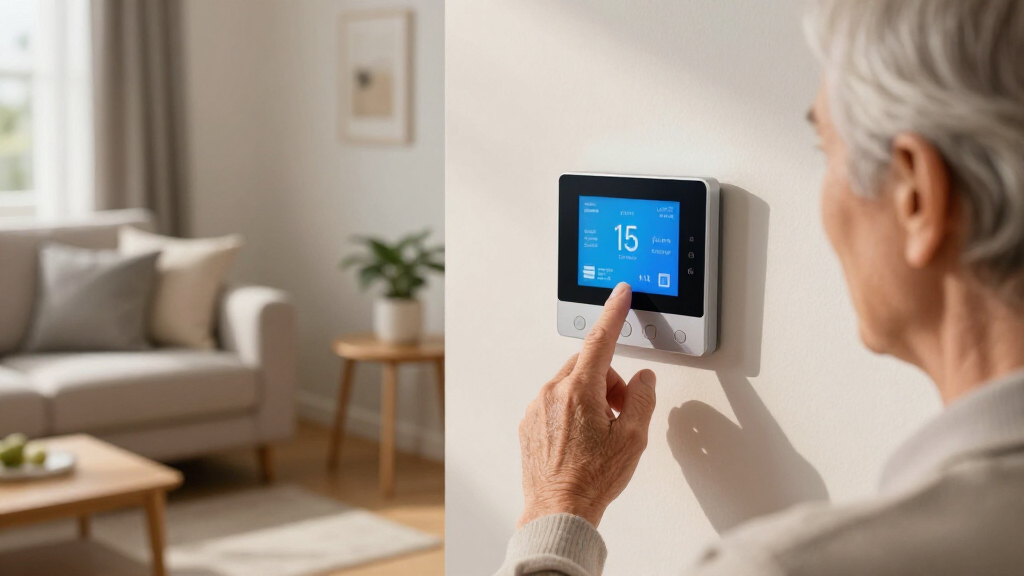
Recent models feature large, bright screens and simple controls, making adjustments straightforward. Plus, many support voice commands, so you can tell your device, “Set the temperature to 70,” without touching a thing. These features are designed to cater to seniors’ varying needs, including visual impairments or limited dexterity, ensuring that comfort and safety are accessible to all users.
As an affiliate, we earn on qualifying purchases.
The Top Features That Make Smart Thermostats Perfect for Seniors
| Feature | Why It Matters for Seniors |
|---|---|
| Large Display & Simple Controls | Easy to read and operate, even with visual or motor impairments. This reduces frustration and the potential for errors, making daily adjustments safer and more manageable. |
| Voice Control | Adjust temperature without physical effort, just by speaking. This feature is particularly helpful for those with mobility challenges or arthritis, allowing hands-free operation that promotes independence. |
| Remote Access | Change settings from anywhere—doctor visits, errands, or from bed. This flexibility ensures that seniors can maintain a comfortable environment without needing to be physically present near the thermostat, which is crucial for those with limited mobility or health concerns. |
| Safety Alerts | Get notifications if temperature is dangerously high or low. Such alerts can prevent health risks like hypothermia or heat exhaustion, and protect property by avoiding frozen pipes or overheating. |
| Learning Capabilities | Automatically optimize comfort based on your routines, saving energy and effort. This reduces the need for manual adjustments, making home climate management more passive and less stressful for seniors. |
For example, a senior homeowner can set the thermostat to alert them if it drops below 60°F during winter, helping prevent pipes from freezing. These features turn a complex device into a straightforward safety tool, giving seniors peace of mind and reducing the cognitive load associated with managing home climate.
easy-to-use smart thermostat with large display
As an affiliate, we earn on qualifying purchases.
As an affiliate, we earn on qualifying purchases.
Step-by-Step Guide to Installing a Smart Thermostat (It’s Easier Than You Think)
- Turn off your current thermostat at the circuit breaker to ensure safety during installation. This step prevents electrical shocks and protects the device.
- Remove the old thermostat, noting how the wires connect. Taking a photo or labeling wires can help during the new setup, especially for those unfamiliar with electrical work.
- Attach the new smart thermostat’s base to the wall, following the included instructions. Make sure it’s securely mounted and level for proper operation.
- Connect the wires to the corresponding terminals on the new device, ensuring they are firmly attached. If unsure, consulting the device’s manual or a professional can prevent mistakes that might affect performance or safety.
- Turn the power back on and follow the on-screen setup, which often includes connecting to Wi-Fi and downloading an app. This process is designed to be user-friendly, with clear prompts guiding you through each step.
- Adjust your settings—temperature preferences, alerts, and voice controls—easily through the app or the device itself. Taking time to customize these features ensures your thermostat works optimally for your comfort and safety.
If the process feels overwhelming, many companies offer professional installation, often covered by insurance or rebate programs. This option can save time and ensure correct setup, especially for those who are not comfortable handling electrical components. However, with clear instructions and some patience, most homeowners can successfully install their own smart thermostat, gaining confidence and control over their home environment.
As an affiliate, we earn on qualifying purchases.
How to Set Safe Temperature Ranges and Alerts for Peace of Mind
Smart thermostats allow you to define safe temperature ranges—say, between 65°F and 75°F—so your home stays within healthy limits. Setting these boundaries is crucial because extreme temperatures can pose health risks or cause property damage. For instance, temperatures that are too low can lead to frozen pipes, while excessively high temperatures can cause heat exhaustion or dehydration, especially in seniors.
By establishing these safe zones within the device’s app, you create a safeguard that actively monitors your home environment. When the temperature approaches or leaves these boundaries, the thermostat can send alerts, prompting you to take action or adjust settings remotely. This proactive approach reduces the need for constant manual checks, which can be burdensome or forgotten, especially for seniors managing multiple health or household concerns.
Imagine traveling or spending time away from home. With preset safety thresholds, your phone will notify you if the temperature drops below or rises above your specified limits. This immediate feedback helps prevent emergencies like frozen pipes or overheating, giving both seniors and caregivers peace of mind. Customizing these settings also allows for consideration of individual health needs—such as keeping the home warmer during winter or cooler during heatwaves—enhancing both safety and comfort.
smart thermostat with safety alerts
As an affiliate, we earn on qualifying purchases.
As an affiliate, we earn on qualifying purchases.
Comparing the Best Smart Thermostats for Seniors: Which One Fits You?
| Model | Ease of Use | Safety Features | Remote Control | Voice Support |
|---|---|---|---|---|
| Model A | Large screen, simple menu | Temperature alerts, emergency mode | Yes, app & web | Supported |
| Model B | Touch screen, minimal buttons | Extreme temp alerts | Yes, app only | Supported |
| Model C | Voice-activated, big display | Custom safety zones, alerts | Yes, app & voice | Supported |
Choosing the right model depends on your comfort with technology. If you prefer simple controls, Model A might be best. For voice commands and advanced safety, Model C offers the most features with ease of use.
When selecting a thermostat, consider not just the features but also how they align with your daily routines and health needs. A device with easy-to-read displays and straightforward controls minimizes frustration and helps ensure consistent use. Safety features like alerts for extreme temperatures are critical for preventing emergencies, especially for seniors living alone. Voice support can be a game-changer for those with mobility issues, making adjustments effortless. Ultimately, the best choice balances usability, safety, and convenience to support your independence and peace of mind.
What Happens When Technology Fails? How to Keep Your Home Comfortable and Safe
Even the most reliable devices can encounter glitches or failures. That’s why it’s important to have backup measures in place. For example, keeping a traditional thermometer or manual thermostat in a visible, accessible spot allows you to verify room temperatures if the smart system malfunctions. This simple step ensures you’re not left in the dark about your home’s climate, which is vital for health and safety, especially in extreme weather conditions.
Regularly testing your smart thermostat’s safety alerts and ensuring your Wi-Fi connection remains strong are proactive steps to prevent issues. A weak or unstable internet connection can disrupt remote control or safety notifications, so maintaining a reliable network is crucial. Additionally, familiarizing yourself with manual controls—many devices have physical buttons or switches—allows you to make quick adjustments if the smart system becomes unresponsive.
Thinking ahead, you might set a baseline temperature manually, so the house stays comfortable even if the smart system temporarily disconnects. For example, setting a manual override or maintaining a simple, easy-to-access control can prevent uncomfortable or unsafe conditions. These backup strategies are simple but vital, offering peace of mind and ensuring continuous safety and comfort regardless of technology issues.
Frequently Asked Questions
Are smart thermostats easy for seniors to operate?
Yes, many are designed with large screens, simple menus, and voice control features that make adjusting the temperature straightforward, even for those less comfortable with technology.How can I make sure the thermostat keeps my home at a safe temperature?
Set temperature boundaries and alerts within the device’s app. For example, you can get notified if the temperature drops below or rises above safe levels, helping you react quickly.Can I control the thermostat remotely from my phone?
Absolutely. Most smart thermostats offer smartphone apps that let you change settings from anywhere—whether you’re at the grocery store or on vacation.What if I find installing it too complicated?
Many models come with step-by-step instructions, and some companies offer professional installation. It’s often a quick, simple process that most homeowners can handle.Are smart thermostats worth the cost?
Yes. They improve comfort, safety, and can lower energy bills—sometimes saving up to 15% on heating and cooling costs—making them a smart investment for long-term peace of mind.Conclusion
A smart thermostat is more than a gadget—it’s a safety net for comfort and independence. When you set it up with your needs in mind, it becomes a silent partner, keeping your home just right—even when you’re not watching. Think of it as giving your home a gentle, intelligent hand for a safer, cozier life.
Imagine walking into your warm, cozy living room on a chilly night, knowing you set the perfect temperature with just a few taps or a voice command. That’s the simplicity and peace of mind a good smart thermostat offers. Your home, your comfort, made effortless.
Fall Picks
fall essentials
As an affiliate, we earn on qualifying purchases.