TL;DR

Turn quiet afternoons into listening time
- Thousands of audiobooks, podcasts and originals
- Listen on your phone, tablet or Echo — also offline
- Cancel anytime
The easiest smart lock method for seniors varies based on their abilities. Keypads are familiar but require memory; fingerprints avoid codes but can wear down; key fobs are simple but easy to lose. A hybrid approach offers flexibility as needs change.
Imagine a front door that opens with a simple wave, a quick touch, or a familiar code—no fumbling with keys, no struggle. For seniors aiming to stay independent at home, smart locks can remove a daily frustration and boost safety. But which type really makes life easier? That’s what we’re here to clarify.
Whether your loved one deals with arthritis, vision loss, or memory issues, choosing the right unlocking method matters. It’s not just about tech — it’s about dignity, independence, and peace of mind. Let’s explore the three main options, how they stack up, and which might be best for your family’s needs.
No single unlocking method is best for every senior; tailor choices to their abilities.
Keypads are familiar but may be hard to see and remember; consider larger buttons or voice prompts.
Biometric locks often struggle with worn or dry fingerprints; always test recognition first.
Key fobs are simple and quick but easily lost; a lanyard or wristband can help.
A hybrid lock combining multiple methods offers the most flexibility as needs change.
Smart Locks for Seniors: Keypad, Fingerprint or Key Fob — Which Is Easiest?
No fumbling with keys, no struggle at the door. For older adults aiming to stay independent at home, the right unlocking method is about dignity, safety and peace of mind — not just tech. Here is how the three main options stack up against arthritis, vision loss and memory issues.
Research shows nearly 70% of seniors over 65 experience reduced fingerprint recognition due to skin dryness and wear — making biometric locks less reliable for this age group without careful testing.
Three Ways Through the Front Door
Each method trades one kind of effort for another. Familiarity, memory, dexterity and reliability pull in different directions — the “easiest” lock depends on which limitation matters most.
PIN Code Keypad
Type a code, like an ATM- Why seniors like it
- A familiar concept with no physical object to carry or lose. Codes can be shared with family and changed instantly; temporary or scheduled codes for caregivers are a major selling point.
- Watch out for
- Requires remembering a code — problematic with memory impairment. Small backlit buttons can be hard to see and press, and worn button pads can reveal the code digits in a “smudge attack.”
- Best for
- Seniors with intact memory and reasonable vision; households with rotating caregivers. Choose large, high-contrast buttons and consistent code routines.
Fingerprint Scanner
Touch and go — nothing to remember- Why seniors like it
- The fastest unlock of all: nothing to remember, nothing to carry, and a fingerprint can’t be forgotten or lent out. Ideal in theory for those who struggle with PINs or small objects.
- Watch out for
- The big caveat: ridges wear down with age and elderly skin is drier and less elastic, so failure rates are measurably higher past 65. Arthritic finger placement makes it worse; cheaper optical sensors struggle most.
- Best for
- Seniors whose prints still read reliably — test the actual fingers under different conditions first. Always choose a model with a PIN fallback.
Key Fob / Proximity
RFID, Bluetooth or NFC — wave or keep in pocket- Why seniors like it
- Minimal dexterity required — just wave the fob, or auto-unlock on approach. A big, easy-to-grasp object that can be worn on a lanyard or wristband, suiting Parkinson’s or severe arthritis.
- Watch out for
- It’s still an object: it can be lost, left inside, or run out of battery. Replacements cost money, cheaper RFID fobs can be cloned, and auto-unlock can trigger unintentionally.
- Best for
- Seniors with significant hand tremor, arthritis or weak grip — often the easiest physical interaction of the three. Keep a backup method programmed.
Ease-of-Use Comparison for Seniors
How each method performs against the realities of aging. The highlighted column is the expert pick for the easiest physical interaction.
| Criteria | Keypad (PIN) | Fingerprint | Key Fob ★ |
|---|---|---|---|
| Nothing to remember | ✗PIN must be memorized | ✓Touch and go | ✓Just carry or wear it |
| Nothing to carry or lose | ✓Code lives in memory | ✓Finger is always with you | ✗Fob can be lost or left inside |
| Arthritis & tremor friendly | ✗Precise button presses needed | ~Steady placement still required | ✓Wave only — no grip or aim |
| Reliable with worn, dry skin (65+) | ~Cold, dry fingers miss buttons | ✗~70% see reduced recognition | ✓Skin condition irrelevant |
| Memory-impairment friendly | ✗Codes get forgotten | ✓Nothing to recall | ✓Nothing to recall |
| Sharing access with caregivers | ✓Per-user & temporary codes | ~Each print must be enrolled | ~Extra fobs cost money |
| Main security weakness | ~Smudge wear reveals digits | ✓Can’t be lost, lent or guessed | ✗Cheap RFID fobs can be cloned |
Which Method Is Easiest? Match the Limitation
There is no universal winner. Experts land on the same practical rule: start from the senior’s specific limitation, not from the technology.
Relative Ease — Arthritic / Tremor-Affected Hands
Qualitative ease score for users who struggle with grip and fine motor control (100 = effortless).
Scores vary by individual — always test with the actual user before buying.
No One-Size-Fits-All — So Buy the Lock That Does All Three
Experts consistently recommend a hybrid lock combining keypad, fingerprint, fob/app and a physical key backup. As physical or cognitive abilities change, the method adapts — no replacements, no lockouts.
Why Hybrid Wins
Flexibility as needs change. Dexterity and memory decline over time; a hybrid system prevents frequent upgrades and stays cost-effective.
Built-in backup. If one method fails due to health or environment — dry winter skin, a dead fob battery — another works seamlessly.
Caregiver-ready. Per-user codes, remote alerts and temporary access for home-health aides, all on the same lock.
Real-World Case
One family noticed their mother’s fingerprint recognition rate dropping over time. Instead of returning the lock, they switched to a hybrid model — and let the season decide the method.
“Now she uses the keypad during winter and the fob when her fingers are stiff.”
Family caregiver · after switching from fingerprint-only to hybridPicking the Right Lock, Step by Step
Five checks before you buy — in the order that saves the most hassle.
Assess Abilities
Do they remember PINs? Any finger-recognition issues? Trouble gripping objects?
Test the Options
Try demo models if possible. See what feels natural and reliable for their hands.
Consider Future Needs
Will dexterity or memory decline? A hybrid lock adapts over time.
Check Compatibility
Does it fit the door? Is installation straightforward? Wi-Fi or Bluetooth only?
Prioritize Backup
Always keep a mechanical key backup and confirm the lock meets safety standards.
What Families Ask Before Buying
Which unlock method is easiest for arthritis or tremors?
Key fobs or proximity devices — they need minimal grip and no precise pressing. For severe tremors, auto-unlock features that sense an approaching device are especially helpful. Always test before committing.
Will fingerprint locks work on dry, worn elderly fingers?
Often less reliably. Newer models use advanced sensors that tolerate partial prints, but testing with the actual user’s fingers is essential. A backup PIN or key option is highly recommended.
What happens if the batteries die — can my parent still get in?
Most smart locks include a mechanical backup key or battery jump terminal. Keep a spare key with a trusted neighbor (it beats a fake rock), check battery health regularly and set up low-battery alerts.
Can I unlock the door remotely if my parent forgets their code?
Yes — Wi-Fi-enabled models allow remote unlocking via an app, plus alerts when a code is used. Choose encrypted remote controls and set temporary codes for visitors. Bluetooth-only models can’t do this.
Keypad Locks: Familiar, But Not Always Easy for Seniors
Keypad locks use a PIN code—like an ATM—making them a familiar choice. They eliminate the need for carrying keys, which can be lost or duplicated. You can even program temporary codes for caregivers or visitors, adding a layer of convenience.
But for seniors with memory issues or vision impairments, a keypad can be a hassle. Remembering a code, especially if it’s changed frequently, can be tricky. Small, backlit buttons may be hard to see or press correctly, especially in cold weather or if fingers are dry or stiff.
Choosing a keypad lock involves considering the tradeoff between familiarity and potential frustration. While it simplifies access by removing physical keys, the reliance on memory and visual acuity means it might not be suitable for everyone. Proper placement of large, high-contrast buttons and consistent code routines can mitigate some issues, but the fundamental challenge remains—what feels natural and reliable to one person may be overwhelming for another.
Popular right now

Hisense 65-inch U6 Pro Mini-LED 4K UHD Smart Fire TV

Ninja Foodi Dual Zone Smart XL Air Fryer, 10 Qt, 6-in-1, Black (DZ550)

De'Longhi Dinamica Plus Fully Automatic Espresso Machine
As an affiliate, we earn on qualifying purchases.
Fingerprint Locks: No Codes, But Worn Fingers Can Be a Problem
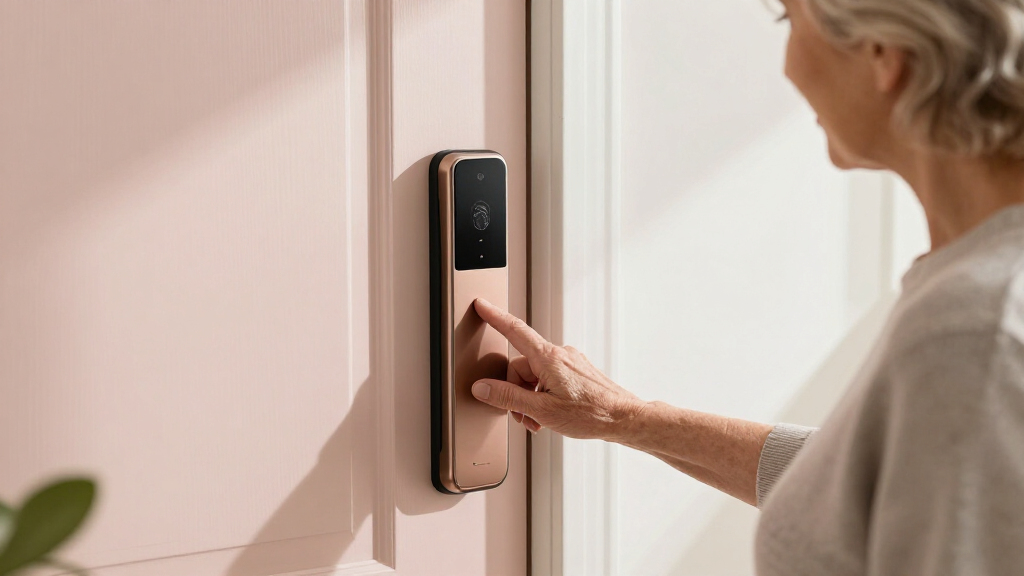
Fingerprint locks scan a finger and unlock instantly—touch and go. They seem perfect for seniors who struggle with remembering PINs or handling small objects.
However, as we age, our fingerprints change. Skin becomes drier and less elastic, making it harder for the sensor to recognize a print. An elderly person with arthritis or dry skin might find their fingerprint failed to register, even after multiple attempts.
Choosing a fingerprint lock involves understanding the tradeoff between convenience and reliability. While biometric access eliminates the need to remember codes or carry keys, recognition failures can be frustrating and potentially unsafe if no backup exists. Advanced sensors that tolerate partial or worn prints are improving, but they are not infallible. Therefore, testing with the user’s actual fingers under different conditions is critical to determine if biometrics will truly enhance ease of access without creating new hurdles.
Key Fobs and Proximity Devices: Wave, Tap, or Keep in Pocket
Key fobs or proximity devices use RFID, Bluetooth, or NFC. Just wave the fob near the lock or keep it in your pocket — the door unlocks automatically. For seniors with tremors, arthritis, or reduced grip strength, this can be the easiest method.
However, the convenience of auto-unlock comes with important considerations. Fobs can be lost or have dead batteries, which means the door might become inaccessible unless a backup method is available. Additionally, cheaper RFID fobs can be cloned by malicious actors, posing a security risk. Auto-unlock features might also trigger accidentally if the device is left inside the house or in a pocket, leading to unintended entry. Recognizing these tradeoffs helps in selecting a device that balances ease of use with security and reliability, especially when considering long-term practicality for seniors.
Which Method Is Easiest? The Practical Verdict for Seniors
There’s no one-size-fits-all. The best choice depends heavily on the senior’s specific abilities. For someone with good memory and vision, a keypad might be fine. For those with dry, worn fingerprints, a keypad or fob could be better. If hand tremors or arthritis make pressing buttons difficult, a key fob might win.
Experts often recommend a hybrid lock—combining keypad, fingerprint, and fob options. This way, as physical or cognitive abilities change, the senior can adapt. The flexibility of hybrid systems can prevent the need for frequent upgrades or replacements, making them a cost-effective and practical solution. They also provide backup options, ensuring that if one method fails due to health or environmental factors, another can be used seamlessly, thus maintaining independence without risking lockouts.
For example, a family switched their mother’s lock from fingerprint-only to a hybrid model after noticing her recognition rate dropped. Now she uses the keypad during winter and the fob when her fingers are stiff.
Quick Guide: Picking the Right Lock for Your Senior
- Assess their abilities: Do they remember PINs? Have finger recognition issues? Struggle with gripping objects?
- Test the options: Try demo models if possible. See what feels natural and reliable.
- Consider future needs: Will their dexterity or memory decline? A hybrid lock offers flexibility to adapt over time.
- Check compatibility: Does it fit your door? Is installation straightforward?
- Prioritize security and backup: Always keep a mechanical key backup and ensure the lock meets safety standards.
Frequently Asked Questions
Which unlock method is easiest for someone with arthritis or tremors?
Key fobs or proximity devices tend to be easiest because they require minimal grip and no precise pressing. For those with severe tremors, auto-unlock features that sense approaching phones or devices can be especially helpful. Always test different options before committing.
Will fingerprint locks work on elderly fingers that are dry or worn?
Fingerprints can become less reliable with age, especially if skin is dry or thin. Many newer models use advanced sensors that tolerate partial prints, but testing with the actual user’s fingers is essential. A backup PIN or key option is highly recommended.
What happens if the batteries die — can my parent still get in?
Most smart locks include a mechanical backup key or a battery jump terminal. It’s smart to hide a physical key nearby or keep a spare in a safe place. Regularly checking battery health and setting up alerts helps prevent lockouts.
Can I unlock the door remotely if my parent forgets their code?
Yes. Many Wi-Fi-enabled smart locks allow remote unlocking via an app. This is especially useful for caregivers or family members managing access. Always choose a lock with secure, encrypted remote controls and consider setting temporary codes for visitors.
Are smart locks as secure as traditional deadbolts?
When properly installed and configured, smart locks can be just as secure as traditional locks. Look for models with high-grade encryption and two-factor authentication. Beware of no-name imports or cheap models that lack proper security features.
Conclusion
Choosing the right smart lock isn’t just about features — it’s about matching the method to the person’s daily realities. A lock that feels effortless can boost independence and peace of mind for everyone involved.
Remember: the goal is safety without sacrifice. Think about what your loved one can comfortably use today, and plan for future changes. After all, a front door that opens with ease is a small step toward a safer, more confident life at home.