
TL;DR

Turn quiet afternoons into listening time
- Thousands of audiobooks, podcasts and originals
- Listen on your phone, tablet or Echo — also offline
- Cancel anytime
A blood pressure cuff that is too small can give a falsely high reading, while one that is too large can give a falsely low reading. Measure around your bare upper arm at its midpoint, then choose an approved cuff whose printed range includes that measurement. Fit matters, but correct placement, a supported arm, and quiet rest also help make readings more consistent.
A cuff that looks close enough can still shift your blood pressure reading in the wrong direction. Too small can read falsely high; too large can read falsely low. That difference can make a home result harder to interpret, even when your monitor is working as designed.
The good news: you can check the fit with a flexible tape measure and the cuff’s printed arm range. This guide shows you where to measure, how to choose a compatible size, and how to put the cuff on so your readings are more useful. You’ll also see what cuff fit can’t tell you on its own, because posture and the monitor itself matter too.
Measure the bare upper arm at its midpoint between shoulder and elbow, using a flexible tape that is level and snug without compressing skin.
Match the measurement to the circumference range printed on the cuff; size names such as “standard” and “large” are not universal.
Use a cuff supplied with or approved for your specific monitor, even if another cuff appears to fit physically.
Put the cuff on a bare arm as directed, sit quietly, and support the arm at heart level for more consistent readings.
Ask a healthcare professional about a suitable monitor if your arm measurement falls outside all approved cuff ranges.
Home blood pressure • Fit guide
Blood Pressure Cuff Sizes: Why Fit Matters and How to Measure an Arm
A cuff that is too small may read falsely high; one that is too large may read falsely low. Measure your upper arm, match it to the cuff’s printed range, and use a cuff approved for your monitor.
Measure your arm in four steps
Use the circumference at the midpoint of your bare upper arm. A quick check replaces guesswork with a measurement.
Find the midpoint
Identify halfway between your shoulder and elbow. Mark the center lightly if needed.
Use a flexible tape
Circle the bare arm at that point. Keep the tape level all the way around.
Note the number
Keep the unit—centimeters or inches—so you can compare it accurately.
Check the cuff range
Your measurement must fall inside the range printed on an approved cuff.
Keep the tape snug, not tight. It should touch the skin without squeezing or leaving an indent. If your number is near a range boundary, recheck the tape position and follow the manufacturer’s guidance rather than rounding casually.
Labels vary. Ranges are the guide.
“Adult,” “standard,” and “large” do not describe the same arm circumference across every brand or monitor.
| What you see | What to check | Why it matters |
|---|---|---|
| “Standard” or “adult” | Printed circumference range | The label alone cannot confirm that the cuff fits your arm. |
| Small, large, or extra-large | Range and monitor approval | Names and available options vary by model. |
| Wide-range cuff | Stated range and validation | A broad range alone does not prove compatibility or accuracy. |
Why the right cuff changes the reading
The cuff is part of the measuring system. A correctly working monitor can still produce an unreliable result when the cuff size or pairing is wrong.
May push the result high
A cuff too small for the arm can produce a falsely high reading. Check the fit if a result seems unexpected; this possibility does not prove the reading is wrong.
May pull the result low
A cuff too large can produce a falsely low reading. Correct sizing helps the monitor estimate pressure more reliably.
Use an approved cuff
Physical fit is not enough. The specific cuff size must be approved for your monitor model; a third-party cuff is not automatically suitable.
Set up for a more consistent reading
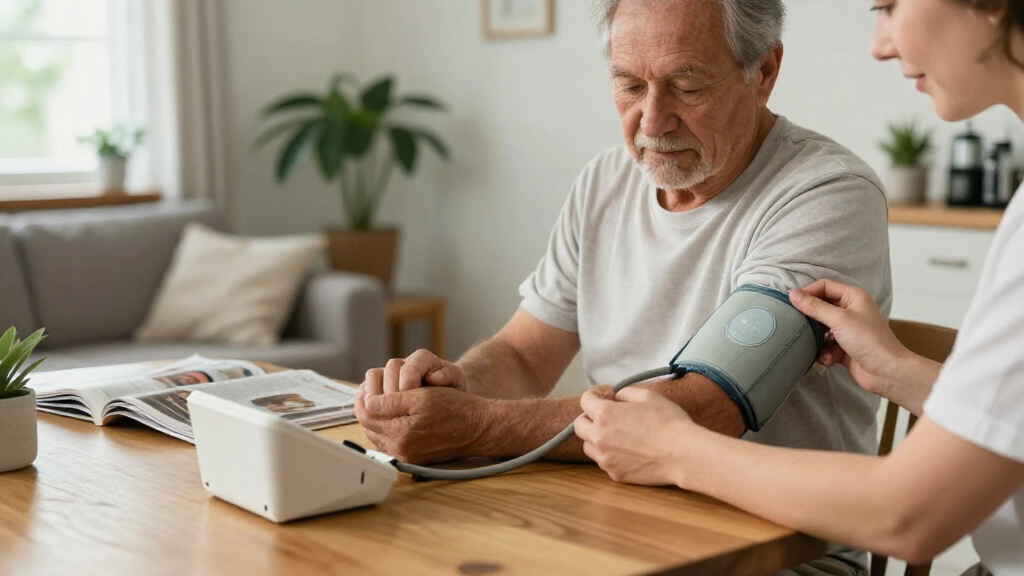
Cuff fit matters, and so do placement, posture, arm support, and a quiet moment before measuring.
Bare upper arm
Uncover the arm. Avoid a tightly rolled sleeve squeezing above the cuff.
Place as directed
Usually just above the elbow crease; align the artery marker per the manual.
Support at heart level
Rest the arm on a table so your shoulder can stay relaxed.
Sit quietly
Rest before starting and avoid talking during the measurement.
Build a repeatable routine
Keeping the setup similar from day to day makes readings easier to compare.
Before you measure
- Use the same arm each time unless a clinician advises otherwise.
- Sit with your back supported and feet flat; support your arm at heart level.
- Rest quietly and avoid conversation during the reading.
- Follow your monitor’s instructions for taking and recording readings.
If your arm falls outside all approved cuff ranges, ask a healthcare professional about a suitable monitor. A validated wrist monitor may be an option when an upper-arm cuff cannot be used; wrist position at heart level is especially important.
Why the right cuff can change your reading
Blood pressure cuff sizes matter because the cuff presses around your arm to help the monitor estimate pressure. If the cuff is too small for your arm, the result may be falsely high; if it is too large, it may be falsely low. Fit gives the monitor a fair chance to measure what is happening, much like using the right-sized measuring cup when a recipe calls for a precise amount.
That distinction matters at home as well as at a clinic. Imagine you take a reading after sitting quietly and see a number that seems unexpectedly high. If your upper arm is near the top of the cuff’s range, check the fit before treating one result as a verdict. A cuff that is too small could be part of the explanation, though it does not prove that the reading is wrong.
The cuff is part of the measuring system. A monitor may work correctly and still produce an unreliable result if you pair it with the wrong size or an unapproved cuff. If your readings concern you, discuss them with a qualified healthcare professional rather than changing care based on a cuff-size guess.
Popular right now

Apple AirPods Pro 3 Wireless Earbuds with Active Noise Cancellation

Ninja DualZone Air Fryer 10 Qt Smart 6-in-1 Grey (DZ950)

Dyson Ball Animal 3 Corded Upright Vacuum
As an affiliate, we earn on qualifying purchases.
How to measure your arm in four simple steps
To measure an arm for a blood pressure cuff, measure its circumference at the midpoint between your shoulder and elbow. Use a flexible tape on bare skin, keep it level and snug without squeezing, then compare the number with the cuff’s printed range. The whole check takes only a few minutes, and it replaces guesswork with a measurement.
- Find the midpoint. Locate the halfway point between the shoulder and elbow on your upper arm. If you are unsure, feel the distance along the arm and mark the center lightly.
- Wrap a flexible tape around the bare arm. Keep it level all the way around. It should touch the skin without digging in or leaving an indent.
- Record the circumference. Note the number and unit, such as centimeters or inches, so you can compare it accurately.
- Check the cuff range. Read the label or manual for the approved arm-circumference range. Your measurement should fall within it.
For example, if your measurement is close to a range boundary, do not round it casually to make a cuff seem suitable. Recheck the tape position and consult the monitor’s instructions or a healthcare professional if the right size is unclear.
How to choose a cuff when labels leave you guessing
Choose a cuff by its printed arm-circumference range, not by a label like “adult,” “standard,” or “large.” Those names do not mean the same measurement across every maker or monitor. The number on the cuff or in its instructions is the useful guide: your measured arm needs to fall within the stated range.
| What you see | What to check | Why it matters |
|---|---|---|
| “Standard” or “adult” | The actual circumference range | Labels alone do not tell you whether the cuff fits your arm. |
| Small, large, or extra-large | The range and approval for your monitor | Size names and available options vary by model. |
| A wide-range cuff | The manufacturer’s stated range and validation | A wider range does not by itself prove compatibility or accuracy. |
A cuff must fit your arm and work with your specific monitor. A cuff that physically wraps around your arm may still be incompatible with the device. Check the maker’s approved options before buying a replacement; a third-party cuff is not automatically suitable just because its range looks right.
Say your arm measures near the edge of the supplied cuff’s range. Look up the approved cuff options for that exact monitor model and follow the manufacturer’s guidance. If no approved cuff covers your measurement, ask a healthcare professional about a suitable monitor rather than forcing a borderline fit.
Put the cuff on so it sits snugly and in the right place
Place the cuff on a bare upper arm, following the monitor’s instructions for position and fit. Many upper-arm cuffs sit with the lower edge just above the elbow crease, with an artery marker lined up as shown in the manual. Keep it secure and snug, but not painfully tight. The cuff should feel settled, not like a tourniquet.
For example, a sleeve rolled tightly above the elbow can squeeze the arm before the reading even begins. It is better to uncover the upper arm than to leave a tight band of fabric around it. If your monitor gives different placement directions, follow those directions; cuff designs can vary.
Support your arm at heart level and sit quietly before you start. A supported arm resting on a table is easier to keep still than one held in the air, where your shoulder may tense. Read the device’s instructions for how much space, if any, to leave between the cuff and skin, and do not pull the cuff tighter to compensate for a mismatch in size.
Correct placement cannot fix an incompatible cuff, but it removes one avoidable source of inconsistency. If you are unsure whether the artery marker or cuff edge is in the right place, use the manual’s diagram or ask a healthcare professional to show you.
Make your readings easier to compare from day to day
Cuff fit is essential, but it is only one part of a useful blood pressure reading. Sitting position, arm support, talking, and rushing into a measurement can all make readings less consistent. A calm routine gives you a steadier basis for comparing one day with the next.
Think of a person who checks their pressure in the kitchen while answering a phone and holding their arm up. The cuff might fit perfectly, yet the setup changes from one reading to another. Sitting with the back supported, feet flat, and arm supported at heart level creates a more repeatable scene. Quietly resting before the measurement and avoiding conversation during it also help with consistency.
Use the same arm each time unless a clinician advises otherwise. If you are just starting home monitoring, a healthcare professional may suggest comparing both arms. Follow your monitor’s directions about taking readings and recording them; a written log with dates and times can help a clinician understand the pattern rather than relying on one number.
If one reading surprises you, check your posture, cuff position, and measurement routine before drawing a conclusion. Repeat measurements only as your device instructions or clinician recommend, and bring your record to a qualified professional if you have questions about what the results mean.
What to do if no approved cuff fits your arm
If your arm falls outside the range of the cuff supplied with your monitor, check for another cuff the manufacturer approves for that model. Cuff choices vary, and some devices offer small, large, extra-large, or wider-range options. The available size range alone does not show that every cuff will work with every monitor.
For instance, you may find a cuff online that looks broad enough to wrap around your upper arm. Before using it, check the model compatibility and instructions. The cuff and monitor need to be an approved combination, not merely a physical match. If you cannot find one, ask a healthcare professional about a suitable device instead of squeezing into a cuff that does not fit.
A wrist monitor may be an option for some people when an upper-arm cuff cannot be used, but wrist position matters especially: follow the device directions and keep the wrist at heart level as instructed. Ask a qualified healthcare professional whether that option suits your situation. A different monitor type still needs proper use and appropriate device validation.
Home monitoring is more useful when the equipment fits the person using it. If you are uncertain about the cuff, bring the monitor and cuff to an appointment so a professional can review the setup with you.
Frequently Asked Questions
How tight should a blood pressure cuff be?
It should feel snug and secure, not painfully tight. Follow your device’s directions for placement and fit, since cuff designs can differ. If it feels painfully tight or will not close as intended, check the size range rather than forcing it.
Can a cuff that is too small make my reading high?
Yes. A cuff that is too small can produce a falsely high reading, while an oversized cuff can produce a falsely low one. Check your arm circumference against the cuff’s printed range if a result seems surprising, and discuss concerns with a qualified healthcare professional.
Should I measure over a sleeve?
Measure your arm directly on bare skin. Take readings with the cuff on a bare arm unless your monitor’s instructions say otherwise. Rolling a tight sleeve above the cuff can constrict the arm and interfere with a consistent measurement.
Can I use a different brand of cuff with my monitor?
Use a cuff supplied with or specifically approved for your monitor. A cuff can fit your arm physically and still be incompatible with the device. Check the manufacturer’s instructions for the exact model before using a replacement.
Does the cuff go on my left or right arm?
Either arm may be used unless a clinician has advised otherwise. For consistent tracking, use the same arm each time. When you begin monitoring, a clinician may recommend comparing both arms and tell you which one to use.
What if my arm is too large for the cuff that came with the monitor?
Look for an approved cuff option whose range includes your measurement. Do not assume a third-party cuff will work just because it wraps around your arm. If no compatible cuff fits, ask a healthcare professional about a suitable monitor.
Can I use a wrist monitor instead?
A validated wrist monitor may be an option when an upper-arm cuff cannot be used. Positioning is especially important, so follow the instructions and keep the wrist at heart level as directed. Ask a qualified healthcare professional which type is appropriate for you.
Conclusion
Measure first, then match your arm to an approved cuff range. That small check can prevent a cuff that is too small from pushing a reading falsely high or one that is too large from pulling it falsely low. Good placement and a calm, repeatable sitting position help complete the picture.
Keep the cuff label and your measurement close to the monitor. When the numbers appear on screen, you can focus on the pattern instead of wondering whether the cuff was quietly working against you.