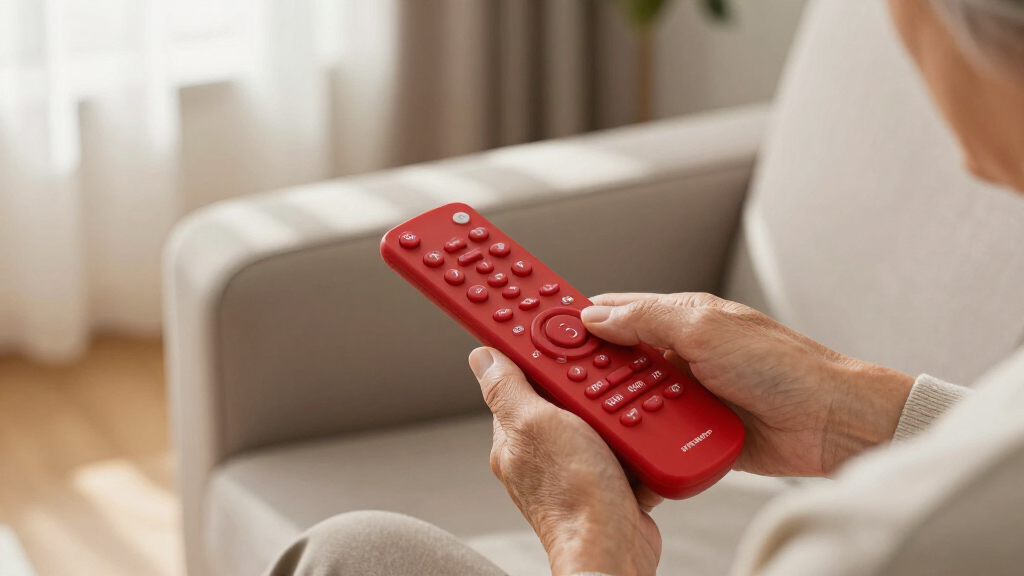

Large button remote controls exist to solve one problem: making a TV usable again for someone who struggles with tiny, cluttered buttons. The Backlit Big Button TV Remote Replacement for Samsung earns my best overall pick for combining backlit keys, a no-setup design, and thoughtful extras like a protective cover and hook. The Flipper Big Button Remote stands out for dementia care with its locked-down, ultra-simple layout, while the GE Big Button Universal Remote offers the broadest brand compatibility for the price. The main tradeoff in this category is simplicity versus flexibility: the easiest remotes often work with only one TV brand or strip out features like volume memory. Keep reading for the full breakdown of all 13 models and which one fits your situation.

Turn quiet afternoons into listening time
- Thousands of audiobooks, podcasts and originals
- Listen on your phone, tablet or Echo — also offline
- Cancel anytime
Complete the kit


Key Takeaways
- Brand-specific remotes like the Backlit Samsung replacement and EZclicker Sony model beat universal remotes on simplicity because they skip setup codes entirely — but only work with one TV brand.
- The Flipper is the only model in this lineup designed specifically for dementia and memory loss, trading features like backlighting for a layout a caregiver can lock in place.
- Backlighting is the single biggest differentiator for low-vision users after button size — only a few models here offer it, and the backlit Samsung pick is the strongest of them.
- The 4-in-1 waterproof model is the only remote here built to survive spills and drops, a genuinely useful trait for households with tremor or grip issues.
- EZclicker dominates the budget tier with four entries in this lineup; they are affordable and easy but vary in compatibility, so matching the exact model to your TV brand matters.
| Backlit Big Button TV Remote Replacement for Samsung TV |  | Best for Low-Light Viewing | Compatibility: Samsung smart TVs (LCD/LED/HDTV/UHD/OLED/3D/4K) | Buttons: Oversized, backlit | Range: 49 feet | VIEW LATEST PRICE | See Our Full Breakdown |
| EZclicker TV Remote for Sony TVs Only |  | Best Zero-Setup Sony Pick | Compatibility: Sony TVs | Button Type: Big buttons with tactile feedback | Dimensions: 7″ x 2″ x 1″ | VIEW LATEST PRICE | See Our Full Breakdown |
| Big Button Universal TV Remote for Seniors |  | Best Budget Universal Option | Compatibility: Major TV brands (not cable boxes or streaming devices) | Button Type: Big buttons with tactile feedback | Programming Method: Hold the Mute button for up to 60 seconds | VIEW LATEST PRICE | See Our Full Breakdown |
| EZclicker Big Button Universal TV Remote |  | Easiest Layout for Beginners | Compatibility: Most top TV brands | Button Size: Large, with extra-large enter button | Programming: One-step simple setup | VIEW LATEST PRICE | See Our Full Breakdown |
| GE Big Button Universal Remote Control |  | Best Multi-Device Control | Compatibility: Samsung, Vizio, LG, Sony, Roku | Device Control: Up to 2 devices | Setup: Automatic code search, direct code entry | VIEW LATEST PRICE | See Our Full Breakdown |
| Flipper Big Button TV Remote for Seniors, Dementia – Easy Setup |  | Best for Cognitive Support | Button Colors: Green (On/Off), Orange (Volume), Blue (Channel), Gray (Mute) | Compatibility: All major TV brands, cable, and satellite providers | Favorite Channels: Up to 25 customizable presets | VIEW LATEST PRICE | See Our Full Breakdown |
| Large Button TV Remote Control for Seniors, Easy to Use Simple Remote with Large Buttons and Clear Layout |  | Best Basic Pick | Button Size: Large, clearly marked | Compatibility: Most major TV brands | Device Support: TVs only (no DVD, cable boxes) | VIEW LATEST PRICE | See Our Full Breakdown |
| Big Button TV Remote 4-in-1 Universal Waterproof for Seniors |  | Most Durable | Compatibility: TVs, streaming boxes, soundbars, DVD/VCR players, DVB | Button Design: Large, color-coded buttons | Waterproof: Yes | VIEW LATEST PRICE | See Our Full Breakdown |
| Big Button Universal Remote for All TV Brands |  | Best No-Setup Pick | Compatibility: Samsung, LG, VIZIO, Sony, Hisense, Philips, Panasonic, Sharp TVs | Setup: No programming needed | Key Feature: Extra-large enter button with tactile feedback | VIEW LATEST PRICE | See Our Full Breakdown |
| LuckyStar Big Button Universal Remote Control for TV |  | Best Budget Buy | Compatibility: LG, Vizio, Sharp, Zenith, Panasonic, Philips, RCA | Modes: Three modes | Setup: Automatic search — insert batteries to use | VIEW LATEST PRICE | See Our Full Breakdown |
| EZclicker Big Button Universal TV Remote, Easy to Use for All Ages (Black) |  | Best for Multi-TV Households | Button Size: Extra-large | Compatibility: Major TV brands (not for cable boxes or streaming devices) | Programming Method: Hold Mute & Volume+ for up to 60 seconds | VIEW LATEST PRICE | See Our Full Breakdown |
| EZclicker TV Remote for Seniors, Extra Simple Big Button Remote (Orange) |  | Best High-Visibility Pick | Button Design: Big buttons with tactile feedback | Compatibility: Major TV brands (not for cable boxes or streaming devices) | Programming Method: Press and hold Mute & Volume+ for up to 60 seconds | VIEW LATEST PRICE | See Our Full Breakdown |
| EZclicker TV Remote for Samsung TVs – Big Button, Easy to Use |  | Best Zero-Setup Option | Compatibility: Samsung TVs | Button Type: Big buttons with tactile feedback | Setup Required: No — works out of the box | VIEW LATEST PRICE | See Our Full Breakdown |
| large button remote control | Compatibility | Batteries | Setup |
|---|---|---|---|
| Backlit Big Button TV Remote R | Samsung smart TVs (LCD/LED/HDTV/UHD/OLED/3D/4K) | — | None required |
| EZclicker TV Remote for Sony T | Sony TVs | 2x AAA (not included) | None — insert batteries and use |
| Big Button Universal TV Remote | Major TV brands (not cable boxes or streaming devices) | 2x AAA (not included) | Simple single-button programming |
| EZclicker Big Button Universal | Most top TV brands | 2x AAA (not included) | — |
| GE Big Button Universal Remote | Samsung, Vizio, LG, Sony, Roku | — | Automatic code search, direct code entry |
| Flipper Big Button TV Remote f | All major TV brands, cable, and satellite providers | 2 AA (not included) | — |
| Large Button TV Remote Control | Most major TV brands | — | — |
| Big Button TV Remote 4-in-1 Un | TVs, streaming boxes, soundbars, DVD/VCR players, DVB | — | Simple programming instructions included |
| Big Button Universal Remote fo | Samsung, LG, VIZIO, Sony, Hisense, Philips, Panasonic, Sharp TVs | Required, not included | No programming needed |
| LuckyStar Big Button Universal | LG, Vizio, Sharp, Zenith, Panasonic, Philips, RCA | Required, not included | Automatic search — insert batteries to use |
| EZclicker Big Button Universal | Major TV brands (not for cable boxes or streaming devices) | 2x AAA (not included) | — |
| EZclicker TV Remote for Senior | Major TV brands (not for cable boxes or streaming devices) | 2x AAA (not included) | — |
| EZclicker TV Remote for Samsun | Samsung TVs | 2x AAA (not included) | — |
More Details on Our Top Picks
Backlit Big Button TV Remote Replacement for Samsung TV
Among all the picks here, this is the only one with backlit buttons, which changes the calculus entirely for anyone who watches TV in a dim room. The no-setup pairing puts it on par with the EZclicker Sony model, but the illumination gives it a clear edge for visually impaired users after dark. It also arrives with extras nobody else in this lineup includes: a silicone protective cover and a wall hook, so it stops the classic ‘lost remote’ scramble. The tradeoff is real, though — it speaks Samsung’s language only. If the household ever adds an LG or Vizio set, this remote becomes a paperweight, and unlike the GE model later in this list, it cannot touch a soundbar or streaming box.
Pros:- Backlit oversized buttons, the only illuminated option in this lineup
- Zero setup — works immediately with compatible Samsung TVs
- Includes silicone cover and wall hook that competitors omit
- Fast 0.1-second response with a generous 49-foot range
Cons:- Locked to Samsung TVs; no support for other brands or streaming devices
- Backlighting likely drains batteries faster than non-illuminated rivals
Best for: Samsung TV owners who watch in low light and want a grab-and-go remote with mounting storage
Not ideal for: Mixed-brand households or anyone using a soundbar, cable box, or Roku — it controls Samsung TVs only
- Compatibility:Samsung smart TVs (LCD/LED/HDTV/UHD/OLED/3D/4K)
- Buttons:Oversized, backlit
- Range:49 feet
- Response Time:0.1 seconds
- Material:ABS plastic and silicone
- Setup:None required
- Included:Remote, silicone cover, mount hook
Our verdict“Buy this if every TV in the house is a Samsung and nighttime visibility matters; skip it the moment a second brand enters the room.”
EZclicker TV Remote for Sony TVs Only
Where the Big Button Universal remote asks you to hold a mute button for up to a minute while it searches for codes, this EZclicker skips all of that — insert batteries and it works on any Sony TV. That simplicity is the whole point. The buttons deliver tactile feedback, so users with tremors or low vision can feel confirmation that a press registered, and the slim 7-inch body is easy to grip for arthritic hands. The narrow focus is both its strength and its ceiling: compared with the GE universal model, it trades flexibility for friction-free operation. It cannot control a soundbar, and it lacks any smart-TV app functions, so households that rely on streaming menus built into a newer Sony set may find it too stripped down.
Pros:- Truly zero programming — the fastest path to working in this roundup
- Tactile button feedback helps users with tremors or low dexterity
- Compact and lightweight at 7 x 2 x 1 inches
- Dedicated large buttons sized for low-vision users
Cons:- Sony-only compatibility; useless elsewhere in the house
- No smart functions, streaming support, or multi-device control
- Batteries not included
Best for: Sony TV owners, especially seniors, who want a remote that works the second batteries go in
Not ideal for: Households with multiple TV brands or soundbar owners who need multi-device control
- Compatibility:Sony TVs
- Button Type:Big buttons with tactile feedback
- Dimensions:7″ x 2″ x 1″
- Setup:None — insert batteries and use
- Batteries:2x AAA (not included)
- Smart Functions:None
Our verdict“The right choice for a pure Sony household that prizes instant usability over flexibility.”
Big Button Universal TV Remote for Seniors
This model earns its spot by splitting the difference between the brand-locked EZclicker remotes and the pricier GE. It covers major TV brands without needing a specific model match, which makes it the sensible pick when you are buying for a parent and are not sure what set sits in their living room. The programming is one gesture — hold the mute button up to 60 seconds — though that wait is noticeably less elegant than the EZclicker Sony’s true zero-setup approach. It shares the same comfortable 7 x 2 x 1 inch footprint and tactile buttons as its rivals here. What holds it back is scope: TVs only, no cable box, no soundbar, no streaming device, so it solves one problem rather than the whole entertainment stack.
Pros:- Works across major TV brands, so brand guessing is unnecessary
- Single-button programming that most seniors can complete alone
- Lightweight, compact body with tactile button feedback
- Typically the cheapest route to a universal big-button remote
Cons:- Up to 60 seconds of mute-button programming per TV
- Controls TVs only — no cable, soundbar, or streaming support
- Batteries not included
Best for: Budget-conscious buyers gifting a remote when the TV brand is unknown or may change
Not ideal for: Anyone with a soundbar, cable box, or streaming stick — those devices remain out of reach
- Compatibility:Major TV brands (not cable boxes or streaming devices)
- Button Type:Big buttons with tactile feedback
- Programming Method:Hold the Mute button for up to 60 seconds
- Dimensions:7″ x 2″ x 1″
- Setup:Simple single-button programming
- Batteries:2x AAA (not included)
Our verdict“A low-risk universal pick when you don’t know the TV brand — just don’t expect it to run anything beyond the television.”
EZclicker Big Button Universal TV Remote
This is the version of the EZclicker formula built for people who get overwhelmed by any remote, universal or not. Its standout detail is the extra-large enter button, a thoughtful touch none of the other four offer — it gives new users one unmistakable target for the action they perform most. Compared with its own Sony-only sibling, this one adds one-step programming across most top TV brands, so it keeps nearly all of that model’s simplicity while shedding the brand lock-in. The tradeoff mirrors the budget universal pick above: it will not run cable boxes or streaming devices, and batteries ship separately. Compared with the GE, you give up multi-device control but gain a cleaner, less intimidating button field — which, for a dementia or early cognitive-decline situation, matters more than flexibility.
Pros:- Extra-large enter button unique to this lineup reduces mispresses
- One-step programming across most major TV brands
- Uncluttered layout that minimizes confusion for new users
- Lightweight 7-inch body easy for weaker hands to hold
Cons:- No support for cable boxes, soundbars, or streaming devices
- Batteries not included
- Fewer functions than the GE if the household setup grows
Best for: Seniors or cognitively impaired users who need the simplest possible universal layout with one dominant button
Not ideal for: Users who want to control a soundbar or streamer alongside the TV — this handles TVs only
- Compatibility:Most top TV brands
- Button Size:Large, with extra-large enter button
- Programming:One-step simple setup
- Dimensions:7″ x 2″ x 1″
- Batteries:2x AAA (not included)
- Device Support:TVs only
Our verdict“The best choice when simplicity itself is the goal — one big confirmation button beats every extra feature for easily confused users.”
GE Big Button Universal Remote Control
Every other remote in this batch controls exactly one device. The GE controls two, which is the difference between a gadget and a genuine living-room solution for households with a TV plus soundbar or a Roku player. It also brings setup options the others lack — automatic code search and direct code entry — plus U.S.-based phone support if pairing goes sideways, a safety net no EZclicker offers. The cost of that capability is complexity: there are more buttons and a device-switching step that a user with advanced memory loss may find frustrating, which is exactly where the simpler EZclicker Universal pulls ahead. The ergonomic body is comfortable, but it is a chunkier, more conventional remote than the slim 7-inch senior-focused units here. Two devices is also a hard ceiling — home theater owners will hit it fast.
Pros:- Only option in this group that controls two devices
- Two programming methods plus U.S.-based technical support
- Ergonomic, comfortable grip with large readable buttons
- Broad brand coverage including Samsung, Vizio, LG, Sony, and Roku
Cons:- More buttons and modes than dedicated single-purpose senior remotes
- Capped at two devices — not enough for larger entertainment setups
- Batteries not included
Best for: Households pairing a TV with a soundbar or Roku who still want big, readable buttons
Not ideal for: Users with significant cognitive decline — the device-switching step adds confusion the simpler remotes avoid
- Compatibility:Samsung, Vizio, LG, Sony, Roku
- Device Control:Up to 2 devices
- Setup:Automatic code search, direct code entry
- Support:U.S.-based technical support
- Design:Large ergonomic body with big buttons
- Battery:2x AA (not included)
Our verdict“Pick this when a soundbar or Roku is part of the equation and pure simplicity can take a back seat to capability.”
Flipper Big Button TV Remote for Seniors, Dementia – Easy Setup
This option stands out for its color-coded button zones—green for power, orange for volume, blue for channels—which do more than make buttons visible; they give users with dementia a memorable logic to follow. The favorite channel feature (up to 25 presets) is the real differentiator, letting caregivers lock the remote to a curated channel list so scanning becomes unnecessary. Compared with the LuckyStar Big Button Universal Remote, which is a straightforward no-programming option, the Flipper asks more of you at setup but repays that with guardrails most simple remotes lack.
The tradeoff is real, though: no streaming app support at all, so a household centered on Netflix or YouTube will still need a second remote. It also requires two AA batteries that aren’t in the box.
Pros:- Color-coded buttons create a learnable logic for users with cognitive decline
- Favorite channel presets eliminate channel scanning entirely
- Controls both the TV and cable/satellite box in one unit
- Purpose-built for impaired vision and reduced dexterity
Cons:- No support for streaming apps like Netflix or YouTube
- Batteries not included, requiring a separate purchase before first use
- Limited to basic functions with no advanced navigation
Best for: Caregivers of seniors with dementia or memory loss who need a remote that limits confusion and locks in favorite channels
Not ideal for: Households that stream regularly — this remote has no app support and will leave you juggling a second controller
- Button Colors:Green (On/Off), Orange (Volume), Blue (Channel), Gray (Mute)
- Compatibility:All major TV brands, cable, and satellite providers
- Favorite Channels:Up to 25 customizable presets
- Streaming App Support:No
- Batteries:2 AA (not included)
- Primary Users:Seniors, dementia patients, low vision users
Our verdict“Buy this if dementia or memory loss is the primary challenge and broadcast or cable TV is the main viewing habit; skip it if streaming is central to the household.”
Large Button TV Remote Control for Seniors, Easy to Use Simple Remote with Large Buttons and Clear Layout
Simplicity is the entire product here. This remote strips control down to an oversized, clearly marked button set on an ergonomic, lightweight body, and that restraint is its strength. Where the Flipper layers on channel presets and multi-device control, this model bets that less is more—and for a senior who only watches broadcast TV on one set, that bet pays off with a shorter learning curve and fewer buttons to misidentify.
The narrow scope is also the ceiling. It won’t run DVD players or cable boxes, and it skips niche TV brands, so anyone with an off-brand television should verify compatibility before buying. There’s no voice control either, which the GE universal option in this roundup can offer as a fallback. Think of this as the purest beginner remote in the lineup, not the most flexible.
Pros:- Fewest buttons of any option here, shortening the learning curve dramatically
- Ergonomic and lightweight body suits weak grips and arthritic hands
- Durable construction stands up to drops
- Clear button marking aids low vision users
Cons:- TV-only control — no cable boxes, DVD players, or other devices
- May not work with niche or off-brand televisions
- No voice control as a backup input method
Best for: Seniors with low vision who watch a single major-brand TV and want the fewest possible buttons to learn
Not ideal for: Anyone with a home theater setup or DVD player — it controls TVs only and skips niche brands
- Button Size:Large, clearly marked
- Compatibility:Most major TV brands
- Device Support:TVs only (no DVD, cable boxes)
- Design:Ergonomic, lightweight
- Durability:Durable long-lasting construction
- Voice Control:No
- Intended Users:Seniors, low vision users
Our verdict“This pick makes the most sense for a single-TV, no-extras household where simplicity outranks versatility.”
Big Button TV Remote 4-in-1 Universal Waterproof for Seniors
Nothing else in this roundup can survive a spill in the sink, and that’s the whole case for this model. The waterproof housing plus 4-in-1 universal compatibility—TVs, streaming boxes, soundbars, DVD/VCR players—makes it the rare big-button remote that handles both accidents and multi-device living rooms. A learning function lets it copy commands from original remotes, which the LuckyStar cannot do, giving it a fallback when auto-codes fail.
Those abilities come at a cost in complexity. Compared with the Large Button TV Remote Control for Seniors, this one demands an initial programming session, which may frustrate the very users it targets. Tech-savvy family members will also find the feature set basic once setup is done—it solves for durability and reach, not for advanced control.
Pros:- Waterproof construction unique among big-button remotes
- Controls up to four device types including soundbars and DVD players
- Learning function copies commands when preset codes don’t match
- High-impact plastic body built for repeated drops
Cons:- Requires an initial programming process that less tech-confident users may struggle with
- Feature set feels basic once configured for advanced users
- Switches between only two devices at a time despite 4-in-1 support
Best for: Families worried about drops, spills, orfood-related accidents around a senior’s chair who also need one remote for several devices
Not ideal for: Buyers wanting true plug-and-play simplicity — the programming setup works against users setting it up alone
- Compatibility:TVs, streaming boxes, soundbars, DVD/VCR players, DVB
- Button Design:Large, color-coded buttons
- Waterproof:Yes
- Durability:High-quality plastic housing
- Setup:Simple programming instructions included
- Special Features:Learning function, switches between two devices
- Intended Users:Seniors with visual or cognitive impairments
Our verdict“Choose this if durability and multi-device coverage matter more than zero-setup convenience.”
Big Button Universal Remote for All TV Brands
The headline feature is what’s absent: no programming required. Insert batteries and it works, which makes it the fastest path from box to working remote in this entire roundup. The extra-large enter button with tactile feedback is a thoughtful touch for blind users—you can feel the primary control without hunting for it, something the LuckyStar’s more uniform layout doesn’t prioritize.
That out-of-the-box convenience comes with the narrowest scope here. Unlike the Big Button 4-in-1 Waterproof remote, which handles soundbars and DVD players, this is TV control only—no streaming devices, no cable boxes, nothing else. Batteries are also excluded. For a senior with one television and no accessories, those limits never matter; for anyone else, they will.
Pros:- Zero setup — works immediately with no codes or programming
- Extra-large enter button with tactile feedback for non-visual operation
- Broad compatibility across Samsung, LG, VIZIO, Sony, Hisense and more
- Buttons sized and spaced for limited dexterity
Cons:- Controls TVs only, with no cable box or streaming device support
- No advanced features beyond basic TV functions
- Batteries not included
Best for: Visually impaired or dementia-affected users who need a remote working within minutes of unboxing, with no caregiver setup
Not ideal for: Cable subscribers or streamers — it ignores cable boxes and streaming devices entirely
- Compatibility:Samsung, LG, VIZIO, Sony, Hisense, Philips, Panasonic, Sharp TVs
- Setup:No programming needed
- Key Feature:Extra-large enter button with tactile feedback
- Device Support:TVs only
- Streaming/Cable Support:No
- Batteries:Required, not included
- Intended Users:Seniors, visually impaired, people with dementia
Our verdict“This is the right choice when the goal is a working big-button remote in under a minute for a TV-only setup.”
LuckyStar Big Button Universal Remote Control for TV
Value is the pitch: this remote covers over 1,000 US TV models through automatic brand search across three modes, with no programming beyond that search—and it backs everything with a 1-year warranty that most budget remotes skip. Compared with the Big Button Universal Remote for All TV Brands, the LuckyStar trades a slightly less refined button layout for broader legacy brand coverage, including Zenith and RCA sets that newer remotes ignore.
The catch is age. It may not recognize the newest models from some brands, so if the TV was purchased in the last couple of years, compatibility is a gamble worth checking first. Batteries are also excluded from the box. For replacing a lost remote on an older set, though, the price-to-coverage ratio is hard to beat here.
Pros:- Automatic search covers over 1,000 US TV models with no manual programming
- Includes legacy brands like Zenith and RCA that competitors drop
- 1-year warranty provides rare protection at this price
- Ergonomic body comfortable for extended handling
Cons:- May not control the newest models from some brands
- Batteries not included
- Three-mode system adds a small setup step that true zero-setup remotes avoid
Best for: Budget-minded buyers replacing a lost remote on an older LG, Vizio, Panasonic, or RCA television
Not ideal for: Owners of very recent TV models — the automatic search may not find a matching code
- Compatibility:LG, Vizio, Sharp, Zenith, Panasonic, Philips, RCA
- Modes:Three modes
- Setup:Automatic search — insert batteries to use
- Coverage:Over 1,000 US TV models
- Batteries:Required, not included
- Warranty:1 year
Our verdict“A sensible low-cost pick for older televisions where brand coverage matters more than cutting-edge compatibility.”
EZclicker Big Button Universal TV Remote, Easy to Use for All Ages (Black)
This black EZclicker universal remote takes a broader approach than brand-specific options like the EZclicker Samsung remote, working across major TV brands — a real advantage if the household has a mixed setup of, say, an LG in the living room and a Vizio in the bedroom. Programming is a single hold-Mute-and-Volume+ sequence that takes up to 60 seconds, which is far less fiddly than code-entry remotes. The tradeoff is scope: unlike the GE Big Button Universal Remote, it won’t touch cable boxes or streaming devices, so households relying on Roku or a cable box will still need a second remote. The extra-large buttons remain the headline feature, and the slim 7-inch body is easy to grip for arthritic hands. Batteries are not included, so factor that into the gift-giving moment.
Pros:- Works across major TV brands, not locked to one manufacturer
- One-step programming in under 60 seconds with no code lists
- Extra-large buttons are genuinely easy to press with limited dexterity
- Slim 7-inch body is comfortable to hold and hard to lose on a side table
Cons:- No support for cable boxes or streaming devices, so it can’t be the only remote in many homes
- Batteries not included, adding an extra step before first use
Best for: Families buying for seniors who have different TV brands in different rooms and only need basic TV control
Not ideal for: Cord-cutters or cable subscribers — it controls TVs only, so Roku sticks and cable boxes stay out of reach
- Button Size:Extra-large
- Compatibility:Major TV brands (not for cable boxes or streaming devices)
- Programming Method:Hold Mute & Volume+ for up to 60 seconds
- Batteries:2x AAA (not included)
- Dimensions:7 x 2 x 1 inches
- Color:Black
Our verdict“A sensible pick for seniors with mixed-brand TVs who just need power, volume, and channels without complexity.”
EZclicker TV Remote for Seniors, Extra Simple Big Button Remote (Orange)
The orange housing is what separates this model from the black EZclicker Big Button Universal — for anyone with low vision, a remote that contrasts against dark couch cushions and dark TV cabinets matters as much as button size. It pairs that visibility with tactile feedback on every key, so users get a physical confirmation of each press, which the Large Button TV Remote with Clear Layout doesn’t emphasize. At 6 inches, it’s also the shorter of the two EZclicker universals, making it easier for smaller or weaker hands to maneuver. The same limitation applies, though: it’s a TV-only remote, so it won’t replace a streaming remote, and setup still requires that 60-second hold sequence. Compared with the pricier Flipper Remote, it skips channel-locking features but wins on sheer findability.
Pros:- Bright orange body is easy to spot for users with low vision
- Tactile button feedback confirms each press without needing to look
- Compact 6-inch frame suits smaller or weaker hands
- Same simple under-60-second programming as the larger EZclicker models
Cons:- Limited to TV functions only — no cable box or streaming device support
- Batteries not included out of the box
- Orange color may not appeal to buyers wanting a neutral living-room look
Best for: Seniors with low vision or early dementia whose remotes keep getting lost against furniture and bedding
Not ideal for: Tech-savvy users who stream everything — there’s no way to control a Roku or Fire TV device with it
- Button Design:Big buttons with tactile feedback
- Compatibility:Major TV brands (not for cable boxes or streaming devices)
- Programming Method:Press and hold Mute & Volume+ for up to 60 seconds
- Dimensions:6 x 2 x 1 inches
- Batteries:2x AAA (not included)
- Color:Orange
Our verdict“The one to buy when being able to find the remote is as important as being able to press it.”
EZclicker TV Remote for Samsung TVs – Big Button, Easy to Use
This is the pick for buyers who want to eliminate setup friction entirely: no programming, no pairing — insert batteries and it works with any Samsung TV. That’s a step simpler than both the universal EZclicker Big Button models, which need a 60-second hold sequence, and the Backlit Big Button Samsung Remote, which is also setup-free but adds a cover and hook at a higher price. For a caregiver setting up a remote for a parent over the phone, that zero-step activation genuinely removes a failure point. The cost of that simplicity is Samsung-only compatibility — plug it into a house with an LG or Sony and it’s a paperweight. Like its siblings, it skips streaming and cable control, and batteries don’t ship in the box. The lightweight body and big tactile keys keep the core accessibility promise intact.
Pros:- Truly zero setup — no programming or pairing steps at all
- Large tactile buttons well suited to limited dexterity and low vision
- Lightweight and compact for easy one-hand handling
- Cheaper and simpler than setup-free rivals with added accessories
Cons:- Works with Samsung TVs only, so it can’t travel between rooms with other brands
- Batteries not included, slightly undercutting the instant-setup promise
- No streaming device or cable box support
Best for: Samsung TV owners or their caregivers who want a remote that works the moment batteries go in
Not ideal for: Households with non-Samsung TVs or heavy streaming use — its compatibility is intentionally narrow
- Compatibility:Samsung TVs
- Button Type:Big buttons with tactile feedback
- Setup Required:No — works out of the box
- Batteries:2x AAA (not included)
- Dimensions:7 x 2 x 1 inches
- Streaming/Cable Support:None
Our verdict“If the TV is a Samsung and the goal is a remote that needs no explanation, this is the lowest-friction choice in the lineup.”
How We Picked
My ranking starts with button size, spacing, and labeling — the core promise of this category — because a remote that merely slaps slightly bigger keys on a crowded layout fails the buyer it’s meant for. From there, I weighted setup difficulty heavily: a no-setup, brand-specific remote scores better for a technophobic user than a universal remote requiring code entry, even if the universal model does more. Visibility features like backlighting and high-contrast key labels separated visually identical-looking products, since low-vision users benefit from contrast as much as size.
I also factored in build quality and drop resistance, since these remotes often live with users who have grip or tremor challenges, plus extras that show real design intent (covers, lanyards, waterproofing, caregiver lock features). Finally, I weighed value against versatility: a $10 universal remote that controls five brands ranks differently than a $30 specialty remote that controls one. Products are ordered by how completely they serve their intended buyer, not by feature count.
Factors to Consider When Choosing Large Button Remote Controls
Before picking a specific model, it helps to understand what actually separates a useful large button remote from a frustrating one. These are the factors that shaped my rankings and the mistakes I see buyers make most often.
Brand-Specific vs. Universal: The Biggest Decision
The single most consequential choice is whether to buy a remote matched to your TV brand or a universal model. Brand-specific remotes work out of the box with no codes, which sounds trivial until you watch someone with memory loss or low vision attempt a code-entry setup. The tradeoff is rigidity: buy a Samsung-specific remote and it becomes a paperweight if the household ever switches to an LG. Universal remotes survive TV upgrades and work in multi-TV households, but someone has to program them initially, and if the codes fail, troubleshooting falls on a caregiver. My advice: if the remote is for one person and one TV, go brand-specific. If you want a spare that works anywhere in the house, go universal.
How Few Buttons Is Too Few
Buyers often assume fewer buttons is always better for seniors, but oversimplification causes its own problems. A remote with only power, volume, and channel keys fails the moment someone needs to access a menu, adjust closed captions, or switch inputs. On the other hand, a remote with 40 buttons defeats the purpose entirely. The sweet spot is usually six to twelve clearly separated keys covering the functions used daily. For dementia care specifically, the ultra-minimal approach wins because unused buttons become sources of confusion. For a senior who is simply tired of squinting, keeping menu and input buttons preserves independence.
Contrast and Backlighting Matter as Much as Size
A large button with low-contrast gray-on-gray labeling is barely better than a small button. High-contrast markings — white or yellow text on black keys, or the reverse — are what actually make a remote readable for someone with macular degeneration or glaucoma. Backlighting adds another layer of usability for evening viewing, but it typically raises the price and drains batteries faster, which is a real maintenance burden for the exact users these remotes serve. If the user watches TV mostly in a well-lit room during the day, contrast alone may be enough. If they watch in a dark bedroom at night, backlighting is worth paying extra for — just stock up on batteries.
Durability: Drops, Spills, and Tremors
Grip strength and hand tremors correlate strongly with the audience for these remotes, which makes drop survival and spill resistance more than a nice-to-have. A remote that cracks open on a tile floor becomes e-waste, and replacing it means re-teaching setup. Look for rubberized or silicone covers, wrist hooks or lanyards that keep the remote off the floor, and in some cases full waterproofing. The waterproof 4-in-1 model in this lineup exists precisely because kitchen-table and bedside spills are common in these households. Also check battery door design — a screw-secured door is annoying to open but prevents the classic lost-battery-cover failure.
The Setup Trap: Who Programs It, Really
Product listings love the phrase “easy setup,” but that phrase hides who actually does the work. A universal remote may be easy for an adult child to program on a Sunday visit, yet impossible for the parent to recover if it desyncs or batteries die mid-use. Ask yourself what happens when something goes wrong and no one is there to fix it. Remotes with no setup at all — brand-specific models — are the most recoverable, since a battery change returns them to working order instantly. Remotes with caregiver lock features take this further by preventing accidental reprogramming. This recovery question is more useful than any setup-speed claim on the box.
Price Expectations and When to Pay More
Most large button remotes cluster between $10 and $15, and at that price point the differences come down to compatibility and labeling quality rather than raw performance. Paying more — typically $25 to $35 — buys you specialty design: backlighting, dementia-specific lock features, waterproofing, or bundled accessories like covers and hooks. The mistake I see is overpaying for a universal remote with a huge button count when a cheap brand-specific model would serve the user better. Another mistake is buying the cheapest option twice because the first one’s labels wore off within months. Print quality on the keys is a legitimate reason to spend a few dollars more, since worn-off labels defeat the entire purpose.
Frequently Asked Questions
Generally, no — and this is one of the most common sources of buyer disappointment. Most large button remotes are designed for basic TV functions: power, volume, and channel changing. They lack the navigation pad, back button, and app shortcuts that streaming interfaces require, and the EZclicker and Flipper models in this lineup are all built around this simplified approach. If the user primarily watches streaming apps, the better solution is usually a simplified streaming remote with larger keys or a voice-controlled option instead. If they watch cable, antenna, or a DVR box, a large button remote covers nearly everything they need. Be honest about how the person actually watches TV before buying.
Do I need to enter codes to set up a big button remote?
It depends entirely on whether the remote is brand-specific or universal. Brand-specific models like the Backlit Samsung replacement or the EZclicker Sony remote work immediately — insert batteries and press power, nothing else. Universal models like the GE and LuckyStar remotes require a short code-entry process where you look up your TV brand and enter a number sequence. That process takes two to five minutes for a comfortable tech user, but it can be a genuine barrier for the person the remote is intended for. If the eventual user will ever replace their own batteries and restart the setup alone, choose a no-code brand-specific model. If a caregiver handles all troubleshooting, a universal remote’s flexibility is worth the setup step.
What’s the best remote for someone with dementia or memory loss?
The Flipper Big Button Remote stands apart for this specific situation because it was designed for it rather than adapted to it. Its key feature is a caregiver lock that prevents the user from accidentally reprogramming or unpairing it, which is the failure mode that frustrates families most. It also strips the layout down to the absolute minimum, typically just power, volume, and channel, so there is less to misinterpret on a confusing day. Universal remotes with more buttons can work early in a diagnosis but tend to become sources of agitation as the condition progresses. If the person is still comfortably independent, a standard big button remote is fine. For progressive memory conditions, the lock feature is what justifies the Flipper’s higher price.
Are backlit buttons worth the extra cost and battery drain?
For anyone who watches TV in a dimly lit room, yes, backlighting is one of the most valuable features in this category. Low vision typically worsens in low light, so a remote that is easy to read at noon can become unusable at 9 PM — which is exactly when many people watch the most TV. The battery tradeoff is real but manageable: backlit remotes usually need battery swaps every few months rather than yearly, so keep spares in a drawer. If the user watches almost exclusively in a bright room or has a lamp right next to their chair, high-contrast non-backlit keys will serve nearly as well for less money. But if the remote will live on a dark bedside table, backlit keys are worth every extra dollar.
Can I use one of these remotes with both a TV and a cable box?
Only a few models in this roundup handle multiple devices, and each one demands a compromise. The 4-in-1 waterproof model is the clearest example: it can control multiple devices but adds setup complexity that partially undercuts its simplicity-first mission. Most of the pure large button remotes — the EZclicker models, the Flipper, and the brand-specific replacements — control a single device by design, and that limitation is intentional. A common workaround is programming the TV remote’s volume while using the cable box’s own remote minimally, or asking the cable provider for their accessible-remote option. If controlling two boxes truly matters, accept that you need a universal model with slightly more complexity. If one device covers 95% of the user’s viewing, single-device remotes stay simpler and more reliable.
Conclusion
After comparing all 13 models, the right choice comes down to who is holding the remote. For best overall, the Backlit Big Button TV Remote Replacement for Samsung wins because it combines visibility, zero setup, and practical accessories in one package — provided your TV is a Samsung. For best value, the Big Button Universal Remote for Seniors and LuckyStar models deliver solid, no-frills usability at the lowest prices in the lineup. For a premium, specialty pick, the Flipper Big Button Remote is worth its higher price for dementia and memory-loss care thanks to its caregiver lock, and the waterproof 4-in-1 model justifies spending more for spill-prone or multi-device households. For beginners or the simplest possible setup, the brand-specific EZclicker models — Sony, Samsung, or the orange Extra Simple version — work the moment batteries go in, with zero codes and zero confusion.
My practical advice: match the remote to the TV brand first, then match the button count to the user’s cognitive needs, and only then worry about price. Every model in this roundup does the basics well; the differences that matter are compatibility, visibility, and how easily the remote recovers when something goes wrong. Choose based on the person, not the specs, and you will get this decision right.
Halloween Picks

Pumpkin Halloween Fog Machine with 12-Color LED Lights, Bluetooth Speaker, and Remote

Kalolary 11 ft Halloween Inflatable Archway Ghost House Tunnel

Fun Costumes 5.5ft Mary the Unhappily Ever After Bride Animatronic Halloween Decoration
As an affiliate, we earn on qualifying purchases.