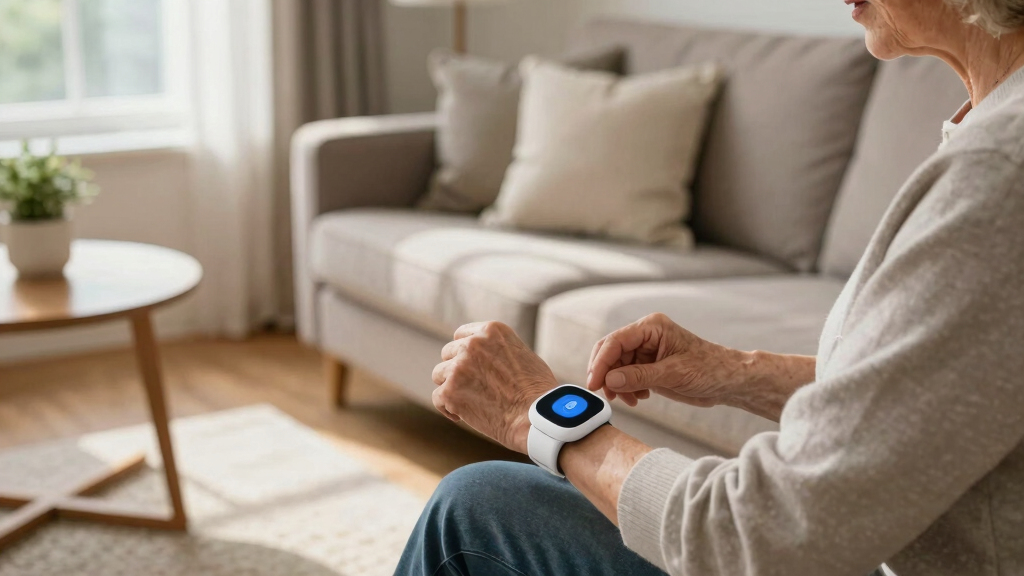

TL;DR
Listen free for 30 days with Audible
Thousands of audiobooks and originals — cancel anytime.
Start your free trialAs an affiliate, we earn on qualifying purchases.
Pick a medical alert system by matching your parent’s activity level, environment, and health needs. Focus on ease of use, coverage, and monitoring quality to ensure they stay safe and independent.
When your parent starts to need a little extra help, a medical alert system can be a game-changer. But with so many options out there, how do you pick the right one? It’s not just about bells and whistles — it’s about matching the system to what your parent truly needs to stay safe and independent.
This guide walks you through the key factors to consider, from device types to hidden costs. You’ll learn how to balance features with ease of use, so your loved one feels confident wearing and using the system every day.
Match the alert system type to your parent’s activity level: in-home, mobile, or hybrid.
Test coverage and signal strength in all critical areas of your parent’s home before choosing.
Prioritize devices with simple operation and large buttons to ensure usability.
Balance cost with features, and watch out for long-term contracts or hidden fees.
Regularly test and maintain the device to keep it reliable when it counts.
Choose the Right Type of System: In-Home, Mobile, or Both?
Medical alert systems come mainly in three flavors: in-home units, mobile devices, and hybrid options. Think about your parent’s lifestyle. Do they spend most of their time at home, or are they active outside?
In-home systems are reliable and simple. They usually include a base station connected to a landline or cellular network, with wearable pendants or wristbands. They’re perfect if your parent rarely leaves the house but want quick help during an emergency.
Mobile systems are like a smartphone for safety — GPS-enabled, portable, and designed for active seniors. They offer peace of mind during walks, errands, or outdoor visits. Hybrid systems combine both features, giving flexibility for a parent who’s a mix of indoors and out.
Choosing between these options involves understanding the tradeoffs. In-home systems are typically less expensive and easier to set up but lack mobility. Mobile devices provide independence outside the house but tend to be more costly and require charging. Hybrid systems offer a balance but may come with higher complexity and price. Your choice should align with your parent’s activity level and comfort with technology, ensuring they have reliable support wherever they are.
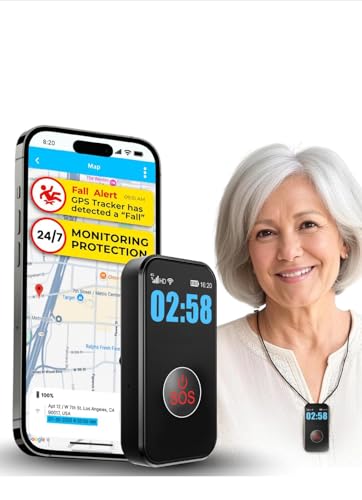
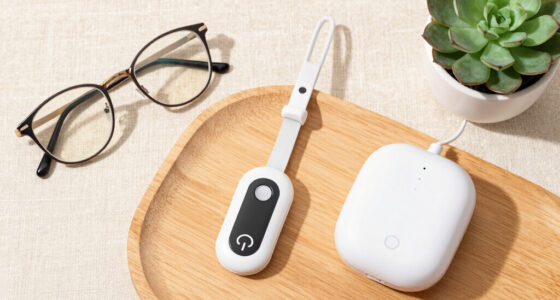
SecuLife Medical Alert Pendant for Seniors — Alerts Go Direct to Family, No Call Center | Auto Fall Detection, GPS Tracking, 2-Way Calling, No Contract, Waterproof Necklace
- Medical Alert Pendant with Fall Detection: Automatically detects falls and alerts contacts
- Easy Activation with Monthly Subscription: $20/month for unlimited alerts and tracking
- Two-Way Call Button: One-touch emergency calls with hands-free auto-answer
As an affiliate, we earn on qualifying purchases.
As an affiliate, we earn on qualifying purchases.
Check Coverage and Connectivity — Will It Work Where Your Parent Lives?
Reliable coverage is the backbone of any alert system. If you live in a rural area, check if the system works with cellular networks or landlines. Some newer models use cellular-only connections, which are often more flexible and easier to install.
For example, if your parent’s house is surrounded by trees or in a basement, signal strength matters. Test the device in different areas of the home — does the button work? Does the base station stay connected?
Remember: a system that drops out during a power outage or internet disruption can leave your parent vulnerable. Look for models with backup batteries or cellular-only options that don’t rely on Wi-Fi. This is critical because a system’s reliability directly impacts your parent’s safety; a false sense of security due to poor connectivity can be dangerous. Ensuring consistent coverage means your loved one can get help whenever needed, regardless of environmental challenges or outages, which are common in certain areas.
As an affiliate, we earn on qualifying purchases.
Pick a Device That’s Easy for Your Parent to Use
When it comes to safety devices, simplicity wins. Choose systems with big, clear buttons, straightforward instructions, and minimal setup. If your parent struggles with small gadgets or tech, a bulky device with large text and simple operation is best.
Imagine a senior with arthritis trying to press tiny buttons — frustrating and dangerous. Instead, opt for a pendant with a single button or a wristband that’s comfortable and unobtrusive.
Test the device yourself, then watch your parent try it. If they get confused or forget how to activate it, that system might do more harm than good. An overly complicated device can lead to frustration, decreasing the likelihood they’ll use it correctly in an emergency. Conversely, a truly simple device enhances confidence and ensures prompt response when needed most. Prioritizing ease of use reduces the risk of accidental non-activation and promotes consistent use, which is essential for safety.
in-home medical alert system with landline
As an affiliate, we earn on qualifying purchases.
As an affiliate, we earn on qualifying purchases.
Decide Between Professional Monitoring or Self-Monitoring
Is someone always available to respond, or do you want trained professionals on call? Most systems offer 24/7 monitoring centers that quickly alert emergency services when needed. Others rely on family or friends to respond.
Professional monitoring provides peace of mind, especially when you can’t be there 24/7. For example, an elderly parent living alone benefits from quick dispatch of emergency help, even if you’re at work.
But self-monitoring systems can save money and work well if family members are nearby. Just remember: quick response times matter. Look for reviews about how fast and reliable the monitoring center is. The key tradeoff here is between cost and immediacy; professional monitoring typically costs more but offers faster, more reliable emergency response, which can be life-saving. Self-monitoring might be sufficient for less critical needs, but it requires active family involvement and quick reaction times from loved ones, which might not always be possible. Understanding your parent’s health status and your availability will help determine the best approach.
hybrid medical alert system for seniors
As an affiliate, we earn on qualifying purchases.
As an affiliate, we earn on qualifying purchases.
Consider Cost, Contracts, and Hidden Fees
Medical alert systems vary widely in price. Some require hefty upfront purchases, while others have monthly fees ranging from $20 to $50. Be wary of long-term contracts and hidden charges for activation, equipment, or cancellation.
For instance, a basic system might cost $99 upfront with a $30 monthly fee. A more advanced model with GPS and fall detection could run $200 initially, plus $45/month.
Understanding the true cost involves looking beyond the sticker price. Hidden fees for activation, equipment replacement, or cancellation can quickly escalate expenses. Additionally, consider whether the system requires a landline or cellular plan, which adds to ongoing costs. Long-term contracts might lock you in but can also contain hefty cancellation fees if your circumstances change. Carefully reviewing all terms ensures you don’t encounter unexpected charges, helping you make a financially sound decision that balances affordability with safety features.
Explore Extra Features That Boost Safety and Peace of Mind
Beyond the basics, some systems offer extras to make life safer and easier. GPS tracking for outdoor activity, medication reminders, or automatic fall detection can be game-changers.
Imagine your parent going for a walk. With GPS, you can see their location in real time if they don’t return on schedule. Or, if they fall, automatic alerts ensure help arrives even if they can’t press the button. These features can significantly reduce response times and improve safety, but they often come with higher costs and increased complexity. Prioritize features based on your parent’s specific risks and routines; for example, GPS is valuable if your parent often ventures outdoors, while medication reminders are helpful for those managing multiple prescriptions. Weighing these options helps you tailor the system to provide maximum safety without unnecessary expense or complication.
Battery Life and Maintenance — Don’t Forget to Keep It Running
A device isn’t helpful if it’s dead or needs frequent charging. Look for systems with long-lasting batteries — at least 24 hours of use — and simple recharging routines.
For example, a pendant with a week-long battery life reduces worries about daily charging. Also, ask how easy it is to replace batteries or if the system alerts you when power is low. Regular testing and maintenance are key to ensuring the device works when needed. A device with poor battery life or complicated maintenance routines can result in unexpected failures, leaving your parent unprotected. Choosing a system with extended battery life and clear maintenance instructions minimizes the risk of downtime, ensuring that emergency help is always accessible when needed.
Protect Your Parent’s Privacy and Data Security
Security isn’t just about hardware — it’s about how your parent’s personal and location data are handled. Choose systems with clear privacy policies and data encryption.
For example, if a device shares location info with multiple contacts, ensure only trusted people have access. Avoid systems that store data unnecessarily or share it without consent. Understanding how your parent’s data is stored and shared helps prevent privacy breaches and misuse. Opt for providers who prioritize data security and transparency, and always read their privacy policies carefully. Protecting sensitive information is essential to maintaining your parent’s dignity and trust, especially as data breaches become more common. Your vigilance ensures their safety isn’t compromised by preventable privacy issues.
Latest Tech Trends: What’s New in Medical Alerts?
Recent developments make these systems more versatile. Integration with smartphones, smart home devices, and better fall detection sensors are reshaping safety options.
For instance, some alerts now sync with smartwatches, providing quick access and real-time location. Enhanced fall sensors reduce false alarms, giving caregivers more confidence in alerts. Wireless and cellular-only models also make installation easier — no landline needed. These innovations improve responsiveness, reduce false alarms, and expand usability for a wider range of seniors. Staying informed about these trends helps you select a system that benefits from the latest technology, offering better safety, convenience, and peace of mind for your loved one.
Frequently Asked Questions
How do I know which type of alert system is best for my parent?
Consider their daily routine and activity level. If they mostly stay home, an in-home system may suffice. For active seniors, a mobile GPS-enabled device offers more freedom. Hybrid options suit those who split time between indoors and outdoors.
Are medical alert systems covered by insurance or Medicare?
Most systems aren’t directly covered by Medicare, but some parts of home health services might support related equipment. Check with your provider or insurance plan about coverage options, and explore local programs that assist with costs.
What’s the typical cost of a medical alert system?
Expect to spend between $99 and $200 upfront, with monthly fees ranging from $20 to $50. Higher-end models with advanced features may cost more initially, but ongoing costs are usually predictable.
How reliable are these systems during power outages or internet disruptions?
Look for systems with backup batteries and cellular connectivity. Many models provide 24-hour battery life to keep your parent protected during outages. Regular testing ensures they work when needed most.
Can the system be used outside the home or during outdoor activities?
Yes, GPS-enabled mobile systems are designed for outdoor use, allowing your parent to stay safe during walks or errands. Always check the device’s outdoor range and battery life for extended use.
Conclusion
Choosing a medical alert system isn’t about the most features — it’s about finding what works best for your parent’s lifestyle. Focus on simplicity, reliability, and peace of mind. When safety feels effortless, your loved one can enjoy independence without worry.
Picture a system that’s always on, always ready — a small device that makes a big difference. That’s what smart caregiving looks like.
College move-in / dorm season Picks
dorm essentials
As an affiliate, we earn on qualifying purchases.