
TL;DR

Turn quiet afternoons into listening time
- Thousands of audiobooks, podcasts and originals
- Listen on your phone, tablet or Echo — also offline
- Cancel anytime
Temporary codes make caregiver access safer and more manageable than physical keys. Use unique, schedule-bound codes, delete them after use, and keep backups. Proper setup prevents mishaps and keeps your home secure.
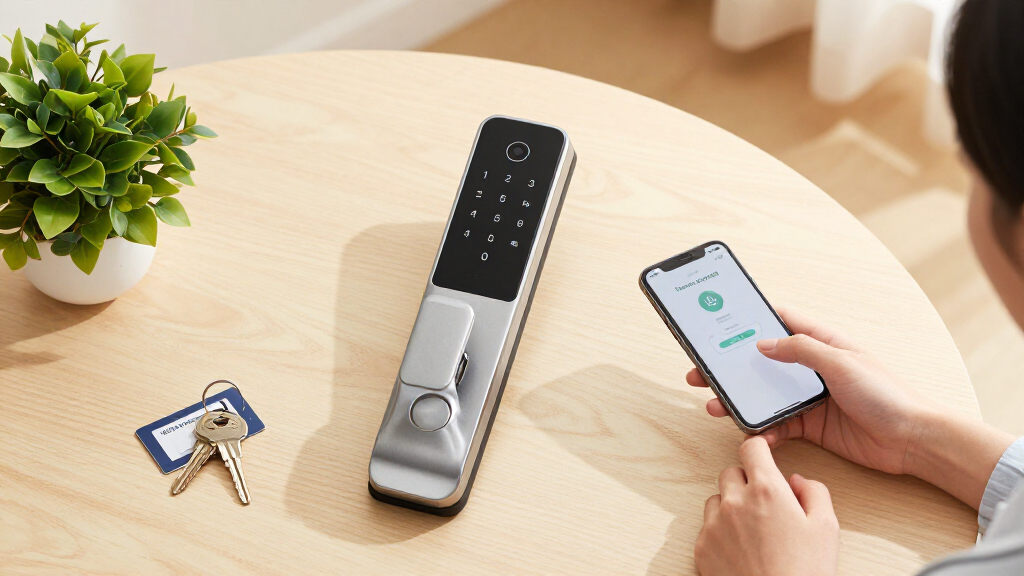
Imagine handing a caregiver a 4-digit code instead of a key. No copying, no losing it, no chasing down spare copies. Smart lock codes transform home care by offering a simple, clean way to grant temporary access without cluttering your pockets or risking security lapses.
But like any tool, they work best when used sensibly. Giving out codes that are too simple, shared, or left active too long can turn a smart solution into a headache. This guide shows you how to set up, manage, and revoke caregiver codes thoughtfully—so your home stays safe, and your peace of mind stays intact.
Assign a unique, random code to each caregiver and remove it immediately after care ends.
Use schedule-bound codes to limit access to specific hours, reducing risk of misuse.
Always keep a physical backup key or mechanical override in case electronics fail.
Test your lock’s behavior during power or connectivity issues to prevent lockouts.
Stay aware of privacy laws and coordinate with home care policies before installing new hardware.
Giving Caregivers Temporary Door Codes — Done Sensibly
Hand a caregiver a 4-digit code instead of a key: nothing to copy, nothing to lose, nothing to chase down when care ends. Smart lock codes offer clean, revocable, auditable access — but only when they are unique, schedule-bound, and promptly deleted. This is the setup playbook.
“Think of codes as digital keys that vanish when no longer needed — not permanent copies that can be lost or shared.”
The Core PrincipleWhy Temporary Codes Beat Keys, Every Time
A physical key is anonymous, copyable, and permanent. A unique, schedule-bound code is the opposite: it names a person, works only during their shift, and disappears the day care ends — no rekeying, no awkward key retrieval.
| Security Question | Physical Key | One Shared “Caregiver Code” | Unique Scheduled Code |
|---|---|---|---|
| Copying risk | ✗ Duplicated at any hardware store | ~ Known by every past & present aide | ✓ Nothing physical exists to copy |
| Accountability in the entry log | ✗ No record at all | ~ Log exists, but who used it? | ✓ Exact person, exact time, every visit |
| When care ends | ✗ Rekey the lock or chase down the key | ~ Deleting it locks out everyone else too | ✓ Delete one code — instant revocation |
| After-hours control | ✗ Works 24/7, forever | ✗ Works 24/7 while active | ✓ Works only inside the shift window |
| Loss & lockout risk | ✗ Losable — and findable by strangers | ✓ Nothing to carry or lose | ✓ Nothing to carry or lose |
Every Entry Is Logged
Most mid-range and better smart locks keep an entry log. One code per person turns that log into a clear record of who entered your home and when — vital for security and accountability.
Schedule-Bound Access
A code that works only 9am–1pm on weekdays aligns access with actual shifts. It quietly blocks late-night or off-hours visits — the core of “done sensibly.”
Revocation Is Instant
When a caregiver leaves, delete their code and access ends that second. No rekeying appointment, no spare keys floating around, no wondering who still has access.
Five Steps to Caregiver Codes That Keep You in Control
The tradeoff for all this control is initial setup and periodic review. Fifteen minutes of configuration, plus a quarterly audit, is what separates a smart solution from a security headache.
Assign uniquely
One code per caregiver — never reused, never shared. If two people share a code, the audit log is meaningless.
Make it random
4–8 unpredictable digits. Skip birth years, street numbers, and repeating digits — check the lock’s length limits.
Bind it to the shift
Set an expiration date or time window in the app — e.g. weekdays 9:00–13:00 only. Match real care hours.
Test before day one
Verify the code works and the schedule actually blocks off-hours entry. No surprises when access matters most.
Delete at the end
Remove the code the day care ends. Audit the full code list quarterly so unused codes never accumulate.
Always keep a physical key or mechanical override nearby. Batteries die, motors fail, and a caregiver in a rush will call you at the worst possible moment. The backup keeps an inconvenience from becoming an emergency.
What to Expect From Your Smart Lock
Capacity, battery, and connectivity differ by model — and each shapes how you manage caregiver codes. The failure mode to engineer against: a caregiver locked out during an outage.
Expect 6–12 months depending on usage and model. Low-battery warnings go to the app — but teach caregivers the 9V emergency terminals or key override so a dead battery never means a locked-out aide.
| Type | Remote Code Mgmt | Hub? |
|---|---|---|
| Wi-Fi | ✓ From anywhere | ✓ No hub |
| Bluetooth only | ✗ Near the door | ✓ No hub |
| Z-Wave / Zigbee / Thread | ✓ Via hub | ~ Hub required |
Wi-Fi is most convenient for busy households; hub-based locks tend to be more reliable in weak-signal homes. Many locks store codes locally, so schedules keep working even if Wi-Fi drops — verify this per model, and test it. Auto-relock and wrong-attempt lockouts vary by brand: test them before a caregiver discovers them.
One Code, Start to Finish
Sensible Access Is Also Legal and Coordinated
Hardware is only half the picture. Consent rules, agency policies, and rental agreements can all shape what you install — and transparency with your own household prevents conflict before it starts.
Cameras Raise the Stakes
Video-equipped locks or doorbells aimed at caregivers raise consent issues — several US states require all-party consent for audio recording. A PIN pad with an entry log is usually the lower-friction, lower-risk option.
Check Agency Rules First
Home care agencies often have their own key and entry policies. Coordinate your code system with the agency so rotating staff and agency protocol don’t conflict with your setup.
Get Landlord Approval
Swapping a deadbolt needs the landlord’s sign-off. Retrofit models that keep the exterior keyway unchanged are the standard workaround for rental homes.
Backup & Transparency Checklist
Physical backup key or mechanical override stored accessibly — batteries die at the worst moment.
Teach the 9V terminals — caregivers should know how to jump-start a dead lock from outside.
Enable tamper alerts and test wrong-attempt lockout behavior before deploying.
Warn household members before turning on entry logs and notifications — transparency avoids conflict.
Frequently Asked Questions
The six questions households ask most before handing out that first code.
Will codes still work if Wi-Fi or power goes out?
Yes. Most smart locks store codes locally and run on batteries, so codes work through outages. Connectivity loss only affects remote management — not day-to-day door access.
How do I stop caregivers from sharing their code?
You can’t technically prevent sharing, but one unique code per person, monitored entry logs, and time restrictions make misuse unlikely — and visible. Delete expired codes promptly.
Can a code work only on certain days or times?
Yes. Most app-controlled or hub-integrated models support schedule-bound PINs — e.g. 9am–1pm weekdays — matching shift hours and blocking everything outside them.
How many codes can a lock store?
Commonly 50–250 depending on the model. With frequent caregivers or rotating aides, choose a higher-capacity lock so unique codes never force constant deletion and recreation.
What if the caregiver mistypes the code repeatedly?
Many locks impose a temporary lockout after several wrong attempts — an anti-tamper feature. Test how quickly it triggers, enable alerts, and walk caregivers through proper entry.
What’s changing in smart lock access?
Matter-over-Thread models now ease cross-platform management; Apple Home Key adds tap-to-unlock on select locks (PINs remain the workhorse for rotating staff); the Aliro credential standard is still coming.
Why Temporary Codes Beat Keys Every Time
Temporary codes surpass physical keys because they eliminate the risk of copying, losing, or forgetting them. When a caregiver leaves, you simply delete their code—no rekeying or chasing down keys needed.
Moreover, the ability to track each entry through logs provides a clear record of who accessed your home and when, which is vital for security and accountability. Schedule-bound codes are especially effective: they restrict access to specific hours, aligning with caregivers’ shifts. This reduces the risk of unauthorized late-night or after-hours visits, giving you control over your household’s security and peace of mind. The tradeoff is that setting these schedules requires initial setup and regular review to ensure they align with actual care times, but this added effort pays off by preventing potential security breaches.
Popular right now

Hisense 65-inch U6 Pro Mini-LED 4K UHD Smart Fire TV

Ninja Foodi Dual Zone Smart XL Air Fryer, 10 Qt, 6-in-1, Black (DZ550)

Roborock Robot Vacuum and Mop Combo with Self-Empty Dock
As an affiliate, we earn on qualifying purchases.
How to Set Up Caregiver Codes That Keep You in Control
- Assign a unique code to each caregiver—never reuse a code for multiple people. This ensures accountability and easy auditing.
- Choose random, 4-8 digit codes. Avoid common patterns like birth years or street numbers, which can be easily guessed or replicated. Strong, unpredictable codes are crucial for maintaining security, especially if codes fall into the wrong hands.
- Set expiration dates or schedule restrictions in your lock’s app. For example, limit a code to weekdays from 9am to 1pm. This minimizes the risk of unauthorized access outside designated times and reduces the chance of forgotten or misused codes. Regularly reviewing these schedules helps ensure they reflect current care needs, reducing vulnerabilities.
- Test the code to ensure it works as intended and that its schedule limits are effective. Testing beforehand prevents emergencies during actual care situations, and verifying schedule restrictions ensures they’re functioning properly—avoiding surprises when access is needed most.
- Delete the code immediately when care ends. Review and audit codes quarterly to keep your list current and secure. This proactive management prevents accumulation of unused codes that could be exploited.
Always keep a physical key or mechanical backup nearby. Batteries die, electronics fail, and caregivers in a rush might need a fallback at the worst moment. Having a reliable backup ensures access during emergencies or technical issues, maintaining security without inconvenience.
Hardware Realities: What to Expect from Your Smart Lock
Battery life typically ranges from 6 to 12 months, depending on usage and lock model. Low-battery warnings appear in the app, giving you time to replace batteries before failure. Teaching caregivers to use emergency 9V terminals or a physical key ensures access during power or battery issues, preventing lockouts that can be disruptive or stressful.
Connectivity matters significantly: Wi-Fi locks allow remote code management, enabling you to add or revoke codes from anywhere, which is highly convenient for busy households. Bluetooth-only models require proximity, limiting remote control but often offering faster local access. Z-Wave, Zigbee, or Thread locks need a hub, which adds complexity but tends to be more reliable in homes with weak Wi-Fi signals. Understanding these tradeoffs helps you choose the best hardware for your needs, balancing convenience, reliability, and security.
Some locks store codes locally, allowing schedule restrictions even if Wi-Fi drops, which is crucial during internet outages. Testing your lock’s behavior during outages or low connectivity ensures that caregivers won’t be locked out unexpectedly. Remember, features like auto-relock and wrong-attempt lockouts vary by brand; testing these in advance helps you understand their operation, preventing surprises during urgent situations.
Frequently Asked Questions
Will the code still work if Wi-Fi or power goes out?
Yes. Most smart locks store codes locally and run on batteries, so the codes will work even during power outages. Connectivity issues only affect remote management, not your day-to-day access.
How do I prevent caregivers from sharing their codes?
While you can’t technically stop code sharing, assigning one unique code per caregiver, monitoring entry logs, and setting time restrictions make misuse less likely. Regularly review and delete expired codes to maintain control and prevent unauthorized access, which is essential for ensuring your home’s security and peace of mind.
Can I give a code that only works on certain days or times?
Yes. Most models with app control or hub integration support schedule-bound or time-limited PINs. You can set these to match shift hours, like 9am to 1pm weekdays, which helps prevent unauthorized access outside of scheduled care times. This feature adds an extra layer of security and flexibility, but requires initial setup and periodic review to ensure it aligns with actual caregiver schedules.
How many codes can my lock store?
The capacity varies by model. Commonly, locks can hold between 50 and 250 codes. For frequent caregivers or aides, choosing a higher-capacity lock ensures that you won’t run out of unique codes, maintaining control without needing to delete and recreate codes constantly.
What if the caregiver mistypes the code multiple times?
Many locks impose a temporary lockout after several incorrect attempts, which can be a security feature to prevent brute-force attacks. Enable tamper alerts if available. Testing this feature helps you understand how quickly a lockout occurs and how to manage it, ensuring caregivers aren’t locked out during urgent situations. Educate caregivers on proper entry procedures to avoid accidental lockouts and ensure smooth access during emergencies.
Conclusion
Smart lock codes bring a new level of control and convenience—when used with care. Think of them as digital keys that vanish when no longer needed, rather than permanent copies that can be lost or shared inappropriately.
Remember, the key to smart, sensible access is planning, regular cleanup, and backup options. Your home’s safety depends on it—and a little foresight now saves headaches later.