TL;DR

Turn quiet afternoons into listening time
- Thousands of audiobooks, podcasts and originals
- Listen on your phone, tablet or Echo — also offline
- Cancel anytime
Smart locks offer remote, keyless access with digital logs but depend on power, while lockboxes are simple, reliable, and low-cost, relying on physical security. Choose based on your need for convenience versus simplicity.
Imagine a loved one needing quick help, or a caregiver arriving at odd hours. You want access that’s both secure and hassle-free. But should you rely on a high-tech smart lock or keep it simple with a key lockbox? Every choice has its quirks, and knowing the differences can make all the difference.
This guide walks through what each option offers—security, ease, cost, and more—so you can decide what fits your family’s needs best. Whether you’re tech-savvy or prefer straightforward solutions, understanding these tools helps keep your loved ones safe and accessible.
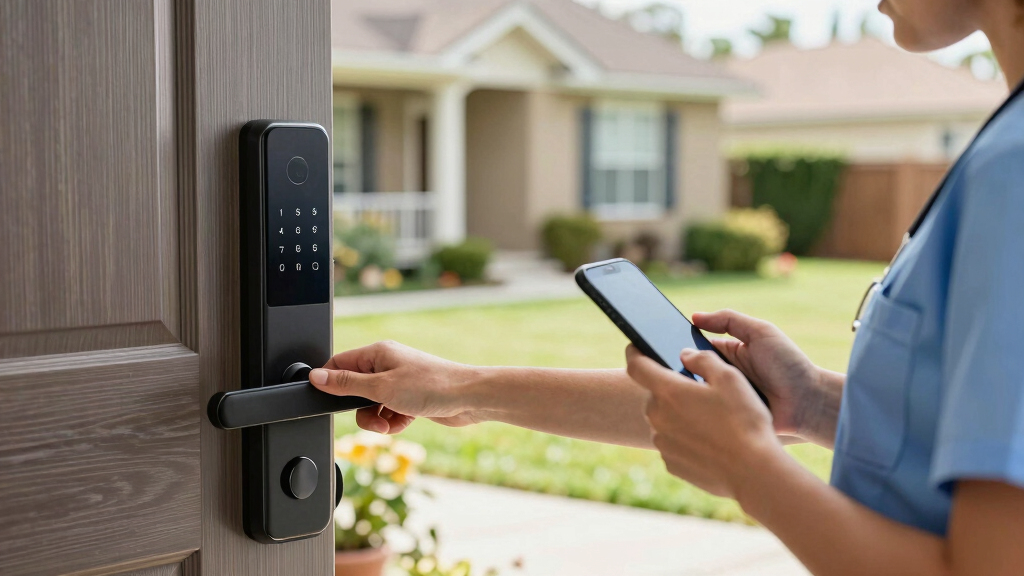
Smart locks offer remote control, activity logs, and biometric options, making caregiver management more flexible.
Lockboxes are simple, affordable, and reliable, especially in power or internet outages or for short-term use.
Both options can be secure if managed properly—smart locks with strong passwords and lockboxes with unique combinations.
Installation and maintenance costs vary widely; plan your budget accordingly.
In emergencies or outages, mechanical lockboxes provide guaranteed access, while smart locks may need backup keys.
Smart Locks vs Key Lockboxes
When a loved one needs quick help, access must be secure, simple and dependable. Smart locks favor remote control and accountability; lockboxes favor mechanical reliability and low cost. The right answer depends on how often access changes—and what must happen when technology fails.
Common installation time for a compatible smart lock.
Typical smart-lock battery life before replacement.
Grant or revoke digital caregiver access from an app.
Power or internet required by a mechanical lockbox.
Two secure ideas, two different strengths
Both systems can protect caregiver access when managed correctly. Smart locks add digital oversight and flexible permissions. Lockboxes reduce technical dependencies but require careful control of the physical key and combination.
Smart lock
Best suited to recurring care, changing schedules and households that want to know who entered and when.
Key lockbox
Best suited to short-term care, emergency access and situations where low cost or outage resilience comes first.
Compare the caregiver experience
A feature is valuable only if caregivers can use it under pressure. Assess the entire path: receiving access, opening the door, documenting entry and recovering from failure.
| Decision factor | Smart lock | Key lockbox |
|---|---|---|
| Remote access | ✓Unlock or share a code remotely | ✗Requires physical arrival |
| Activity history | ✓Time-stamped audit trails | ✗No automatic record |
| Outage resilience | ~Depends on local entry or backup key | ✓Fully mechanical operation |
| Cyber exposure | ~Manage with encryption, updates and strong credentials | ✓No connected attack surface |
| Physical exposure | ~Similar to a conventional door lock | ~Box can be discovered or attacked |
| Access changes | ✓Revoke individual codes instantly | ~Change code and notify all users |
| Learning curve | ~App and device familiarity may be needed | ✓Simple code-and-key workflow |
Plan access for the worst five minutes
A caregiver arriving during an outage should never have to invent a workaround. Test the access path in advance and document one dependable fallback.
Caregiver arrives
Confirm the caregiver has the current code, credential or instructions.
Primary method
Use the assigned PIN, phone credential, biometric or lockbox code.
Failure check
Identify dead battery, lost connectivity, forgotten code or jammed hardware.
Backup entry
Use a mechanical override, backup key or authorized emergency contact.
Verify low-battery alerts, the external power option if available, and the mechanical key before care begins.
Use a unique combination, secure mounting, discreet placement and immediate code rotation after staff changes.
Price is only the first decision
Include batteries, subscriptions, firmware care, code changes and replacement hardware. A lower-cost device can become expensive if it creates missed visits or unreliable access.
Key lockbox
Economical, quick to deploy and generally maintenance-light.
Smart lock
Higher investment in exchange for control, visibility and automation.
Encryption and tamper alerts
Reputable models increasingly combine protected communications with warnings for repeated or suspicious attempts.
Biometric entry
Fingerprint and facial recognition can reduce shared-code risk while making routine access faster.
Weather-ready hardware
Outdoor designs increasingly address rain, cold and heat—but environmental ratings still require verification.
Recurring access windows
Caregiver credentials can be limited to scheduled days or hours and revoked without retrieving a key.
Connected home routines
Compatible locks can coordinate with alarms, lights and major smart-home ecosystems.
Logs require boundaries
Entry records can improve accountability, but access, retention and local privacy requirements should be reviewed.
A secure access chain
Security is not the device alone. It is the connected routine from caregiver identity through entry, oversight and recovery.
Match the system to the care pattern
Choose based on operational needs, not novelty. Then secure the chosen system with unique credentials, clear instructions and a tested emergency pathway.
Frequent, changing care
Ideal when multiple caregivers need scheduled access, remote help or individual accountability.
Best fit: ongoing remote managementSimple, resilient access
Ideal for short-term care, emergency use, limited budgets or locations with uncertain connectivity.
Best fit: low-tech reliabilitySmart primary + backup
Use connected access for daily control while preserving an authorized mechanical fallback for outages.
Best fit: high-continuity householdsWhat makes each option secure — and what doesn’t?
Security is the top concern when choosing caregiver access tools. Smart locks employ digital encryption, PIN codes, or biometric scans, and they generate audit trails that document each entry—this means you can review who accessed the home and when, providing accountability and peace of mind. They can also send alerts if tampering or unauthorized attempts occur, allowing quick response. However, their reliance on electronic systems introduces vulnerabilities; hacking or power failures can compromise access if not properly secured.
Lockboxes, on the other hand, depend purely on physical security—such as a combination lock or a hidden key. While inherently simple, their security depends on choosing a strong, unique code and hiding it well. If someone guesses the code or finds the key, the security is compromised. The tradeoff is that lockboxes are less susceptible to digital hacking but are more vulnerable to physical theft or discovery. Understanding these nuances helps you weigh convenience against potential risks and decide which method aligns with your security priorities.
Popular right now

TCL T7 Series 85-Inch 4K 144Hz QLED Smart Google TV

TCL QM64L 85-Inch QD-Mini LED 4K Smart Fire TV

Ninja DualZone Smart XL Air Fryer, 10-Qt, 6-in-1, DZ950
As an affiliate, we earn on qualifying purchases.
How easy is it for caregivers to use these systems?
Ease of use is critical, especially if caregivers are managing urgent situations or have varying tech skills. Smart locks offer significant convenience by enabling remote unlocking, temporary code sharing, or biometric access, which can be a game-changer for caregivers arriving late or during emergencies. For example, a caregiver arriving after hours can unlock the door from their phone without needing to coordinate a physical key. However, the reliance on smartphones, internet, and batteries means that if these fail, the system might become inaccessible unless backup options are in place.
Lockboxes require only physical access—knowing the code or having a key. They’re straightforward, with no reliance on technology or power, making them reliable in all circumstances. The downside is that they can be less convenient if the caregiver forgets the code or if someone else discovers it. This simplicity makes lockboxes especially suitable for caregivers who prefer or need a no-fuss solution, but it limits remote management capabilities. The choice depends on whether you prioritize remote control and logging or straightforward, always-available access.
Installation and setup — what’s involved?
Installing a smart lock typically involves removing your existing deadbolt or door knob and replacing it with the new device, a process that usually takes about 15–30 minutes. Many models are designed to be compatible with standard doors and connect via Bluetooth or Wi-Fi, allowing for easy integration with existing smart home systems. For instance, upgrading a front door to include a smart lock can enhance not only security but also automation capabilities, such as automatically locking the door at a set time. Proper installation is crucial; misaligned or incompatible hardware can compromise security or functionality.
Lockboxes are generally very simple to set up—either portable or mountable with a few screws or a clasp. They require minimal tools and can be placed outdoors or indoors quickly. For temporary needs, such as short-term caregiving or vacation rentals, they are especially convenient since they can be set up and removed in minutes. The ease of setup makes lockboxes ideal for situations where quick deployment is necessary, but they lack the advanced features of smart locks.
Cost and ongoing maintenance — what should you budget?
Cost considerations are vital for making an informed choice. Lockboxes are typically budget-friendly, priced between $20 and $50, and require minimal ongoing maintenance—mainly changing the combination periodically or cleaning to ensure the lock’s smooth operation. They are a cost-effective, low-maintenance solution suitable for short-term needs or budget-conscious families.
Smart locks tend to be more expensive, ranging from $100 to over $300 depending on features like biometric access, smart home integration, and weather resistance. They require batteries—usually lasting 6–12 months—and some models may need occasional firmware updates or app maintenance. Investing in a high-end smart lock with remote management and activity logs can be cost-effective over time if it reduces caregiver hassle and enhances security. Budgeting for these ongoing expenses ensures the system remains reliable and secure, avoiding surprises that can compromise access or safety.
What happens if the power or internet fails?
Power outages or internet disruptions can significantly impact smart lock functionality. Many smart locks are equipped with backup keys or mechanical overrides—physical keys hidden inside or external keyholes—that serve as fail-safes. For example, if Wi-Fi drops overnight or during a storm, you can still unlock the door with the backup key, ensuring continuous access. This redundancy is crucial in emergencies or during outages.
In contrast, lockboxes are entirely mechanical, making them inherently reliable regardless of power or connectivity. They function without electronic components, so even during prolonged outages or internet failures, access remains guaranteed. This makes lockboxes especially valuable in remote or disaster-prone areas where connectivity can be unpredictable. Understanding these reliability factors helps you plan for emergencies and choose the best solution to ensure uninterrupted access when it matters most.
What’s new in smart lock technology?
Recent innovations in smart lock technology significantly enhance security and usability. Many now incorporate advanced encryption algorithms, tamper alerts, and seamless integration with home security systems—adding layers of protection against hacking or unauthorized access. For example, a smart lock with facial recognition not only speeds up access but also eliminates the risk of lost or stolen codes, providing a biometric safeguard. Weather-resistant designs have improved, making these devices more durable for outdoor use in harsh conditions like rain or snow. Additionally, some models now support voice commands and AI-based management, further simplifying caregiver access. These technological advances mean smart locks are becoming smarter, more secure, and more adaptable to diverse household needs, ultimately offering peace of mind alongside convenience.
Which is better for your family — quick summary
Choosing between smart locks and lockboxes ultimately depends on your specific priorities and circumstances. Smart locks excel in remote control, detailed activity logs, and integration with other smart home devices—making them ideal for families managing multiple caregivers or those who value technological convenience. They are especially beneficial if you often need to monitor access or want to grant temporary permissions easily.
Lockboxes offer a straightforward, cost-effective, and reliable solution, especially suitable for short-term use, emergencies, or families with limited comfort with technology. Their simplicity ensures they work reliably during power outages or internet failures, providing peace of mind in critical moments.
To make the best choice, consider your daily routines, comfort with technology, budget, and security concerns. Sometimes, combining both—using a smart lock for everyday management and a lockbox for emergencies—can provide comprehensive coverage for your loved ones’ safety and your peace of mind.
Frequently Asked Questions
Which option is more secure: smart lock or lockbox?
Both can be secure when used correctly. Smart locks use encrypted digital protocols and activity logs, reducing unauthorized access. Lockboxes depend on a strong, unique combination or key hiding spot. Regularly updating codes and choosing quality models enhances security for both.
Are smart locks easy for caregivers to operate?
Yes, especially if caregivers are familiar with smartphones or biometric devices. Many smart locks allow temporary codes or remote unlocking. However, some caregivers prefer the straightforward nature of a lockbox—no tech needed.
What if the smart lock’s battery dies?
Most smart locks have low-battery alerts and include backup keys or mechanical overrides. It’s wise to check batteries regularly and keep a backup method ready in case of power issues.
Can smart locks be hacked?
While theoretically possible, reputable smart locks use encryption and secure protocols to prevent hacking. Using strong, unique passwords and keeping firmware updated greatly reduces risks.
Which is better for emergency access?
Lockboxes are straightforward and guaranteed to work during outages. Smart locks offer remote access, but depend on power and connectivity—making lockboxes a reliable fallback in emergencies.
Conclusion
Choosing between smart locks and lockboxes isn’t about one being better—it’s about what fits your lifestyle. Want remote control, activity logs, and sleek tech? A smart lock could be your best bet. Need simplicity, affordability, and reliability? A lockbox might do the trick.
Picture a smart lock quietly logging every entry, or a lockbox sitting ready on the porch. Both are tools—your job is to pick the one that keeps your loved ones safe and your mind at ease.