TL;DR

Turn quiet afternoons into listening time
- Thousands of audiobooks, podcasts and originals
- Listen on your phone, tablet or Echo — also offline
- Cancel anytime
Properly configuring your video doorbell allows seniors to receive important notifications without being overwhelmed by constant chimes. Customizable zones, sensitivity, and scheduling make this balance easy to achieve. Recent tech improvements enhance usability and security, offering peace of mind.
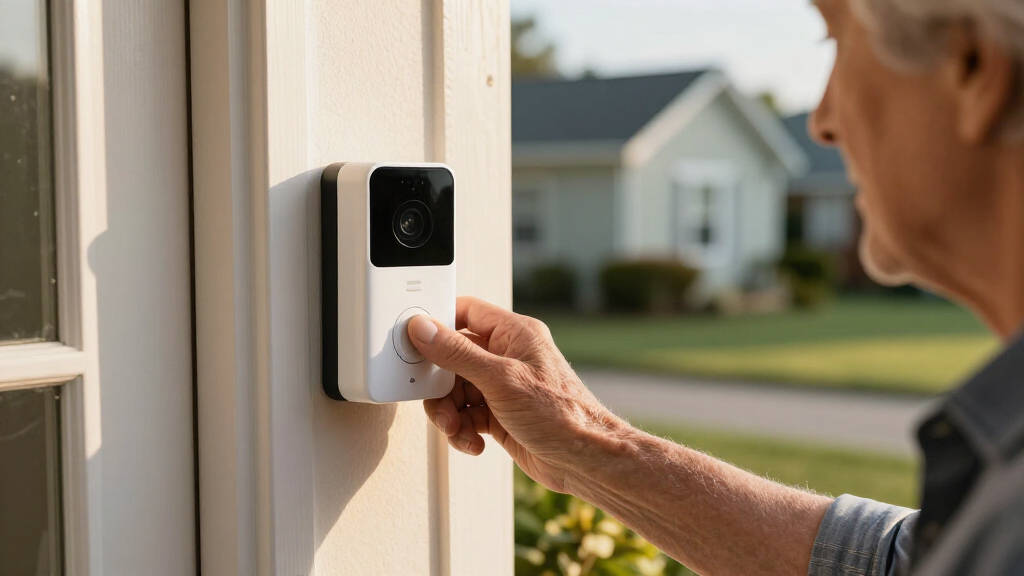
Imagine a doorbell that only buzzes when it really matters — no more constant chimes every time a leaf blows past or a squirrel scampers by. That’s the goal for many families caring for seniors: have a system that’s smart enough to alert only for meaningful activity during the day, without disrupting peace.
This guide reveals how to fine-tune your video doorbell’s settings so that seniors stay safe, relaxed, and in control. Whether it’s customizing alert zones or scheduling quiet hours, you’ll learn practical steps to make your device work for your loved one — not against them.
Customize motion zones and sensitivity to minimize false alarms during the day.
Use scheduled quiet hours to prevent constant alerts, reducing stress for seniors.
Leverage AI and smart features for easier recognition of familiar visitors.
Ensure privacy with zones and secure Wi-Fi to protect video footage.
Control your device remotely for maximum flexibility and peace of mind.
Senior-safe daytime setup
Video doorbell alerts without constant chimes.
A calmer home does not require less security. Focused motion zones, person detection and a predictable alert schedule help the doorbell speak only when something meaningful happens.
Build a four-filter alert path.
Each filter removes a different source of nuisance activity. Used together, they reduce alert fatigue while preserving a clear path for real visitors, caregivers and deliveries.
Draw the zone
Cover the porch, steps and approach. Exclude roads, sidewalks, trees and neighboring entrances.
Lower sensitivity
Start around the middle. Reduce it gradually if shadows, leaves or animals continue to trigger alerts.
Select people
Enable person detection and, where available, familiar-visitor recognition or package filtering.
Choose the response
Use a gentle indoor chime for priority events and silent phone notifications or recording for everything else.
Change one setting at a time. Walk toward the door slowly, quickly and from both sides. Then confirm that a real visitor is detected before narrowing the zone again.
Reduce noise without switching security off.
The goal is layered filtering, not total silence. Quiet hours can mute the indoor sound while the doorbell continues recording and sends selected notifications to a caregiver.
Illustrative alert load
Three levels of filtering
Relative daytime alert volume falls as environmental motion is removed from the notification path.
Example routine
A calmer daytime schedule
Match audible alerts to the senior’s routine. Recording can remain active during every period.
Important: During quiet hours, retain recording or remote notifications so genuine visitors are documented and a caregiver can still respond.
High versus low: choose the middle that works.
High sensitivity responds quickly but can create frequent interruptions. Lower sensitivity favors calm, yet an overly low setting may miss a slow approach or someone standing near the edge of the zone.
| Feature | High sensitivity | Low sensitivity | Senior-home guidance |
|---|---|---|---|
| False-alarm rate |
× Higher Minor motion, animals and environmental movement can trigger alerts. |
✓ Lower Fewer nuisance events reach the indoor chime or phone. |
✓ Favor calm Start in the middle, then lower only if false alerts continue. |
| Visitor detection |
✓ Faster Quick detection supports immediate awareness. |
~ Selective Slow or edge-of-zone movement may be detected later. |
~ Verify Test fast, slow and side-angle approaches after every adjustment. |
| Daily experience |
× More disruption Repeated chimes can cause confusion, anxiety or alert fatigue. |
✓ Calmer Meaningful alerts are easier to understand and trust. |
✓ Best fit Combine moderate-to-low sensitivity with a focused porch zone. |
The practical sweet spot: a tightly framed zone, moderate-to-low sensitivity, person-only alerts and a door-press chime that always remains available.
Turn the doorbell into a gentle guardian.
A senior-friendly setup should be easy to understand locally and easy for a trusted caregiver to manage remotely. These settings form the core configuration.
Porch-only zones
Exclude the street, public sidewalk, moving branches and neighboring property. Keep the doorway and complete visitor approach visible.
Review seasonallyPerson detection
Prioritize people over vehicles, animals and generic movement. Familiar-face tools can add context where available and appropriate.
Test every approachScheduled quiet hours
Mute indoor chimes during rest or high-activity periods while preserving silent recording and selected caregiver notifications.
Keep recording onGentle, clear cues
Choose a recognizable chime, comfortable volume and visual indicator. Avoid stacking several speakers that repeat the same alert.
One clear signalProtected footage
Use privacy masks, a strong unique Wi-Fi password, encryption, multi-factor authentication and current device firmware.
Secure every accountRemote management
Allow a trusted caregiver to view live video, adjust settings and temporarily silence alerts without changing the senior’s routine.
Limit trusted accessFrom movement to meaningful action.
A well-configured system filters the event before it reaches the senior. The result is an alert that is easier to recognize, trust and act upon.
Movement
Event beginsPorch zone
Location verifiedPerson filter
Human detectedSchedule
Response selectedCalm alert
Actionable signalThe target outcome: fewer alerts, stronger trust.
When most chimes represent a real person at the door, seniors and caregivers are less likely to ignore, disable or become anxious about the system.
Common setup questions.
Feature names vary by manufacturer, but the underlying controls are similar: activity zones, sensitivity, person detection, schedules, privacy masks and shared access.
Can alerts be limited to family visits?
Use a porch-only zone and person detection. If the device supports familiar-person recognition, configure it carefully—but retain a door-press alert so unexpected visitors are not missed.
What stops constant daytime notifications?
Reduce sensitivity, disable vehicle and generic-motion alerts, enable person-only notifications and schedule quiet periods around the senior’s normal routine.
Are special senior doorbells required?
Usually not. Prioritize simple controls, reliable detection, a recognizable chime, visual cues, voice-assistant compatibility and remote caregiver access.
How should footage remain private?
Mask sensitive areas, secure Wi-Fi, use multi-factor authentication, install firmware updates and restrict shared access to trusted caregivers.
Can a caregiver manage it remotely?
Most modern systems support app-based live view, notification changes and temporary silencing. Use separate shared accounts instead of sharing the primary password.
How often should settings be reviewed?
Recheck after seasonal light changes, landscaping, construction, new routines or repeated false alerts. Always test a real approach after making changes.
How to Make Your Doorbell Only Alert for Important Visitors
When it comes to alerts, less noise means less stress. Adjusting motion detection zones and sensitivity not only reduces unnecessary notifications but also ensures that your loved one is only disturbed by truly important visitors. For example, setting a focused zone around the porch prevents alerts for passing cars or wandering animals, which are common sources of false alarms. This focus is crucial because it helps prevent alert fatigue—where too many notifications cause caregivers and seniors to ignore or disable alerts altogether—potentially missing genuine threats or visitors. Enabling ‘person detection’ further refines this by leveraging AI to distinguish humans from animals or environmental movements, optimizing the balance between security and convenience. The tradeoff here is that over-tightening zones or lowering sensitivity might cause some real visitors to be missed, so regular testing and adjustments are key. Testing different sensitivity levels over days allows you to find the sweet spot where alerts are meaningful but not overwhelming, fostering trust in the system and peace of mind.
Popular right now

Hisense 43-Inch E6SR Series Hi-QLED 4K UHD Smart Roku TV (2026 Model)

Bose QuietComfort Headphones (2nd Gen), Wireless Over-Ear Noise-Cancelling Headphones, Black

Hisense 40-Inch Class QD4SR Series Hi-QLED FHD Smart Roku TV (2026 Model)
As an affiliate, we earn on qualifying purchases.
Setting Quiet Hours — When Your Doorbell Takes a Break
Implementing quiet hours isn’t just about silencing the doorbell; it’s about creating a predictable routine that reduces stress for seniors and caregivers alike. Scheduling times during which alerts are muted helps prevent constant disturbances during busy periods, like late mornings or early afternoons when multiple visitors or activities occur. This scheduling allows family members to focus on their routines without the distraction of false alarms, while still maintaining security because the system can continue recording footage silently. The real benefit is that it fosters a calmer environment, especially for seniors who may be sensitive to noise or sudden alerts. However, a potential tradeoff is that during quiet hours, real visitors might go unnoticed unless the system is configured to record continuously or send manual notifications. Using visual cues, like a blinking light indicator during quiet mode, helps seniors recognize that the system is active but silent, maintaining awareness without unnecessary agitation. This balance is vital because it ensures safety without sacrificing peace and tranquility in the home.
Using a Comparison Table to Pick the Best Alert Settings
| Feature | High Sensitivity | Low Sensitivity | Best For |
|---|---|---|---|
| False Alarm Rate | Higher — more triggers from minor movements, which can cause alert fatigue if not managed carefully | Lower — fewer false alarms, but might miss subtle or slow movements | High traffic areas or when rapid detection is needed |
| Visitor Alert Speed | Faster — alerts come quickly, useful for immediate awareness | Slightly delayed — may take longer to detect slower movements but reduces unnecessary alerts | Recognizing important visitors quickly while minimizing interruptions |
| Ideal for Seniors | Less suitable — more frequent interruptions could cause confusion or stress | Better — fewer false alerts help maintain a calm environment and reduce anxiety |
Choosing between high and low sensitivity involves understanding the environment and the needs of the senior. High sensitivity ensures quick detection but risks overwhelming notifications, while low sensitivity reduces false alarms but might delay recognizing important visitors. The key is to find a balance that minimizes stress without compromising security. Regularly reassessing these settings as conditions change ensures the system remains effective and non-intrusive, fostering a sense of safety and control for seniors and their caregivers.
Frequently Asked Questions
How can I set my video doorbell to only alert me when my family visits?
Use the person detection feature and customize motion zones to focus solely on your porch. Some systems allow you to recognize familiar faces, so you only get alerts for known visitors. Adjust sensitivity and test over time to find the right balance.
What settings prevent constant notifications during the day?
Schedule quiet hours during busy parts of the day, reduce motion sensitivity, and enable alerts only for specific activities or visitors. This targeted approach reduces the likelihood of alert fatigue and ensures that only meaningful activity triggers notifications, helping seniors stay relaxed while maintaining security.
Are there video doorbells specifically designed for seniors?
While many models aren’t specifically made for seniors, features like large buttons, voice control, and simplified apps make them ideal. Look for devices that emphasize ease of use and accessibility.
How do I keep my video doorbell’s footage private?
Use privacy zones to hide sensitive areas, ensure your Wi-Fi is secured with a strong password, and choose devices with encrypted video feeds. Regularly update firmware for the latest security patches to prevent unauthorized access and protect your loved one’s privacy.
Can I manage my doorbell remotely?
Yes, most modern systems offer remote management via smartphone apps. You can check live footage, adjust settings, or silence alerts from anywhere, providing peace of mind and flexibility while ensuring the safety of your loved one.
Conclusion
Setting up your video doorbell for daytime use isn’t about overwhelming alerts — it’s about smart, tailored notifications that keep your senior loved ones safe and peaceful. A few simple adjustments can make a world of difference, turning technology into a gentle guardian rather than a source of stress.
Think of your doorbell as a caring eye that only speaks when it’s truly needed — a small change that offers big peace of mind. Remember, a calm home is a secure home.