
TL;DR

Turn quiet afternoons into listening time
- Thousands of audiobooks, podcasts and originals
- Listen on your phone, tablet or Echo — also offline
- Cancel anytime
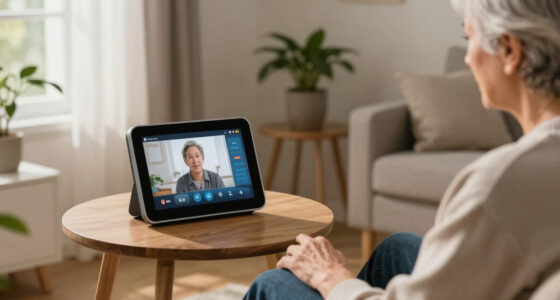
Video calling devices for seniors are now more user-friendly and accessible than ever. They help reduce loneliness, improve mental health, and are available at various price points. Choosing the right device depends on ease of use, connectivity, and support.
Staying connected isn’t just about passing time — it’s about feeling close, loved, and supported. For seniors, especially those living alone or far from family, a simple video call can brighten their day. Yet, many face hurdles with technology that’s complicated or overwhelming.
This guide cuts through the jargon to show you the easiest, most reliable devices for seniors. Whether you’re helping a parent or planning for your own future, understanding what makes a device senior-friendly can make all the difference.
Choose devices with large icons, simple interfaces, and voice commands to simplify use.
Recent tech combines video calling with health and emergency features for added safety.
Prices vary; investing in a user-friendly device can significantly reduce loneliness.
Support and tutorials are vital for seniors to get the most out of their devices.
Privacy settings matter — pick trusted brands with strong security options.
Video Calling Devices for Seniors
Connection should feel easy. The best device removes small buttons, confusing menus and setup stress—so seeing family becomes as natural as answering the phone.
Potential reduction in feelings of loneliness through regular video contact.
From basic tablets and smart speakers to premium senior-focused systems.
A device only works when calling, answering and adjusting it feel manageable.
Fewer steps mean less frustration.
Two simple ways to start a call.
Match the home and mobility needs.
Setup help keeps the device in use.
Simple on the surface. Thoughtful underneath.
A senior-friendly device reduces decisions at every step. Look beyond screen size: the interface, sound, connection and ongoing help determine whether it becomes part of daily life.
Large, clear controls
Prioritize large icons, familiar contact photos and a home screen with very few choices.
Voice or one touch
Commands such as “Call my daughter” remove the need to navigate menus.
Readable and audible
Adjustable text, loud speakers, captions and hearing aid compatibility improve comfort.
Contacts pre-loaded
Family-managed settings and ready-to-call contacts make the first experience less stressful.
Reliable access
Wi-Fi suits most homes; cellular can help where broadband is unreliable or mobility matters.
Privacy and support
Choose reputable brands, review permissions and confirm that real setup help is available.
Choose a person
Recognizable photo or spoken name.
Start the call
One tap or one voice command.
See and hear clearly
Strong volume, large image, captions.
End without worry
A clear button returns to the home screen.
Match the device to the person—not the trend.
Dedicated senior devices offer the simplest experience. Smart displays excel at hands-free calling, while tablets provide more flexibility for seniors comfortable with apps.
| Device type | Ease of use | Calling method | Connection | Extra features | Best for |
|---|---|---|---|---|---|
| Senior-focused tablet | ✓ Excellent | Large contacts, one touch | Wi-Fi or cellular | Family controls, reminders | Very low tech confidence |
| Smart display | ✓ Very good | Voice or touch | Usually Wi-Fi | Reminders, smart home | Hands-free home calling |
| Standard tablet | ~ Varies | Video calling apps | Wi-Fi or cellular | Apps, reading, entertainment | Confident or supported users |
| Smartphone | ~ Moderate | Apps or voice assistant | Cellular and Wi-Fi | Portable, emergency access | Active seniors on the move |
| Basic smart speaker | ✓ Simple | Voice only | Usually Wi-Fi | Reminders, audio calls | Voice contact without video |
| Complex laptop setup | ✗ Difficult | Apps, links and logins | Usually Wi-Fi | Maximum flexibility | Experienced computer users |
Examples: GrandPad represents the senior-focused category; Amazon Echo Show is a common smart-display option; an iPad can be simplified but may still require family setup and support.
Spend for the barriers you need to remove.
Price alone does not predict success. A cheaper device that sits unused is poor value; a well-matched device can support connection, confidence and safety every day.
Start with the senior’s comfort level.
Check Wi-Fi strength and cellular costs.
Test text size, volume and captions.
Review privacy controls together.
Plan who provides ongoing support.
What families ask before buying.
The best answer depends on the senior’s home, hearing, eyesight, dexterity and confidence—not simply the longest feature list.
What is easiest for a beginner?
A senior-focused tablet or voice-controlled smart display with pre-loaded contacts and minimal setup.
Is Wi-Fi required?
Most smart displays need Wi-Fi. Cellular-enabled tablets are useful when home internet is weak or unavailable.
Can it help in an emergency?
Some devices include emergency calling, caregiver alerts or links to medical alert services. Verify exactly how the feature works.
Are video devices secure?
Reputable products offer privacy controls, but families should configure permissions, updates and approved contacts together.
How should we teach it?
Practice one task at a time, leave a short printed guide nearby and repeat calls until the routine feels familiar.
What keeps it in daily use?
Reliable family check-ins, accessible customer service and patient troubleshooting prevent small problems from becoming abandonment.
Better design creates more than easier calls.
Technology should serve connection—not complicate it.
Choose the device the senior can use confidently and repeatedly. Ease, security and human support matter more than novelty. The right setup can turn a small investment into daily smiles and real peace of mind.
What Makes a Video Calling Device Senior-Friendly?
Senior-friendly devices prioritize simplicity. Think large icons, clear screens, and minimal steps to make a call. For example, the GrandPad features giant buttons and pre-loaded contacts. Voice commands, like saying ‘Call Mom,’ can eliminate the need for navigation.
Design also matters. Devices with adjustable font sizes, loud speakers, and ergonomic shapes fit better in a senior’s daily routine. Connectivity options like Wi-Fi or cellular help ensure they stay connected without fuss.
Understanding these features is crucial because they directly impact whether a senior can confidently use the device daily. A device that’s too complicated can lead to frustration and abandonment, while one designed with their needs in mind fosters independence and regular communication. The goal is to reduce barriers, making technology an enabler rather than a hurdle.
Popular right now

Dyson V8 Cyclone Cordless Vacuum

Bose QuietComfort Ultra Wireless Noise-Cancelling Headphones with Spatial Audio, Black

TCL QM64L 85-Inch QD-Mini LED 4K Smart Fire TV
As an affiliate, we earn on qualifying purchases.
Latest Tech That Makes Video Calls Easier Than Ever
Tech for seniors is evolving fast. Dedicated devices like the Amazon Echo Show and GrandPad are built just for simplicity. They often come with one-touch calling or voice activation. For instance, with voice commands, a senior can say, “Alexa, call my daughter,” and it’s done.
Some devices are pre-loaded with contacts and settings, removing the need for complicated setup. Accessibility features like larger text, hearing aid compatibility, and closed captioning are now common, making video calls more comfortable.
Hybrid devices combine video calling with health or emergency features, offering all-in-one support. Imagine a device that not only connects you to loved ones but also reminds you to take medication or alerts caregivers if something’s wrong.
These innovations matter because they address common barriers—complex setup, small text, or poor audio—by integrating features that adapt to seniors’ unique needs. This means fewer technical frustrations and more consistent use, which is vital for maintaining emotional bonds and safety. The tradeoff might be higher costs or slightly more complex features, but the benefits in accessibility often outweigh these concerns.
How Much Do These Devices Cost — And Are They Worth It?
Prices range from around $50 for basic tablets or smart speakers to over $200 for premium devices with bigger screens and more features. For example, the Amazon Echo Show 8 costs about $130 but offers voice control, video calling, and smart home integration.
Investing in a good device can reduce loneliness and improve mental health. According to research, regular video chats can cut feelings of isolation by nearly 40% among seniors.
It’s important to weigh the costs against the potential benefits. Cheaper devices might lack certain features like larger screens or emergency buttons, which could limit usability or safety. Conversely, more expensive devices often provide added convenience, better audio-visual quality, and integrated health features, which can justify the investment. The key is to match the device’s capabilities with the senior’s specific needs and daily routines, ensuring that the investment translates into meaningful connection and safety.
Answering Your Most Common Questions About Senior Video Devices
- What’s the easiest device for a non-tech-savvy senior? Devices like the GrandPad or Amazon Echo Show are designed for simplicity, with large buttons and voice commands. Choosing a device with minimal setup reduces frustration and encourages regular use, which is essential for maintaining connections and safety.
- How much do they cost? Budget options start at around $50, while more advanced tablets or smart displays go over $200. The right choice depends on the senior’s needs—whether they prioritize ease of use, emergency features, or video quality.
- Do they need Wi-Fi or cellular? Most require Wi-Fi, but cellular-enabled devices exist for areas with poor Wi-Fi or for mobility. This choice impacts connectivity reliability and costs, so consider the senior’s living situation and mobility needs when choosing.
- Can they be used for emergencies? Yes, many include emergency call features or can link to medical alert systems. This functionality provides peace of mind, especially for seniors living alone, by enabling quick access to help when needed.
- Are privacy concerns addressed? Reputable devices have security settings, but it’s wise to set up controls and educate users on safe usage. Understanding privacy implications ensures that sensitive information remains protected, fostering trust in the technology.
- How do I help a senior set up and learn? Many companies offer setup support, tutorials, or in-home assistance to make the process smoother. Providing ongoing support ensures the senior feels confident and comfortable using the device, which increases the likelihood of consistent use and benefits.
Conclusion
If you want a senior to feel closer to loved ones, a simple, accessible video calling device is a game-changer. Focus on ease of use, security, and support — the right tech makes staying connected effortless and joyful.
Remember, technology should serve connection, not complicate it. A small investment in the right device can bring big smiles and peace of mind.