
Easy-to-use smart home devices for seniors should do one job well: keep an older adult safer without demanding tech skills, subscriptions they don’t understand, or fiddly setup. The Seculife Medical Alert Smartband earns my best overall pick because it combines fall detection, GPS tracking, and two-way calling in a single wearable with no hub required, though it costs more than simpler alternatives. If budget is the priority, the CallToU Caregiver Pager with 2 Wireless Call Buttons delivers reliable one-press help signaling for a fraction of the price. The main tradeoff in this category is between passive monitoring systems that work even when the senior can’t press a button, and simple alert devices that depend on the user taking action. Continue reading for the full breakdown of all 14 options and who each one suits best.

Turn quiet afternoons into listening time
- Thousands of audiobooks, podcasts and originals
- Listen on your phone, tablet or Echo — also offline
- Cancel anytime
Complete the kit


Key Takeaways
- Medical alert wearables with automatic fall detection (Seculife, StackCare, ADT On-The-Go) provide protection even when the senior is unconscious or confused, but they carry monthly monitoring fees that basic caregiver pagers avoid entirely.
- Among the six caregiver pager systems compared, range, receiver count, and button style (wrist vs. wall-mount) — not price — were what actually separated useful setups from frustrating ones.
- Floor mat alarms (Floor Mat Exit Alarm, Smart Caregiver Wireless Floor Mat) are the best fit for dementia and wandering risk specifically, but they’re the wrong purchase for general fall prevention.
- Devices that work without WiFi or a smartphone, like the CallToU and VTech options, proved most dependable for seniors in rural areas or homes with unreliable internet.
- The Jitterbug Smart5 stands apart from everything else in this lineup because it solves communication and emergency response together, making it the strongest choice for seniors who want one device instead of many.
| PILSAMAS WiFi Caregiver Call Button for Seniors |  | Best for Long-Distance Family Alerts | Power Source: Battery powered (1 lithium polymer battery included) | Compatible Devices: Smartphone | Control Method: Touch | VIEW LATEST PRICE | See Our Full Breakdown |
| VTech SN5147 Amplified Corded/Cordless Senior Phone |  | Best for Hearing and Visibility Needs | Phone Type: Corded base with one cordless handset | Ringer Volume: Up to 90 dB | Audio Assist: Up to 50 dB amplification | VIEW LATEST PRICE | See Our Full Breakdown |
| Floor Mat Exit Alarm for Fall Prevention and Anti-Wandering |  | Best for Nighttime Wandering Alerts | Included Components: 1 economy exit alarm and 1 floor mat | Mat Dimensions: 24 x 48 inches | Mat Surface: Non-slip with beveled edges | VIEW LATEST PRICE | See Our Full Breakdown |
| Seculife Medical Alert Smartband for Seniors |  | Best Premium Full-Protection Wearable | Operating System: iOS, Android | Key Features: Fall alerts, GPS tracking, geofencing, SOS calling, two-way calling | Sensors: Heart rate, blood oxygen, body temperature | VIEW LATEST PRICE | See Our Full Breakdown |
| CallToU Caregiver Pager with 2 Wireless Call Buttons |  | Best Value In-Home Paging System | Receivers: 2 | Call Buttons: 2 | Power Source: Battery powered (two 12V alkaline batteries included) | VIEW LATEST PRICE | See Our Full Breakdown |
| Wireless Caregiver Pager with 1 Call Button and 1 Receiver |  | Best Long-Range Pager | Included components: 1 call button, 1 receiver | Wireless range: Up to 1,500 ft | Expandable capacity: Up to 30 call buttons, multiple receivers | VIEW LATEST PRICE | See Our Full Breakdown |
| DAYTECH WiFi Caregiver Call Button with Wrist Button and Two Receivers |  | Best for Dual-Receiver Coverage | Connectivity: 2.4 GHz WiFi | Included components: 1 call button, 1 wrist button, 2 receivers | App alerts: Shared mobile notifications | VIEW LATEST PRICE | See Our Full Breakdown |
| Lively Jitterbug Smart5 Smartphone for Seniors |  | Best Smart Device for On-the-Go Help | Compatibility: Lively phone service only | SIM: Pre-installed | Screen size: 6.75 inches | VIEW LATEST PRICE | See Our Full Breakdown |
| DAYTECH WiFi Caregiver Call Button System with 2 Buttons, Wrist Watch, and Receiver |  | Best Multi-Button Setup | Brand: DAYTECH | Model: CR02TY-CT02WR-WB06WH | Included components: 2 call buttons, 1 wrist watch, 1 receiver | VIEW LATEST PRICE | See Our Full Breakdown |
| Smart Caregiver Wireless Floor Mat Alarm and Pager System | 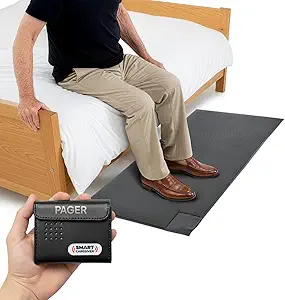 | Best for Wandering and Fall Prevention | Mat dimensions: 24 x 48 x 0.5 in | Color: Grey | Power source: Battery powered | VIEW LATEST PRICE | See Our Full Breakdown |
| CallToU Caregiver Pager and Wireless Alert System with Two-Way Radios |  | Best for Two-Way Communication | Included components: 2 receivers, 2 call buttons, 2 two-way radios | Maximum range: 500 feet open areas; under 300 feet recommended indoors | Ringtones: 55 selectable tones | VIEW LATEST PRICE | See Our Full Breakdown |
| Caregiver Pager System with 2 Wireless Call Buttons |  | Best Value Pick | Included components: 2 wireless call buttons, 1 portable pager | Wireless range: Up to 500 feet in open areas | Alert modes: Chime and continuous alarm | VIEW LATEST PRICE | See Our Full Breakdown |
| StackCare Medical Alert System with Passive Fall Detection for Seniors |  | Best Non-Wearable Monitoring | Compatible devices: iOS, Android | Control method: Smartphone app | Sensor technology: Motion sensor, contact sensor | VIEW LATEST PRICE | See Our Full Breakdown |
| ADT On-The-Go Emergency Medical Alert for Seniors |  | Best Professional Emergency Response | Activation: Phone activation required | Monitoring: 24/7 U.S.-based professional monitoring | Plan: Monthly plan required; no long-term contracts | VIEW LATEST PRICE | See Our Full Breakdown |
| easy-to-use smart home devices for senior | Included Components |
|---|---|
| PILSAMAS WiFi Caregiver Call B | — |
| VTech SN5147 Amplified Corded/ | — |
| Floor Mat Exit Alarm for Fall | 1 economy exit alarm and 1 floor mat |
| Seculife Medical Alert Smartba | — |
| CallToU Caregiver Pager with 2 | — |
| Wireless Caregiver Pager with | 1 call button, 1 receiver |
| DAYTECH WiFi Caregiver Call Bu | 1 call button, 1 wrist button, 2 receivers |
| Lively Jitterbug Smart5 Smartp | — |
| DAYTECH WiFi Caregiver Call Bu | 2 call buttons, 1 wrist watch, 1 receiver |
| Smart Caregiver Wireless Floor | TL-2020P pager, PTFM-07C wireless floor mat |
| CallToU Caregiver Pager and Wi | 2 receivers, 2 call buttons, 2 two-way radios |
| Caregiver Pager System with 2 | 2 wireless call buttons, 1 portable pager |
| StackCare Medical Alert System | — |
| ADT On-The-Go Emergency Medica | — |
More Details on Our Top Picks
PILSAMAS WiFi Caregiver Call Button for Seniors
This option stands out for one thing the CallToU pager can’t do: it sends alerts straight to a smartphone app, so family members miles away — not just a caregiver in the next room — know the moment the button is pressed. There’s no monthly fee for app notifications, and alerts can be shared with multiple relatives, which makes it a natural fit for seniors living semi-independently. The button can be worn or wall-mounted by a bed or bathroom. The tradeoffs are real, though: it only works on 2.4 GHz WiFi, must stay within 15 meters of the router, and anything beyond app alerts — SMS, phone calls, email — requires a subscription. Compared with the CallToU, you trade local reliability for remote reach.
Pros:- Real-time smartphone app alerts with no monthly fee
- Alerts can be shared with multiple family members
- Button can be worn as a pendant or wall-mounted
- Battery powered with no wiring required
Cons:- Only supports 2.4 GHz WiFi networks
- SMS, phone, and email alerts require a paid subscription
- Button must stay within 15 meters of the router
Best for: Adult children who want smartphone alerts when a parent living alone needs help, without paying a monthly fee
Not ideal for: Caregivers in the same house — a plug-in pager system like CallToU is simpler and has no WiFi dependency
- Power Source:Battery powered (1 lithium polymer battery included)
- Compatible Devices:Smartphone
- Control Method:Touch
- Mounting Type:Wall mount or wearable
- Maximum Range:15 meters from router
- WiFi Compatibility:2.4 GHz only
- Color:White
Our verdict“This pick makes the most sense for families monitoring a senior remotely who want fee-free app alerts and don’t need in-room paging.”
VTech SN5147 Amplified Corded/Cordless Senior Phone
While most devices in this roundup handle emergencies, this phone solves the everyday problem that causes many of them: not hearing calls or reading small buttons. With up to 50 dB audio amplification and a 90 dB ringer, it’s built for hearing loss, and the large backlit buttons plus photo speed dial mean a senior can call family without remembering a single number. The corded base keeps working during power outages, something no battery-driven pager in this lineup can match for longevity. Unlike the PILSAMAS call button, this isn’t an alerting device — it’s communication — but pairing the two covers both directions of contact. The main limitation is that expanding beyond the single cordless handset requires buying VTech SN5307 units specifically.
Pros:- Up to 50 dB audio amplification with 90 dB ringer and visual alerts
- Large buttons and easy-to-read backlit display
- Blocks up to 1,000 unwanted numbers
- Corded base works during power outages
Cons:- Extra handsets must be the compatible SN5307 model
- Only one cordless handset included in the box
Best for: Seniors with hearing or vision loss who need amplified calls, big buttons, and photo speed dial for family
Not ideal for: Buyers seeking emergency alerting or fall detection — this handles calls only, not caregiver notifications
- Phone Type:Corded base with one cordless handset
- Ringer Volume:Up to 90 dB
- Audio Assist:Up to 50 dB amplification
- Call Blocking:Up to 1,000 numbers
- Photo Speed Dial:4 slots
- Answering Machine:22 minutes
- Expandable:Up to 4 handsets with SN5307
Our verdict“This model is better suited to seniors whose biggest daily struggle is hearing and dialing, rather than emergency monitoring.”
Floor Mat Exit Alarm for Fall Prevention and Anti-Wandering
Every other product here depends on a senior pressing a button — this one doesn’t, which is exactly why it earns its place. The pressure-sensing mat alerts a caregiver the moment someone steps on it by a bed, chair, or doorway, catching unsupervised nighttime wandering before it becomes a fall. Compared with the Smart Caregiver wireless floor mat alarm also in this guide, this wired version keeps things simple and affordable, with an 8-foot cord and a 24 x 48-inch non-slip, beveled mat that’s less of a trip hazard than typical mats. The compromises: it runs on 3 AA batteries that aren’t included, can’t use an AC adapter at all, and the alert only reaches the wired alarm unit — there’s no pager, app, or remote notification.
Pros:- Detects movement automatically with no button press required
- Adjustable volume and variable tone options
- Includes visual alert and low-battery warning
- Non-slip mat with beveled edges reduces trip risk
Cons:- Requires 3 AA batteries that are not included
- Cannot be used with an AC adapter
- Alert only reaches the nearby wired alarm unit
Best for: In-home caregivers monitoring dementia patients who get out of bed or wander toward doors at night
Not ideal for: Family members monitoring remotely — the alert only sounds at the local unit, with no app or phone notifications
- Included Components:1 economy exit alarm and 1 floor mat
- Mat Dimensions:24 x 48 inches
- Mat Surface:Non-slip with beveled edges
- Cord Length:8 feet
- Power:3 AA batteries (not included)
- AC Adapter:Not compatible
- Alarm Features:Adjustable volume, variable tones, visual alert, low-battery warning
Our verdict“The strongest choice for live-in caregivers of dementia patients who need hands-free detection of bed exits and wandering.”
Seculife Medical Alert Smartband for Seniors
This is the most complete safety net in the batch — and the most expensive to run. Unlike the PILSAMAS button, which only works near home WiFi, this smartband adds GPS tracking with geofencing, automatic fall detection, and two-way calling, so it protects a senior at the grocery store as well as in the bedroom. Approved contacts can even be answered automatically, meaning a confused or injured wearer doesn’t have to fumble with a screen. Health sensors track heart rate, blood oxygen, and temperature as a bonus. The tradeoffs are hard to ignore: a required subscription starting at $25 per month, and a one-day battery life that makes nightly charging an absolute must — a real risk for forgetful users. For active seniors who leave the house, though, nothing else here covers them outdoors.
Pros:- Automatic calls to preselected contacts after a fall or SOS press
- GPS tracking and geofencing with location history
- Two-way calling with auto-answer for approved contacts
- IP67 water-resistant design
Cons:- Requires a monthly subscription from $25
- Listed battery life is only one day
- More complex to set up than simple call buttons
Best for: Active seniors who leave home alone and need fall detection, GPS location, and calling on their wrist
Not ideal for: Seniors who mostly stay home or struggle with daily charging — the subscription cost and one-day battery are wasted risks
- Operating System:iOS, Android
- Key Features:Fall alerts, GPS tracking, geofencing, SOS calling, two-way calling
- Sensors:Heart rate, blood oxygen, body temperature
- Water Resistance:IP67, listed depth 1 meter
- Battery Capacity:680 mAh
- Battery Life:1 day
- Display Size:2 inches
- Subscription:Required, from $25 per month
Our verdict“The right pick for families who want around-the-clock, anywhere coverage and accept the ongoing subscription to get it.”
CallToU Caregiver Pager with 2 Wireless Call Buttons
For a caregiver and senior in the same house, this is the most straightforward option here — no WiFi, no app, no subscription, just buttons and receivers that work out of the box. The two call buttons and two plug-in receivers cover both ends of a home, and the 500-foot stated range comfortably beats the PILSAMAS’s 15-meter router limit. Buttons can be worn as pendants or mounted near a bed, and waterproof, dustproof construction means bathroom use is fine — where falls are most common. Volume reaches 110 dB across five levels with 55 ringtones, so it can be heard over a TV or washing machine. Compared with the Seculife smartband, you give up anything beyond the walls of the house, but you also give up the monthly bill entirely. Note that the 500-foot figure assumes open air; walls will cut it down.
Pros:- Two buttons and two receivers included in one package
- No WiFi, app, or subscription required
- Waterproof and dustproof buttons safe for bathroom use
- 55 ringtones and five volume levels up to 110 dB
Cons:- Receivers must be plugged into electrical outlets
- The 500-foot range applies to open areas only; walls reduce it
Best for: Budget-conscious families with a caregiver in the home who need reliable room-to-room alerting with zero ongoing costs
Not ideal for: Anyone who needs alerts while away from home — this system has no app, phone, or SMS capability
- Receivers:2
- Call Buttons:2
- Power Source:Battery powered (two 12V alkaline batteries included)
- Maximum Range:500 feet (open areas)
- Ringtones:55
- Volume:5 levels, 0–110 dB
- Waterproof/Dustproof:Yes
- Mounting Type:Tabletop receiver; buttons wearable or mountable
Our verdict“The best no-recurring-cost choice for same-household caregiving, as long as alerts never need to leave the home.”
Wireless Caregiver Pager with 1 Call Button and 1 Receiver
This option stands out for raw range and simplicity — a claimed 1,500-foot wireless reach that comfortably beats the 300-foot limit of the Smart Caregiver Floor Mat system, making it the better fit for larger homes or yards where a caregiver may be far from the room. Unlike the DAYTECH WiFi call button, it needs no WiFi and no app setup: press the button, the receiver chimes. That zero-configuration design is exactly what many seniors and less tech-savvy caregivers want. The tradeoff is that alerts stop at the receiver — there are no phone notifications, so it fails if the caregiver leaves the house or sleeps through the 120 dB alarm being turned down. Buyers outfitting a multi-room home should also budget for extra buttons, since only one of each is included.
Pros:- One-button simplicity with no app or WiFi required
- Claimed 1,500 ft range covers large homes and yards
- Expands up to 30 buttons and multiple receivers
- IP55 rating tolerates bathroom and outdoor use
Cons:- Receiver-only alerts — no smartphone notifications at all
- Only one button and one receiver in the box, so multi-room coverage costs extra
Best for: Caregivers living in the same large home or property as the senior, who want a plug-free, app-free alert system with room to expand
Not ideal for: Remote or working family caregivers who need phone alerts when they’re away from the house
- Included components:1 call button, 1 receiver
- Wireless range:Up to 1,500 ft
- Expandable capacity:Up to 30 call buttons, multiple receivers
- Ringtones:58
- Volume:5 levels, 0 to 120 dB
- Ingress protection:IP55 waterproof and dustproof
- Operating temperature:-4°F to 140°F
- Warranty:18 months
Our verdict“This is the pick when distance matters more than app connectivity and both people share one property.”
DAYTECH WiFi Caregiver Call Button with Wrist Button and Two Receivers
Where the single-receiver Wireless Caregiver Pager forces you to choose where the alarm lives, this DAYTECH kit includes two plug-in receivers plus a wearable wrist button, so alerts reach a caregiver whether they’re upstairs or in the kitchen. The shared mobile app notifications over 2.4 GHz WiFi add a layer the simpler CallToU-style pagers can’t match — adult children can get pinged even off-site. The wrist button is the key usability win: a senior in the shower or hallway doesn’t have to remember where the wall button is. The compromises are real, though. Both receivers eat outlet space, WiFi outages silence the app alerts, and phone or text notifications require a paid upgrade. Compared with the 1,500-foot RF pager, its reliability is only as good as the home’s internet.
Pros:- Two receivers cover multiple rooms out of the box
- Wrist button keeps help within reach anywhere in the house
- Shared app notifications include off-site family members
Cons:- Both receivers occupy wall outlets
- App alerts fail without an internet connection
- Phone and text alerts require a paid upgrade
Best for: Families where one caregiver is usually home but relatives want backup alerts on their phones
Not ideal for: Homes with unreliable WiFi or few free power outlets, since both receivers must stay plugged in
- Connectivity:2.4 GHz WiFi
- Included components:1 call button, 1 wrist button, 2 receivers
- App alerts:Shared mobile notifications
- Ringtones:20 options
- Volume levels:5
- Dimensions:4.8 x 4.1 x 3.6 inches
- Weight:10.8 ounces
- Battery:1 included 12V battery
- Model:CR02TY-CT02WR-WB06WH
Our verdict“Buy this if you want in-home and app-based alerting in one kit; skip it if your WiFi is spotty.”
Lively Jitterbug Smart5 Smartphone for Seniors
Everything else in this roundup keeps help inside the home — the DAYTECH pagers and the Smart Caregiver mat all stop at the front door. The Jitterbug Smart5 is the lone option that travels with the senior, pairing a 6.75-inch screen and simplified menu with an Urgent Response button that connects to Lively’s support team from anywhere with coverage. For a senior who finds standard smartphones confusing, the list-based menu removes the swipe-and-hunt frustration of an iPhone or Galaxy, and real-time call captions help those with hearing loss follow conversations. The catch is lock-in: the phone only works with Lively’s service, so it’s useless with another carrier and monthly costs continue indefinitely. It’s a communication device first and an alert device second, but for active seniors it covers more ground than any pager here.
Pros:- Large 6.75-inch screen with a simplified list-based menu
- Urgent Response button reaches help away from home
- Real-time call captions support hearing-impaired users
- Pre-installed SIM removes setup friction
Cons:- Locked to Lively phone service — no other carrier will work
- Requires activation and an ongoing Lively plan
Best for: Active seniors who leave the house regularly and want one simple device for calls plus emergency help
Not ideal for: Budget-conscious buyers or families already happy with an existing carrier, because of the Lively-only service requirement
- Compatibility:Lively phone service only
- SIM:Pre-installed
- Screen size:6.75 inches
- Key features:Easy menu, voice calling, real-time call captions, Urgent Response button
- Service features:Unlimited talk and text; access to Lively’s caring team
Our verdict“This makes the most sense for seniors whose safety needs extend beyond the four walls a pager covers.”
DAYTECH WiFi Caregiver Call Button System with 2 Buttons, Wrist Watch, and Receiver
This kit is the broader-coverage sibling of the DAYTECH dual-receiver system: instead of two receivers and two triggers, you get two call buttons, a wrist watch, and one receiver. That configuration favors homes where coverage means more places to press — bedside, bathroom, and wrist — rather than more places to hear the alarm. Compared with the single-button Wireless Caregiver Pager, the three triggers here mean a senior never has to cross a room to call for help, which matters for fall risk. App notifications are shareable with family, but the same DAYTECH limitations apply: 2.4 GHz WiFi only, a receiver that monopolizes an outlet, and phone/text alerts behind an upgrade. If your home has mesh WiFi broadcasting on 5 GHz, expect a setup headache before the 2.4 GHz connection is found.
Pros:- Three triggers included: two buttons plus a wrist watch
- Shared app notifications keep family informed
- Customizable ringtones and volume levels
Cons:- 2.4 GHz-only WiFi can complicate setup on modern dual-band routers
- Receiver requires a dedicated wall outlet
- Phone and text alerts require a paid upgrade
Best for: Caregivers outfitting several rooms with call points who want maximum trigger coverage from one purchase
Not ideal for: Small apartments where one button suffices — the extra triggers add cost without benefit
- Brand:DAYTECH
- Model:CR02TY-CT02WR-WB06WH
- Included components:2 call buttons, 1 wrist watch, 1 receiver
- WiFi:2.4 GHz only
- Ringtones:20 options
- Volume levels:5
- Dimensions:4.8 x 4.1 x 3.6 inches
- Weight:10.2 ounces
- Battery:1 included 12V battery
Our verdict“Choose this over the dual-receiver DAYTECH when the priority is more ways to call for help, not more places to hear it.”
Smart Caregiver Wireless Floor Mat Alarm and Pager System
This is the only product in this lineup that doesn’t require the senior to do anything — no button to find, no watch to wear. The 24 × 48-inch pressure mat sits at a bedside or doorway and pages the caregiver automatically when stepped on, which makes it a different tool entirely from the DAYTECH or Wireless Caregiver pagers: those summon help on request, while this one prevents unassisted wandering for seniors with dementia or fall risk at night. The pager’s vibrate mode is a thoughtful touch for sleeping caregivers who’d miss an audible chime. The compromises: its 300-foot range is a fraction of the 1,500-foot RF pager’s, AA batteries aren’t included, and the ecosystem of bed pads, motion sensors, and call buttons that pair with this pager all cost extra, so a full setup adds up.
Pros:- Automatic triggering — no action needed from the senior
- Pager offers both audible and vibration alerts
- Pairs with optional bed pads, motion sensors, and call buttons
- Wide 24 × 48 in mat covers a doorway or bedside fully
Cons:- 300 ft range falls far short of RF pager alternatives
- Two AA pager batteries not included
- Companion sensors and pads sold separately, raising total cost
Best for: Caregivers of seniors with dementia or nighttime fall risk who need alerts before a wandering incident, not after a button press
Not ideal for: Cognitively sharp seniors who can press a button themselves — a call button system is cheaper and less intrusive
- Mat dimensions:24 x 48 x 0.5 in
- Color:Grey
- Power source:Battery powered
- Pager batteries:2 AA required (not included)
- Maximum range:300 feet
- Audible noise:70 dB
- Sensor technology:Contact sensor
- Included components:TL-2020P pager, PTFM-07C wireless floor mat
- Warranty:1 year
Our verdict“Buy this for the wandering-prone senior who can’t reliably press a button; skip it if a call button would actually get used.”
CallToU Caregiver Pager and Wireless Alert System with Two-Way Radios
This option stands out for being the only caregiver pager in this lineup that lets caregivers and residents actually talk, thanks to the two included two-way radios. Compared with the simpler Caregiver Pager System with 2 Wireless Call Buttons, this CallToU kit costs more complexity upfront but removes the guesswork of whether someone just wants a glass of water or needs urgent help. The call buttons work as pendants or wall mounts, and the waterproof, dustproof design makes them practical for bathrooms, where most household falls happen. The tradeoff is real: receivers must stay plugged into outlets, so they anchor to specific rooms, and indoor range shrinks below the advertised 500 feet once walls get involved. One quirk to know — the pager and intercom systems cannot be paired with each other, so plan placements before buying.
Pros:- Two-way radios allow real conversation, not just alerts
- Call buttons double as wearable pendants or wall mounts
- Waterproof and dustproof components suit bathroom use
- 55 ringtones and volume up to 110 dB work in noisy or quiet households
Cons:- Reivers must be plugged into outlets, limiting placement flexibility
- Indoor range drops well below 500 feet with walls and floors in the way
- Pager and intercom systems cannot pair with each other
Best for: Families where a live-in or nearby caregiver needs to respond and speak with the senior immediately, not just receive a chime
Not ideal for: Caregivers who live far away or need overnight room-to-room coverage, since receivers stay tethered to wall outlets
- Included components:2 receivers, 2 call buttons, 2 two-way radios
- Maximum range:500 feet open areas; under 300 feet recommended indoors
- Ringtones:55 selectable tones
- Volume levels:5 levels, 0 to 110 dB
- Power source:Battery powered call buttons; plug-in receivers
- Waterproof and dustproof:Yes
- Mounting type:Wall mount, door mount, pendant
Our verdict“Pick this over basic pager kits if spoken check-ins matter as much as the alert itself.”
Caregiver Pager System with 2 Wireless Call Buttons
For buyers who just need a reliable press-a-button chime without extra gear, this kit is the most straightforward value in the roundup. Unlike the CallToU system with two-way radios, there is no conversation feature — but that simplicity is the point. One portable pager with a belt clip travels with the caregiver around the house or yard, while the two call buttons can hang on lanyards, mount to walls, or sit beside the bed. The chime and continuous alarm modes let you choose between a gentle ding for routine requests and a louder sustained alert for urgency. Tradeoffs are honest ones: the 500-foot range applies to open space only, walls will cut it down, and the manufacturer publishes no battery specifications, so stock spare batteries and test the buttons regularly.
Pros:- Two call buttons plus a portable pager at a lower complexity level than radio kits
- Both chime and continuous alarm alert modes
- Buttons can be worn, wall-mounted, or placed at the bedside
- 12 months of product support included
Cons:- Wireless range of 500 feet only applies in open areas and shrinks indoors
- No battery specifications provided, making replacements harder to plan
Best for: Budget-conscious families with a caregiver in the same home who only need a simple summon button
Not ideal for: Anyone who wants to talk back to the resident or monitor from outside the house — this is chime-only with no app or radio
- Included components:2 wireless call buttons, 1 portable pager
- Wireless range:Up to 500 feet in open areas
- Alert modes:Chime and continuous alarm
- Carrying options:Pager belt clip; call button brackets and lanyards
- Mounting:Wall mount, lanyard wear, or bedside placement
- Product support:12 months
Our verdict“A no-frills summoning system that makes sense when the caregiver is in the same house and just needs to hear the call.”
StackCare Medical Alert System with Passive Fall Detection for Seniors
This pick makes the most sense for a specific problem: seniors who refuse to wear pendants or smartbands. Compared with wearable options like the Seculife Medical Alert Smartband, StackCare flips the model — motion and contact sensors watch daily activity patterns instead of a device on the wrist, with no cameras or microphones in the home. That privacy-first design is a genuine selling point for privacy-sensitive seniors. The app sends alerts and daily summaries when behavior shifts suggest a fall or concern, letting remote family members check in without calling constantly. Two tradeoffs shape the decision: the $75/month subscription after the first free month adds up fast, and because detection relies on behavior patterns rather than a direct sensor, it is not a substitute for an emergency alert device someone can press in a crisis. It is early warning, not rescue.
Pros:- No wearables, cameras, or microphones required
- App-based alerts and daily activity summaries for remote family
- Sensors install without tools
- Works with both iOS and Android
Cons:- $75/month subscription after the first free month
- Fall detection depends on behavior patterns and can miss sudden events a wearable would catch
Best for: Adult children monitoring a parent living alone who won’t tolerate wearables and values a camera-free home
Not ideal for: Households wanting guaranteed emergency response — pattern-based detection cannot replace a pressable SOS button or professional monitoring
- Compatible devices:iOS, Android
- Control method:Smartphone app
- Sensor technology:Motion sensor, contact sensor
- Monitoring type:WiFi in-home passive monitoring
- Subscription:$75/month after first month free
- Batteries:8 nonstandard batteries, included
Our verdict“Choose StackCare for quiet, camera-free oversight of an independent parent — but pair it with a true SOS device for emergencies.”
ADT On-The-Go Emergency Medical Alert for Seniors
When the priority is a human being on the line 24/7, this is the pick the rest of the roundup cannot match. The pager systems from CallToU and similar brands alert a family member who might be out of reach; the ADT device connects directly to U.S.-based monitoring agents who can dispatch help. Its edge over in-home units is portability — built-in GPS and nationwide cellular service mean it works at the grocery store or on a walk, not just the living room, and there is no pendant or wristband to forget. The tradeoffs are cost and activation friction: it requires phone activation and a monthly plan, and optional fall detection carries an additional monthly fee while still not catching every fall. Compared with the Seculife Smartband, you give up health metrics like heart rate but gain a professionally monitored safety net.
Pros:- 24/7 access to U.S.-based professional monitoring agents
- Built-in GPS and nationwide cellular coverage for use away from home
- All-in-one design with no pendant, wristband, or accessories to manage
- No long-term contracts on monthly plans
Cons:- Requires phone activation and an ongoing monthly monitoring plan
- Fall detection costs extra monthly and may not detect every fall
Best for: Active seniors who leave the house alone and want professional emergency response anywhere in the country
Not ideal for: Buyers avoiding recurring fees — the device is unusable without an active monthly monitoring plan
- Activation:Phone activation required
- Monitoring:24/7 U.S.-based professional monitoring
- Plan:Monthly plan required; no long-term contracts
- Fall detection:Optional add-on at extra monthly cost; not 100% detection
- Connectivity:Built-in GPS and nationwide cellular service
- Accessories:No pendant, wristband, or external accessories required
Our verdict“Worth the subscription for seniors who want a trained responder, not just a family notification, wherever they go.”

How We Picked
I judged every device in this roundup against one filter: could a senior (or their caregiver) get real protection with minimal setup and zero daily friction? That meant favoring single-button operation, large tactile controls, clear instructions, and battery life measured in days rather than hours. I also weighed whether each device works during power or internet outages — a surprisingly common failure point that separates a genuine safety tool from a gadget. Devices that automatically summon help without requiring the user to act scored higher than press-button-only alternatives, because falls often leave people unable to reach anything.
From there, I compared each product against its closest rivals within the same type — pager against pager, wearable against wearable — to rank by range, reliability, subscription cost burden, and caregiver convenience. Products that demanded a smartphone app for basic functions ranked lower for solo seniors, while systems offering multiple receivers or two-way communication earned higher placement for families managing care remotely. The ranking reflects which devices deliver dependable protection for their price tier, not which ones pack in the most features.
Factors to Consider When Choosing Easy-to-use Smart Home Devices For Seniors
Before choosing any single product, it helps to understand the broader landscape of senior safety tech — because the most common mistake isn’t picking a bad device, it’s picking the wrong type of device for the actual risk.Active Alerts vs. Passive Monitoring
The single biggest decision is whether the device requires the senior to take action. A caregiver pager only works if the person can press a button — which is fine for mobility help, bathroom assistance, or mild emergencies. But in a serious fall, disorientation, unconsciousness, or a broken wrist can make button-pressing impossible. Passive systems — fall-detection wearables, floor mats, motion sensors — call for help on their own, which is why they cost more and often carry monthly fees. A useful rule: buy a pager for a senior who is alert and communicative, and buy passive monitoring for anyone with a fall history, epilepsy, or advancing dementia. Many families layer both, using the pager for daily convenience and the wearable for emergencies.
Monthly Fees and Total Cost of Ownership
The sticker price is rarely the real price. Medical alert systems with professional monitoring — like the ADT and StackCare options — typically require an ongoing subscription that can exceed the hardware cost within a year. That fee buys 24/7 human response, which is genuinely valuable for seniors living alone, but it’s wasted money for seniors whose main caregiver is a spouse in the same house. Caregiver pagers have no recurring cost, making them the better economics for in-home care situations. Before buying, ask who actually responds when an alert fires: a paid monitoring center, a family member’s phone, or a chime in the next room. Match the payment structure to the real care arrangement, not the marketing.
Home Layout, Range, and Yard Coverage
Wireless range claims on packaging assume open air, and walls, floors, and appliances can cut effective range dramatically — sometimes by half or more. A senior with a large house, a basement, or a habit of gardening needs a pager system with confirmed long range, or better yet, a WiFi-based system like the PILSAMAS or DAYTECH buttons that pushes alerts to a caregiver’s phone anywhere. Two-story homes often need two receivers, one per floor, which is why multi-receiver bundles earn their place in this lineup. Measure the actual distance first, including through-floor paths from bedroom to kitchen. Also check whether the receiver is loud enough to hear over a TV or laundry machine — a chime nobody hears is a false sense of security.
Cognitive and Physical Ability of the User
The device has to match the person, not the diagnosis on paper. A senior with arthritis may struggle with small buttons or clasps, favoring large pendants or wall-mounted pads they can slap with a palm. Someone with early dementia may forget what a wearable is for or remove it repeatedly, which is exactly the scenario where floor mats and bed sensors outperform any wearable. Vision and hearing matter too: the VTech SN5147 earned its spot because amplified sound and oversized buttons solve problems standard phones create. Be honest about the senior’s worst days, not their best ones — devices bought for good days routinely fail during bad ones.
Water Resistance and Battery Reality
Bathrooms are the most common fall location in any home, so a device that can’t get wet leaves the riskiest room unprotected. Look for shower-safe ratings on wearables, and treat any device marketed as merely ‘splash-proof’ with caution for bathroom use. Battery life is the other silent failure point: a wearable that needs nightly charging will inevitably be dead on the night it matters. Devices with multi-day battery life or replaceable batteries rank higher for this reason, and low-battery alerts to a caregiver’s phone are a feature worth paying extra for. For plug-in receivers and mats, ask what happens during a power outage — the best systems include battery backup as a standard feature.
Caregiver Setup and Remote Involvement
Consider who installs and maintains the system, because many buyers are adult children setting up devices for a parent who lives hours away. WiFi-based systems that send alerts to your phone let you respond from anywhere, but they assume the parent’s internet stays up and someone remembers the password after a router swap. Traditional radio pagers work without any internet but only reach people physically in range. GPS-equipped wearables bridge the gap for active seniors who leave the house, letting you check location and receive alerts remotely. If you’re the remote caregiver, prioritize systems with app-based notifications and remote battery or connectivity status — the small setup effort saves repeated troubleshooting trips later.
Frequently Asked Questions
Do I need a medical alert subscription, or is a caregiver pager enough?
It depends on whether someone is reliably nearby when help is needed. A caregiver pager with no monthly fee works well when a spouse, roommate, or live-in aide is almost always within range — the alert goes straight to them. A monitored system becomes necessary when the senior lives alone or the caregiver is frequently out of the house, because a pager has nobody to reach. Monitored services also add fall detection and professional responders who can dispatch emergency services, something no standalone pager can do. If budget allows and the senior lives alone, the subscription is usually worth it; if in-home care is already present, skip it and save the money.
Are fall detection wearables reliable enough to trust?
Automatic fall detection has improved considerably, but no system catches 100% of falls — hard falls onto soft surfaces and slow slides to the floor are the hardest to register. The Seculife Smartband and StackCare system represent the more dependable end of this lineup because they combine multiple sensors and allow the wearer to trigger the SOS button manually as a backup. That backup matters: a good wearable should make automatic detection the safety net, not the only path to help. False alarms also happen, usually from abrupt sitting or bending, so choose a device that gives the wearer a cancel window. Treat fall detection as a major improvement over nothing, while still keeping a manual button available.
What’s the best option for a senior with dementia who wanders at night?
For wandering specifically, floor mat alarms are the purpose-built answer. The Floor Mat Exit Alarm and Smart Caregiver Wireless Floor Mat sit beside a bed or in front of a doorway and alert the caregiver the moment weight is detected, before the senior reaches stairs or an exit. This works far better than a wearable for dementia patients because it requires no memory, no cooperation, and no action from the senior at all. Placement is flexible — bedside mats for nighttime risers, doorway mats for exit prevention. Pair the mat with a pager receiver so the alert reaches a caregiver sleeping in another room, and consider a GPS wearable as a second layer for daytime outings.
Can these devices work if my parent doesn’t have WiFi?
Several can, and this matters more than many buyers realize. The CallToU pagers, the basic Wireless Caregiver Pager, and the VTech SN5147 phone all operate on radio frequencies or landline connections with no internet requirement at all. These are also the most dependable choices for rural properties with spotty broadband, and they keep working during internet outages. The tradeoff is range: radio-based systems only alert people physically nearby, so they won’t reach a distant family member’s phone. WiFi models like the PILSAMAS and DAYTECH buttons offer remote smartphone alerts but become useless without a working connection. If reliability outranks remote notifications, go with the radio-based options.
Is a senior-focused smartphone like the Jitterbug Smart5 a substitute for a medical alert device?
It can cover a lot of ground, but with real limits. The Jitterbug Smart5 includes urgent response services, large on-screen buttons, and a simplified list-based menu that most seniors can genuinely operate, and it handles everyday communication that no medical alert device does. The catch is that a phone must be carried, charged, unlocked, and consciously used during an emergency — none of which are guaranteed after a fall. A dedicated wearable stays on the wrist around the clock and often includes automatic fall detection the phone lacks. The strongest setup for an independent senior is the Jitterbug for daily life plus a lightweight alert wearable as the emergency backstop, since each covers what the other misses.
Conclusion
The right choice comes down to one question: what risk are you actually covering? For best overall protection, the Seculife Medical Alert Smartband leads this lineup because it combines fall detection, GPS, heart monitoring, and two-way calling in a device the senior simply wears. For best value, the CallToU Caregiver Pager with 2 Wireless Call Buttons delivers dependable one-press alerting with no subscription and no setup headaches. For best premium option, the ADT On-The-Go Emergency Medical Alert pairs trusted professional monitoring with nationwide cellular coverage, making it the pick for seniors who leave the house often.
For beginners and low-tech households, the Wireless Caregiver Pager with 1 Call Button and 1 Receiver is the simplest possible starting point — plug it in and it works. For specific needs: choose the Floor Mat Exit Alarm or Smart Caregiver Wireless Floor Mat for dementia and nighttime wandering, the VTech SN5147 for hearing and vision challenges, the StackCare system for passive in-home fall detection without a wearable, and the Jitterbug Smart5 for seniors who want one device handling both communication and emergencies. Whatever you pick, buy for the senior’s hardest days rather than their easiest ones — that’s when these devices earn their place.
Halloween Picks

HOPOCO Halloween Pumpkin Fog Machine with 12 LED Colors and 4 Light Modes

Fun Costumes 5.5ft Mary the Unhappily Ever After Bride Animatronic Halloween Decoration

Gemmy 5.4 ft The Nun Animatronic Halloween Decoration
As an affiliate, we earn on qualifying purchases.