For seniors who want an easier-to-read, easier-to-operate TV remote, the GE BigEZ OneTouch is my best overall pick for its focus on simple, large-button television control. The GE Big Button 2-Device is a stronger fit when one remote needs to operate both a TV and another device, while the Flipper suits viewers who want a deliberately simplified layout and do not need streaming controls. The main tradeoff is between simplicity and broader device support: extra functions can reduce the need for multiple remotes, but also add buttons and setup steps. Compatibility, button contrast, and whether essential controls are easy to identify matter as much as button size. Read on for my full comparison and guidance on matching a remote to the viewer’s devices and habits.

Turn quiet afternoons into listening time
- Thousands of audiobooks, podcasts and originals
- Listen on your phone, tablet or Echo — also offline
- Cancel anytime
Complete the kit


Key Takeaways
- The GE BigEZ OneTouch leads for straightforward TV control; the GE 2-Device model is the better direction when a second device also needs control.
- The Flipper is a simplicity-first choice, not a streaming pick: its no-streaming limitation matters if the viewer uses a streaming box or stick.
- Large buttons do not automatically mean easier operation. Button spacing, labels, contrast, and the number of functions determine whether controls are easy to distinguish.
- Device count changes the shortlist: QFX REM-115 supports up to eight devices, but buyers should weigh that breadth against a potentially busier control layout.
- Several entries are close in name and purpose, including the GE and Philips BigEZ models and multiple generic senior remotes. Confirm the exact model’s supported devices and setup method before choosing by appearance alone.
| GE BigEZ OneTouch Big Button Universal TV Remote |  | Best Overall for Simple Two-Device Setups | Compatible TV brands: Samsung, LG, Vizio, Sony, Roku | Maximum supported devices: 2 | Connectivity: Infrared | VIEW LATEST PRICE | See Our Full Breakdown |
| GE Big Button 2-Device Universal Remote Control |  | Best for Flexible Two-Device Control | Maximum supported devices: 2 | Compatible brands: Sony, Samsung, Hisense, Westinghouse, LG, Toshiba, Sharp, Vizio, Insignia, Philips, TCL | Connectivity: Infrared | VIEW LATEST PRICE | See Our Full Breakdown |
| Gmatrix U-43 Big Button Universal Remote Control |  | Best for a Single-Device Setup | Brand: Gmatrix | Model: U-43 | Connectivity: Infrared | VIEW LATEST PRICE | See Our Full Breakdown |
| EZclicker Big Button Universal TV Remote, Orange |  | Best for Tactile, TV-Only Operation | Brand: EZClicker | Model: EZCPTVO | Color: Orange | VIEW LATEST PRICE | See Our Full Breakdown |
| SMATAR Big Button Universal TV Remote Control |  | Best for a Lightweight, Curved Grip | Brand: SMATAR | Model: RC-G001 | Compatible devices: Televisions from Samsung, LG, VIZIO, Sony, Hisense, Philips, Panasonic, Sharp, and others | VIEW LATEST PRICE | See Our Full Breakdown |
| Large Button TV Remote Control for Seniors |  | Best for the Simplest TV-Only Setup | Brand: Generic | Connectivity: Infrared | Compatible devices: Television | VIEW LATEST PRICE | See Our Full Breakdown |
| Big Button Universal TV Remote for Seniors |  | Best for a Basic Replacement Remote | Brand: NJALNKHM | Connectivity: Infrared | Compatible devices: Televisions | VIEW LATEST PRICE | See Our Full Breakdown |
| Big Button Universal TV Remote for Seniors |  | Best for TV and Cable-Box Control | Brand: Nettech | Connectivity: Infrared | Compatible devices: Televisions, cable and satellite boxes, compatible soundbars and IR devices | VIEW LATEST PRICE | See Our Full Breakdown |
| Big Button Learning Universal Remote Control for TVs and Devices |  | Best for Learning Controls from an Existing Remote | Brand: TSCFGBTH | Connectivity: Infrared | Compatible devices: Televisions, DVD players, streaming devices, cable boxes, and other equipment | VIEW LATEST PRICE | See Our Full Breakdown |
| Flipper Big Button TV Remote for Seniors (No Streaming) |  | Best for Favorite-Channel Shortcuts | Connectivity: Infrared | Supported devices: Up to 3 | Compatible devices: Televisions and cable boxes | VIEW LATEST PRICE | See Our Full Breakdown |
| QFX REM-115 Jumbo Universal Remote Control, 8-Device |  | Best for Multi-Device Setups | Model: REM-115 | Maximum supported devices: 8 | Connectivity: Bluetooth (as listed) | VIEW LATEST PRICE | See Our Full Breakdown |
| Philips BigEZ OneTouch Big Button Universal TV Remote |  | Best for Straightforward Setup | Model: SRP3945B/37 | Compatible TV brands: Samsung, LG, Sony, Vizio, Roku | Maximum supported devices: 2 | VIEW LATEST PRICE | See Our Full Breakdown |
| EZclicker Big Button TV Remote for Seniors, Blue | 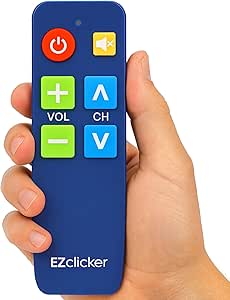 | Best for Minimal Controls | Brand: EZClicker | Color: Blue | Connectivity: Infrared | VIEW LATEST PRICE | See Our Full Breakdown |
| LuckyStar A-TV2 Big-Button Universal TV Remote |  | Best for Basic Older TVs | Compatible brands: LG, Vizio, Sharp, Zenith, Panasonic, Philips, RCA, and others | Connectivity: Infrared | Maximum range: 10 feet | VIEW LATEST PRICE | See Our Full Breakdown |
| Gvirtue Big Button Universal TV Remote |  | Best for No-Programming Replacement | Model: BN59-01301A | Connectivity: Infrared | Button quantity: 39 | VIEW LATEST PRICE | See Our Full Breakdown |
| large button universal remote controls for senior | Connectivity | Maximum range | Maximum supported devices | Batteries |
|---|---|---|---|---|
| GE BigEZ OneTouch Big Button U | Infrared | 30 feet | 2 | — |
| GE Big Button 2-Device Univers | Infrared | 30 feet | 2 | 2 AA alkaline batteries (not included) |
| Gmatrix U-43 Big Button Univer | Infrared | 30 feet | — | 2 AA batteries (required) |
| EZclicker Big Button Universal | Infrared | 45 feet | 1 | — |
| SMATAR Big Button Universal TV | Infrared | 10 meters | 4 (TV remote; description excludes streaming devices and cable boxes) | 2 AAA batteries required |
| Large Button TV Remote Control | Infrared | 10 meters | 1 | — |
| Big Button Universal TV Remote | Infrared | 10 meters | 1 | — |
| Big Button Universal TV Remote | Infrared | 40 feet | 2 | 2 AAA batteries required |
| Big Button Learning Universal | Infrared | 10 meters | 1 | 2 AAA batteries required |
| Flipper Big Button TV Remote f | Infrared | 30 feet | — | 2 AA alkaline batteries, not included |
| QFX REM-115 Jumbo Universal Re | Bluetooth (as listed) | 30 feet | 8 | — |
| Philips BigEZ OneTouch Big But | Infrared | 30 feet | 2 | 2 AA batteries |
| EZclicker Big Button TV Remote | Infrared | 45 feet | — | 2 AAA batteries, not included |
| LuckyStar A-TV2 Big-Button Uni | Infrared | 10 feet | 1 | — |
| Gvirtue Big Button Universal T | Infrared | 10 meters | 1 | 2 AAA alkaline batteries required |
More Details on Our Top Picks
GE BigEZ OneTouch Big Button Universal TV Remote
I’d put the GE BigEZ OneTouch first for seniors who want large, visible controls without giving up the ability to operate a second device. Its backlit buttons help when the room is dim, while color-coded volume and channel controls make common actions easier to spot. One-touch setup for five named TV brands is a simpler starting point than the code search offered by the GE Big Button 2-Device Remote. Both can handle only two devices, so neither suits a system with several components. The BigEZ’s IR connection also calls for a clear line of sight and has a stated 30-foot range. I’d choose it for straightforward TV-plus-player or TV-plus-soundbar use, but not for someone who needs streaming-device control or wants batteries included.
Pros:- Large, backlit buttons are easier to locate in low light.
- Color-coded volume and channel controls distinguish frequently used functions.
- One-touch setup is offered for five popular TV brands.
- Can operate a TV and one additional compatible device.
Cons:- Limited to two devices, like the GE Big Button 2-Device Remote.
- Two AA batteries are required and not included.
- Infrared control needs a clear path to the device.
Best for: Seniors with a compatible Samsung, LG, Vizio, Sony, or Roku TV who want backlit controls and a second device buttoned into the same remote.
Not ideal for: People who need to control more than two devices, use unsupported equipment, or prefer not to buy batteries separately.
- Compatible TV brands:Samsung, LG, Vizio, Sony, Roku
- Maximum supported devices:2
- Connectivity:Infrared
- Maximum range:30 feet
- Power:2 AA batteries (not included)
- Color:White
- Weight:0.16 kg
- Features:Backlit buttons, big buttons, pre-programmed, universal
Our verdict“Choose the GE BigEZ if visible, backlit controls and simpler setup matter more than controlling a larger home entertainment system.”
GE Big Button 2-Device Universal Remote Control
The GE Big Button 2-Device Remote is a practical pick for someone who wants large, readable controls and a choice of setup methods rather than the BigEZ’s brand-focused one-touch approach. It supports a broad list of TV brands and offers automatic code search as well as direct code entry, which can help when the right code is known—or when it isn’t. Master volume control is useful when a TV and soundbar are both in the setup. Its ceiling is still two devices, and it lacks the listed backlighting of the GE BigEZ, so the BigEZ is a better match for dark rooms. I’d favor this silver model when compatibility flexibility and cross-device volume matter more than illuminated buttons or support for a larger system.
Pros:- Large buttons are designed to be easy to read.
- Supports automatic code search and direct code entry.
- Master volume control can work across connected devices.
- Lists compatibility with a wide range of TV brands.
Cons:- Controls a maximum of two devices.
- Two AA batteries are required and not included.
- No backlighting is listed, unlike the GE BigEZ OneTouch.
Best for: Seniors with a TV and one other compatible device who want multiple setup methods and master volume control across devices.
Not ideal for: Users who need backlit buttons, more than two-device control, or a remote that arrives with batteries.
- Maximum supported devices:2
- Compatible brands:Sony, Samsung, Hisense, Westinghouse, LG, Toshiba, Sharp, Vizio, Insignia, Philips, TCL
- Connectivity:Infrared
- Maximum range:30 feet
- Batteries:2 AA alkaline batteries (not included)
- Color:Silver
- Weight:2.4 ounces
- Dimensions:5.46 x 1.78 x 0.94 inches
Our verdict“Pick this GE when flexible programming and two-device volume control are more useful than backlit buttons.”
Gmatrix U-43 Big Button Universal Remote Control
For a household that only needs to operate one device, the Gmatrix U-43 keeps the job simple: it supports one device and offers large, readable buttons plus quick setup and code search. That one-device limit is its defining tradeoff. Unlike the GE Big Button 2-Device Remote, it cannot combine TV control with a separate cable box or soundbar, but it may be a less complicated fit when one TV or receiver is all that needs a remote. The listed compatibility covers many familiar television and audio/video brands, though buyers should still confirm their equipment works with it. Its 30-foot infrared range is in line with the GE models, and two AA batteries are required. I’d skip it if the aim is to reduce several remotes to one.
Pros:- Large, readable buttons support easier everyday operation.
- Quick setup and code search provide two setup options.
- Compatibility includes many common TV and audio/video brands.
- Lightweight design weighs 1.6 ounces.
Cons:- Controls only one device, unlike either GE two-device option.
- Requires two AA batteries.
- Buyers need to verify compatibility with their specific equipment.
Best for: Seniors who want large buttons for one compatible television or other single audio/video device and do not need a second-device control.
Not ideal for: People who need one remote for both a TV and cable box, soundbar, or another device.
- Brand:Gmatrix
- Model:U-43
- Connectivity:Infrared
- Supported devices:1
- Compatible equipment:Television, audio/video receiver, cable/satellite box, media player, and other electronic equipment
- Maximum range:30 feet
- Batteries:2 AA batteries (required)
- Weight:1.6 ounces
Our verdict“Choose the Gmatrix U-43 only when a single compatible device is the whole setup and simplicity outweighs multi-device control.”
EZclicker Big Button Universal TV Remote, Orange
The EZclicker Big Button TV Remote puts tactile operation ahead of multi-device convenience. Its 13 buttons include an extra-large Enter button, a useful distinction for someone who has trouble locating or pressing smaller controls. Compared with the Gmatrix U-43, this is a more explicitly TV-focused choice: it supports one television, not a TV plus another component. It also does not work with cable boxes, Fire TV Stick, or Roku Stick, so it is a poor fit for many streaming setups. Programming uses the Mute and Volume+ buttons, keeping the stated process button-based, but compatibility depends on the TV model. The 45-foot listed range exceeds the GE remotes’ 30 feet; I’d still prioritize confirmed TV compatibility over that range difference.
Pros:- 13 tactile buttons include an extra-large Enter button.
- TV-focused layout avoids controls for additional devices.
- Button-based programming uses Mute and Volume+.
- Listed maximum range is 45 feet.
Cons:- Controls only one device and is limited to televisions.
- Does not work with cable boxes, Fire TV Stick, or Roku Stick.
- Requires two AAA batteries, which are not included.
Best for: Seniors with a compatible TV who value tactile, oversized controls and do not need to operate a separate streaming player or cable box.
Not ideal for: Households using Roku Stick, Fire TV Stick, a cable box, or multiple devices from one remote.
- Brand:EZClicker
- Model:EZCPTVO
- Color:Orange
- Compatible devices:Televisions
- Connectivity:Infrared
- Button quantity:13
- Maximum supported devices:1
- Maximum range:45 feet
- Battery and warranty:2 AAA batteries (not included); 5-year warranty
Our verdict“Choose the EZclicker for tactile TV-only control after confirming the exact television is compatible.”
SMATAR Big Button Universal TV Remote Control
The SMATAR RC-G001 is the lineup’s grip-focused option, with a lightweight, curved shell and high-contrast large buttons intended to be easier to hold and read. It supports a wide range of named TV brands, which makes it more broadly aimed at television compatibility than the TV-only EZclicker’s emphasis on tactile buttons. But despite a listed capacity of four, the description says it does not work with streaming devices or cable boxes; buyers should not read that number as support for a mixed-device setup. Pairing also requires the original remote, adding a hurdle that the GE models’ stated setup methods avoid. I’d choose SMATAR for a compatible TV when its shape suits the user’s grip, but skip it if the original remote is missing or other devices need control.
Pros:- Large, high-contrast buttons are designed for easier reading.
- Curved, lightweight shell is intended to be comfortable to handle.
- Lists compatibility with many major TV brands.
- Drop-resistant design is specified.
Cons:- Pairing requires the original remote.
- Does not control streaming devices or cable boxes.
- Requires two AAA batteries.
Best for: Seniors with a supported TV who prefer a lightweight curved remote and can use the original remote during pairing.
Not ideal for: People without the original remote, or households needing controls for cable boxes, streaming devices, or other equipment.
- Brand:SMATAR
- Model:RC-G001
- Compatible devices:Televisions from Samsung, LG, VIZIO, Sony, Hisense, Philips, Panasonic, Sharp, and others
- Connectivity:Infrared
- Maximum range:10 meters
- Maximum supported devices:4 (TV remote; description excludes streaming devices and cable boxes)
- Batteries:2 AAA batteries required
- Color and dimensions:Black; 6 x 2 x 7.5 inches
- Warranty:2 years
Our verdict“Choose SMATAR for a compatible TV and a grip-friendly shape, provided the original remote is available for pairing.”
Large Button TV Remote Control for Seniors
For someone who wants a straightforward replacement for a television remote, this model keeps the controls to 10 large, clearly labeled buttons. That compact layout may reduce wrong-button presses for users with low vision or limited dexterity. It works with most major TV brands and uses infrared, so it suits a conventional TV setup rather than a collection of connected devices. Compared with the Nettech Big Button Universal TV Remote, it is more limited: Nettech can operate a TV and a cable or satellite box, while this one is for a single television. That simplicity is also its tradeoff. It cannot operate cable boxes, DVD players, or voice-control features, and niche TV compatibility is not promised. I’d choose it for basic TV use, not as a one-remote solution for a full entertainment system.
Pros:- Ten large, clearly marked buttons support easier viewing and selection.
- Simple layout is intended to reduce accidental button presses.
- Compatible with most major TV brands.
- Lightweight ergonomic design may be easier to hold.
Cons:- Controls only one television and does not operate cable boxes or DVD players.
- Niche TV brands are not supported.
- No voice control or warranty information is stated.
Best for: Seniors who use one compatible television and want a lightweight remote with a small, clearly labeled set of buttons.
Not ideal for: Households that need one remote for a TV and cable box, DVD player, or other separate device.
- Brand:Generic
- Connectivity:Infrared
- Compatible devices:Television
- Maximum supported devices:1
- Button quantity:10
- Maximum range:10 meters
- Color:Black
- Warranty:None stated
Our verdict“Choose this for basic control of one compatible TV; pick the Nettech instead if you also need cable-box control.”
This is a pared-back infrared option for buyers who mainly want large, easy-to-press buttons and a familiar button-control layout. It operates one television and is described as compatible with most TV brands, making it more suitable as a direct replacement than as a hub for a living-room setup. Unlike the Flipper Big Button TV Remote, it has no stated favorite-channel feature and is not described as controlling a cable or satellite box. That keeps its intended job narrow, but leaves fewer ways to simplify channel selection when a cable box is part of the setup. The product information lists a warranty description of “1” without clarifying its duration, so I would not treat the coverage as a clearly defined advantage. This makes the most sense when basic TV control is the only requirement.
Pros:- Large, clearly marked buttons are designed to be easier to see and press.
- Simple layout suits users who prefer basic television controls.
- Works with most TV brands according to the product description.
Cons:- Controls one television and does not support cable boxes or streaming devices.
- No voice control is offered.
- Warranty information is unclear in the supplied product details.
Best for: A senior replacing a standard remote for one compatible TV who wants large buttons without extra device functions.
Not ideal for: Viewers who use a cable or satellite box, streaming device, or want favorite-channel programming from the remote.
- Brand:NJALNKHM
- Connectivity:Infrared
- Compatible devices:Televisions
- Maximum supported devices:1
- Controller type:Button control
- Maximum range:10 meters
- Warranty description:1; duration not specified
Our verdict“Pick this as a basic one-TV replacement, but choose the Flipper if favorite channels or compatible cable-box control matter.”
Big Button Universal TV Remote for Seniors
The Nettech stands out for combining large, color-coded tactile buttons with support for two devices. For a senior who uses a TV and a compatible cable or satellite box, that can mean fewer remotes to identify and keep nearby. Its stated 40-foot range also exceeds the 10-meter range listed for the single-TV Large Button TV Remote Control, though infrared still depends on a clear path in some setups. The description specifically notes that some Xfinity boxes require direct line of sight, so furniture or unusual placement may affect operation. It needs two AAA batteries, and its advertised coverage is described both as a two-year warranty and a 90-day replacement offer; buyers should check the applicable terms. Compared with the Flipper, it offers more device flexibility, while the Flipper adds favorite-channel programming.
Pros:- Large, color-coded tactile buttons help distinguish controls by sight and touch.
- Can control a TV and a compatible cable or satellite box.
- Supports up to two devices and a stated range of 40 feet.
- Product information lists warranty coverage and a separate replacement offer.
Cons:- Some Xfinity boxes may require a direct line of sight.
- Requires two AAA batteries.
- Does not offer stated streaming-app navigation or voice control.
Best for: Seniors who use a compatible TV plus a cable or satellite box and want tactile, color-coded controls on one remote.
Not ideal for: People who need streaming-app navigation, or whose cable box is difficult to reach with an infrared line of sight.
- Brand:Nettech
- Connectivity:Infrared
- Compatible devices:Televisions, cable and satellite boxes, compatible soundbars and IR devices
- Maximum supported devices:2
- Maximum range:40 feet
- Batteries:2 AAA batteries required
- Warranty information:2 years listed; 90-day free replacement offer also described
Our verdict“Choose the Nettech for a two-device TV-and-cable setup, while the Flipper is a better fit if favorite-channel shortcuts are the priority.”
Big Button Learning Universal Remote Control for TVs and Devices
This learning remote takes a different route from preset-style simplicity: its 21 large buttons and tactile feedback are paired with setup that requires the original remote. That can suit a household with equipment the buyer wants to teach the replacement to operate, but it makes setup less convenient than the Nettech, which is described as controlling a TV and cable or satellite box without this learning requirement. Despite its broad compatibility claims across TVs, DVD players, streaming devices, and cable boxes, the listed maximum is one device. I would read that limit carefully before choosing it for multiple components; wide equipment compatibility does not mean simultaneous multi-device control. It also uses two AAA batteries. For a senior who can get help with setup and needs a replacement programmed from an existing remote, its tactile buttons may be worth the extra step.
Pros:- Large buttons and tactile feedback support easier operation.
- Learning setup can capture controls from a compatible original remote.
- Lists compatibility with TVs, DVD players, streaming devices, cable boxes, and other equipment.
- Includes an instruction manual.
Cons:- Requires the original remote for setup.
- Supports only one device despite broad compatibility claims.
- Requires two AAA batteries.
Best for: A senior or caregiver who has the original remote available and wants to teach a replacement the controls for a compatible device.
Not ideal for: People who no longer have the original remote, need a simple out-of-box setup, or expect one remote to control several devices at once.
- Brand:TSCFGBTH
- Connectivity:Infrared
- Compatible devices:Televisions, DVD players, streaming devices, cable boxes, and other equipment
- Maximum supported devices:1
- Button quantity:21
- Maximum range:10 meters
- Batteries:2 AAA batteries required
- Dimensions:6 × 1.5 × 6 inches
- Warranty:1 year listed; description also mentions a 365-day warranty
Our verdict“Choose this when learning from an available original remote matters; the Nettech is more straightforward for controlling a TV and cable box together.”
Flipper Big Button TV Remote for Seniors (No Streaming)
The Flipper is built around a notably small set of four visible, color-coded buttons, with support for up to 25 favorite channels. That makes it a more specialized choice than the 21-button TSCFGBTH learning remote: the Flipper emphasizes quick access to everyday TV and channel functions, while the learning model offers a broader button set and needs an original remote for setup. It can control compatible TVs and cable or satellite boxes, but it does not navigate streaming apps, so it is best for traditional television viewing. Its listed range is 30 feet, shorter than Nettech’s stated 40 feet, and the two AA batteries are not included. The channel shortcuts may simplify use for someone who watches a familiar set of programs, but the limited visible controls are not a substitute for full streaming or device navigation.
Pros:- Large, tactile, color-coded buttons make key controls easier to distinguish.
- Can control compatible televisions and cable or satellite boxes.
- Stores up to 25 favorite channels for quicker access to familiar programming.
- Designed around simple everyday TV operation.
Cons:- Cannot navigate streaming apps.
- Two AA alkaline batteries are required and not included.
- Listed range is 30 feet, less than Nettech’s stated 40 feet.
Best for: Traditional TV viewers who rely on a cable or satellite box and want familiar channels saved as simple shortcuts.
Not ideal for: Seniors who watch through streaming apps, need broad on-remote controls, or want batteries included.
- Connectivity:Infrared
- Supported devices:Up to 3
- Compatible devices:Televisions and cable boxes
- Visible button quantity:4
- Maximum range:30 feet
- Batteries:2 AA alkaline batteries, not included
- Weight:4 ounces
- Dimensions:2 × 2 × 7 inches
- Favorite channels:Up to 25
Our verdict“Choose the Flipper for simple traditional TV viewing with favorite-channel shortcuts, but skip it if streaming-app control is needed.”
QFX REM-115 Jumbo Universal Remote Control, 8-Device
The QFX REM-115 suits someone who wants large, easy-to-find controls without keeping separate remotes for every component. Its support for up to eight compatible devices is a major advantage over the Philips BigEZ, which handles only two, while glow-in-the-dark buttons can help locate controls in a dim room. Dedicated buttons for five streaming services also shorten the trip to familiar apps, though they require a compatible internet-connected smart TV and may not replace the controls for a separate streaming box. The tradeoff is a busier feature set than a basic TV-only remote, which may be harder to learn for someone who uses only a television. Its stated 30-foot range is more flexible than the LuckyStar A-TV2’s 10-foot limit, but the QFX still needs two AA batteries.
Pros:- Controls up to eight compatible devices, reducing the need to juggle remotes.
- Glow-in-the-dark buttons are easier to locate in a dim room.
- Dedicated shortcuts for Netflix, Prime Video, YouTube, Hulu, and Disney+.
- Stated 30-foot range offers more placement flexibility than the LuckyStar A-TV2.
Cons:- The larger feature set may be less straightforward than a simple TV-only remote.
- Streaming shortcuts require an internet-capable smart TV and may not control a separate streaming player.
- Requires two AA batteries.
Best for: People who want one large-button remote to manage a TV and several compatible home entertainment devices, including smart-TV streaming apps.
Not ideal for: TV-only users who want the fewest possible buttons, or people whose streaming services run through a separate device rather than a compatible smart TV.
- Model:REM-115
- Maximum supported devices:8
- Connectivity:Bluetooth (as listed)
- Maximum range:30 feet
- Battery requirement:2 AA batteries
- Weight:9.6 ounces
- Streaming shortcuts:Netflix, Prime Video, YouTube, Hulu, Disney+
Our verdict“Choose the QFX REM-115 if managing several compatible devices matters more than having the simplest possible keypad.”
Philips BigEZ OneTouch Big Button Universal TV Remote
The Philips BigEZ OneTouch is a practical middle ground for someone who wants clearer controls than a standard remote but still needs to operate a TV and one additional AV device. Its 15 oversized, backlit, color-coded buttons make volume and channel controls easier to distinguish, particularly in low light. One-touch setup for Samsung, LG, Sony, Vizio, and Roku TVs is less involved than the brand search and code entry offered by the LuckyStar A-TV2. Unlike the EZclicker, the Philips can also control a second compatible device, such as a soundbar or streaming player. The limitation is its two-device ceiling and restricted OneTouch brand list; it is not the pick for a larger entertainment system or an unlisted TV brand. It also requires two AA batteries, not stated as included.
Pros:- Backlit, oversized buttons improve visibility in dim rooms.
- Color-coded volume and channel controls are easier to distinguish.
- One-touch setup covers five listed TV brands.
- Controls a second compatible AV device, unlike the TV-only EZclicker.
Cons:- Supports only two devices, fewer than the QFX REM-115.
- OneTouch setup is limited to the listed TV brands.
- Requires two AA batteries, which are not stated to be included.
Best for: People with a compatible Samsung, LG, Sony, Vizio, or Roku TV who want backlit controls and a simple way to add one soundbar or other compatible device.
Not ideal for: Households with more than two devices to control, or owners of TV brands outside the listed OneTouch setup options.
- Model:SRP3945B/37
- Compatible TV brands:Samsung, LG, Sony, Vizio, Roku
- Maximum supported devices:2
- Connectivity:Infrared
- Button quantity:15
- Maximum range:30 feet
- Batteries:2 AA batteries
Our verdict“Pick the Philips BigEZ if your TV is on its supported list and you want an easy-to-read remote for the TV plus one extra device.”
EZclicker Big Button TV Remote for Seniors, Blue
With just 10 tactile buttons, the blue EZclicker is the clearest fit for someone who finds a conventional keypad crowded or difficult to handle. It controls one television and is designed around basic TV use, rather than the broader equipment management offered by the Philips BigEZ or QFX REM-115. That simplicity can reduce accidental presses, while its compact, lightweight body is easier to hold than a larger multi-device remote. The cost of that focus is strict: it does not control cable boxes or streaming devices, so users may need a second remote for those functions. Its stated 45-foot range is longer than the LuckyStar A-TV2’s 10 feet, and the five-year warranty is a standout in this group. Two AAA batteries are required but not included.
Pros:- Ten tactile buttons keep the control layout simple.
- Designed for easier use by people with limited dexterity or vision.
- Stated 45-foot range exceeds the LuckyStar A-TV2’s 10-foot range.
- Five-year warranty is longer than the warranty listed for the other products here.
Cons:- Controls one television only, not cable boxes or streaming devices.
- Requires two AAA batteries that are not included.
- The compact size may be less comfortable for buyers who prefer a larger handset.
Best for: Seniors or people with limited vision or dexterity who mainly use a compatible television and want a small set of tactile controls.
Not ideal for: Viewers who change cable channels through a cable box or rely on a separate streaming device and want one remote for both.
- Brand:EZClicker
- Color:Blue
- Connectivity:Infrared
- Supported devices:1 television
- Button quantity:10
- Maximum range:45 feet
- Batteries:2 AAA batteries, not included
- Dimensions:6 x 2 x 1 inches
- Warranty:5 years
Our verdict“Choose the EZclicker if a simple TV-only keypad and long listed warranty matter more than controlling other devices.”
LuckyStar A-TV2 Big-Button Universal TV Remote
The LuckyStar A-TV2 is best treated as a basic replacement for a compatible television, not as a way to consolidate an entire entertainment setup. Its preset support for several brands, plus automatic search and code entry, gives buyers more than one route to getting a TV working. That makes it more flexible to set up than the Gvirtue, which is described as requiring no programming only for compatible TVs. Yet the LuckyStar’s listed range is just 10 feet, well below the EZclicker’s 45 feet and the Philips BigEZ’s 30 feet. That short reach may be limiting from a sofa or across a large room. It controls one device, batteries are not included, and the product description cautions that some newer TV models may not work.
Pros:- Preset support includes several popular TV brands.
- Automatic search and code entry provide alternative setup methods.
- Big-button design keeps it focused on basic TV controls.
- One-year manufacturer warranty is stated.
Cons:- Maximum listed range is only 10 feet.
- May not work with some newer TV models.
- Requires two AAA alkaline batteries that are not included.
Best for: Buyers replacing a remote for a supported, older TV who are comfortable trying automatic search or code entry during setup.
Not ideal for: People who sit more than 10 feet from the TV, need a remote for cable or streaming devices, or own a newer model that may not be supported.
- Compatible brands:LG, Vizio, Sharp, Zenith, Panasonic, Philips, RCA, and others
- Connectivity:Infrared
- Maximum range:10 feet
- Maximum supported devices:1
- Battery requirement:2 AAA alkaline batteries, not included
- Color:Black
- Warranty:1 year
Our verdict“Consider the LuckyStar A-TV2 for a compatible basic TV in a small viewing area, but skip it if longer range or newer-TV support is a priority.”
Gvirtue Big Button Universal TV Remote
The Gvirtue is the pick for buyers who want a larger, 39-button layout and a replacement remote that works with listed compatible TVs without programming. Its extra-large Enter button gives a prominent target for menu selections, while the broad brand list covers Samsung, LG, Vizio, Sony, Hisense, Philips, Panasonic, and Sharp. Compared with the EZclicker’s 10-button design, this is not the simpler choice: it offers more controls, but the larger count may take longer to learn. Like the EZclicker and LuckyStar, it handles one TV only and cannot replace remotes for cable boxes or streaming devices. The stated range of 10 meters is longer than the LuckyStar’s 10 feet, though setup-free use applies only to compatible TVs. Battery inclusion is not stated, and warranty information conflicts between a 90-day replacement claim and a three-day item detail.
Pros:- Large tactile buttons include an extra-large Enter button.
- No programming or pairing is required for compatible TVs.
- Supports a broad list of major TV brands.
- Stated 10-meter range is greater than the LuckyStar A-TV2’s 10-foot range.
Cons:- The 39-button layout is busier than the EZclicker’s 10-button keypad.
- Does not control streaming devices or cable boxes.
- Requires two AAA alkaline batteries, with inclusion not stated; warranty details conflict.
Best for: People replacing a compatible major-brand TV remote who want prominent tactile controls and prefer to avoid programming.
Not ideal for: Viewers who want a very simple button layout or need one remote to operate a cable box, streaming player, or multiple devices.
- Model:BN59-01301A
- Connectivity:Infrared
- Button quantity:39
- Maximum range:10 meters
- Compatible devices:Televisions
- Maximum supported devices:1
- Compatible brands:Samsung, LG, Vizio, Sony, Hisense, Philips, Panasonic, Sharp
- Batteries:2 AAA alkaline batteries required
- Warranty:Description states 90-day replacement; item details state 3 days
Our verdict“Choose the Gvirtue for a compatible TV if you want a full-size tactile replacement without programming, not a minimal or multi-device remote.”

How We Picked
I ranked these 15 remotes around the needs behind this search: clear, accessible controls and practical operation of the viewer’s equipment. I gave weight to large, legible buttons, a layout that makes common TV tasks easy to locate, device capacity, setup demands, and whether the feature set fits a senior who may prefer fewer controls. I also treated compatibility as a core buying factor rather than assuming that “universal” means every television or accessory will work.
The order favors remotes with a clearer use case and a sensible balance of accessibility and control. A simple TV-focused model can rank ahead of a higher-capacity remote when fewer buttons better suit the intended viewer; broader device support earns a place when it addresses a real need rather than adding complexity. Where product names are generic or similar, I avoid assuming unlisted functions and recommend checking the exact listing and device compatibility before purchase.
| large button universal remote controls for senior | Connectivity | Compatible devices |
|---|---|---|
| GE BigEZ OneTouch Big Button U | Infrared | — |
| GE Big Button 2-Device Univers | Infrared | — |
| Gmatrix U-43 Big Button Univer | Infrared | — |
| EZclicker Big Button Universal | Infrared | Televisions |
| SMATAR Big Button Universal TV | Infrared | Televisions from Samsung, LG, VIZIO, Sony, Hisense, Philips, Panasonic, Sharp, and others |
| Large Button TV Remote Control | Infrared | Television |
| Big Button Universal TV Remote | Infrared | Televisions |
| Big Button Universal TV Remote | Infrared | Televisions, cable and satellite boxes, compatible soundbars and IR devices |
| Big Button Learning Universal | Infrared | Televisions, DVD players, streaming devices, cable boxes, and other equipment |
| Flipper Big Button TV Remote f | Infrared | Televisions and cable boxes |
| QFX REM-115 Jumbo Universal Re | Bluetooth (as listed) | — |
| Philips BigEZ OneTouch Big But | Infrared | — |
| EZclicker Big Button TV Remote | Infrared | — |
| LuckyStar A-TV2 Big-Button Uni | Infrared | — |
| Gvirtue Big Button Universal T | Infrared | Televisions |
Factors to Consider When Choosing Large Button Universal Remote Controls For Seniors
Choosing among large-button remotes is less about finding the one with the most functions and more about matching the controls to the viewer’s setup and comfort. I would work through these factors before deciding, especially when the remote will replace one that the viewer already knows.
Match the remote to every device the viewer actually uses
Write down the equipment controlled from the chair: television, cable or satellite box, DVD player, sound system, or streaming device. A remote described as universal may support many brands without controlling every function on every device. Check the exact model’s device list and setup method, then confirm that the controls the viewer relies on—such as input, volume, and channel—are available. Avoid paying for extra device capacity if the viewer only needs the TV, since more functions can make the layout harder to scan. When the setup includes a streaming stick or box, confirm support directly rather than inferring it from the word “universal.”
Judge readability by layout, not button size alone
A big key helps only if the viewer can tell it apart from nearby controls. Look for clear labels, strong contrast, generous spacing, and an arrangement that puts frequent actions in predictable places. Small, crowded secondary buttons can still cause mistakes even when the main channel and volume keys are large. Think about the viewer’s eyesight, dexterity, and whether they distinguish colors or symbols easily. If possible, compare product images at actual scale or check dimensions; a photo can make a modest remote look larger than it is. Prioritize a few recognizable controls over a dense field of oversized but similar-looking keys.
Choose simplicity or device consolidation deliberately
Some viewers are best served by a remote that handles only the television, while others prefer one controller for several devices. Consolidation can reduce the number of remotes to keep track of, but it may add mode buttons or extra steps that are easy to forget. Ask which actions the viewer performs every day and whether they want to switch between devices themselves. If a caregiver usually selects the input or streaming service, fewer direct controls may be a better fit. Do not assume that a longer feature list means an easier experience; the right balance depends on who operates the system and how often.
Account for setup, programming, and future help
Setup can be a larger barrier than the remote’s everyday operation. Before buying, check whether it uses code entry, automatic code search, learning from an existing remote, or another method, and decide who will complete that process. A model that works with the equipment but requires repeated troubleshooting may frustrate a viewer who wants a straightforward replacement. Keep the original remote until the new one has been programmed and the essential controls have been checked. If a family member or caregiver will help, a slightly more capable remote may be reasonable when that person can manage setup and explain the controls.
Plan for the viewer’s habits, not just today’s television
A remote that suits a basic TV setup may become a poor fit if the household adds a streaming device or sound system. At the same time, buying for hypothetical equipment can introduce functions the viewer never uses. Ask whether the current setup is stable and whether the viewer already uses streaming services independently. For a fixed, familiar arrangement, favor easy operation over future-proofing. If equipment is likely to change, verify that the remote can control the anticipated devices and that its extra controls will remain understandable. This avoids replacing one confusing setup with another.
Frequently Asked Questions
Will a universal remote work with my parent’s exact TV and cable box?
It may, but the word “universal” is not a guarantee of full compatibility. Check the exact remote model’s supported brands and devices, then confirm that it can control the functions your parent uses every day. Some remotes may operate basic power and volume but not every menu or accessory function. If the product listing is unclear, contact the manufacturer or seller with the TV and box model numbers before ordering. Keep the original remotes available until the new one has been programmed and tested.
Is a TV-only remote better than a model that controls several devices?
It depends on whether the viewer wants fewer controls or fewer remotes. A TV-focused option can make frequent actions easier to find, while a multi-device model may reduce clutter on a side table. The tradeoff is that controlling multiple devices can involve mode changes or additional buttons. Ask the viewer which equipment they operate without help and how comfortable they are switching between devices. If they mainly watch television and someone else handles the rest, a simpler remote may be the more usable choice.
Does a large-button remote work with streaming devices?
Some models may control streaming equipment, but support varies by remote and device. Do not assume compatibility from a product’s universal label or from the presence of buttons that resemble streaming controls. Check whether the exact model supports the viewer’s streaming box or stick and whether it handles the functions they need, such as navigation and playback. The Flipper in this roundup is explicitly described as having no streaming support, so it is not the right match for a setup that depends on streaming-device control. If streaming is essential, verify compatibility before choosing a simplified TV remote.
What should I check if the viewer has low vision or limited dexterity?
Look beyond the advertised button size and examine label contrast, spacing, and whether commonly used keys are easy to distinguish by shape or placement. A large remote can still be difficult if its buttons are crowded or its labels are faint. For limited dexterity, consider how much force the keys appear to require and whether the remote can be gripped securely. Product photos and descriptions may not answer those questions, so check dimensions and return terms where available. If possible, let the viewer handle the remote before relying on it as a replacement.
Should I keep the old remote after programming a new one?
Yes, at least until the new remote has been set up and checked across the viewer’s normal routine. Test power, volume, channel changes, input selection, and any device-specific actions they need. A universal remote may not reproduce every function of the original, even when basic controls work. Keeping the old remote also gives a caregiver a fallback if programming changes or the new remote is misplaced. Once the replacement is reliable, store the original somewhere known rather than discarding it immediately.
Conclusion
For most shoppers seeking large-button universal remote controls for seniors, I would start with the GE BigEZ OneTouch as the best overall fit for simple TV control. The GE Big Button 2-Device is my value-minded pick for viewers who need one remote for a TV and one additional device, while the Flipper is best for beginners who want a simplified, non-streaming setup. For buyers who need wider equipment coverage, the QFX REM-115 stands out for its eight-device capacity, though its broader scope may not suit someone who prefers fewer controls. My best premium recommendation is the Big Button Learning Universal Remote for shoppers who specifically need learning functionality and are comfortable confirming setup requirements. Choose by the viewer’s actual equipment and comfort with controls—not by button size alone—and verify compatibility before ordering.
Halloween Picks

Pumpkin Halloween Fog Machine with 12-Color LED Lights, Bluetooth Speaker, and Remote

Fun Costumes 5.5ft Mary the Unhappily Ever After Bride Animatronic Halloween Decoration

Kalolary 11 ft Halloween Inflatable Archway Ghost House Tunnel
As an affiliate, we earn on qualifying purchases.