Elderly-friendly smart home devices can help seniors call for assistance and help caregivers notice specific events, such as getting out of bed or opening a door. My best overall pick is the PILSAMAS Wi-Fi Smart Caregiver Pager for its mix of call buttons, wristband, and receiver; the Smart Caregiver Wireless Floor Mat Alarm stands out for bed or doorway monitoring, while the Mercury Alert AI Senior Fall Monitor suits buyers seeking a different kind of fall-monitoring approach. The main tradeoffs are simple local alerts versus app-connected features, and broad coverage versus a device aimed at one task. Compatibility, alert reach, and whether the senior will comfortably use the device matter as much as its feature list. Continue reading for the full comparison and guidance on matching a device to a home and care routine.

Turn quiet afternoons into listening time
- Thousands of audiobooks, podcasts and originals
- Listen on your phone, tablet or Echo — also offline
- Cancel anytime
Complete the kit


Key Takeaways
- Call systems lead this roundup: The PILSAMAS Wi-Fi Smart Caregiver Pager combines call buttons, a wristband, and receiver, making it the most adaptable pick for everyday requests for help.
- Monitoring a movement is different from asking for help: The Smart Caregiver floor mat and bed alarm, YisTech door sensors, and EverNary bed sensor focus on activity alerts rather than a senior pressing a button.
- More connectivity can add setup demands: Wi-Fi options offer app-based alert possibilities, while basic wireless pager systems can make more sense when a receiver-based alert is enough.
- Multiple alert points help shared care routines: Systems with two call buttons or more than one receiver can cover several rooms or caregivers, but buyers should check that the included pieces suit their layout.
- There is no single device for every safety concern: A call button, bed sensor, door alarm, floor mat, and fall monitor detect different events; choosing by the specific gap in care is more useful than buying by feature count.
| Smart Caregiver Wireless Floor Mat Alarm and Pager System, 24 x 48 in | 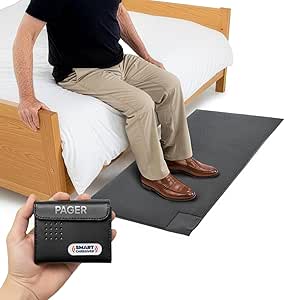 | Best for Bed-Exit Monitoring | Mat dimensions: 24 x 48 inches | Mat thickness: 0.5 inches | Maximum range: 300 feet | VIEW LATEST PRICE | See Our Full Breakdown |
| PILSAMAS Wi-Fi Smart Caregiver Pager with Receiver, Call Buttons, and Wristband |  | Best for Shared Family Alerts | Wi-Fi: 2.4 GHz only | Wireless technology: 433 MHz | Range: Up to 328 feet through walls | VIEW LATEST PRICE | See Our Full Breakdown |
| Wi-Fi Caregiver Pager with Waterproof Call Button, Watch Button, and Receiver |  | Best for Long-Range App Alerts | Included components: 1 waterproof call button, 1 watch button, 1 receiver | Wi-Fi: 2.4 GHz only | Range: Up to 656 feet (200 meters) | VIEW LATEST PRICE | See Our Full Breakdown |
| YisTech WiFi Caregiver Door Alarm with App, 2 Sensors and 1 Gateway |  | Best for Door and Window Monitoring | Included: 2 door sensors and 1 gateway | Power source: Battery-powered sensors; gateway plugs in | Batteries: Two 12V alkaline batteries, included | VIEW LATEST PRICE | See Our Full Breakdown |
| CallToU Wireless Caregiver Pager with 2 Call Buttons and 2 Receivers |  | Best for Audible Coverage Around the Home | Set contents: 2 call buttons and 2 receivers | Wireless range: 500+ feet | Ringtone options: 55 | VIEW LATEST PRICE | See Our Full Breakdown |
| SINGCALL Tuya Wi-Fi Smart SOS Caregiver Alert Button |  | Best for Shared Smartphone Alerts | Power source: Battery powered | Included battery: 1 lithium-ion battery | Voltage: 3.6 volts | VIEW LATEST PRICE | See Our Full Breakdown |
| JoneR WiFi Caregiver Call Button with Voice and Two-Way Calls |  | Best for Flexible Calling | Compatible devices: Smartphone, tablet | Control methods: App, push button, remote, voice | Mounting types: Wall mount, tabletop | VIEW LATEST PRICE | See Our Full Breakdown |
| Smart Caregiver Bed Alarm for Elderly Adults – Alerts When Getting Up |  | Best for Bed-Exit Monitoring | Power source: Battery powered | Battery required: 1 alkaline 9V battery | Voltage: 9 volts DC | VIEW LATEST PRICE | See Our Full Breakdown |
| Smart Caregiver Pager System with Two Call Buttons |  | Best Value for Two Alert Points | Model: TL-5102TP | Included components: Two call buttons, one pager, batteries, optional lanyards, and mounting cradle for buttons | Stated coverage: Up to 300 feet | VIEW LATEST PRICE | See Our Full Breakdown |
| Wireless Caregiver Pager with 1 Call Button and 1 Receiver |  | Best for Long-Range In-Home Alerts | Included components: 1 receiver and 1 call button | Stated wireless range: Up to 1,500 feet | Ringtones: 58 | VIEW LATEST PRICE | See Our Full Breakdown |
| EverNary Wi-Fi Bed Sensor Alarm with App Alerts |  | Best for Bed-Exit Monitoring | Included: 1 hub and 2 sensors | Wi-Fi: 2.4 GHz only | Maximum sensor range: 16.4 feet | VIEW LATEST PRICE | See Our Full Breakdown |
| PILSAMAS WiFi Caregiver Call Button for Seniors |  | Best Simple App-Only Call Button | Model: CF101W | Power: Battery powered | Battery: 1 included lithium polymer battery | VIEW LATEST PRICE | See Our Full Breakdown |
| DAYTECH Wi-Fi Caregiver Call System with 2 Buttons, Wristband, and Receiver |  | Best for an Audible In-Home Alert | Model: CR02TY-CT02WR-WB06WH | Included: 2 call buttons, 1 wristband, and 1 receiver | Connectivity: 2.4 GHz Wi-Fi | VIEW LATEST PRICE | See Our Full Breakdown |
| Mercury Alert AI Senior Fall Monitor |  | Best for Passive Fall and Activity Monitoring | Sensor technology: AI-powered passive infrared and motion sensing with machine learning analytics | Maximum range: 30 feet | Power: AC power; 5 watts | VIEW LATEST PRICE | See Our Full Breakdown |
| CallToU Wi-Fi Caregiver Pager with 2 Call Buttons, Watch Button, and Receiver |  | Best for Long-Range Button Alerts | Model: TY01WH-06W | Included: 2 call buttons, 1 watch button, and 1 receiver | Wireless technology: 433 MHz | VIEW LATEST PRICE | See Our Full Breakdown |
More Details on Our Top Picks
Smart Caregiver Wireless Floor Mat Alarm and Pager System, 24 x 48 in
For households where the main concern is noticing a bed exit or movement near a doorway, this 24 x 48-inch contact mat can alert a caregiver without asking the older adult to press anything. Its pager offers audible or vibration alerts, so a caregiver can choose a quieter notification when sound would disturb others. The stated 300-foot range gives it more reach around the home than an outlet-based alert setup may provide, though walls and layout can affect wireless performance. Unlike the PILSAMAS Wi-Fi Smart Caregiver Pager, this system responds to someone stepping on a mat rather than a call button or wearable. That makes it useful for passive monitoring, but less suited to someone who needs to summon help from different rooms. The mat is half an inch thick, and the pager needs two AA batteries that are not included; compatible extra alarms are sold separately.
Pros:- Detects stepping on the mat without requiring the user to press a button
- Pager can alert by sound or vibration
- Stated range reaches up to 300 feet
- Pager can monitor multiple compatible devices
Cons:- Pager requires two AA batteries, which are not included
- Additional compatible alarms must be purchased separately
- The half-inch mat may not suit every doorway or mobility setup
Best for: Caregivers who want an alert when an older adult steps out of bed or approaches a monitored doorway.
Not ideal for: People who need an older adult to request help from anywhere in the home, or households that want app-based notifications.
- Mat dimensions:24 x 48 inches
- Mat thickness:0.5 inches
- Maximum range:300 feet
- Alert options:Audible or vibration
- Audible noise:70 dB
- Sensor technology:Contact sensor
- Pager batteries:2 AA batteries required; not included
- Warranty:1 year
Our verdict“Choose this mat when bed-exit awareness matters more than giving the older adult a call button or app-connected alert.”
PILSAMAS Wi-Fi Smart Caregiver Pager with Receiver, Call Buttons, and Wristband
The PILSAMAS set is a strong fit when several family members need to know who called and from which assigned device. Its app labels and alert history make it easier to distinguish a bedroom button from a bathroom wristband, while family sharing can spread notifications beyond the person closest to the receiver. The package includes two call buttons and a wristband, giving it more ways to request help than the Smart Caregiver Wireless Floor Mat Alarm, which detects movement at one fixed spot instead. The buttons and wristband are IP65-rated, a practical advantage near wet areas, though this rating does not make them suitable for every kind of water exposure. App alerts do not require a subscription, but SMS, calls, and email do require an optional plan. The hub also supports only 2.4 GHz Wi-Fi, so buyers should check their network before choosing it.
Pros:- App labels and alert history help identify where a call originated
- Family sharing supports multiple caregivers
- Includes two buttons and a wristband
- IP65-rated buttons and wristband suit use around wet areas
Cons:- Hub connects only to 2.4 GHz Wi-Fi
- SMS, phone calls, and email require an optional plan
- App notifications depend on a working Wi-Fi connection
Best for: Families who want labeled app alerts shared among caregivers and need both fixed call buttons and a wearable option.
Not ideal for: Households whose Wi-Fi uses only 5 GHz, or caregivers who require SMS or phone-call alerts without an optional plan.
- Wi-Fi:2.4 GHz only
- Wireless technology:433 MHz
- Range:Up to 328 feet through walls
- Included components:1 hub, 2 call buttons, 1 wristband
- Water resistance:IP65
- Alert tones:18
- Volume levels:4
- Battery:One 12V battery, included
Our verdict“Pick PILSAMAS for shared, location-labeled app alerts and several ways to call for help, provided 2.4 GHz Wi-Fi is available.”
Wi-Fi Caregiver Pager with Waterproof Call Button, Watch Button, and Receiver
This pager’s defining advantage is its stated 656-foot range, the longest listed among these five options. It pairs a waterproof call button and watch button with a receiver, so an older adult can ask for help without walking to a fixed station. Compared with the CallToU Wireless Caregiver Pager, which includes two receivers for hearing alerts in separate parts of the home, this model emphasizes app notifications and a longer claimed wireless reach rather than multiple receivers. Its four volume levels and customizable ringtones give caregivers some control over how alerts sound, and the call button supports adhesive, screw, or lanyard mounting. The tradeoff is network dependence: Wi-Fi is limited to 2.4 GHz, and SMS or phone-call alerts require a subscription. Buyers should treat the range as a stated maximum, not a guarantee through every wall or floor plan.
Pros:- Stated wireless range of up to 656 feet
- Includes both a waterproof call button and a watch button
- Customizable ringtones and four volume levels
- Call button offers adhesive, screw-mount, and lanyard placement
Cons:- Supports only 2.4 GHz Wi-Fi
- SMS and phone-call alerts require a subscription
- One receiver may not provide audible coverage throughout a large home
Best for: Caregivers in a larger home who want app notifications and an older adult to have both a wearable and a mounted call option.
Not ideal for: People without 2.4 GHz Wi-Fi, or households that need text and phone alerts without paying for a subscription.
- Included components:1 waterproof call button, 1 watch button, 1 receiver
- Wi-Fi:2.4 GHz only
- Range:Up to 656 feet (200 meters)
- Waterproof:Call button
- Volume levels:4
- Package dimensions:4.13 x 4.13 x 3.11 inches
- Item weight:7.4 ounces
Our verdict“Choose this model for its stated long range and app-connected button options, but choose CallToU instead if two plug-in receivers matter more.”
YisTech WiFi Caregiver Door Alarm with App, 2 Sensors and 1 Gateway
YisTech is aimed at a different safety concern from the call-button systems: it alerts caregivers when a monitored door or window opens. Two contact sensors are included, and the plug-in gateway can sound a chime while the app sends a remote notification. That makes it more useful for monitoring exits than the PILSAMAS pager, which relies on someone pressing a button or wearing its wristband. The gateway’s 32 melodies and five volume levels, reaching a stated 110 dB maximum, offer options for households that need an audible in-home cue. App sharing can keep other caregivers informed, and support for additional sensors allows wider coverage. The tradeoff is that remote alerts depend on a smartphone app, while the gateway needs an outlet. This is an alert system, not a way for an older adult to summon help.
Pros:- Notifies a phone when a monitored door or window opens
- Includes two contact sensors and a gateway
- Gateway offers 32 melodies and five volume levels
- App alerts can be shared with other caregivers
Cons:- Remote notifications require use of a smartphone app
- Gateway must stay plugged into an outlet
- Monitors openings rather than providing a call-for-help button
Best for: Caregivers who want to know when an older adult opens a monitored exit door or window and need two sensors in the initial setup.
Not ideal for: Older adults who need an easy way to call for assistance, or homes where a suitable outlet is unavailable for the gateway.
- Included:2 door sensors and 1 gateway
- Power source:Battery-powered sensors; gateway plugs in
- Batteries:Two 12V alkaline batteries, included
- Maximum volume:110 dB
- Ringtones:32 melodies
- Volume levels:5
- Sensor technology:Contact sensor
- Control method:App and touch
Our verdict“Choose YisTech to monitor exits and windows; choose a caregiver pager such as CallToU when the priority is letting someone request help.”
CallToU Wireless Caregiver Pager with 2 Call Buttons and 2 Receivers
CallToU stands out for a simple reason: it includes two call buttons and two plug-in receivers, letting caregivers place alert sounds in separate rooms without relying on a phone app. Its stated range exceeds 500 feet, and the receivers offer 55 ringtone choices plus five volume levels up to 110 dB. That makes it a more direct choice for audible in-home coverage than the Wi-Fi Caregiver Pager with Waterproof Call Button, which has app notifications and a longer stated range but only one receiver in the package. The buttons can be worn as pendants or mounted, giving an older adult a choice of how to reach a caregiver. The drawbacks are practical: receivers need outlets, and wireless range varies with walls and surroundings. Unlike PILSAMAS, this set does not list app-based family sharing or location labels.
Pros:- Two call buttons and two receivers are included
- Stated wireless range is over 500 feet
- 55 ringtone options and five adjustable volume levels
- Buttons can be worn as pendants or mounted
Cons:- Receivers require nearby electrical outlets
- Wireless range may vary with walls and surroundings
- No app alerts or family-sharing features are listed
Best for: Households that want two physical receivers in different rooms and two call buttons for an older adult and caregiver.
Not ideal for: Caregivers who need remote app notifications or cannot place receivers near electrical outlets.
- Set contents:2 call buttons and 2 receivers
- Wireless range:500+ feet
- Ringtone options:55
- Volume levels:5
- Maximum volume:110 dB
- Power source:Battery-powered call buttons; receivers plug into an outlet
- Batteries:Two 12V alkaline batteries, included
- Waterproof and dustproof:Yes
Our verdict“Choose CallToU for straightforward audible alerts in two parts of the home; choose PILSAMAS if shared app notifications are more useful.”
SINGCALL Tuya Wi-Fi Smart SOS Caregiver Alert Button
I’d choose the SINGCALL when family members need to receive an alert on their own phones rather than rely on a pager in the next room. Pressing the portable button sends a notification through the Tuya app, and multiple caregivers can share alerts, which can help when family members take turns checking in. It can be carried or wall-mounted, so the user can keep it nearby or place it at a regular assistance point. Compared with the Smart Caregiver Pager System with Two Call Buttons, this model offers remote smartphone notifications instead of a dedicated receiver with a stated 300-foot range. That flexibility comes with a dependency: alerts rely on 2.4 GHz Wi-Fi and caregivers’ phones and app access. It also sends notifications, not a two-way call, so it is less suited to users who need to speak directly with someone after pressing the button.
Pros:- Sends emergency notifications to paired smartphones.
- Allows alerts to be shared with multiple caregivers.
- Can be carried or wall-mounted for flexible placement.
- Provides low-battery alerts on the device and in the app.
Cons:- Requires 2.4 GHz Wi-Fi for pairing and ongoing operation.
- Remote alerts depend on caregivers having smartphone and app access.
- Does not provide two-way voice calls.
Best for: Older adults whose family caregivers are comfortable using the Tuya app and want alerts delivered to multiple smartphones.
Not ideal for: People without reliable 2.4 GHz Wi-Fi, or users who need an audible in-home receiver or a direct two-way conversation.
- Power source:Battery powered
- Included battery:1 lithium-ion battery
- Voltage:3.6 volts
- Connectivity:2.4 GHz Wi-Fi
- Compatible device:Smartphone
- Control method:App, touch
- Mounting type:Wall mount
- Monthly fee:None
Our verdict“Choose the SINGCALL if app-based alerts to several caregivers matter more than a dedicated receiver or two-way calling.”
JoneR WiFi Caregiver Call Button with Voice and Two-Way Calls
The JoneR is the most adaptable option here for an older adult who may not be able to press a conventional button. It can respond to voice, tapping, knocking, a push button, or a pull cord, then notify up to four linked family members and support two-way calls. That gives it a broader way to ask for help than the SINGCALL Tuya Wi-Fi Smart SOS Caregiver Alert Button, which depends on pressing its button and sends app notifications rather than offering a call. The camera-free design may also suit households that want voice communication without a camera in the room. The tradeoff is setup and connectivity: it needs 2.4 GHz Wi-Fi, and alerts depend on family members being linked. Voice and sound triggers may also be a poor fit in a noisy home or where ordinary sounds could cause confusion.
Pros:- Supports voice, tapping, knocking, a button, and a pull cord.
- Provides app alerts and two-way calls.
- Can notify up to four linked family members.
- Camera-free design and no subscription fee.
Cons:- Requires 2.4 GHz Wi-Fi.
- Alerts depend on family members being linked.
- Voice and sound-triggered requests may be less dependable in noisy surroundings.
Best for: Older adults with limited hand strength or mobility who need several ways to request help and want two-way communication with up to four family members.
Not ideal for: Households without reliable 2.4 GHz Wi-Fi or users who need a standalone pager that works without linked smartphones.
- Compatible devices:Smartphone, tablet
- Control methods:App, push button, remote, voice
- Mounting types:Wall mount, tabletop
- Sensor technology:Tapping sound, voice detection
- Wi-Fi:2.4 GHz only
- Alert recipients:Up to 4 family members
- Warranty:2 years
Our verdict“Pick the JoneR for an older adult who benefits from multiple alert methods and direct two-way calls, provided family can manage the Wi-Fi and app setup.”
Smart Caregiver Bed Alarm for Elderly Adults – Alerts When Getting Up
Unlike a call button, this alarm responds to a specific risk: the user getting out of bed without a caregiver nearby. A pressure-sensing pad sits under a fitted sheet and sounds an 80 dB audible alarm when pressure is removed, making it a focused choice for overnight monitoring. The vinyl pad is described as incontinence-resistant, and volume control and low-battery indicators help with everyday use. Compared with the JoneR WiFi Caregiver Call Button, it does not rely on the user remembering or being able to request help; it alerts when the person leaves the bed. The tradeoff is that the included setup sounds an alarm locally, while caregiver-device notifications require an optional wireless add-on. It is a specialized monitoring tool, not a replacement for a portable help button or direct two-way communication.
Pros:- Sounds an alarm when pressure is removed from the bed pad.
- Pad fits under a fitted sheet for discreet placement.
- Vinyl pad is described as incontinence-resistant.
- Includes volume control and low-battery indicators.
Cons:- Wireless caregiver notifications require an optional add-on.
- A 9V battery is required.
- The monitor may be bulky on a wall or bedside surface.
Best for: Caregivers monitoring an older adult who may get out of bed without assistance, especially when a local audible alert is useful.
Not ideal for: People who need a wearable or portable call button, remote alerts without add-on equipment, or monitoring away from the bed.
- Power source:Battery powered
- Battery required:1 alkaline 9V battery
- Voltage:9 volts DC
- Audible alarm:80 dB
- Pad size:10 x 30 inches
- Dimensions:30 x 0.5 x 10 inches
- Warranty:1 year
Our verdict“Choose this bed alarm when the main concern is unsupervised bed exits, not when the user needs a general-purpose way to call for help.”
Smart Caregiver Pager System with Two Call Buttons
This system makes sense for a household that wants a simple, local alert setup with two places to request help. The included buttons can be worn on lanyards or mounted on walls, while the portable pager lets a caregiver carry the receiver around the home. Its stated 300-foot range and two ringtone choices make it more straightforward than app-dependent options such as the SINGCALL Tuya Wi-Fi Smart SOS Caregiver Alert Button: there’s no smartphone pairing described, but the caregiver needs to remain within range of the pager. Two buttons are useful for covering separate rooms or giving one person more than one accessible call point. The system is less suitable for alerts across longer distances or to family members away from home, and the 90-day warranty is shorter than the JoneR’s two-year warranty.
Pros:- Includes two call buttons and a portable pager.
- Buttons can be worn on lanyards or mounted on a wall.
- Offers two ringtone options.
- Batteries are included.
Cons:- The stated range is up to 300 feet, limiting use across larger properties.
- Battery-powered operation requires eventual battery replacement.
- Warranty is limited to 90 days.
Best for: Caregivers who stay within the home and want two physical call buttons with a portable receiver for nearby alerts.
Not ideal for: Families needing remote smartphone notifications, a stated range beyond 300 feet, or a longer warranty period.
- Model:TL-5102TP
- Included components:Two call buttons, one pager, batteries, optional lanyards, and mounting cradle for buttons
- Stated coverage:Up to 300 feet
- Sound level:75 dB
- Battery:2 AAA batteries included
- Average battery life:720 hours
- Weight:8 ounces
- Warranty:90 days
Our verdict“Choose this system for two convenient in-home call points and a dedicated pager, but skip it if caregivers need alerts while away.”
Wireless Caregiver Pager with 1 Call Button and 1 Receiver
The STECHRO stands out when a caregiver may be far from the older adult within the home or property. Its stated range of up to 1,500 feet is substantially longer than the Smart Caregiver Pager System’s 300-foot range, while the receiver offers five volume levels and a choice of 58 ringtones. The maximum volume is listed as 120 dB, giving households more ways to make an alert noticeable, though that level may be too loud for some users. The IP55 rating and ability to expand with additional buttons and receivers make this more adaptable than the two-button Smart Caregiver system as needs change. It starts with just one call button, however, and the supplied product details conflict on warranty duration, listing both 18 months and two years.
Pros:- Stated wireless range reaches up to 1,500 feet.
- Offers 58 ringtone options and five volume levels.
- IP55-rated water and dust protection.
- Can expand to up to 30 call buttons and multiple receivers.
Cons:- Includes only one call button and one receiver.
- Requires batteries for operation.
- Product information gives conflicting warranty durations of 18 months and two years.
Best for: Caregivers who need a dedicated receiver across a large home or property and may want to add call buttons or receivers later.
Not ideal for: Buyers who need multiple call points out of the box, prefer smartphone alerts, or want clearly stated warranty terms before choosing.
- Included components:1 receiver and 1 call button
- Stated wireless range:Up to 1,500 feet
- Ringtones:58
- Volume levels:5
- Maximum volume:120 dB
- Water and dust resistance:IP55
- Expandable capacity:Up to 30 call buttons and multiple receivers
- Warranty information:Product details list both 18 months and 2 years
Our verdict“Pick the STECHRO when long-range receiver alerts and future expansion matter more than having multiple buttons included from the start.”
EverNary Wi-Fi Bed Sensor Alarm with App Alerts
Best suited to monitoring movement rather than summoning help, the EverNary uses two sensors to alert a hub and connected smartphones when someone gets out of bed or leaves a room. That makes it a better fit for caregivers tracking movement than the PILSAMAS WiFi Caregiver Call Button, which relies on the older adult pressing a button. App sharing can keep several family members informed, and the system can expand with more sensors and hubs for additional areas. The tradeoff is that alerts depend on the hub’s Wi-Fi connection, while sensor communication can be limited indoors. Its 2.4 GHz-only Wi-Fi requirement may also complicate setup on networks that use different bands. Choose this for passive monitoring, not as a replacement for a call button or personal emergency response service.
Pros:- Detects movement associated with bed exits or leaving a room
- Shares app alerts with multiple users
- Includes two sensors and supports system expansion
- Battery-powered sensors avoid needing a nearby outlet
Cons:- Phone alerts depend on the hub being within Wi-Fi range
- Supports 2.4 GHz Wi-Fi only
- Indoor sensor range may be reduced by walls and layout
Best for: Families who want smartphone alerts when an older adult gets out of bed or leaves a monitored room, without relying on them to press a button.
Not ideal for: Caregivers who need an older adult to summon help directly, or households with weak indoor signal or no 2.4 GHz Wi-Fi.
- Included:1 hub and 2 sensors
- Wi-Fi:2.4 GHz only
- Maximum sensor range:16.4 feet
- Wireless range:Up to 330 feet in open areas; about 30–150 feet indoors
- Power:Battery powered; requires 4 AAA alkaline batteries
- Average battery life:6 months
- Expansion:Up to 50 transmitters per hub and up to 50 hubs per transmitter
- Mounting:Wall mount
Our verdict“Choose EverNary for shared, passive bed-exit alerts, but pair it with a call button if the resident needs a way to request assistance.”
PILSAMAS WiFi Caregiver Call Button for Seniors
The simplest route to an app-based call for help in this group, the PILSAMAS sends a notification when its button is pressed and allows the alert to be shared with family members. It can be worn or mounted on a wall, so an older adult can keep it close or leave it in a consistent spot. Unlike the DAYTECH Wi-Fi Caregiver Call System, it has no included receiver to sound an alarm at home; this keeps the setup focused on phones but makes it less suitable when caregivers may not be watching their screens. App alerts have no monthly fee, while SMS, phone, and email notifications require a subscription. The 15-meter range and 2.4 GHz-only Wi-Fi narrow placement options, so check the home’s router location before choosing it.
Pros:- App notifications have no monthly fee
- Can be worn or mounted on a wall
- Supports sharing alerts with multiple family members
- Includes a rechargeable lithium polymer battery
Cons:- Router distance is limited to a stated maximum of 15 meters
- Works with 2.4 GHz Wi-Fi only
- SMS, phone, and email alerts require a subscription
Best for: Families who want a wearable or wall-mounted button that sends shared app alerts without a recurring fee for those app notifications.
Not ideal for: Households that need a loud in-home receiver, or caregivers who require calls or texts without a subscription.
- Model:CF101W
- Power:Battery powered
- Battery:1 included lithium polymer battery
- Wi-Fi:2.4 GHz only
- Maximum range:15 meters
- Mounting:Wall mount; also designed to be worn
- App alerts:Shared notifications; no monthly fee
- Warranty:2 years
Our verdict“Pick PILSAMAS when shared smartphone notifications are enough and you do not need the separate in-home receiver included with DAYTECH.”
DAYTECH Wi-Fi Caregiver Call System with 2 Buttons, Wristband, and Receiver
A useful middle ground between phone-only alerts and more elaborate monitoring, DAYTECH includes two call buttons, a wristband, and a plug-in receiver. A press can alert someone nearby through the receiver while also sending notifications to shared app users, which gives it a practical advantage over the PILSAMAS WiFi Caregiver Call Button when a caregiver is at home and not checking a phone. The five volume levels and 20 ringtone options help households choose a sound that is noticeable without being needlessly disruptive. Its receiver needs an outlet, though, and Wi-Fi is limited to 2.4 GHz. Phone and text alerts without internet require an upgrade, so this system is less appealing where dependable cellular-style notifications are the priority.
Pros:- Combines a receiver alarm with mobile app notifications
- Includes two call buttons and a wristband
- Offers 20 ringtones and five volume levels
- Supports shared app notifications
Cons:- Receiver must remain plugged into an outlet
- Works with 2.4 GHz Wi-Fi only
- Phone and text alerts without internet require an upgrade
Best for: Older adults and nearby caregivers who want a physical receiver at home plus app alerts for family members who are away.
Not ideal for: Households without a convenient outlet for the receiver, or families seeking phone and text alerts that do not depend on internet access.
- Model:CR02TY-CT02WR-WB06WH
- Included:2 call buttons, 1 wristband, and 1 receiver
- Connectivity:2.4 GHz Wi-Fi
- Ringtones:20 options
- Volume:5 levels
- Battery:1 included 12V battery
- Receiver:Plug-in
- Dimensions:4.8 × 4.1 × 3.6 inches
Our verdict“Choose DAYTECH over a phone-only button when someone at home needs an audible alert as well as remote app notifications.”
Mercury Alert AI Senior Fall Monitor
Mercury Alert AI is the most hands-off monitor in this set: it uses wall-mounted motion sensing to track falls, room and bed exits, wandering, and activity without asking the resident to wear or press anything. That makes it a different kind of tool from the EverNary Wi-Fi Bed Sensor Alarm, which focuses on motion alerts, and from call-button systems such as DAYTECH, which depend on someone requesting help. Mercury also sends app notifications, calls, and texts and presents activity trends, giving caregivers more context than a simple alert. The tradeoff is substantial: a subscription is required, and the unit needs corded power. It can support monitoring, but it should not be treated as a guaranteed substitute for direct supervision or emergency response.
Pros:- Monitors falls and movement without wearables
- Tracks bed exits, room exits, sleep, and activity history
- Can send alerts by app notification, call, and text
- Stick-on mounting avoids drilling
Cons:- Requires a subscription
- Needs corded AC power
- Motion-based monitoring does not provide a button for the resident to request help
Best for: Families seeking wearable-free monitoring for an older adult who may not reliably use a call button and who can be monitored in a location with power.
Not ideal for: Buyers who want a one-time setup without a subscription, need battery operation, or require a system that works without an internet-connected app.
- Sensor technology:AI-powered passive infrared and motion sensing with machine learning analytics
- Maximum range:30 feet
- Power:AC power; 5 watts
- Battery:No battery required
- Mounting:Wall mount; adhesive mounting strip included
- Compatible devices:Android and iOS smartphones and tablets
- Alerts:App notifications, calls, and texts
- Subscription:Required
- Dimensions and weight:3.5 × 3 × 3 inches; 4 ounces
Our verdict“Choose Mercury for broader passive monitoring and activity trends if you accept the subscription and can place it near a power outlet.”
CallToU Wi-Fi Caregiver Pager with 2 Call Buttons, Watch Button, and Receiver
CallToU is the strongest fit when the resident and caregiver may be separated by walls or doors: its 433 MHz link is listed for up to 328 feet, and a press can trigger a receiver alarm with flashing lights as well as a free app notification. Two call buttons and a watch button give the resident several ways to reach someone, while custom button names can help caregivers identify which location needs attention. Compared with the DAYTECH Wi-Fi Caregiver Call System, CallToU provides a stated longer wireless range, though both pair a receiver with shared app alerts and adjustable sound options. Its phone or text alerts require a subscription, and the system still relies on 2.4 GHz Wi-Fi for app connectivity. The published range is not a guarantee through every home layout.
Pros:- 433 MHz wireless range is listed up to 328 feet
- Includes two call buttons, a watch button, and a receiver
- Receiver offers flashing lights, 20 ringtones, and five volume levels
- Free shared app alerts support custom button names
Cons:- Phone and text alerts require a subscription
- App connectivity supports 2.4 GHz Wi-Fi only
- Actual signal range may be reduced by walls and home layout
Best for: Households where a resident may need to alert a caregiver across rooms or floors and benefits from both a local receiver and shared app notifications.
Not ideal for: Families who need phone or text alerts without a subscription, or homes where the 2.4 GHz Wi-Fi connection is unreliable.
- Model:TY01WH-06W
- Included:2 call buttons, 1 watch button, and 1 receiver
- Wireless technology:433 MHz
- Maximum range:Up to 328 feet (100 meters)
- Wi-Fi:2.4 GHz only
- Receiver options:20 ringtones and 5 volume levels
- Power:Battery powered; includes two 12V batteries
- Mounting:Wall mount
- Warranty:1 year
Our verdict“Choose CallToU over DAYTECH when longer stated button-to-receiver range and a wearable watch button matter more than subscription-free phone or text alerts.”

How We Picked
I compared these 15 devices by the job they are designed to do: let someone request help, alert a caregiver to movement, or support fall monitoring. I gave more weight to clear everyday use, practical alert methods, and a fit with common home-care routines than to a long feature list. I also considered whether a product includes useful components such as multiple call buttons, a wearable button, or more than one receiver, and whether its approach appears suited to one room or a broader routine.
The ranking favors devices with a flexible, understandable role and useful combinations of alert components. Specialized sensors rank higher for buyers who need to monitor a particular event, not as replacements for a call system. Wi-Fi connectivity can be useful, but it does not automatically make a device a better choice: setup, network reliance, and the senior’s willingness to use it affect the real-world fit. Product names alone cannot establish range, app reliability, compatibility, or clinical performance, so buyers should confirm those details with the manufacturer before choosing.
Factors to Consider When Choosing Elderly Friendly Smart Home Devices
Before choosing a device, start with the care task you need it to support. A system that waits for someone to press a button cannot replace a sensor intended to report movement, and a movement alarm does not give a senior a direct way to call a caregiver. These decisions can help narrow the options before comparing individual models.
Match the Alert to the Problem
Write down the specific event that needs a response: a request for help, an unplanned bed exit, a doorway opening, or a possible fall. Call buttons work when the person can recognize and press one; sensors can alert caregivers to an event without that action. A common mistake is buying a device because it sounds broadly protective, then expecting it to detect events outside its stated purpose. Some homes may need two complementary devices rather than one all-purpose product. Decide who receives each alert and what that person should do next. A well-matched alert can support a care routine, but it does not replace supervision or emergency services.
Choose Controls the Senior Will Actually Use
Think about dexterity, vision, hearing, memory, and comfort with wearable devices before selecting a control. A wristband may keep a call button within reach, while a fixed button can work better near a chair, bedside, or bathroom. If a senior is unlikely to wear or press a device, its advertised features will not solve the communication gap. Ask whether buttons are easy to distinguish and whether the receiver’s alert can be noticed from the rooms where caregivers spend time. Involve the senior in the choice when possible; acceptance can matter more than extra functions. Avoid treating a wearable as a fall detector unless the manufacturer specifically describes that capability.
Plan for Wi-Fi, Power, and Alert Delivery
Wi-Fi-connected devices may send app alerts, but that advantage depends on a working network, compatible phones, and correctly configured notifications. Check whether the product also alerts through an included receiver, and what happens during internet or power interruptions. A local wireless pager may be preferable when caregivers are in the home and want a direct receiver alert without relying on an app. Confirm batteries, charging needs, backup behavior, and who will maintain the devices. Do not assume every product with “Wi-Fi” in its name works with every router, phone, or smart-home platform. Verify supported connections and alert paths before purchase.
Map Coverage to the Home and Care Team
Sketch where the senior spends time and where caregivers are likely to be when an alert occurs. A second call button can reduce the need to move one device between rooms, while an extra receiver may help more than one caregiver hear a local alert. Door and bed sensors need placement that matches the movement being monitored; a sensor cannot cover a location just because it is part of the same system. Ask the seller for tested range and installation guidance, especially in homes with thick walls or multiple floors. Consider who will respond when the primary caregiver is away. A device that alerts only one person may leave a gap in a shared-care arrangement.
Balance Monitoring With Privacy and Comfort
Monitoring can provide useful information, but it can also feel intrusive or disrupt a senior’s routine. A floor mat or bed sensor may suit a narrowly defined movement concern, while a general call button leaves more control with the person using it. Explain what is monitored, who receives alerts, and how the information is used. Avoid installing sensors in private areas without a clear care reason and the senior’s involvement where possible. Test placement and alert settings with the people affected, then adjust if ordinary movement creates frequent interruptions. The best setup is one caregivers can maintain without making the home feel like a surveillance system.
Check Ongoing Costs, Support, and Reliability Claims
Before settling on a connected device, check whether app access, cellular service, subscriptions, or replacement parts carry ongoing costs. Ask how the manufacturer handles software updates, support, and device replacement if a sensor or receiver stops working. Seek specific information about alert delays, range, battery life, and what the device can and cannot detect rather than relying on broad safety claims. Fall-monitoring labels do not by themselves establish medical accuracy or guarantee that every fall will be detected. For a critical care need, discuss the proposed setup with a clinician or care professional. Paying for more features makes sense only when the household can use and maintain them.
Frequently Asked Questions
Should I choose a call button or a bed and floor alarm?
Choose a call button when the senior can recognize a need for help and press a control. A bed or floor alarm is intended to notify a caregiver about a particular movement, such as getting up, without waiting for a button press. Neither type covers the other’s role. If both communication and movement alerts matter, consider a combined care plan and decide who will respond to each alert. Confirm with the manufacturer how the sensor detects activity and where it should be placed.
Will a Wi-Fi caregiver alert work if the internet goes down?
That depends on the specific model and how it sends alerts. Some devices include a receiver that may provide a local alert, while app notifications generally depend on network access and phone settings. Check the product documentation for behavior during Wi-Fi, power, or service interruptions rather than assuming the system has a backup. Ask whether the receiver works independently of the app and how it is powered. If uninterrupted alerting matters, plan a backup method with the caregiver or care team.
Is a caregiver pager a substitute for a medical alert service?
A home caregiver pager typically alerts a designated person, while a medical alert service may connect users to a monitoring center or emergency response process. The products in this roundup should not be treated as equivalent to a monitored service unless the manufacturer explicitly provides that service. Think about whether someone is reliably available to hear and respond to alerts at all times. Also consider what happens when the senior is alone or the caregiver cannot answer. Confirm response arrangements before relying on any alert device for emergencies.
What should I check before installing a door or bed sensor?
Confirm the sensor’s intended placement, detection method, power requirements, and how alerts reach the caregiver. Check whether the monitored door or bed position matches the movement you want to know about; placement errors can create missed or unwanted alerts. Ask about range, network needs, and settings that can reduce alerts during ordinary activity. Discuss the monitoring with the senior and respect privacy, especially if the sensor affects a personal space. Try the setup during normal routines and adjust it with the manufacturer’s guidance.
Can a fall monitor guarantee that every fall will be detected?
No device should be assumed to detect every fall unless its maker clearly defines its capabilities, and even then no alert system can promise perfect detection. Performance may depend on placement, movement, connectivity, and the way a fall occurs. Ask the manufacturer for limitations and whether the product requires a wearable, a subscription, or a particular home setup. Consider a fall monitor as one part of a broader safety plan, not a replacement for supervision or emergency support. If fall risk is a concern, discuss the home setup with a clinician or care professional.
Conclusion
For a flexible everyday call system, my best overall choice is the PILSAMAS Wi-Fi Smart Caregiver Pager, with its mix of call buttons, wristband, and receiver. For best value, I would start with the Wireless Caregiver Pager with 1 Call Button and 1 Receiver if a straightforward single-person setup meets the need; choose a two-button system when multiple rooms matter. The best premium-style pick for buyers seeking a distinct fall-monitoring approach is the Mercury Alert AI Senior Fall Monitor, after checking its stated limits and support requirements. For beginners, a basic receiver-based pager is a simpler starting point than an app-dependent setup. For specific movement concerns, choose the Smart Caregiver floor mat or bed alarm for bed-exit awareness, the YisTech door alarm for door activity, or the EverNary bed sensor for app-based bed alerts. Match the device to the event, confirm how alerts reach a caregiver, and add a second device only when it fills a separate gap.