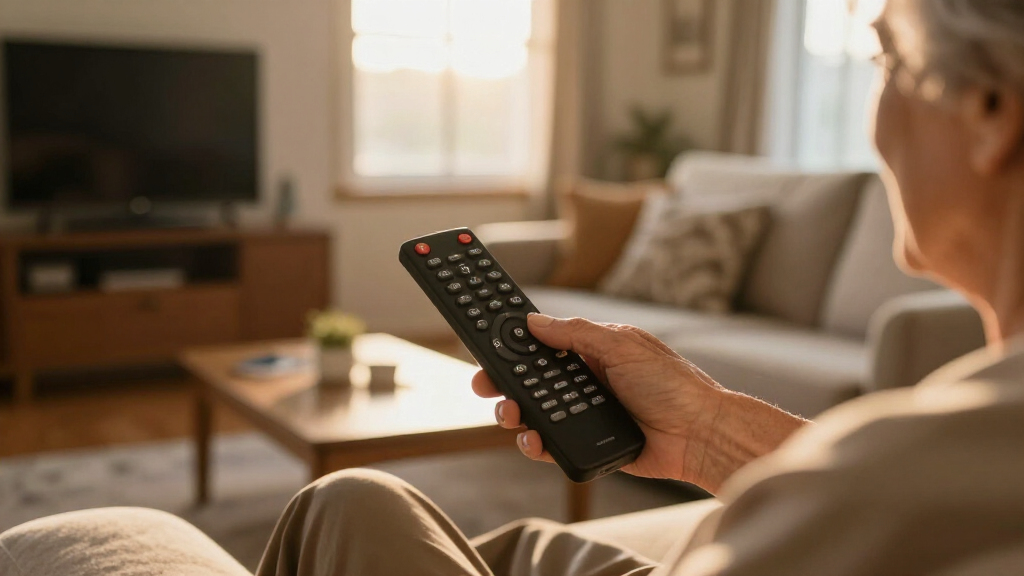

Finding a remote that suits the needs of seniors can be challenging, especially with so many options that vary in size, features, and compatibility. If you’re looking for a simple, easy-to-use remote, two options stand out: the EZclicker TV Remote for its lightweight simplicity and tactile feedback, and the Flipper Big Button Remote for its customizable, color-coded buttons tailored for dementia and vision impairments. Both excel at basic TV control but differ in compatibility and setup complexity, making the choice depend on specific user needs and TV setups.

Turn quiet afternoons into listening time
- Thousands of audiobooks, podcasts and originals
- Listen on your phone, tablet or Echo — also offline
- Cancel anytime
Complete the kit


Key Takeaways
- The best remote for simplicity and ease of use features large, tactile buttons that require minimal dexterity.
- Compatibility with major TV brands varies; some remotes only work with Samsung or specific models.
- Additional features like backlighting or programmable favorites improve accessibility but can add complexity.
- Battery requirements and setup ease are crucial for elderly users who prefer plug-and-play solutions.
- Tradeoffs often involve balancing compatibility, features, and straightforward operation.
| EZclicker TV Remote for Seniors, Extra Simple Big Button Remote (Blue) | 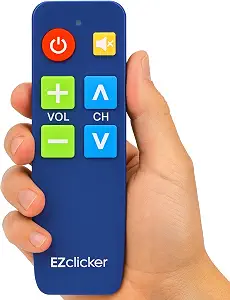 | Best Overall for Simplicity and Compatibility | Button Size: Large | Compatibility: Major TV brands | Dimensions: 6″ x 2″ x 1″ | VIEW LATEST PRICE | See Our Full Breakdown |
| Flipper Big Button TV Remote for Seniors, Dementia – Easy Setup |  | Best for Dementia and Vision Impairments | Button Colors: Green, Orange, Blue, Gray | Number of Customizable Favorites: 25 | Compatibility: Major TV brands and cable/satellite | VIEW LATEST PRICE | See Our Full Breakdown |
| Large Button TV Remote Control for Seniors, Easy to Use Simple Remote for TV, Large Buttons and Clear Layout |  | Best for Traditional TV Users | Button Size: Large | Compatibility: Most major TV brands | Control Type: Traditional | VIEW LATEST PRICE | See Our Full Breakdown |
| Backlit Big Button TV Remote Replacement for Samsung TV with Cover & Hook, No Setup, Suitable for Seniors and Visually Impaired |  | Best Backlit for Visually Impaired | Compatibility: Samsung smart TVs | Buttons: Large, backlit | Range: 49 feet | VIEW LATEST PRICE | See Our Full Breakdown |
| Big Button TV Remote for Seniors, Dementia – Easy Setup with Large Color-Coded Buttons |  | Best for Color-Coded Simplicity | Compatibility: Major TV brands, cable/satellite | Button Type: Large, color-coded tactile | Warranty: 90 days | VIEW LATEST PRICE | See Our Full Breakdown |
| big button tv remotes for senior | Compatibility |
|---|---|
| EZclicker TV Remote for Senior | Major TV brands |
| Flipper Big Button TV Remote f | Major TV brands and cable/satellite |
| Large Button TV Remote Control | Most major TV brands |
| Backlit Big Button TV Remote R | Samsung smart TVs |
| Big Button TV Remote for Senio | Major TV brands, cable/satellite |
More Details on Our Top Picks
EZclicker TV Remote for Seniors, Extra Simple Big Button Remote (Blue)
This remote emphasizes easy use with large, tactile buttons and a lightweight design. It is compatible with most major TV brands, making it a versatile choice. Its simple programming process is ideal for seniors who want a straightforward device. However, it doesn’t support cable boxes, streaming devices, or smart functions, which limits its use for some users. Compared with more feature-rich remotes, the EZclicker prioritizes basic TV control, making it perfect for those who need a no-fuss device.
Pros:- Large, tactile buttons for easy pressing
- Simple setup process
- Lightweight and compact for easy handling
Cons:- Limited to traditional TV controls, no smart features
- Not compatible with cable boxes or streaming devices
- Batteries not included
Best for: Seniors seeking a simple, reliable remote compatible with major TVs
Not ideal for: Users with streaming devices or smart TV setups
- Button Size:Large
- Compatibility:Major TV brands
- Dimensions:6″ x 2″ x 1″
- Batteries:2x AAA (not included)
Our verdict“A straightforward remote that excels at basic TV control for seniors who value simplicity.”
Flipper Big Button TV Remote for Seniors, Dementia – Easy Setup
The Flipper remote is designed with color-coded, tactile buttons that help seniors and dementia patients operate their TVs independently. It supports both TVs and cable/satellite boxes, with customizable favorites for quick access. While it excels at reducing frustration with its simple interface, it doesn’t support streaming apps, and its basic functions may be limiting for those who want more smart features. Compared to the EZclicker, the Flipper offers more customization but less universal compatibility.
Pros:- Color-coded, tactile buttons for easy recognition
- Supports multiple devices including cable boxes
- Customizable favorite channels for quick access
Cons:- Limited to basic TV and cable functions
- Requires two AA batteries (not included)
- No support for smart app control
Best for: Seniors or dementia patients needing simple, customizable controls
Not ideal for: Tech-savvy users or those with streaming needs
- Button Colors:Green, Orange, Blue, Gray
- Number of Customizable Favorites:25
- Compatibility:Major TV brands and cable/satellite
- Power Source:2 AA batteries (not included)
Our verdict“A highly accessible remote that simplifies TV control for users with cognitive or vision challenges.”
Large Button TV Remote Control for Seniors, Easy to Use Simple Remote for TV, Large Buttons and Clear Layout
This remote offers a simple, ergonomic design with oversized, clearly marked buttons, making it ideal for users with low vision. It works with most major TV brands, providing a dependable, no-frills experience. Its durability and lightweight build make it suitable for everyday use. However, it doesn’t support smart devices, voice commands, or advanced features, limiting its appeal to those seeking basic control.
Pros:- Large, clearly marked buttons for visibility
- Compatible with most major TV brands
- Ergonomic and lightweight design
Cons:- Limited to traditional TV control
- No voice or smart app integration
- Not compatible with DVD or streaming devices
Best for: Seniors who need straightforward, reliable TV operation
Not ideal for: Tech enthusiasts or those with smart TV setups
- Button Size:Large
- Compatibility:Most major TV brands
- Control Type:Traditional
- Remote Features:Large buttons, clear layout
Our verdict“A dependable choice for seniors who prefer simple, traditional remote control.”
Backlit Big Button TV Remote Replacement for Samsung TV with Cover & Hook, No Setup, Suitable for Seniors and Visually Impaired
The Backlit remote is designed for easy use in low-light conditions, with large, illuminated buttons that stay lit for 30 seconds. Its compatibility with Samsung smart TVs makes it ideal for users with Samsung devices, especially those with vision impairments. The included cover and hook add convenience, and no setup is needed—just insert batteries and start using it. The main drawback is its limited compatibility, which restricts its use outside Samsung TVs.
Pros:- Large, backlit buttons for visibility in dark environments
- No setup required, ready to use out of the box
- Includes protective cover and hook for convenience
Cons:- Limited to Samsung TVs
- No advanced features or smart functions
- Batteries not included
Best for: Seniors with low vision using Samsung smart TVs
Not ideal for: Users with non-Samsung TVs or streaming-only setups
- Compatibility:Samsung smart TVs
- Buttons:Large, backlit
- Range:49 feet
- Response Time:0.1 seconds
Our verdict“An excellent choice for Samsung TV users needing enhanced visibility in low light.”
Big Button TV Remote for Seniors, Dementia – Easy Setup with Large Color-Coded Buttons
This remote stands out for its large, color-coded tactile buttons, making it easy for seniors or those with dementia to operate. It supports all major TV brands and cable services, simplifying remote control. Its straightforward setup and universal compatibility make it a versatile option, though some models may require IR extenders for optimal use with Xfinity and similar services. It lacks advanced features, focusing solely on basic TV functions, which suits users who prefer simplicity.
Pros:- Large, color-coded buttons for easy recognition
- Universal compatibility with most TVs and cable providers
- Simple setup designed for elderly users
Cons:- Requires line of sight for some providers like Xfinity
- Some models may need IR extenders
- Limited features beyond basic control
Best for: Seniors and dementia patients needing simple, color-coded control
Not ideal for: Those seeking smart features or advanced customization
- Compatibility:Major TV brands, cable/satellite
- Button Type:Large, color-coded tactile
- Warranty:90 days
Our verdict“A straightforward remote that combines visual cues with universal compatibility for easy use.”

How We Picked
Our selection process focused on remotes specifically designed for seniors, prioritizing large, tactile buttons, straightforward setup, and compatibility with common TV brands. We considered user feedback, product reviews, and feature sets that promote independence. Devices that offer customization, backlighting, and durability earned higher marks, while those with limited compatibility or complex features were rated lower. The goal was to identify remotes that simplify TV control without sacrificing essential functionality.
| big button tv remotes for senior | Compatibility |
|---|---|
| EZclicker TV Remote for Senior | Major TV brands |
| Flipper Big Button TV Remote f | Major TV brands and cable/satellite |
| Large Button TV Remote Control | Most major TV brands |
| Backlit Big Button TV Remote R | Samsung smart TVs |
| Big Button TV Remote for Senio | Major TV brands, cable/satellite |
Factors to Consider When Choosing Best Big Button Tv Remotes For Seniors
Choosing the best remote for seniors involves balancing simplicity, compatibility, and features tailored to specific needs. A good big button remote should have large, tactile buttons that are easy to press without requiring fine motor skills. Compatibility with the most common TV brands and cable providers ensures the remote can be used in most households. Additional features like backlighting, programmable favorites, or color coding can enhance usability, but often come with tradeoffs in complexity or cost.
Size and Button Design
Large buttons with tactile feedback are essential for users with low vision or limited dexterity. The remote should have a clear, simple layout, avoiding clutter that can confuse or overwhelm. Ergonomic design helps prevent fatigue and makes handling easier, especially for those with arthritis or tremors.
Compatibility and Setup
Ensure the remote matches your TV brand and model. Some remotes are universal, covering most major brands, while others are brand-specific. Ease of setup is vital; look for remotes that require minimal programming or are ready to use out of the box. Batteries should be easy to replace, and the remote should function reliably without frequent re-pairing or troubleshooting.
Additional Features
Features like backlit buttons, color-coding, and programmable favorites can make remote control easier in various lighting conditions and for different users. However, these extras often increase complexity and cost. Decide which features matter most based on the user’s specific impairments or preferences.
Durability and Battery Life
Seniors benefit from sturdy, durable remotes that withstand drops and daily use. Long-lasting batteries reduce the inconvenience of frequent replacements, especially for users with limited mobility. Some remotes include protective covers or hooks to prevent loss or damage.
Frequently Asked Questions
Are big button remotes compatible with all TVs?
Most big button remotes are designed to be compatible with major TV brands, but it’s important to check each remote’s specifications. Universal remotes typically support a wide range of brands and models, whereas brand-specific remotes may only work with certain models. Always verify compatibility before purchasing to avoid frustration.
Do these remotes support smart TV functions or streaming apps?
Generally, big button remotes for seniors focus on basic TV control and do not support smart functions or streaming apps like Netflix or YouTube. Some, like the Samsung-specific remote, may control smart features, but most are designed for traditional TV operation to keep things simple.
How difficult is it to set up these remotes?
Setup difficulty varies; many are designed for quick, straightforward use with minimal programming. Some remotes, like the EZclicker, require only a few button presses to pair, while others may need more detailed programming or code entry. Always check the setup instructions and look for models that are labeled as ‘plug-and-play’ or ‘easy setup.’
What if my batteries die—are replacements easy to find?
Most remotes use standard batteries like AAA or AA, which are widely available. It’s advisable to choose a remote with easily accessible battery compartments and to keep spare batteries on hand. Some models, like the backlit Samsung remote, include long-range capabilities that may reduce battery drain, but regular replacement is still necessary.
Can these remotes control multiple devices?
Some remotes, especially the more advanced or customizable ones, can control multiple devices such as cable boxes, DVD players, and smart TVs. However, many basic models are limited to TV control only. Check each product’s specifications if multi-device compatibility is a priority for your setup.
Conclusion
For seniors prioritizing simplicity and basic TV control, the EZclicker remains a strong choice, especially for those with limited dexterity. Those with cognitive challenges or vision impairments should consider the Flipper remote for its color-coded, tactile buttons and customization options. Users with Samsung TVs who want a no-fuss experience in low light might prefer the Samsung backlit remote. On the other hand, if durability and traditional design are key, the Large Button Remote offers a reliable, no-frills solution. Ultimately, the best remote depends on the user’s specific needs, TV setup, and preferences for features versus simplicity.
Halloween Picks

Pumpkin Halloween Fog Machine with 12-Color LED Lights, Bluetooth Speaker, and Remote

HOPOCO Halloween Pumpkin Fog Machine with 12 LED Colors and 4 Light Modes

Gemmy 5.4 ft The Nun Animatronic Halloween Decoration
As an affiliate, we earn on qualifying purchases.