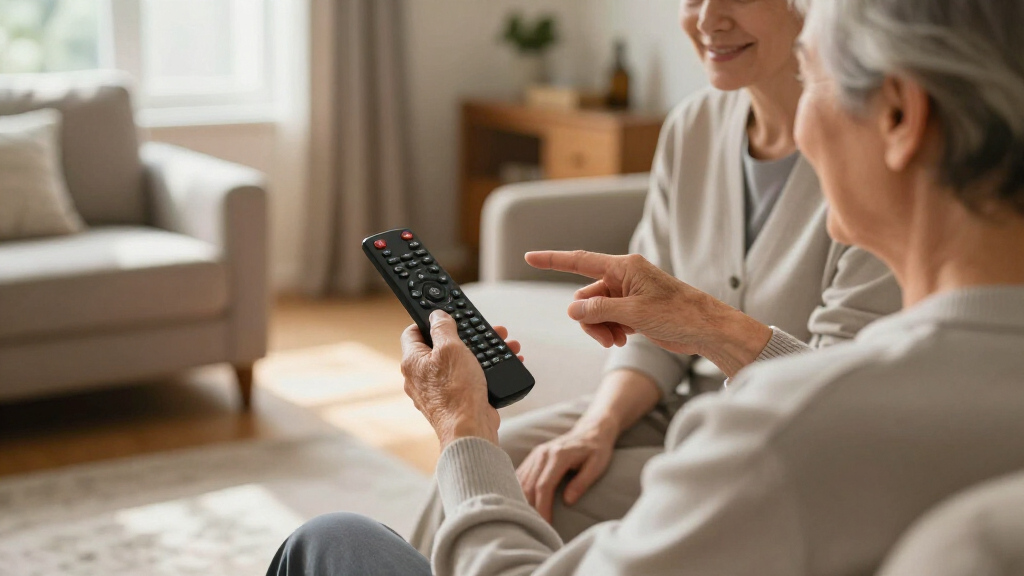

Finding the right universal remote for an elderly person with dementia can significantly improve their independence and reduce frustration. The best options prioritize large, clearly labeled buttons, simple layouts, and minimal setup. The EZclicker TV Remote for Seniors often stands out as the top choice because of its straightforward design and tactile buttons. Other strong contenders include the Big Button Universal TV Remote for Seniors and the GE Big Button Remote, which offer easy setup and broad compatibility. However, tradeoffs include limited smart features or slightly higher costs. Continue reading for a detailed comparison to help you pick the best remote for your loved one.

Turn quiet afternoons into listening time
- Thousands of audiobooks, podcasts and originals
- Listen on your phone, tablet or Echo — also offline
- Cancel anytime
Complete the kit


Key Takeaways
- Large, tactile buttons are essential for ease of use and to reduce confusion for seniors with dementia.
- Simplified layouts with minimal buttons outperform complex remotes in safety and usability.
- Compatibility with major TV brands is important but should not compromise simplicity.
- The top picks balance durability, ease of setup, and affordability effectively.
- More features sometimes mean more complexity, which can confuse users with cognitive difficulties.
| EZclicker TV Remote for Seniors, Extra Simple Big Button Remote (Blue) | 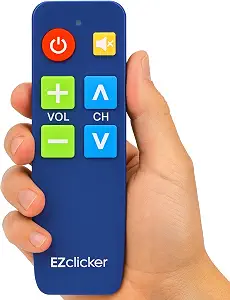 | Best Overall for Simplicity and Accessibility | Design: Big button universal controls with tactile feedback | Compatibility: Major TV brands (not for cable boxes, streaming devices, or Rokus) | Dimensions: 6 x 2 x 1 inches | VIEW LATEST PRICE | See Our Full Breakdown |
| Big Button Universal TV Remote for Seniors |  | Best for Traditional TV Users on a Budget | Button Size: Large | Compatibility: Most major TV brands | Remote Type: Traditional | VIEW LATEST PRICE | See Our Full Breakdown |
| Big Button TV Remote for Seniors, Dementia – Easy Setup with Large Color-Coded Buttons |  | Best for Dementia Patients and Visual Impairments | Compatibility: All major TV brands and cable providers | Button Size: Large | Color Coding: Yes | VIEW LATEST PRICE | See Our Full Breakdown |
| GE Big Button Universal Remote Control for Samsung, Vizio, LG, Sony, Roku |  | Best for Multi-Device Control in Assisted Living | Device Control: Up to 2 devices | Power Source: 2 AA batteries (not included) | Compatibility: Samsung, Vizio, LG, Sony, Roku | VIEW LATEST PRICE | See Our Full Breakdown |
| EZclicker TV Remote for Seniors, Big Button Universal Remote (Black) |  | Best Compact Design for Everyday Use | Button Size: Big buttons | Compatibility: Major TV brands | Dimensions: 6″ x 2″ x 1″ | VIEW LATEST PRICE | See Our Full Breakdown |
| Flipper Big Button TV Remote for Seniors, Dementia – Easy Setup |  | Best Overall for Simplicity and Customization | Button Colors: Green (On/Off), Orange (Volume), Blue (Channel), Gray (Mute) | Compatibility: All major TV brands, cable and satellite providers | Favorite Channels: Up to 25 | VIEW LATEST PRICE | See Our Full Breakdown |
| Big Button Universal Remote for All TV |  | Best for Immediate Use Without Setup | Compatibility: Major TV brands | Features: Extra-large enter button, tactile feedback | Batteries: Not included | VIEW LATEST PRICE | See Our Full Breakdown |
| EZclicker Big Button Universal TV Remote, Easy to Use for All Ages |  | Best for All-Ages Accessibility and Simplicity | Button Size: Large | Compatibility: Major TV brands | Programming Method: Press and hold Mute & Volume+ for up to 60 seconds | VIEW LATEST PRICE | See Our Full Breakdown |
| EZclicker Big Button Universal TV Remote, Easy to Use for All Ages |  | Best Lightweight Design for Comfort and Ease | Button Size: Large | Compatibility: Major TV brands | Dimensions: 7″ x 2″ x 1″ | VIEW LATEST PRICE | See Our Full Breakdown |
| Big Button Universal TV Remote for Seniors, Easy to Use, Compatible with Major TV Brands |  | Best for Simplicity and Compatibility in a Compact Form | Button Size: Large | Compatibility: Major TV brands | Batteries: Not included | VIEW LATEST PRICE | See Our Full Breakdown |
| universal remotes for elderly with dementia | Compatibility | Batteries | Button Size |
|---|---|---|---|
| EZclicker TV Remote for Senior | Major TV brands (not for cable boxes, streaming devices, or Rokus) | 2x AAA (not included) | — |
| Big Button Universal TV Remote | Most major TV brands | — | Large |
| Big Button TV Remote for Senio | All major TV brands and cable providers | — | Large |
| GE Big Button Universal Remote | Samsung, Vizio, LG, Sony, Roku | — | — |
| EZclicker TV Remote for Senior | Major TV brands | 2x AAA (not included) | Big buttons |
| Flipper Big Button TV Remote f | All major TV brands, cable and satellite providers | 2 AA (not included) | — |
| Big Button Universal Remote fo | Major TV brands | Not included | — |
| EZclicker Big Button Universal | Major TV brands | 2x AAA (not included) | Large |
| EZclicker Big Button Universal | Major TV brands | 2x AAA (not included) | Large |
| Big Button Universal TV Remote | Major TV brands | Not included | Large |
More Details on Our Top Picks
EZclicker TV Remote for Seniors, Extra Simple Big Button Remote (Blue)
This remote stands out for its large, tactile buttons and straightforward setup, making it a top choice for seniors with limited dexterity or vision. Compared to the Big Button Universal TV Remote for Seniors, it offers a more compact design that’s easier to hold, but it doesn’t support streaming devices or cable boxes. Its compatibility with major TV brands and easy programming process ensure minimal frustration, though the need for batteries adds an extra step. The tactile feedback and lightweight build make it ideal for users who need a highly accessible remote that minimizes cognitive load. However, it’s limited to basic TV functions and not suitable for those seeking advanced features or control over multiple devices.
Pros:- Large, easy-to-press buttons with tactile feedback
- Simple, one-step programming process
- Lightweight and compact for easy handling
Cons:- Not compatible with cable boxes or streaming devices
- Batteries not included, requiring additional purchase
Best for: Seniors with visual impairments or dexterity challenges seeking a simple, no-fuss remote
Not ideal for: Users wanting control over streaming devices or cable boxes, as it isn’t compatible with those
- Design:Big button universal controls with tactile feedback
- Compatibility:Major TV brands (not for cable boxes, streaming devices, or Rokus)
- Dimensions:6 x 2 x 1 inches
- Batteries:2x AAA (not included)
Our verdict“This remote is best suited for seniors who prioritize ease of use and straightforward functionality in their TV control devices.”
Big Button Universal TV Remote for Seniors
This remote excels for users who want a straightforward, large-button layout with broad device compatibility. Its simplicity makes it easier to operate than more complex remotes like the GE Big Button Universal Remote Control, which offers control over only two devices but has a more ergonomic shape. The large buttons eliminate confusion for users with impaired vision, yet it lacks voice control or advanced features, limiting its appeal for tech-savvy seniors. Its compatibility with most major TV brands ensures it can replace multiple remotes, but it doesn’t support control over streaming devices or sound systems. Its design is functional but basic, making it ideal for those seeking a no-frills remote without bells and whistles.
Pros:- Large buttons for easy operation
- Compatible with most major TV brands
- Simple, no-fuss design
Cons:- Does not support voice control
- Limited to traditional TV functions only
Best for: Seniors who need a simple replacement remote for their TV without extra features
Not ideal for: Caregivers or users wanting voice control or multi-device control capabilities
- Button Size:Large
- Compatibility:Most major TV brands
- Remote Type:Traditional
- Voice Control:Not supported
Our verdict“This remote is perfect for seniors seeking a basic, reliable TV remote that’s easy to use without extra features.”
Big Button TV Remote for Seniors, Dementia – Easy Setup with Large Color-Coded Buttons
This remote is tailored for users with dementia or impaired vision, featuring large, color-coded buttons that simplify operation. It surpasses the EZclicker Big Button Universal TV Remote (Black) in visual cues, making it easier for users to differentiate functions at a glance. Its universal compatibility with all major TV brands and cable providers offers flexibility, but the reliance on line of sight for some setups can be a drawback. The color coding helps reduce confusion, and the remote supports basic functions, which is ideal for users who need a simple, intuitive device. However, it’s limited in advanced features and may require IR extenders for certain setups, making it less suitable for tech-savvy users wanting more control.
Pros:- Large, color-coded buttons for easy navigation
- Compatible with all major TV brands and cable providers
- Designed to help regain independence among dementia patients
Cons:- Requires line of sight for some setups
- Limited to basic functions, not suitable for advanced features
Best for: Elderly individuals with dementia or significant visual impairments needing a simplified remote
Not ideal for: Those seeking advanced remote functions or control over smart devices
- Compatibility:All major TV brands and cable providers
- Button Size:Large
- Color Coding:Yes
- Works with:TV, cable/satellite boxes, soundbars
- Warranty:90 days
Our verdict“This remote makes the most sense for dementia patients and seniors with visual challenges who need a simple, easy-to-understand device.”
GE Big Button Universal Remote Control for Samsung, Vizio, LG, Sony, Roku
This remote offers control over up to two devices with large, ergonomic buttons that are easy to read, making it suitable for environments like nursing homes or assisted living facilities. Compared to the EZclicker TV Remote for Seniors, it provides multi-device control, which can be convenient for residents managing multiple entertainment devices. Its straightforward setup and ergonomic design reduce frustration, but its limited device control scope might be restrictive for users with more complex setups. The reliance on AA batteries and basic functionality means it’s less suitable for tech-savvy users wanting smart features or voice support. Its size and design make it ideal for shared or institutional use, but not for tech enthusiasts or those needing more advanced control options.
Pros:- Controls up to 2 devices with easy setup
- Large, easy-to-read buttons
- Ergonomic design for comfortable handling
Cons:- Requires two AA batteries (not included)
- Limited to controlling only two devices
Best for: Care facilities or families needing a reliable, multi-device remote for multiple users
Not ideal for: Home users seeking advanced features or control over streaming services
- Device Control:Up to 2 devices
- Power Source:2 AA batteries (not included)
- Compatibility:Samsung, Vizio, LG, Sony, Roku
- Features:Automatic code search, direct code entry, master volume control
- Design:Large buttons, ergonomic shape
Our verdict“This remote is well-suited for institutional settings where simple, multi-device control is needed without advanced features.”
EZclicker TV Remote for Seniors, Big Button Universal Remote (Black)
This remote provides large buttons and tactile feedback in a compact form, making it suitable for seniors who prefer a smaller, lightweight device. It shares many features with the EZclicker TV Remote for Seniors, Extra Simple, but its slightly smaller size appeals to users who want a more portable option. Its basic compatibility with major TV brands makes it a reliable choice for those who don’t need streaming or cable control. However, the limited control scope and lack of advanced features mean it’s not ideal for users wanting to manage multiple devices or smart home functions. Its simplicity makes it a good everyday remote for minimalists, but less adaptable for complex setups.
Pros:- Large, easy-to-press buttons
- Simple programming process
- Lightweight and compact for portability
Cons:- Not compatible with cable boxes or streaming devices
- Batteries not included
Best for: Seniors who prefer a smaller, lightweight remote for regular TV use
Not ideal for: Users looking for control over streaming devices or advanced functions
- Button Size:Big buttons
- Compatibility:Major TV brands
- Dimensions:6″ x 2″ x 1″
- Batteries:2x AAA (not included)
Our verdict“This remote is ideal for seniors who want a smaller, straightforward device for regular TV viewing without extra features.”
Flipper Big Button TV Remote for Seniors, Dementia – Easy Setup
This remote stands out for its highly intuitive, color-coded buttons that help users with low vision or dexterity challenges identify functions easily. Compared to the EZclicker Big Button Universal TV Remote, it offers more customization with up to 25 favorite channels, which can reduce navigation frustration. However, it remains limited to basic TV control and does not support streaming apps, which could be a drawback for tech-savvy seniors. Its simple four-button design minimizes confusion, making it ideal for those who need straightforward operation. The requirement for two AA batteries, not included, is a minor inconvenience but manageable given its focus on ease of use. This remote is best suited for seniors who primarily watch traditional TV and need a tactile, color-coded interface to promote independence.
Pros:- Large, tactile, color-coded buttons for easy recognition
- Compatible with all major TV brands and cable providers
- Simple 4-button layout reduces confusion
Cons:- Does not support streaming services like Netflix or YouTube
- Requires two AA batteries, not included
Best for: Seniors with low vision or dexterity challenges who watch mainly from traditional TV channels
Not ideal for: Users wanting streaming app support or smart TV navigation, as it does not support these features
- Button Colors:Green (On/Off), Orange (Volume), Blue (Channel), Gray (Mute)
- Compatibility:All major TV brands, cable and satellite providers
- Favorite Channels:Up to 25
- Batteries:2 AA (not included)
Our verdict“This remote is perfect for seniors needing a straightforward, customizable TV control experience without smart features.”
Big Button Universal Remote for All TV
This remote is designed for absolute convenience, offering plug-and-play operation with no programming required, making it ideal for users who need quick accessibility. Unlike the EZclicker Big Button Universal TV Remote, which also emphasizes simplicity, this model’s compatibility spans many major TV brands, eliminating the need for setup or learning new codes. Its extra-large enter button and tactile feedback are particularly helpful for users with visual impairments or limited dexterity. However, it only controls TVs and does not support streaming devices or cable boxes, limiting its functionality for households with more advanced entertainment systems. Batteries are needed, but they are not included, so users should prepare for that. This remote fits best for seniors who want a ready-to-use device that minimizes setup hassle, especially if their focus is on traditional TV viewing.
Pros:- Large, easy-to-press buttons suitable for low vision and dexterity issues
- No programming or setup required, ready to use immediately
- Universal compatibility with major TV brands
Cons:- Limited to TV control only, no streaming or cable support
- Batteries not included, requiring an extra purchase
Best for: Seniors and visually impaired users seeking a no-setup, out-of-the-box remote for TV control
Not ideal for: Households with streaming devices or cable boxes needing a multi-function remote, as this model only controls TVs
- Compatibility:Major TV brands
- Features:Extra-large enter button, tactile feedback
- Batteries:Not included
Our verdict“This remote simplifies TV control for seniors who want immediate, hassle-free use without extra features.”
This remote is a versatile choice, offering large, easy-to-press buttons and simple programming that appeal to seniors and users with limited dexterity. It shares many features with the EZclicker Big Button Universal TV Remote, but its slightly more compact dimensions make it easier to handle for some users. Compared to the Big Button Universal Remote for All TV, it emphasizes simplicity and universal compatibility, but it does not support streaming or cable devices, limiting its use in more complex setups. Programming involves pressing and holding specific buttons, which is straightforward but may still pose a challenge for those with severe dexterity issues. Batteries are not included, so buyers should be prepared. This remote is ideal for those needing a simple, lightweight device that works across major TV brands.
Pros:- Large, easy-to-press buttons for low vision and dexterity issues
- Simple, tool-free programming process
- Lightweight and compact for easy handling
Cons:- Limited to TV control, no streaming or cable support
- Batteries not included, extra cost
Best for: Seniors and individuals with limited dexterity seeking an easy-to-program, universally compatible remote
Not ideal for: People with cable or streaming device needs, as it only controls TVs
- Button Size:Large
- Compatibility:Major TV brands
- Programming Method:Press and hold Mute & Volume+ for up to 60 seconds
- Batteries:2x AAA (not included)
Our verdict“This remote offers a straightforward, adaptable solution for seniors who need basic TV control without extra features.”
EZclicker Big Button Universal TV Remote, Easy to Use for All Ages
This version of the EZclicker remote emphasizes a simple, lightweight design with large, tactile buttons that are easy to press. It closely resembles the EZclicker Big Button Universal TV Remote, with a focus on ease of programming and universal compatibility. Compared with the Big Button Universal Remote for All TV, it may be slightly more comfortable for users who prioritize a lighter device. Its straightforward programming process makes it accessible for seniors, but it only controls TVs and not streaming or cable boxes, which might limit its relevance in some households. Batteries are not included, so buyers should be prepared. This remote is best suited for seniors who want an easy-to-handle, simple control device for traditional TV watching.
Pros:- Large, tactile buttons for easy operation
- Simple programming process suitable for non-technical users
- Lightweight and easy to handle for limited dexterity
Cons:- Limited to TV control, no support for streaming devices
- Batteries not included, requiring additional purchase
Best for: Seniors seeking a lightweight, easy-to-program remote for TV use
Not ideal for: Families with streaming services or cable boxes, as it doesn’t support these functions
- Button Size:Large
- Compatibility:Major TV brands
- Dimensions:7″ x 2″ x 1″
- Batteries:2x AAA (not included)
Our verdict“This remote is well-suited for seniors who prefer a lightweight, uncomplicated device for traditional TV viewing.”
Big Button Universal TV Remote for Seniors, Easy to Use, Compatible with Major TV Brands
This remote balances simplicity with broad compatibility, featuring large buttons and tactile feedback ideal for seniors with vision or dexterity issues. It shares similarities with the Big Button Universal TV Remote for All TV but emphasizes ease of setup and straightforward use. Its simple design makes it accessible, though it only supports basic TV functions—no streaming or cable support—limiting its utility for more complex setups. Batteries are not included, which could be inconvenient. Its compact size and clear controls make it a good choice for seniors who want a reliable, easy-to-program device for traditional TV control without extra bells and whistles. It’s best for users who prioritize simplicity and compatibility over advanced features.
Pros:- Large, easy-to-press buttons for low vision users
- Simple setup process for quick use
- Compatible with major TV brands
Cons:- Limited to TV control only, no support for streaming or cable devices
- Batteries not included
Best for: Seniors who want a straightforward, reliable remote compatible with major TV brands
Not ideal for: Households with streaming services or those needing multi-device control, as it only manages TVs
- Button Size:Large
- Compatibility:Major TV brands
- Batteries:Not included
Our verdict“This remote offers a straightforward, reliable control option for seniors who need basic TV operation with minimal fuss.”

How We Picked
I evaluated these remotes based on several key factors relevant to elderly users with dementia. Priority was given to simplicity of design, large tactile buttons, and minimal setup to reduce frustration. Durability and build quality were also important since the remote needs to withstand frequent handling. Compatibility with major TV brands ensured broad usability, while value and affordability helped identify options suitable for different budgets. Products were ranked to favor ease of use and safety, with tradeoffs considered for features that could introduce confusion or complication.| universal remotes for elderly with dementia | Compatibility | Button Size |
|---|---|---|
| EZclicker TV Remote for Senior | Major TV brands (not for cable boxes, streaming devices, or Rokus) | — |
| Big Button Universal TV Remote | Most major TV brands | Large |
| Big Button TV Remote for Senio | All major TV brands and cable providers | Large |
| GE Big Button Universal Remote | Samsung, Vizio, LG, Sony, Roku | — |
| EZclicker TV Remote for Senior | Major TV brands | Big buttons |
| Flipper Big Button TV Remote f | All major TV brands, cable and satellite providers | — |
| Big Button Universal Remote fo | Major TV brands | — |
| EZclicker Big Button Universal | Major TV brands | Large |
| EZclicker Big Button Universal | Major TV brands | Large |
| Big Button Universal TV Remote | Major TV brands | Large |
Factors to Consider When Choosing Best Universal Remotes For Elderly With Dementia
Choosing the best remote for an elderly person with dementia involves balancing simplicity, safety, and compatibility. It’s important to focus on design features that reduce cognitive load and prevent accidental presses. Beyond the specific product features, understanding broader considerations such as durability, setup ease, and user familiarity can make a significant difference in daily use. Here are key factors to consider:Simplicity and Layout
Opt for remotes with large, clearly labeled buttons and minimal functions. Complex layouts increase the risk of accidental presses and confusion. A well-organized, straightforward design helps users focus on essential controls and reduces frustration during daily use. Avoid remotes with multiple small buttons or confusing arrangements that can overwhelm caregivers and users alike.
Button Size and Tactility
Large, textured buttons are vital for those with visual or motor challenges. Tactile feedback helps users confirm their presses without needing to look closely, which is especially helpful for seniors with cognitive impairments. Small or flat buttons should be avoided because they are harder to press accurately and can cause frustration.
Compatibility and Setup
While broad compatibility with major brands is desirable, it shouldn’t come at the expense of simplicity. Some remotes require complex programming, which can be confusing or intimidating. Look for models with straightforward setup instructions, ideally with pre-programmed functions or manual controls that are easy to understand and operate. Compatibility with multiple devices can be a bonus, but only if it doesn’t add complexity.
Durability and Build Quality
Remotes used daily by seniors need to withstand drops, spills, and frequent handling. Durable, high-quality materials reduce the need for replacements and add to safety by avoiding broken or malfunctioning buttons. Consider models with reinforced casings or water-resistant features if possible, especially for users who may not handle devices gently.
Price and Value
While investing in a high-quality remote can pay off in usability and longevity, the best product depends on your budget. Sometimes, a simple, affordable remote with large buttons is all that’s needed, whereas more expensive options may include additional features like universal compatibility or ergonomic designs. Be wary of overpaying for features that won’t be used or understood by the user.
Frequently Asked Questions
Will a universal remote work with all types of TVs?
Most universal remotes are designed to work with a wide range of TV brands, but compatibility isn’t guaranteed for all models. Check the remote’s compatibility list before purchasing, and consider remotes that offer easy programming options. Some models come with pre-set codes for popular brands, making setup simpler and faster. Remember, even compatible remotes may require initial configuration, so look for options with straightforward instructions or remote controls with manual buttons.
Are there remotes specifically designed for seniors with dementia?
Yes, some remotes are designed with features tailored for seniors with cognitive challenges. These often include large, high-contrast buttons, minimal functions, and simple layouts. Devices like the EZclicker are crafted to reduce confusion and accidental presses, making them safer and easier to operate. However, even these specialized remotes should be tested for individual needs, as comfort and familiarity can vary widely among users.
Can I program these remotes myself, or do I need professional help?
Most universal remotes are designed for easy setup and can be programmed at home using included instructions or codes. Many models feature one-button setup or code search functions, making self-programming straightforward. For users with limited technical skills, assistance from a caregiver or a step-by-step guide can simplify the process. If programming proves difficult, some retailers or manufacturers offer customer support to assist with setup.
How durable are these remotes for daily use?
Durability varies among models, but many designed for seniors feature sturdy construction and reinforced buttons. Look for remotes with impact-resistant casings or water-resistant features if mishandling or spills are a concern. Regular wear and tear are inevitable, so choosing a remote with good build quality can extend its lifespan and reduce replacement costs. Read reviews for insights into how well a remote holds up over time in real-world use.
Is it better to buy a remote with more functions or fewer buttons?
For elderly users with dementia, fewer functions generally lead to better usability. A remote with a simplified interface minimizes confusion and accidental presses, which can cause frustration. While extra features like volume controls or smart TV integrations are useful in some cases, they often add complexity. Focus on a remote that covers essential functions with large, clearly labeled buttons, and consider expanding features only if the user is comfortable with more options.
Conclusion
For those seeking the best overall balance of simplicity, compatibility, and durability, the EZclicker TV Remote for Seniors stands out as the top choice. If budget is a concern, the Big Button Universal TV Remote for Seniors offers reliable performance at a lower price. For caregivers looking for a premium, highly durable option, the GE Big Button Remote provides broad compatibility and easy setup. Beginners or users with severe cognitive challenges will benefit most from remotes with minimal buttons and straightforward operation. Ultimately, selecting a remote depends on the user’s familiarity with technology, physical ability, and specific needs—prioritizing simplicity and safety will often lead to the best experience.Halloween Picks

Pumpkin Halloween Fog Machine with 12-Color LED Lights, Bluetooth Speaker, and Remote

DomKom 6-Foot Halloween Inflatable Ghosts Roasting Marshmallows

HOPOCO Halloween Pumpkin Fog Machine with 12 LED Colors and 4 Light Modes
As an affiliate, we earn on qualifying purchases.