
TL;DR

Turn quiet afternoons into listening time
- Thousands of audiobooks, podcasts and originals
- Listen on your phone, tablet or Echo — also offline
- Cancel anytime
Video doorbells help seniors verify visitors, stay aware of home activity, and maintain independence. Modern models are easier to use, more secure, and now include features like voice control and higher-resolution video.
Choose models with large buttons, simple controls, and clear visuals for easy use.
Recent tech updates like AI detection and high-res video make devices more reliable and helpful.
Wireless installation options make setup straightforward, even for non-technical users.
Prioritize security features like encryption and privacy controls to protect your data.
Budget wisely: basic models start around $50, but investing a bit more can boost functionality and peace of mind.
Video Doorbells for Seniors
TL;DR: Video doorbells help seniors verify visitors, stay aware of home activity, and maintain independence. The best models keep things simple: clear video, large controls, voice help, reliable alerts, and privacy settings that are easy to understand.
See who is there before opening the door.
Easy should feel obvious.
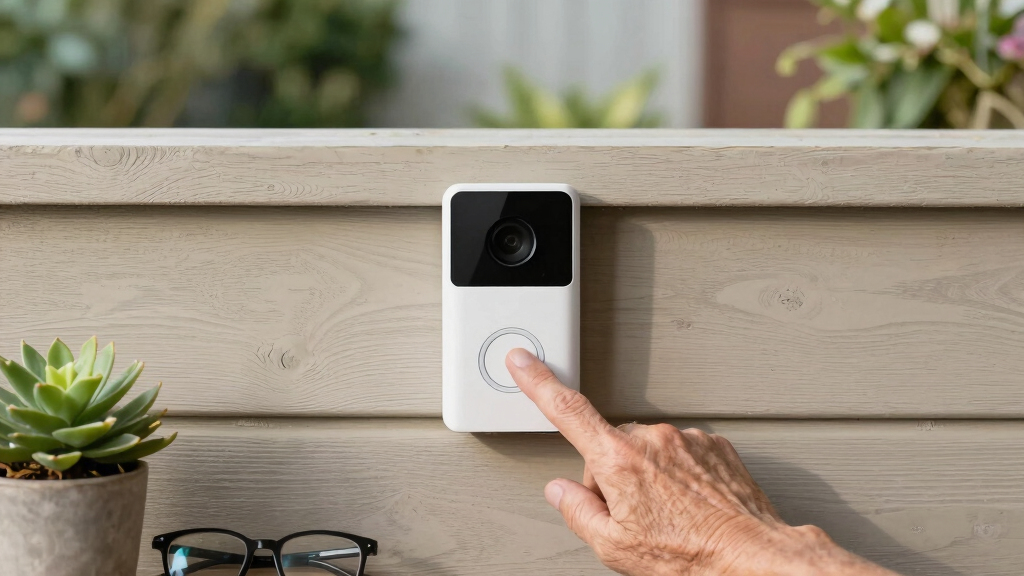
A senior-friendly doorbell should reduce decisions, not add them. Look for a bright physical button, a simple app, clear audio, visible alerts, and setup instructions that do not assume technical confidence.
Large buttons and simple controls
Big, visible controls support limited dexterity or vision and make everyday use feel natural.
Clear video at a glance
1080p or better helps seniors quickly identify visitors, deliveries, and unfamiliar activity.
Reliable support and prompts
Step-by-step setup, voice prompts, and customer support matter as much as specs.
From ring to reassurance.
A video doorbell turns the front door into a manageable checkpoint. The goal is not more alerts; it is better information at the right moment.
Visitor arrives
Motion detection notices activity before the bell is pressed.
Alert appears
Phone, tablet, chime, or visual cue lets the resident know.
Video confirms
Clear live view helps identify deliveries, neighbors, or strangers.
Talk safely
Two-way audio allows conversation without opening the door.
Decide calmly
The senior can answer, ignore, call a caregiver, or ask someone to leave.
Choose for confidence, not complexity.
The strongest pick is usually the model that combines easy operation, clear video, useful alerts, and privacy controls without burying everything in confusing menus.
| Feature | Why It Matters | Senior Fit | Plain-English Check |
|---|---|---|---|
| Large buttons and simple controls | Reduces frustration and supports consistent use by people with vision or dexterity challenges. | ✓ Essential | Can the main action be understood without opening a manual? |
| Clear 1080p+ video | Helps identify visitors accurately, especially at night or during quick checks. | ✓ Essential | Is the face clear enough on a phone or tablet screen? |
| Voice assistant compatibility | Allows hands-free use through Alexa, Google Assistant, or similar systems. | ✓ Helpful | Can the door be checked with a simple spoken command? |
| AI smart detection | Filters pets, leaves, shadows, and passing cars to reduce false alarms. | ~ Useful | Does it alert for people without buzzing constantly? |
| No privacy controls | Weak settings can expose video feeds or make sharing permissions unclear. | ✗ Avoid | Can password, encryption, and sharing settings be found easily? |
Newer models are calmer and clearer.
Modern video doorbells are better for seniors because the improvements focus on fewer false alarms, sharper images, less maintenance, and easier ways to answer the door.
The buying logic in one line.
Start with the person using it every day, then match the technology to their comfort level, home layout, and support network.
Can seniors install one themselves?
Many wireless models are made for DIY installation with a Wi-Fi connection, a few screws, and basic tools. Some seniors may still prefer help from family, a caregiver, or a technician.
What if the internet goes out?
Some models offer battery backup or local storage, but most smart features need Wi-Fi. Choose a model that clearly explains what still works offline.
Are they secure?
Reputable brands use encryption, account protections, and privacy settings. The practical rule: use a strong password and review who can access the video feed.
What is the best starter choice?
A balanced model with 1080p video, two-way audio, adjustable alerts, and simple installation is usually a better long-term value than the cheapest option.
What makes a video doorbell easy for seniors to use?
Most video doorbells designed for seniors feature large buttons, simple setup, and clear visuals. For example, a model with a big, bright button and a straightforward app makes operation feel natural. Imagine a device that lights up with a friendly icon when someone rings, and the app shows a crisp, clear image. Intuitive controls mean less frustration, more confidence.
Look for models with step-by-step instructions and good customer support. Wireless options are easier to install, often requiring just a few screws and a Wi-Fi connection. Some even offer voice prompts or easy-to-read screens, turning tech into a helpful friend rather than a puzzle.
Popular right now

Samsung 85-Inch QN70H Neo QLED 4K Smart TV (2026)

Ninja Foodi 10-Qt DualZone Smart XL Air Fryer, 6-in-1, DZ550

Bose QuietComfort Ultra Wireless Noise-Cancelling Headphones with Spatial Audio, Black
As an affiliate, we earn on qualifying purchases.
How do modern video doorbells keep seniors safe and secure?
Video doorbells act like a vigilant neighbor, streaming live video directly to your phone or tablet. This means you can verify visitors before opening the door, reducing the risk of scams or unwanted intrusions. For seniors, this instant access provides reassurance and control, especially when alone. Motion alerts notify you when someone is nearby, even if they don’t ring the bell, which helps catch suspicious activity early. Two-way audio allows for communication without physical contact, enabling you to ask questions or tell someone to leave, all from a safe distance. This capability reduces the need for risky confrontations and adds a layer of safety.
Recent models incorporate AI technology that can differentiate between humans, pets, or falling leaves. This not only reduces false alarms but also helps seniors avoid unnecessary worry or constant checking. Understanding the implications of these features means recognizing how they balance security with convenience — false alarms can lead to alarm fatigue, making it harder to respond to genuine threats, so AI helps filter out noise. These technological advancements turn the front door into a manageable, safe checkpoint, giving seniors greater peace of mind and independence.
Which features matter most for seniors choosing a video doorbell?
| Feature | Why It Matters |
|---|---|
| Large buttons & simple controls | Facilitates ease of use for those with limited dexterity or vision, reducing frustration and error. This ensures seniors can operate the device confidently, which is crucial for consistent use and safety. Complex controls can discourage use or lead to mistakes that compromise security, so simplicity is key. |
| Clear video resolution (1080p or higher) | Provides crisp, detailed images that help seniors accurately identify visitors even in low light or at a glance. This clarity is vital because misidentifying visitors can lead to unnecessary worry or missed threats. Higher resolution reduces the chance of errors and enables quick, informed decisions about whether to open the door or speak through the device. |
| Voice assistant compatibility | Enables hands-free operation, allowing seniors to control the device via simple voice commands. This is especially useful for those with mobility issues or when multitasking, making technology less of a barrier. It also allows for quick responses in urgent situations, enhancing safety and independence. |
| Visual alerts & adjustable volume | Supports users with hearing impairments by providing visual cues, while customizable volume settings prevent audio from being too loud or too soft, ensuring clear communication in various environments. Balancing alert types and volume levels helps prevent missed notifications or startling sounds, which can be confusing or frightening. |
| Wireless installation | Eliminates complicated wiring, making setup less intimidating and more flexible. This allows for quick installation, whether on a porch or wall, without extensive technical knowledge. It also means less disruption and fewer potential errors during setup, encouraging more consistent use. |
What recent tech updates make video doorbells better for seniors?
Modern video doorbells now boast 1080p resolution or higher, giving crisp images even at night, which helps seniors recognize visitors clearly regardless of lighting conditions. AI-driven motion sensors reduce false alarms caused by leaves, animals, or shadows, making alerts more relevant and less overwhelming. This means seniors won’t be bombarded with unnecessary notifications, helping them stay calm and focused. Voice control integration allows seniors to answer or check the door using simple voice commands, which is especially helpful for those with mobility or dexterity challenges. Built-in screens enable direct viewing of visitors without needing a phone or app, reducing dependence on additional devices and making the process more straightforward. Longer-lasting batteries or wired power options mean the device stays operational with minimal maintenance, which is crucial for those who may forget frequent recharges or have unreliable power sources. These updates collectively improve reliability, ease of use, and security, aligning with the needs of seniors who want dependable, straightforward technology, and understanding these features helps caregivers and seniors make informed choices that balance convenience with safety.
How much do video doorbells for seniors typically cost?
Prices range from about $50 for basic models to over $200 for more advanced features. Basic models often include live video streaming and motion alerts, which are sufficient for everyday safety and are budget-friendly. Higher-end units offer better video quality, AI detection of visitors or pets, and voice control, providing more convenience and security. When choosing, consider the value of added features versus cost, as investing a little more can significantly enhance ease of use, reliability, and peace of mind. Think of it as buying a friendly, always-on guard dog that fits right into your home, offering reassurance without the hassle of complicated setups or frequent repairs. Weighing the tradeoffs between price and features helps ensure you get a device that’s both affordable and effective for your specific needs.
What questions do seniors usually ask about video doorbells?
- Are they easy to use? Yes, most are designed with simplicity in mind, featuring large buttons, clear visuals, and straightforward setup instructions. This minimizes confusion and encourages regular use. Recognizing the importance of ease, manufacturers often emphasize intuitive design to prevent frustration and ensure safety.
- Can I install it myself? Many wireless models are designed for DIY installation, often requiring just a Wi-Fi connection and basic tools. However, assistance from family or tech support can make the process smoother, especially for those less comfortable with technology. Understanding the tradeoffs between convenience and potential technical hurdles helps seniors decide whether to attempt installation themselves or seek help.
- Are they secure? Reputable brands use strong encryption and secure servers to protect your video feeds and personal data. Regular updates and choosing trusted brands further enhance security. It’s important to understand that security isn’t just about the device but also about how you set it up and maintain it, including changing default passwords and keeping firmware current.
- What if Wi-Fi drops? Some devices include local storage options or battery backups that continue functioning during outages, ensuring continuous security. However, a stable internet connection generally improves picture quality and alert responsiveness. Recognizing these tradeoffs helps users plan for contingencies and select models that best fit their environment.
- Are they private? Privacy controls and encryption are standard in reputable models, preventing unauthorized access. It’s important to understand and configure these settings properly to maintain your privacy and trust in the device. Being aware of privacy implications encourages responsible use and helps prevent potential security breaches.