
TL;DR
Listen free for 30 days with Audible
Thousands of audiobooks and originals — cancel anytime.
Start your free trialAs an affiliate, we earn on qualifying purchases.
Talking blood pressure monitors provide audible readings, making blood pressure tracking accessible for all. They combine ease of use with smart tech, helping you stay on top of your health without hassle.
Imagine sitting quietly with a cuff wrapped around your arm, hearing your blood pressure numbers spoken aloud. No need to strain your eyes or struggle with small displays. Talking blood pressure monitors turn a routine check into an accessible, stress-free experience, especially if you’re visually impaired or simply prefer auditory guidance.
Today, these devices are more than just talking gadgets—they’re smart, reliable tools that help millions keep tabs on their health easily and confidently. In this guide, you’ll learn what makes them special, how they fit into your daily routine, and what features to look for.
Validated talking blood pressure monitors offer accuracy comparable to standard devices, making them reliable for home use.
Voice prompts and visual features enhance independence, especially for visually impaired or elderly users.
Choosing a device with smart connectivity can make tracking and sharing your health data much easier.
Focus on features like voice clarity, cuff comfort, and ease of operation to find the best fit for your needs.
Price varies widely, but investing in a validated, well-featured device pays off in trust and convenience.
Accessible home health / plain-English guide
Talking Blood Pressure Monitors
Hear systolic pressure, diastolic pressure and pulse spoken aloud—without squinting at a small display. A validated talking monitor can make routine checks simpler, more independent and easier to track.
Cost rises with connectivity, memory, voice options and advanced detection features.
Systolic pressure, diastolic pressure and pulse rate are announced after each check.
A validated talking model can provide accuracy comparable to a standard home monitor.
Especially useful for people with low vision, older adults and auditory learners.
Many models automate inflation, measurement and spoken results.
Compact battery-powered designs suit home checks and travel.
Follow the maker’s calibration guidance or your clinician’s recommendation.
01 / How it works
From cuff to clear spoken feedback
The measurement technology is much like a standard automatic upper-arm monitor. The difference is a voice module that guides the check and reads the result aloud, reducing dependence on a display.
Fit the cuff
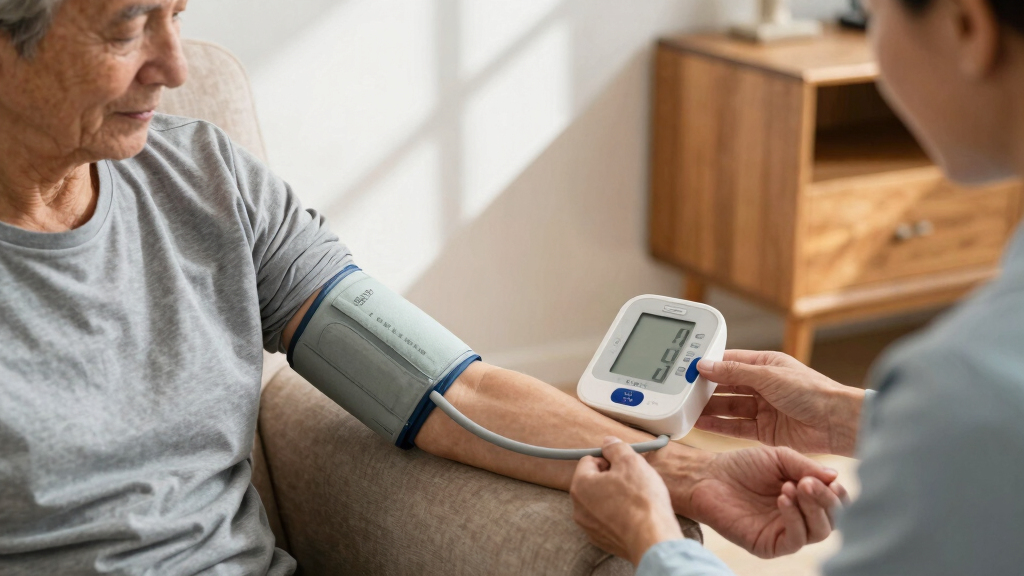
Wrap the correct-size cuff around a bare upper arm, following the alignment mark.
Sit quietly
Rest with feet flat, back supported and the cuffed arm held near heart level.
Press start
The cuff inflates and deflates automatically while prompts remind you to stay still.
Hear the result
The monitor announces systolic, diastolic and pulse readings and may save them.
“Your systolic blood pressure is 120.” Immediate speech turns a screen-based task into a hands-free health check.
02 / Accessibility
Why voice changes the experience
Audible prompts do more than add convenience. They help people complete a check privately, confirm each stage and understand the result without relying on a sighted helper.
No tiny numbers
Spoken results remove the need to read a small LCD, while a large high-contrast screen remains useful as a second channel.
More autonomy
Clear prompts can reduce reliance on caregivers and make regular home monitoring easier to fit into everyday life.
Fewer missed steps
Instructions such as “remain still” provide real-time reassurance and may reduce avoidable technique errors.
Important tradeoff: Speech is only helpful when it is understandable. Look for adjustable volume, clear pronunciation and suitable language options. People with hearing loss should also prioritize a large visual display or vibration alert.
Voice + visual03 / Buying guide
Choose well in three steps
Start with your real daily needs—not the longest feature list. Comfort, understandable speech and validated accuracy matter more than extras you may never use.
Define must-haves
Choose the voice language, volume, button size, memory capacity and connectivity you will actually use.
Measure your arm
Match your arm circumference to the manufacturer’s cuff range. Poor fit can undermine accuracy and comfort.
Verify accuracy
Look for independent validation, relevant medical-device compliance and reviews from people with similar needs.
| Feature | Basic model | Accessible pick | Smart model |
|---|---|---|---|
| Spoken readings | ✓ | ✓ | ✓ |
| Adjustable volume | ~ | ✓ | ✓ |
| Large tactile controls | ~ | ✓ | ~ |
| Reading memory | ✓ | ✓ | ✓ |
| Bluetooth app sync | ✗ | ~ | ✓ |
| Simple setup | ✓ | ✓ | ~ |
04 / Feature priorities
What matters most?
For most people, clear speech and correct cuff fit should outrank premium technology. Memory and app syncing become valuable when you need to spot trends or share a record with a healthcare professional.
Smart features can automate logging, build graphs and send reminders—but they may add cost, setup time and dependence on a smartphone.
Priority guide based on practical usefulness, not a clinical scoring system.
05 / Reliable readings
Accuracy is about the device and the technique
A talking monitor can be accurate enough for home tracking when the model is validated and the cuff is used correctly. The voice feature itself does not make the measurement more or less accurate.
Do not diagnose yourself from one reading. Follow the measurement plan agreed with your healthcare professional, and seek medical advice when results are repeatedly unusual or symptoms concern you.
Where trust comes from
Regulatory availability alone does not always prove that a specific model passed a recognized accuracy protocol.
A cuff that is too small or too large can distort the reading.
Rest before measuring and avoid movement or conversation during inflation and deflation.
Follow battery, storage and calibration instructions for consistent performance.
The complete health-data chain
From a quiet moment to a useful conversation
Sit, rest and position the cuff.
Receive clear spoken readings.
Store results in memory or an app.
Look for patterns across time.
Discuss the record with a clinician.
What exactly is a talking blood pressure monitor, and how does it work?
A talking blood pressure monitor is a device that measures your blood pressure and then announces the numbers aloud. It combines a typical cuff and sensor with a speaker and voice module, guiding you through each step and then reading out systolic, diastolic, and pulse rate.
For example, after wrapping the cuff around your arm, you press a button. As the cuff inflates and deflates, the device narrates instructions like “Please remain still” and finally announces, “Your systolic blood pressure is 120,” making the process straightforward and hands-free.
This real-time spoken feedback is especially handy if reading small screens or remembering numbers is challenging. The technology behind it is similar to standard monitors, but with added speech components—making health checks more inclusive.
Understanding how these devices operate reveals the importance of their design. The fusion of traditional measurement technology with speech modules allows for immediate, accessible feedback. This integration ensures that users receive both accurate readings and clear instructions, reducing user error and enhancing confidence in self-monitoring. The tradeoff, however, can be that speech-enabled devices may sometimes be more complex to set up or require batteries, which users should consider for consistent performance.
talking blood pressure monitor with voice prompts
As an affiliate, we earn on qualifying purchases.
As an affiliate, we earn on qualifying purchases.
Why are talking blood pressure monitors a game-changer for accessibility?
If you’ve ever squinted at tiny numbers on a display, you’ll appreciate how voice prompts remove that hurdle. For visually impaired users, these monitors provide independence—no need for a sighted helper. They also benefit seniors or anyone who finds reading small screens difficult.
Imagine a person with limited eyesight, using a monitor that says, “Your pulse rate is 72,” so they don’t have to ask someone else for help. Plus, they can check their blood pressure discreetly, anytime, in the comfort of home.
This accessibility isn’t just about convenience; it’s about giving everyone control over their health, even if reading isn’t your strong suit. The implications are significant: users gain autonomy, reduce reliance on caregivers, and can integrate health monitoring into daily routines more seamlessly. The tradeoff is that some models might lack customizable voice options or might not be loud enough for all users, so selecting a device with adjustable volume and clear speech is crucial for maximum benefit.
validated home blood pressure monitor with audio
As an affiliate, we earn on qualifying purchases.
As an affiliate, we earn on qualifying purchases.
How to pick the right talking blood pressure monitor for you in 3 easy steps
- Decide on your must-have features. Do you want multiple voice languages? Large buttons? Connectivity to apps? Knowing what’s essential helps narrow your options.
- Check the cuff size and comfort. Make sure the cuff fits your arm—most monitors come with adjustable sizes, but it’s good to verify beforehand.
- Look for validated accuracy and user reviews. Choose models that meet medical standards and have positive feedback from real users, especially those with similar needs.
For example, a senior user might prioritize a device with large, easy-to-press buttons and a loud, clear voice, while a tech-savvy person may want Bluetooth connectivity and app tracking.
Following these steps ensures you get a device that’s both reliable and suits your lifestyle, turning health checks into a simple daily habit. By considering these factors, you minimize the risk of purchasing a device that might be difficult to use or less accurate, which could lead to misinterpretations of your health status. Investing time in your selection process ensures your device becomes a trusted health companion.
smart blood pressure monitor with app connectivity
As an affiliate, we earn on qualifying purchases.
As an affiliate, we earn on qualifying purchases.
How do smart features and app connectivity improve your blood pressure tracking?
Smart features turn a basic device into a health partner. Some talking monitors connect via Bluetooth to your smartphone, automatically recording readings and creating trend graphs. This makes tracking over weeks or months easier and more accurate.
Picture yourself checking your blood pressure in the morning. The device whispers your numbers, then syncs with an app that charts your progress—spotting patterns or spikes. It even reminds you to take measurements, reducing skipped days.
The benefits extend beyond convenience. These features enable you to analyze your health over time, identify trends, and share data effortlessly with your healthcare provider. However, users should weigh the tradeoff: more features often mean higher costs, and some might require a learning curve to use effectively. Additionally, reliance on smartphone connectivity can be a barrier for those less comfortable with technology, so choosing a device with an intuitive interface is advisable to maximize usability and ensure consistent health monitoring.
easy-to-use talking blood pressure cuff
As an affiliate, we earn on qualifying purchases.
As an affiliate, we earn on qualifying purchases.
What features matter most when choosing a talking blood pressure monitor?
Not all features are created equal. Here’s what to focus on:
- Voice clarity and language options: Clear speech and multiple languages can make a big difference.
- Memory storage: Ability to store several readings helps track your progress over time.
- Ease of operation: Large, tactile buttons and simple instructions prevent frustration.
- Connectivity: Bluetooth or Wi-Fi for app syncing.
- Cuff size and comfort: Ensures accurate readings and ease of use.
Choosing the right combination of these features can significantly influence your user experience. For example, a device with a loud, easy-to-understand voice and a simple interface can be more effective for users with hearing or vision challenges. Similarly, devices with robust connectivity options support comprehensive health management, but might come with increased complexity or cost. Balancing feature set with your comfort level and needs ensures you select a device that enhances your health monitoring without adding unnecessary frustration or expense.
Are talking blood pressure monitors accurate enough for health decisions?
Absolutely, if they’re validated and used correctly. Many models meet strict standards set by health authorities, including the FDA. Accuracy depends on proper cuff placement, remaining still, and following calibration guidelines.
Understanding the importance of validation helps you avoid unreliable devices. Using an unvalidated monitor can lead to false readings, potentially causing unnecessary concern or false reassurance. Proper technique, such as sitting calmly and positioning the cuff at heart level, is crucial to ensure the device’s accuracy. Additionally, regular calibration or comparison with clinical measurements can help confirm your device’s reliability. The implication is that with correct use and validated devices, you can confidently base health decisions on your home readings, making routine monitoring a trustworthy part of your health management.
Can I use a talking blood pressure monitor if I have hearing impairments?
If hearing is limited, look for models with enhanced visual features—large, bright displays, vibration alerts, or visual indicators. Many devices include big numbers, bright backlights, or flashing lights for alerts, making them accessible without sound.
For example, some monitors vibrate when the measurement is complete, and display the results loudly on the screen. This multimodal feedback ensures that users with hearing challenges can still effectively monitor their blood pressure, fostering independence and confidence. Choosing a device with customizable visual alerts or adjustable brightness and vibration settings can further enhance usability, ensuring that the device adapts to your specific needs. Accessibility features like these are vital for inclusive health management, allowing everyone to stay informed without relying solely on audio cues.
What’s the typical price range for talking blood pressure monitors?
Expect to pay between $50 and $150, depending on features and brand. Basic models with voice prompts and large buttons tend to be more affordable, while advanced devices with app connectivity and multiple languages cost more.
For example, a simple, validated model might be around $60, while a premium device with Bluetooth, multiple voice options, and extra storage could be closer to $130.
Investing in a reliable, validated device can save you money in the long run, providing peace of mind that your readings are trustworthy. While upfront costs vary, selecting a device within this range generally balances affordability with quality, ensuring accurate and accessible health monitoring that is worth the investment.
Frequently Asked Questions
Are talking blood pressure monitors as accurate as traditional ones?
When validated and used correctly, talking blood pressure monitors provide reliable readings similar to standard devices. Proper cuff placement, remaining still, and following calibration instructions are key to accuracy.
How do I choose the right talking blood pressure monitor?
Identify your priorities—voice clarity, cuff size, connectivity, and ease of use. Read reviews and verify that the device meets medical standards before purchasing.
Can children or people with disabilities use these monitors?
Yes, many models are suitable for children or users with disabilities, especially if they feature adjustable cuff sizes, loud voices, or visual alerts. Always check the product specifications for your needs.
How often should I check or calibrate my device?
Follow the manufacturer’s instructions—usually once a year or as recommended by your healthcare provider. Regular checks ensure consistent, trustworthy readings.
What if I have trouble hearing the voice prompts?
If hearing is limited, opt for devices with large, bright screens, vibration alerts, or visual indicators. Some models also allow customizable volume and alert settings.
Conclusion
Talking blood pressure monitors turn a routine health check into an accessible, empowering experience. They make it easier to stay on top of your health—no squinting, no guessing, just clear, spoken numbers.
Remember, the right device adapts to your needs and keeps you confident in your health journey. In a world full of tech, simplicity and trust still matter most—so choose what works for you and keep checking in with your doctor regularly.
Back to school Picks
back to school
As an affiliate, we earn on qualifying purchases.