TL;DR

Turn quiet afternoons into listening time
- Thousands of audiobooks, podcasts and originals
- Listen on your phone, tablet or Echo — also offline
- Cancel anytime
Talking clocks and watches use clear voice output to help low-vision users tell time easily. Recent innovations like smart connectivity and customization make them more versatile and reliable, improving daily independence.
Imagine waking up in the morning, reaching for your clock, and hearing the time clearly spoken aloud. No squinting, no fumbling. That’s the power of talking clocks and watches. These simple helpers are designed to bridge the gap between sight and sound, making daily routines smoother for people with low vision.
If you or someone you care about struggles to see traditional clocks, understanding these devices can open new doors to independence. Today’s tech isn’t just about flashy gadgets — it’s about making life easier, more accessible, and less frustrating. Let’s explore how these tools work and what recent innovations are transforming low-vision assistance.
Choosing the right talking clock or watch depends on your lifestyle, preferences, and environment.
Recent tech advances like smart connectivity and voice assistant integration make these devices more versatile and user-friendly.
Adjustable volume, speech customization, and tactile controls are key features to look for.
Proper maintenance and selecting reputable brands ensure reliable performance over time.
These simple tools significantly boost independence, especially when designed with user needs in mind.
Talking Clocks and Watches
Simple helpers that turn sight into sound. With one press—or one spoken request—these accessible devices announce the time clearly, reducing squinting, fumbling, and dependence on others throughout the day.
Timekeeping built around real life
A useful talking device combines clear speech with controls that are easy to find and operate. The strongest designs add visual or tactile feedback without making the basic task unnecessarily complicated.
Clear voice output
Natural speech announces the time, alarms, and sometimes reminders. Adjustable volume, language, and speech speed help the device fit the user and environment.
Tactile simplicity
Large, easy-to-press buttons and raised markings reduce searching. Minimal controls can make the device faster to learn and more dependable under pressure.
Optional visual cues
Large, high-contrast displays support people with residual vision. Combined audio, visual, and tactile feedback gives users more than one way to confirm the time.
Pick the right helper
The best device is not automatically the most advanced. Match its controls, location, and feature set to the routines it needs to support.
Start with daily needs
Choose between a bedside clock, wearable watch, or app. Consider portability, alarms, room noise, and comfort with technology.
Check customization
Listen for clear speech and test the buttons. Look for suitable volume, language, voice, tactile cues, and visual contrast.
Set a practical budget
Pay for features that will be used. Grants, insurance coverage, discounts, or assistive-technology programs may reduce the cost.
Basic clock or smart watch?
Basic models prioritize predictability and ease. Smart devices add health data, notifications, reminders, and connectivity—but may require more setup and ongoing maintenance.
| Feature | Basic talking clock | Smart talking watch |
|---|---|---|
| Design | Large buttons, simple interface | Discreet, wearable, multifunctional |
| Connectivity | ✗ Standalone; no internet needed | ✓ Bluetooth, Wi-Fi, app integration |
| Customization | ~ Voice, volume, language | ✓ Voice, alerts, apps, health tracking |
| Automatic time sync | ~ Available on selected models | ✓ Common through connected services |
| Learning curve | ✓ Usually low | ~ Moderate; setup may be required |
| Typical price | $20–$50 | $100–$300+ |
The central tradeoff: choose simplicity and standalone reliability when time announcement is the main need; choose smart connectivity when reminders, health functions, and digital integration add meaningful value.
Smarter without losing the purpose
Modern improvements can reduce manual adjustments, improve speech clarity, and expand a timepiece into a broader daily assistant.
Look beyond the feature list
A short hands-on test can reveal more than packaging. Confirm that the device remains understandable, reachable, and comfortable in the place where it will actually be used.
Speech and volume
Is the voice clear at the required distance? Can volume and speech speed accommodate quiet and noisy settings?
Buttons and feedback
Are controls easy to locate by touch? Does each press provide an obvious sound, click, or vibration response?
Power and reliability
Check battery life, replacement method, charging access, alarm backup, warranty, and brand support.
Room to adapt
Consider languages, custom alerts, smartphone compatibility, and features that may support future routines.
Small device. Meaningful freedom.
Talking clocks and watches are most effective when their design reflects the user’s actual sensory needs, routines, and comfort level.
Choose for the lifestyle: bedside, wearable, or app-based use calls for different controls and features.
Prioritize fundamentals: clear speech, adjustable volume, tactile buttons, and dependable power matter most.
Add smart features deliberately: connectivity is valuable when it reduces effort or supports useful routines.
Plan for reliability: reputable support, routine maintenance, and accessible charging protect long-term use.
Test with the user: the right solution should increase confidence without introducing avoidable complexity.
What Makes a Talking Clock or Watch Perfect for Low Vision?
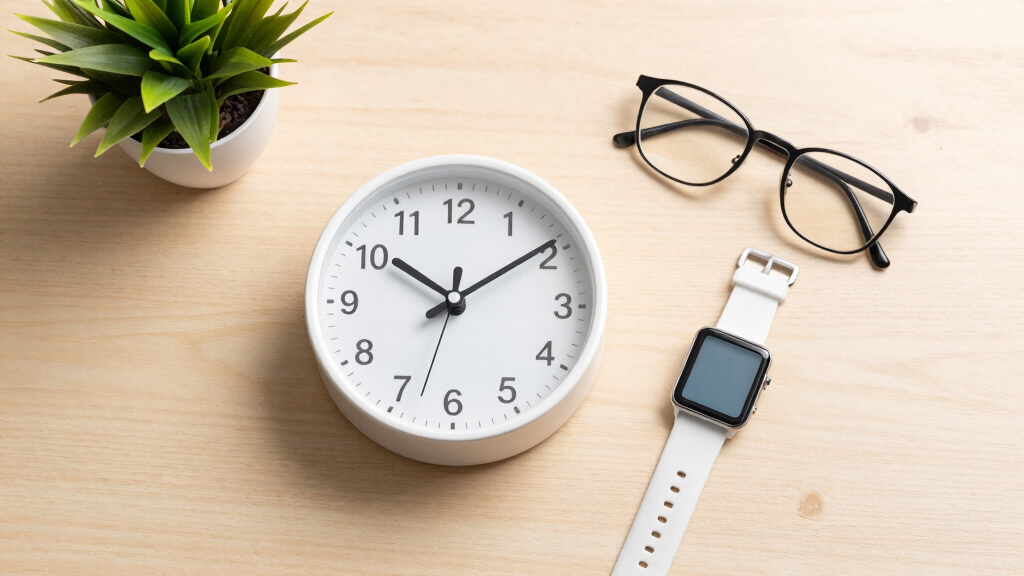
A talking clock or watch is a device that announces the time with a clear voice. It’s designed for people who find reading tiny numbers or high-contrast displays difficult. These devices feature simple operation, large buttons, and adjustable volume, making them easy to use daily.
For example, a busy retiree might place a basic talking clock on the bedside table. When they wake up, they press a big, tactile button, and the clock loudly states the time. The sound is loud enough to hear over morning noises but customizable to suit individual needs.
Many models also include visual cues, like large, high-contrast numbers or tactile markings for those who prefer a combined visual and auditory experience. This flexibility makes talking clocks accessible to a broader audience.
Understanding what makes these features effective is crucial because it directly impacts usability and independence. Large buttons and adjustable volume ensure the device can be tailored to various sensory needs, reducing frustration and increasing confidence. Visual cues, such as high-contrast displays or tactile markings, provide additional reassurance for users with residual sight or preferences for multi-sensory feedback. The tradeoff often lies in balancing simplicity and advanced features; a more straightforward device might be easier to learn, but less versatile, while more complex models could offer greater customization at the expense of user-friendliness for some.
Popular right now

Samsung 85-Inch QN70H Neo QLED 4K Smart TV (2026)

Ninja Foodi 10-Qt DualZone Smart XL Air Fryer, 6-in-1, DZ550

TCL QM64L 85-Inch QD-Mini LED 4K Smart Fire TV
As an affiliate, we earn on qualifying purchases.
How to Pick the Right Talking Clock or Watch in 3 Easy Steps
- Assess your needs: Do you prefer a simple voice, multiple alarms, or smart features? Consider if portability or a stationary device suits your lifestyle best. Recognizing your specific environment and daily routine helps determine which features are most beneficial, as some users may prioritize portability for travel, while others need a fixed device for bedside use.
- Check customization options: Can you change the voice, language, or volume? Do you need tactile buttons or visual cues? The ability to customize ensures the device adapts to individual sensory preferences, which is essential for comfort and effective use. However, more customizable devices might require a learning curve or extra setup time, so weighing convenience versus flexibility is key.
- Set a budget and explore options: Prices range from budget-friendly basic models ($20-$50) to advanced smart watches ($150+). Many organizations offer financial aid. While budget models are often straightforward and reliable, they might lack advanced features like smart connectivity or extensive customization. Conversely, higher-end devices can integrate with other tech, offering expanded functionality but possibly overwhelming new users. Finding the right balance involves considering both immediate needs and future adaptability.
Compare Standard Talking Clocks and Smart Devices Side-by-Side
| Feature | Basic Talking Clock | Smart Talking Watch |
|---|---|---|
| Design | Large buttons, simple interface | Discreet, stylish, multifunctional |
| Connectivity | Standalone, no internet needed | Bluetooth, Wi-Fi, app integration |
| Customizability | Voice, volume, language | Voice, language, alerts, health tracking |
| Price Range | $20–$50 | $100–$300+ |
While basic talking clocks serve the fundamental purpose of announcing time reliably, smart devices expand the role of timekeeping to include health monitoring, reminders, and seamless integration with other digital tools. This tradeoff means users can choose simplicity and reliability or versatility and connectivity, depending on their needs and comfort with technology. The decision impacts not just functionality but also the learning curve and maintenance requirements, which are important considerations for long-term independence.
Recent Tech Boosts Making Talking Devices Smarter and Easier
Modern talking clocks and watches now connect with smartphones via Bluetooth, syncing time automatically. They also integrate with voice assistants like Alexa or Google Assistant, allowing you to ask for the time aloud anytime.
These features are significant because they reduce the need for manual adjustments and empower users to access information effortlessly, fostering independence. For example, a user can simply say, “Hey Google, what time is it?” and receive an immediate, clear response. This seamless interaction minimizes frustration and makes the device more versatile across different environments.
Enhanced speakers deliver natural-sounding speech, and customizable options like choosing preferred voices or languages enhance user comfort. These updates turn a basic time-telling device into an interactive, multi-functional assistant, which can also help with reminders, weather updates, and even health alerts. The tradeoff involves managing complexity; some users may find smart features overwhelming initially, but they offer significant long-term benefits for those comfortable with technology. The implication is that as these devices become more integrated, they can substantially improve daily routines and overall independence, especially as users learn to leverage these capabilities effectively.
What to Look for When Buying a Talking Clock or Watch
Choosing a device depends on how you’ll use it. Think about where you’ll keep it, how much control you want, and whether you prefer simple or smart tech. Look for features like adjustable volume, clear speech, and easy-to-press buttons.
Another key point: check if the device offers multiple language options or custom alerts. If you travel or use multiple devices, compatibility with smartphones or voice assistants can be a game-changer. Being aware of these features helps ensure the device will meet your needs and adapt as your preferences or environment change. For instance, a device with multiple language settings might be essential for bilingual users or travelers, while a model with customizable alerts can help in managing medication schedules or daily routines more effectively. The tradeoff often involves balancing ease of use with advanced features, so understanding your priorities is essential to avoid overwhelming yourself with unnecessary complexity.
How Reliable Are These Devices? What You Can Expect
When maintained properly, talking clocks and watches are highly dependable. They typically run on batteries that last months, and modern devices sync automatically with time standards, so you don’t need to set them manually.
Reliability is crucial because it directly affects your confidence in the device. If a clock fails to announce the time when needed, it can cause frustration or missed appointments. Ensuring you choose reputable brands and follow simple maintenance routines—like replacing batteries when low—helps prevent these issues. Additionally, understanding potential limitations, such as sensitivity to environmental factors or hardware wear, allows users to plan for backups or replacements, minimizing disruptions to daily routines. The tradeoff is that more advanced or feature-rich devices might require more regular updates or care, but their benefits in reliability and functionality often outweigh these concerns.
How Well Do These Devices Work in Noisy Places?
Many talking clocks and watches feature adjustable volume and vibration alerts, making them useful even in noisy environments. You can turn the volume up, or use vibrations if loud sounds aren’t enough.
Imagine someone waiting for an important train announcement in a bustling station. A device with vibration alerts can silently notify them when the time is up or an alarm sounds. Many users find that customizing volume and alert types makes all the difference in different settings.
This flexibility ensures the device remains a reliable helper, whether at home, in busy cafes, or on public transit. The ability to customize alert types is essential because it allows users to adapt to varying noise levels and personal preferences, ensuring consistent awareness and safety. The tradeoff is that devices with multiple alert options may be slightly more complex to program initially, but this investment enhances overall usability and peace of mind.
Frequently Asked Questions
How do I choose the best talking clock or watch for my needs?
Start by considering how simple you want it to be, whether you need portability, and if you want smart features like app control or voice assistant compatibility. Then, compare options based on ease of use, customization, and price.Are these devices affordable for most users?
Yes. Basic models can cost as little as $20-$50, while advanced smart watches range from $100 to over $300. Many organizations offer financial aid or discounts for low-vision users.Can I change the voice or language on these devices?
Most modern talking clocks and watches allow you to customize the voice, language, and speech speed, making it easier to personalize your experience.Are these devices suitable for children with low vision?
While primarily designed for adults, some models with simple controls and loud speech can be suitable for children with visual impairments, especially under supervision.How long do these devices last before needing new batteries or updates?
With proper care, basic models often last several months on a single battery. Smart devices may require software updates, but generally, they provide consistent, long-term reliability when maintained well.Conclusion
Modern talking clocks and watches are more than just gadgets — they’re bridges to independence for people with low vision. With a few thoughtful choices, you can find a device that fits your lifestyle, provides clear and reliable time updates, and even connects with your other tech tools.
These helpers aren’t just about telling time; they’re about reclaiming daily confidence and freedom. Imagine the peace of knowing you can always hear the time, no matter where you are — that’s the real power of these accessible devices. Make your choice, turn it on, and step into a more autonomous tomorrow.