
TL;DR

Turn quiet afternoons into listening time
- Thousands of audiobooks, podcasts and originals
- Listen on your phone, tablet or Echo — also offline
- Cancel anytime
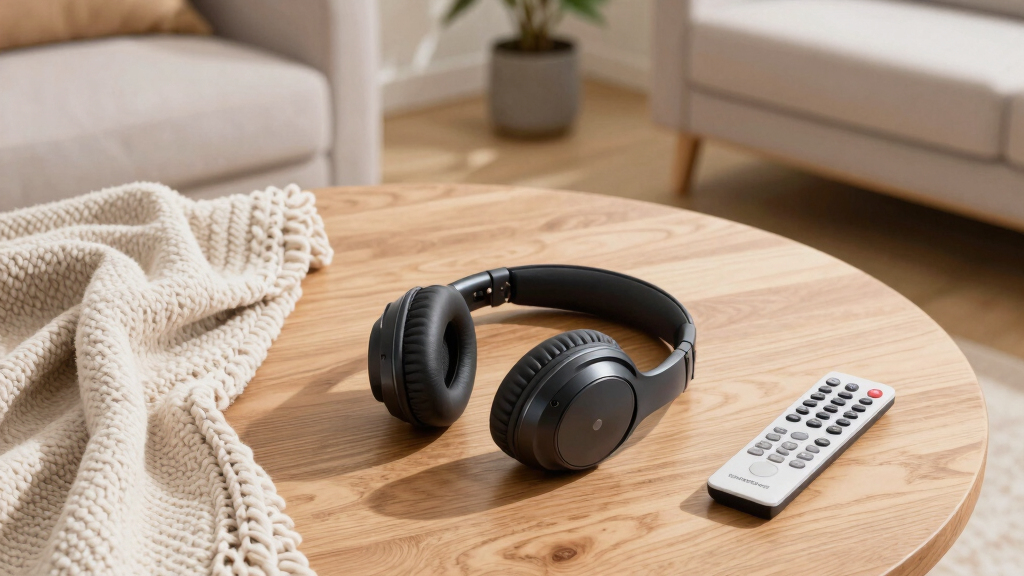
Wireless TV headphones free you from cords and offer a more comfortable viewing experience. Focus on comfort, low latency, and compatibility to pick the best model for your setup.
Imagine sinking into your couch after a long day, turning on your favorite show, and not worrying about cables tugging or lagging behind. Wireless TV headphones make that possible. They let you enjoy your programs with freedom of movement and crisp sound, without the clutter of wires. But choosing a pair that’s comfortable and reliable isn’t always straightforward.
This guide will walk you through what really matters—comfort, sound quality, connectivity, and features—so you can find a wireless TV headphone that feels as good as it sounds. Whether you’re watching late at night or enjoying a movie marathon, the right pair transforms your TV time into pure relaxation.
Prioritize comfort: plush padding, adjustable headbands, and light weight prevent fatigue.
Choose low-latency options like RF or aptX Low Latency Bluetooth for sync-perfect TV watching.
Test fit and comfort by trying headphones for at least 10 minutes before buying.
Match your headphone type to your watching style—over-ear for long movies, in-ear for portability.
Check compatibility with your TV’s outputs—Bluetooth, optical, or RCA—to avoid setup hassles.
Wireless TV Headphones: How to Choose a Comfortable Pair
Freedom from cables is only the beginning. The right headphones combine a fatigue-free fit, synchronized sound, dependable connectivity, and enough battery life to carry you through a movie marathon.
Comfort is a system, not a single feature
Small pressure points become major distractions over a two-hour film. Balance weight, cushioning, and adjustability instead of judging a headset by softness alone.
Plush padding
Memory foam cushions spread pressure around the ear. Avoid stiff or thin pads that create soreness and trap discomfort in one spot.
Adjustable band
A flexible headband helps prevent tight spots and headaches. Check that it stays secure without squeezing when you move or recline.
Lower weight
Aim below 300 grams for extended viewing. Lightweight construction matters most during long films, series binges, and late-night sessions.
Match the shape to how you watch
There is no universal winner. Your session length, room noise, movement, and sensitivity to pressure determine which form feels best.
Over-ear
Large cushions surround the ear, distributing pressure and improving passive isolation. Usually the strongest choice for long viewing sessions.
Best for / films, binges, noisy roomsOn-ear
Smaller cups feel lighter and less enclosing, but direct pressure on the ears can become uncomfortable over extended periods.
Best for / moderate sessions, compact storageIn-ear
Tiny, portable, and easy to wear while moving around. Ear-canal pressure may cause fatigue when a quick episode turns into a marathon.
Best for / portability, casual viewingMeasure
Check head circumference and compare it with the model’s adjustment range or available sizes.
Inspect padding
Look for soft, resilient foam and breathable contact surfaces that recover after compression.
Wear and move
Test for at least ten minutes, turn your head, recline, and check for pressure or slipping.
Great audio still fails when it arrives late
Clear dialogue, controlled bass, and crisp treble build immersion. Low latency keeps those sounds attached to the action, especially during speech and fast movement.
Relative TV latency
Bluetooth or RF?
Choose around the television first. Confirm whether it offers Bluetooth, optical, RCA, or a headphone output—and whether a transmitter or adapter is included.
| Feature | Bluetooth | RF system | Hybrid model |
|---|---|---|---|
| Latency | ~ Variable — codec dependent | ✓ Lower — designed for TV | ✓ Flexible — choose the link |
| Typical range | Up to about 33 feet | Typically 100+ feet | Varies by connection mode |
| Device support | ✓ Wide — phones, tablets, PCs | ~ Focused — primarily TV | ✓ Widest — TV plus mobile |
| Setup | Simple when the TV has Bluetooth | Transmitter connects to TV output | ~ More steps — more flexibility |
| Best choice when… | You want one pair for many devices | You want stable, sync-focused TV audio | You need versatility and accept added cost |
Battery life should outlast the story
Most wireless TV headphones deliver enough power for a full day of intermittent viewing. Heavy users should prioritize longer runtime and fast charging.
Easy controls
Large, tactile volume and playback buttons reduce fumbling in a dark room.
Noise control
ANC can improve focus, though it often increases price, weight, and power use.
Multi-device
Useful when switching between the TV, phone, tablet, and computer.
Storage
Foldable hinges, a stand, or a charging dock keep the setup organized.
From television output to relaxed viewing
Trace the whole system before buying. A comfortable headset cannot compensate for an incompatible connector or disruptive audio delay.
The comfort-first shortlist
Prioritize plush padding, an adjustable headband, and low weight. Then confirm low latency, the correct TV connection, and at least 10–20 hours of battery life. For long movies, over-ear RF headphones are often the strongest dedicated-TV option; for multi-device use, modern low-latency Bluetooth offers greater flexibility.
Why Comfort Matters More Than You Think
Comfort isn’t just about feeling good for a few minutes. When you wear wireless TV headphones for hours—say, during a movie marathon or late-night binge—small details make a big difference. Over-ear models with plush padding distribute pressure evenly, preventing soreness after long use. Adjustable headbands let you customize fit, avoiding tight spots that cause headaches.
Picture this: you’re watching your favorite series, and your headphones start feeling uncomfortable after an hour. The soft, memory foam cushions of a good pair can keep you cozy, whether you’re lying on the sofa or sitting upright. Lighter headphones—under 300 grams—reduce fatigue, making your viewing session more enjoyable.
For example, a friend switched from heavy, plastic headsets to a lightweight, cushioned pair. The difference? They could watch two movies back-to-back without discomfort. That’s the power of choosing comfort over just sound quality.
Popular right now

Apple AirPods Pro 3 Wireless Earbuds with Active Noise Cancellation

TCL QM64L 85-Inch QD-Mini LED 4K Smart Fire TV

Vitamix Propel Series 750 Professional-Grade Blender, 4 Programs, Black
As an affiliate, we earn on qualifying purchases.
Matching Headphone Type to Your Watching Style
Wireless TV headphones mainly come in three styles: over-ear, on-ear, and in-ear. Over-ear designs wrap around your ears with large cushions—great for long-term comfort and noise isolation. On-ear models sit on your ears, offering a lighter feel but sometimes less comfort during extended use. In-ear options are tiny, fit inside your ear canal, and are super portable—ideal for casual watching or if you’re always on the go.
Imagine you’re in a quiet apartment. Over-ear headphones with plush padding block out background noise and stay comfy through hours of binge-watching. If you prefer lightweight options, in-ear might suit your quick TV sessions, but they may cause fatigue if used for hours.
For instance, a user who watches late-night shows loved their over-ear pair for comfort and sound clarity. Meanwhile, another who moves around a lot prefers the in-ear style for its snug fit and portability.
How to Pick the Perfect Fit: 3 Simple Steps
- Measure your head: Use a tape measure to check your head circumference to choose adjustable headbands or size-specific models.
- Test padding types: Soft memory foam cushions feel plush and distribute pressure evenly. Avoid stiff or thin padding that can cause soreness.
- Try on different styles: If possible, visit a store to wear various headphones for at least 10 minutes. Notice how they sit, feel, and whether they stay comfortable during movement.
For example, a person shopping online for headphones found that adjustable headbands and memory foam padding made a huge difference in comfort during their regular movie nights. Trying before buying helps you avoid buying a pair that feels wrong after just a few minutes.
Sound Quality and Latency: Why They’re Non-Negotiable
Good sound quality is essential because it directly impacts your immersion and enjoyment. Clear audio with rich bass and crisp treble ensures you catch every detail, from dialogue to background effects, making scenes more lifelike. However, sound quality alone isn’t enough; latency—the delay between the audio signal and what you see on screen—can significantly affect your experience. When audio lags behind the video, it creates a disjointed feeling that can be distracting, especially during conversations or fast-paced action scenes.
Latency over 150 milliseconds is often noticeable and can break immersion. This delay can cause lip-sync issues or make it seem like sound is coming from a different time than the visuals. Choosing headphones supporting codecs like aptX Low Latency or AAC is crucial because they minimize this delay, aligning sound with the picture and ensuring seamless viewing. This tradeoff means you might pay a premium for these features, but the payoff is a more synchronized, natural experience that keeps you fully engaged without annoyance or confusion.
Imagine watching a suspenseful scene where timing is everything; a mismatch between audio and visuals can ruin the tension. Low-latency headphones preserve the integrity of this experience, making your movie nights truly immersive and enjoyable.
Connectivity Options: Bluetooth vs. RF — Which One Fits You?
| Feature | Bluetooth | RF (Radio Frequency) |
|---|---|---|
| Latency | Higher (may cause delay) | Lower (ideal for TV) |
| Range | Up to 33 feet | Typically 100+ feet |
| Compatibility | Wide device support | Primarily for TV, less flexible |
| Ease of pairing | Simple, widely supported |
If you want seamless TV watching with minimal lag, RF headphones are often better because they are designed specifically for low-latency audio transmission over longer distances, ensuring your audio stays in sync with the picture even from across the room. This is especially important if you’re watching fast-paced content where timing is critical. On the other hand, Bluetooth headphones are more versatile—they work with smartphones, tablets, and laptops, making them a convenient all-in-one solution. Some models now combine both technologies, offering the flexibility of Bluetooth with the low latency of RF, but be aware that this can sometimes come at a higher price or complexity in setup. Your choice depends on your priority: dedicated low-latency TV experience or multi-device versatility.
Battery Life: How Long Will Your Wireless Headphones Last?
Battery life is a key factor because it determines how long you can enjoy uninterrupted viewing. Most wireless TV headphones provide between 10 to 20 hours of use on a single charge, which generally covers a full day or a long movie marathon without needing to recharge. This range is a practical balance between portability and continuous use, allowing you to settle into extended sessions without interruptions. Some premium models boast up to 30 hours, making them ideal for heavy users or those who dislike frequent charging. Fast-charging features are also valuable—they can give you several hours of playback after just a 15-minute charge, which is handy if you forget to recharge beforehand. Consider your typical viewing habits: if you often watch late into the night or binge multiple movies, longer battery life can significantly improve your experience by reducing the need to pause or switch devices.
Extra Features That Make or Break Your Experience
Additional features can greatly enhance your comfort, convenience, and overall enjoyment of wireless TV headphones. Built-in microphones enable voice commands or phone calls without removing the headphones, adding versatility. Easy-to-use controls—large buttons or touch-sensitive panels—allow you to adjust volume, change tracks, or mute quickly, which is especially useful during movie nights. Noise cancellation, particularly active noise cancelling (ANC), is a game-changer for immersive viewing; it reduces background sounds like street noise, barking dogs, or household chatter, creating a more private and focused environment. Foldable or collapsible designs improve portability, making it easier to pack and carry your headphones when traveling or moving around the house. These extras, while sometimes adding to the cost, directly impact your experience—better controls and noise reduction lead to less frustration and more enjoyment, especially in noisy environments or during extended use.
How to Test Your Headphones Before You Buy
If you can, try headphones in person. Wear them for at least 10 minutes, move your head, and see how they feel. Check if they stay snug but not tight. Listen for audio clarity and low latency, especially if you have a setup supporting aptX Low Latency. This hands-on experience helps you assess whether the headphones will remain comfortable during longer sessions and if the audio quality meets your expectations. If in-store testing isn’t possible, focus on detailed reviews that mention comfort over extended periods, sound quality, and lag issues. Many online retailers now offer return policies that allow you to test the headphones in your environment and return them if they don’t meet your standards, but testing beforehand reduces the hassle and ensures you’re making a well-informed choice.
Remember, comfort and performance are subjective—what works for one person might not for another. Prioritize your personal needs and preferences when testing, and don’t hesitate to try multiple models to find the best fit for your viewing habits.
Frequently Asked Questions
How do I know if my TV supports wireless headphones?
Check your TV’s audio output options—Bluetooth, optical, or RCA. Most modern smart TVs support Bluetooth, but if yours doesn’t, you might need an adapter. Compatibility info is usually in the user manual or on the manufacturer’s website.Are RF headphones better than Bluetooth for watching TV?
Typically, RF headphones offer lower latency, making them ideal for TV viewing where syncing is key. Bluetooth headphones are more versatile and work with many devices, but may introduce slight delays unless they support low-latency codecs.What should I look for if I want headphones for long movie nights?
Choose over-ear models with thick padding and adjustable headbands. Look for lightweight designs and at least 15-20 hours of battery life. Noise cancellation features can also enhance comfort and immersion.Can I use wireless headphones for gaming or other devices?
Yes, many wireless headphones are multi-purpose. Just verify they support your device’s connection type and check latency specs—low latency is especially important for gaming to avoid lag.How often should I recharge my wireless TV headphones?
Most last between 10 to 20 hours per charge. Recharge them after each long session or when you notice battery life declining. Keeping a charging routine ensures seamless usage.Conclusion
Comfort isn’t just a luxury—it’s essential for enjoying your TV time fully. When you pick a pair that sits snugly without squeezing and supports your viewing habits, you transform your experience. Think of your headphones as an extension of your comfort zone—make sure they fit just right.
Investing in the right wireless TV headphones means more peaceful nights, clearer sound, and a better connection to your favorite shows. After all, great sound and comfort should go hand in hand—your TV nights deserve it.