TL;DR

Turn quiet afternoons into listening time
- Thousands of audiobooks, podcasts and originals
- Listen on your phone, tablet or Echo — also offline
- Cancel anytime
A tablet with cellular capability can work without Wi-Fi, offering seniors independence and reliable internet access anywhere. Choosing the right plan and device makes it practical and secure.
Cellular-enabled tablets work independently of Wi-Fi, offering real mobility for seniors.
Choosing the right data plan depends on typical usage—light browsing and calls vs. streaming or video chats.
Setup is often simple, with many devices and carriers providing support and clear instructions.
Cellular tablets provide a more secure connection than public Wi-Fi, reducing hacking risks.
Battery life can drain faster on cellular, so plan for portable chargers or power management.
What Does a Cellular-Enabled Tablet Do for a Senior?
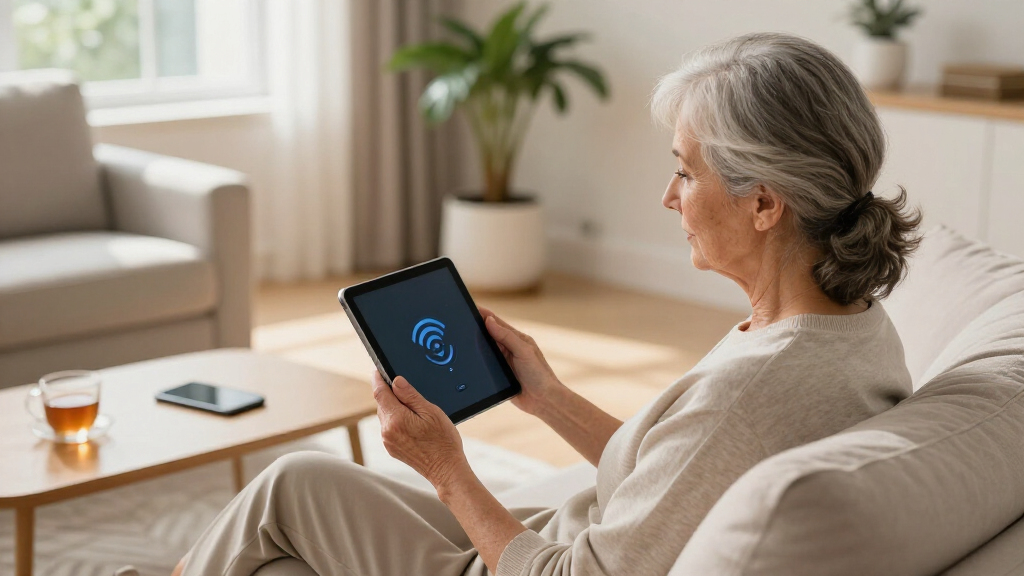
Cellular-enabled tablets come with a SIM card slot, letting them connect directly to 4G or 5G networks. They work independently of Wi-Fi, providing internet access wherever there’s coverage. Imagine a senior sitting on a park bench, streaming their favorite show or catching up on family emails—without hunting for a Wi-Fi hotspot. These tablets are perfect for travel, outdoor activities, or homes with unreliable Wi-Fi. They’re designed to give seniors the freedom to be online without being tethered to a single location.
Popular right now

Apple AirPods Max 2 Wireless Over-Ear Headphones – Midnight

LG 85-Inch QNED73B Mini LED 4K Smart TV (2026)

Dyson W1 PencilWash Cordless Wet and Dry Floor Cleaner with Dock
As an affiliate, we earn on qualifying purchases.
How Easy Is It for a Senior to Use a Cellular Tablet?
Setting up a cellular tablet is surprisingly straightforward. Many come with simple instructions, and carriers often provide step-by-step support. For example, inserting a SIM card or activating an eSIM can be done in minutes. Devices like the iPad or Samsung Galaxy Tab have intuitive interfaces—big icons, clear menus, voice commands—that suit seniors. Plus, choosing a plan with a small data cap reduces costs and prevents surprises. This ease of setup and use is crucial because it means seniors can become self-sufficient, reducing their reliance on others and increasing their confidence in managing technology. The tradeoff is that initial setup might still seem daunting for some, but with proper guidance, the process becomes manageable, turning technology into an empowering tool rather than a barrier.
Compare the Costs: Cellular Data vs. Wi-Fi for Seniors
| Feature | Wi-Fi |
|---|---|
| Cost | Often free at home or public spots |
| Limitations | Dependent on available hotspots |
Using cellular data involves a monthly plan, with costs ranging from $10 to $50+ depending on data limits. While Wi-Fi is usually free, it’s not always available outside the home or in rural areas. For seniors, selecting the right plan involves balancing their typical usage—such as frequent video calls, streaming, or browsing—and their budget. For example, if a senior mainly uses their tablet for email and occasional video chats, a low-data plan might suffice, saving money. Conversely, regular streaming or remote health monitoring might justify a higher data cap. Understanding these tradeoffs is essential because it impacts their ability to stay connected reliably without incurring unexpected charges. A plan that’s too limited can lead to frustration and disconnection, while an overly expensive plan might strain a fixed income. Therefore, assessing actual usage patterns and future needs helps optimize both cost and connectivity, ensuring they’re not just connected, but connected affordably and effectively.
What Are the Key Benefits of Using a Cellular Tablet?
Think of a senior enjoying a hot air balloon ride, with internet access in hand. Cellular tablets offer mobility, independence, and peace of mind. They allow real-time communication, access to health apps, and entertainment without Wi-Fi worries. Cellular networks tend to be more secure than public Wi-Fi, protecting personal information from potential hacking attempts. This security aspect is especially important for activities like online banking or sharing sensitive health data. The ability to stay connected in any location means seniors can maintain social ties, access emergency services, and manage health remotely, all of which contribute to their overall well-being and confidence in navigating the digital world. The tradeoff here is that cellular service can sometimes be more expensive or consume more battery life, so selecting a device with good battery efficiency and choosing a plan that matches their usage ensures they get the most benefit without unnecessary costs or inconvenience.
Top Questions Seniors Ask About Cellular Tablets
- How do I activate a cellular tablet? Usually by inserting a SIM card or using eSIM technology, then selecting a plan. Carriers often assist with setup, and many offer dedicated support for seniors to ensure the process is smooth and understandable. This initial step is crucial, as a properly activated device ensures reliable connectivity and avoids unnecessary frustrations. Understanding the activation process also helps seniors avoid common pitfalls, such as choosing incompatible plans or misconfiguring settings, which can delay their ability to connect. Being informed about these details empowers seniors to handle setup confidently and reduces dependency on others, fostering independence and peace of mind.
- How much does a data plan cost? Expect to pay around $10-$50 monthly, based on your data needs. Consider your typical usage—if you primarily check emails and make calls, a lower plan might be sufficient. For streaming or frequent video calls, a higher cap provides peace of mind and avoids overage charges. Recognizing these costs helps seniors plan their budgets effectively, ensuring they don’t overpay for unused data or get surprised by extra charges, which can be discouraging and financially stressful.
- Is it complicated for seniors? Not at all. Many devices feature simplified interfaces with large icons, voice commands, and easy-to-navigate menus. Additionally, carriers often offer setup assistance or tutorials tailored for seniors, making the transition seamless and empowering them to manage their plan independently. The key is choosing devices and plans designed with accessibility in mind, which reduces frustration and encourages consistent use. While initial setup might seem intimidating, proper guidance transforms the experience into an empowering journey, boosting confidence and ensuring they can troubleshoot minor issues on their own.
- Is using cellular data safe? Yes, especially compared to public Wi-Fi, which can be vulnerable to hacking. Cellular networks use encryption and authentication protocols that protect personal data. Educating seniors about basic security measures, like avoiding suspicious links or downloads, further enhances their safety while using cellular data. The implication is that with proper precautions, seniors can enjoy the internet safely without exposing themselves to unnecessary risks, making cellular data a secure choice for everyday activities, including sensitive transactions like online banking or telehealth appointments.
- What devices are best for seniors? Options like the Apple iPad with cellular, Samsung Galaxy Tab series, or LTE-compatible Fire tablets are popular for their ease of use, accessibility features, and reliable connectivity. Choosing a device with a large screen, simple interface, and good battery life ensures a positive experience and encourages regular use. The tradeoff involves selecting a device that balances simplicity with functionality—too basic might limit features, while too complex could be overwhelming. Prioritizing accessibility features like voice control, magnification, and hearing assistance makes the device truly user-friendly and tailored to seniors’ needs, enhancing their confidence and willingness to stay connected.
Frequently Asked Questions
Can a senior use a tablet on cellular data without Wi-Fi?
Absolutely. As long as the tablet supports cellular networks and has an active data plan, it can operate fully without Wi-Fi. This allows seniors to stay online wherever they go.How much does it usually cost to add cellular data to a tablet?
Most plans range from about $10 to $50 a month, depending on how much data is needed. Light users, like those mainly emailing or video calling, often choose lower-cost plans.Is setting up a cellular tablet complicated for seniors?
Not really. Most devices walk you through activation, and carriers often provide support. Big icons, voice commands, and simple menus make it user-friendly.Is cellular data safe for seniors?
Yes. Cellular networks tend to be more secure than public Wi-Fi, making them a safer choice for sensitive activities like online banking or health updates.What should I look for in a tablet for a senior on cellular data?
Focus on devices with large screens, simple interfaces, and good accessibility features. Popular choices include the Apple iPad with cellular, Samsung Galaxy Tab, and LTE Fire tablets.Conclusion
A cellular tablet can be a game-changer for seniors craving independence and reliable internet. With the right device and plan, they can stay connected anywhere—be it a park, a road trip, or in the backyard. The key is choosing simplicity, affordability, and coverage—then watch as the world opens up to them. Connectivity isn’t just for the young anymore; it’s a bridge for everyone.This article is for informational purposes only and is not medical advice. Always consult a qualified healthcare professional about your specific situation.