
TL;DR

Turn quiet afternoons into listening time
- Thousands of audiobooks, podcasts and originals
- Listen on your phone, tablet or Echo — also offline
- Cancel anytime
Using a single, simple app or voice control can greatly reduce confusion for older adults managing smart home devices. Recent advancements like unified platforms and intuitive devices make smart homes more accessible, safe, and beneficial.
Imagine trying to juggle multiple remote controls and apps just to turn on the lights or check the thermostat. Frustrating, right? For many older adults, this complexity can turn smart home tech from a helpful tool into a source of confusion. But there’s good news.
Today, smarter solutions exist—designed specifically with simplicity and safety in mind. Whether it’s a single app, voice commands, or simplified devices, these options can make managing a smart home feel natural and secure. In this guide, you’ll learn how to choose the best control method for an older adult, making technology a true ally rather than a hassle.
Using a single, simplified app reduces confusion and makes control easier for older adults.
Voice commands turn complex device management into effortless conversations, boosting independence.
Automation routines support daily life, helping seniors manage routines without fiddling with controls.
Prioritize security—strong passwords, updates, and privacy settings protect vulnerable users.
Ongoing support and simple tutorials turn smart home tech into a reliable, empowering tool.
One App or Many?
Simplifying smart home controls for an older adult means reducing choices at the moment of use. A unified app, natural voice commands, and reliable routines can turn connected devices into a quiet layer of safety and independence.
Three ways to reduce daily friction
The best setup does not require an older adult to remember which brand controls which device. Give every common task one obvious path.
One familiar dashboard
Put lights, locks, cameras, and temperature controls behind large icons, clear labels, and one login.
Speak instead of tap
Natural commands remove tiny buttons and menu hunting—especially useful for arthritis, low vision, or limited mobility.
Let routines do the work
Lights at sunset, a comfortable morning temperature, and scheduled door checks reduce repeated manual tasks.
Voice turns controls into conversation
Voice can be the fastest route from intention to action. It also needs a backup option for noise, recognition errors, or internet outages.
Ease vs. control
A unified interface usually offers the strongest balance for everyday use.
One unified app vs. multiple controls
Multiple apps maximize device choice, but every extra login, layout, and notification increases cognitive load and support needs.
| Feature | One unified app | Multiple apps / devices |
|---|---|---|
| Ease of use | ✓High—one interface, clear labels | ✗Low—frequent app switching |
| Setup time | ✓Less—one primary setup | ✗More—several accounts and settings |
| Device flexibility | ~Moderate—platform dependent | ✓High—broader brand choice |
| Reliability | ✓Generally consistent | ~Variable—compatibility can differ |
| Learning curve | ✓Lower—repeat one familiar pattern | ✗Higher—several layouts to remember |
| Troubleshooting | ✓One place to check first | ✗More vendors and failure points |
From need to confident routine
Start with the person and the task—not the gadget. Each step should make the next one easier to understand and support.
Identify the need
Safety, comfort, mobility, or reassurance.
Choose one control
App, voice, or a simple physical button.
Connect essentials
Add only devices that solve a real problem.
Test together
Practice common tasks and backup controls.
Support the habit
Review routines, updates, and confidence.
Simplicity needs a security layer
Good security should be set up quietly in the background, with only the most important controls exposed to the everyday user.
Use a password manager and avoid reused credentials.
Keep hubs, apps, and connected devices current.
Limit recording, sharing, and unnecessary access.
Protect the network and replace default router settings.
Explain that support teams should never demand passwords.
Document who can assist without sharing the main login.
Make technology feel dependable
The goal is not the smartest possible home. It is a home whose controls remain understandable on an ordinary day and usable during a stressful one.
Use one primary app whenever compatibility allows.
Add tested voice commands for frequent actions.
Schedule predictable routines with clear overrides.
Use strong security and transparent privacy settings.
Provide short tutorials and ongoing human help.
Why a Single App Can Make Life Easier for Seniors
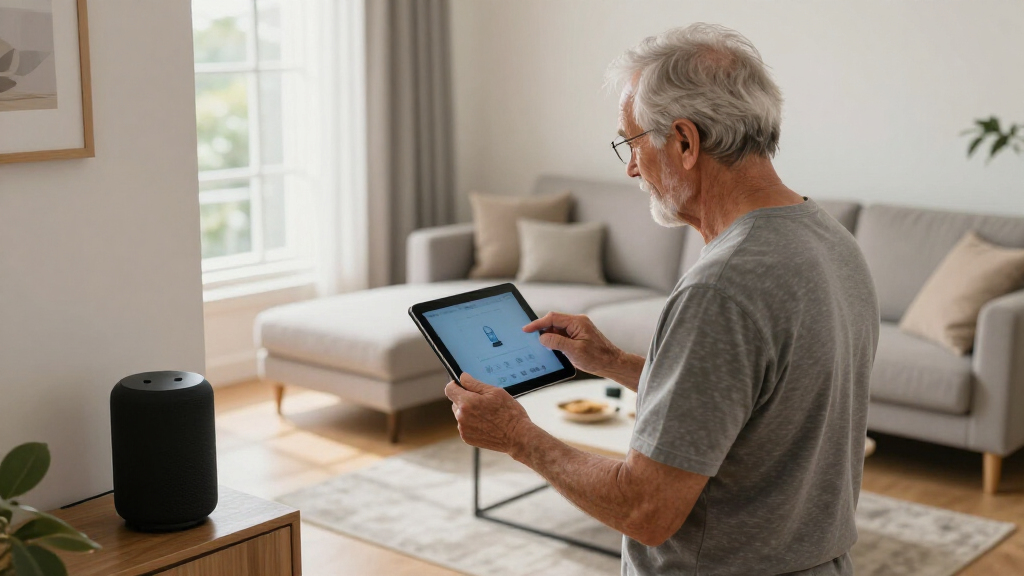
When an older adult uses one app for all devices, it cuts down on confusion and frustration. Instead of juggling multiple controls, they tap into one simple interface. Think of it like a remote that controls everything—lights, locks, thermostats—all from one place.
For example, a senior might use a platform like Apple Home or Google Home. These apps can connect various devices—smart bulbs, doorbells, security cameras—so they operate seamlessly. This reduces the mental load and makes daily routines smoother.
Plus, many apps now feature large icons, clear labels, and voice control, turning complex setups into straightforward tasks. It’s like having a personal assistant who always understands what you want.
Choosing a single app simplifies not just daily use but also troubleshooting. When problems arise, caregivers or seniors only need to learn one interface, which can be less intimidating and quicker to master. However, this approach may limit compatibility with certain niche devices, so balance is key—prioritize platforms that support a wide range of your preferred devices to maximize flexibility without complicating the interface.
Popular right now

Hisense 40-Inch Class QD4SR Series Hi-QLED FHD Smart Roku TV (2026 Model)

Hisense 43-Inch E6SR Series Hi-QLED 4K UHD Smart Roku TV (2026 Model)

Breville Bambino Espresso Machine, Brushed Stainless Steel
As an affiliate, we earn on qualifying purchases.
How Voice Control Turns Tech Into a Senior-Friendly Superpower
Voice control is a game-changer. It transforms the way older adults interact with their smart home. Instead of hunting for the app or fiddling with tiny buttons, they speak. Simple commands like, ‘Turn on the living room lights,’ or ‘Set the thermostat to 72 degrees,’ become second nature.
Imagine a grandparent with arthritis trying to press small buttons. Voice control removes that barrier. Devices like Amazon Alexa, Google Assistant, or Apple Siri are improving rapidly—understanding natural language, even in noisy environments.
For instance, a senior might say, ‘Hey Google, lock the front door,’ and it happens instantly. This hands-free control not only boosts independence but also adds a safety layer—no need to reach for switches or struggle with complicated interfaces.
While voice control makes interacting with technology easier, there are tradeoffs to consider. Voice recognition might occasionally misunderstand commands, especially with accents or background noise, leading to frustration. Also, privacy considerations come into play, as voice assistants listen constantly. Therefore, setting clear boundaries—like muting microphones when not in use—is essential. Proper setup and understanding these limitations ensure voice control remains a reliable, empowering tool rather than a source of confusion or concern.
Comparison Table: One App vs. Many Devices and Controls
| Feature | One Unified App | Multiple Apps / Devices |
|---|---|---|
| Ease of Use | High — single interface reduces confusion, large icons, clear labels | Low — switching between apps can be overwhelming |
| Setup Time | Less — one setup, one login | More — multiple accounts and configurations |
| Flexibility | Moderate — depends on supported devices | High — can integrate many brands and types |
| Reliability | Generally consistent, but depends on platform stability | Variable, risk of compatibility issues |
| Learning Curve | Lower — intuitive interfaces | Higher — managing multiple controls |
Understanding these differences helps caregivers and seniors weigh the tradeoffs. While a single app simplifies daily use and reduces cognitive load, it might limit some device choices. Conversely, multiple apps offer broader compatibility but at the expense of increased complexity. The key is to find a balance that aligns with the individual’s comfort level and safety needs, ensuring technology remains a helpful aid rather than a source of frustration.
Frequently Asked Questions
What is the easiest way for an older adult to control multiple smart devices?
A single, unified app or a voice assistant like Alexa or Google Home makes controlling multiple devices straightforward. These platforms centralize controls and often support voice commands, reducing the need to manage multiple apps.Are there smart home systems specifically designed for seniors?
Yes, some devices are built with seniors in mind, featuring large buttons, simple interfaces, and voice control. These systems aim to make technology more accessible without sacrificing functionality.How can I make smart home technology more accessible for an older adult?
Focus on user-friendly interfaces, set up voice control, provide easy-to-follow tutorials, and offer ongoing support. Simplifying device choices and routines also helps boost confidence.Is it safe to give older adults control over smart home devices?
Yes, with proper security measures—such as strong passwords, regular updates, and privacy settings—it can be safe. Education about scams and privacy is equally important.What are the costs involved?
Costs vary depending on device complexity. Starter kits or simplified systems are often affordable, especially considering the safety and independence benefits over time.Conclusion
Making smart home technology accessible for older adults isn’t about adding more gadgets—it’s about simplifying how they control and interact with those gadgets. A single app, voice control, and automation turn a potentially overwhelming setup into a helpful, safe environment.
Imagine a world where seniors confidently say, ‘Alexa, turn on the lights,’ and it happens. That’s the kind of independence and peace of mind smart tech can bring. As you consider options, remember: simplicity isn’t a feature; it’s the foundation of real safety and comfort.