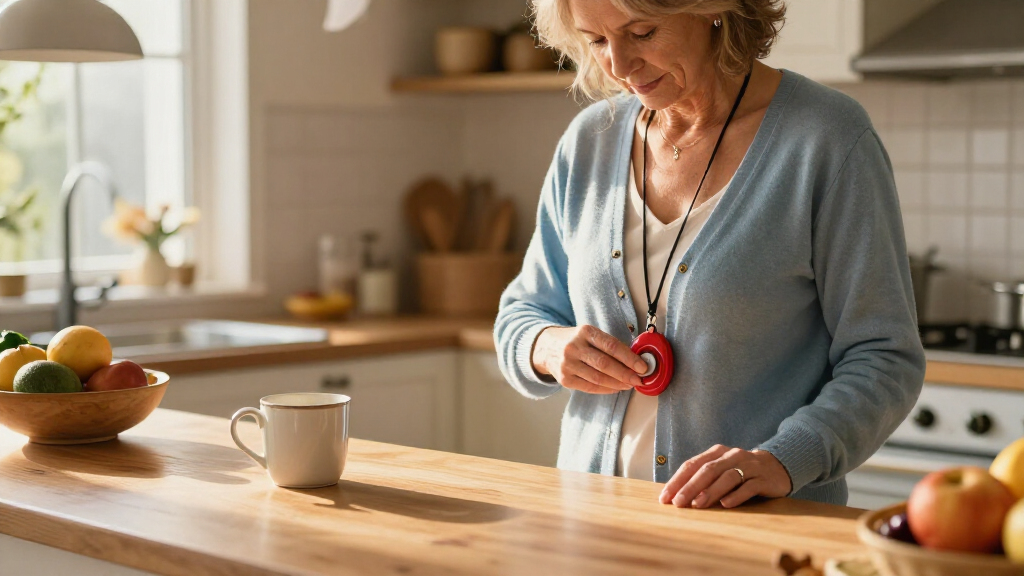

The best home emergency alert system overall in this roundup is the Greetmed Wireless Caregiver Pager System, which pairs two SOS transmitters with dual receivers for alerts in more than one room. For households that want a simple, local call button, the SYNLETT Caregiver Pager is a straightforward alternative; for people who need alerts beyond the home, the Medical Guardian MGMini offers a wearable mobile approach. The main choice is between a nearby caregiver alert, a Wi-Fi-connected system, and a personal emergency device with mobile communication. Button placement, receiver coverage, internet or landline needs, and fall-detection limits can matter as much as the feature list. Read on for the full comparison and help matching a system to the person and home.

Turn quiet afternoons into listening time
- Thousands of audiobooks, podcasts and originals
- Listen on your phone, tablet or Echo — also offline
- Cancel anytime
Complete the kit


Key Takeaways
- Greetmed ranks first for shared household coverage: its two transmitters and two receivers suit homes where one alert needs to reach multiple rooms or caregivers.
- Local caregiver pagers dominate this list: SYNLETT, CallToU, and FullHouse focus on signaling a nearby helper, rather than connecting the user to a monitoring center.
- Wi-Fi systems add flexibility but bring network dependence: DAYTECH and the CallToU Wi-Fi models are a better fit when app-connected alerts are wanted and the home internet is reliable.
- Mobile pendants serve a different need: Medical Guardian, SecuLife, and LogicMark are more relevant when the wearer may need help away from a fixed call button.
- Wearable buttons and multiple alert points improve access: wrist buttons or several SOS transmitters can make it easier to call for help from different rooms, but they do not replace checking coverage and response plans.
| SYNLETT Caregiver Pager with 2 Wireless Call Buttons |  | Best for Two Caregiver Call Points | Brand: SYNLETT | Model: D091G1 | Included components: 2 call buttons and 1 receiver | VIEW LATEST PRICE | See Our Full Breakdown |
| CallToU Caregiver Pager Wireless Alert Button | 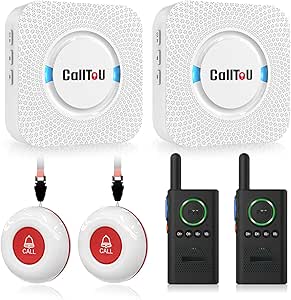 | Best for Two-Way Household Communication | Package contents: 2 call buttons, 2 receivers, and 2 walkie-talkies | Power source: Battery powered | Battery description: Alkaline; includes 2 lithium polymer batteries | VIEW LATEST PRICE | See Our Full Breakdown |
| Greetmed Wireless Caregiver Pager System with Dual Receivers and Two SOS Transmitters |  | Best for Long Open-Plan Coverage | Brand: Greetmed | Model: GT-CP22 | Receivers and transmitters: 2 receivers and 2 transmitters | VIEW LATEST PRICE | See Our Full Breakdown |
| Medical Guardian MGMini Medical Alert Device for Seniors, Black |  | Best for Professional Monitoring On the Go | Brand: Medical Guardian | Connectivity: Cellular with Wi-Fi backup | Emergency features: SOS button, two-way speaker, and GPS location assistance | VIEW LATEST PRICE | See Our Full Breakdown |
| CallToU Caregiver Pager Wireless Call Button Nurse Alert System |  | Best Simple Single-Button Pager | Manufacturer: CallToU | Part number: CC01US+01A | Package quantity: 1 | VIEW LATEST PRICE | See Our Full Breakdown |
| SecuLife Medical Alert Pendant for Seniors with Fall Detection, GPS Tracking and Two-Way Calling |  | Best for GPS and Mobile Coverage | Connectivity: 4G LTE cellular | Alert features: Fall detection and SOS calling | Communication: Two-way calling with hands-free auto-answer | VIEW LATEST PRICE | See Our Full Breakdown |
| LogicMark Guardian Alert 911 Plus Emergency Pendant with Fall Detection |  | Best No-Monthly-Fee Cellular Pendant | Model: 40711 | Network compatibility: 4G LTE | Communication: Two-way voice | VIEW LATEST PRICE | See Our Full Breakdown |
| SINGCALL Remote Emergency Strobe Siren Alarm Kit with 4 Emergency Buttons |  | Best for Multi-Room Local Alerts | Model: J008 520C | Included components: Two sirens and four emergency buttons | Audible alarm: 120 dB | VIEW LATEST PRICE | See Our Full Breakdown |
| Freedom Alert Landline Personal Emergency Device |  | Best for Landline Households | Connection: Landline phone service required | Communication: Two-way voice via pendant | Pendant battery: Rechargeable | VIEW LATEST PRICE | See Our Full Breakdown |
| FullHouse Wireless Caregiver Pager with Emergency Call Button |  | Best for Nearby Caregiver Alerts | Included items: One call button and one plug-in receiver | Maximum range: 1,000 feet in open air; 500 feet through walls | Volume: Five levels, up to 110 dB | VIEW LATEST PRICE | See Our Full Breakdown |
| DAYTECH Wi-Fi Caregiver Call System with 2 Buttons, Wrist Button, and Receiver |  | Best for Shared Family App Alerts | Brand: DAYTECH | Model: CR02TY-CT02WR-WB06WH | Included components: 2 buttons, 1 wrist button, 1 receiver | VIEW LATEST PRICE | See Our Full Breakdown |
| CallToU Wi-Fi Caregiver Pager with Call Button, Watch Button, and Receiver |  | Best for a Simple One-Button Setup | Brand: CallToU | Model: TY01WH-US 2-1 | Included components: 1 call button, 1 watch button, 1 receiver | VIEW LATEST PRICE | See Our Full Breakdown |
| CallToU Wi-Fi Caregiver Call Button Emergency Alert System |  | Best for Multiple Wearable and Room Call Points | Brand: CallToU | Model: TY02BL | Included devices: 2 call buttons, 1 wrist button, 1 receiver | VIEW LATEST PRICE | See Our Full Breakdown |
| FullHouse Wireless Caregiver Pager with Emergency Call Button and Wristband |  | Best No-Wi-Fi Option | Brand: Full House | Open-air range: Up to 1,000 feet | Range through walls: Up to 500 feet | VIEW LATEST PRICE | See Our Full Breakdown |
| home emergency alert system | Brand | Model |
|---|---|---|
| SYNLETT Caregiver Pager with 2 | SYNLETT | D091G1 |
| CallToU Caregiver Pager Wirele | — | — |
| Greetmed Wireless Caregiver Pa | Greetmed | GT-CP22 |
| Medical Guardian MGMini Medica | Medical Guardian | — |
| CallToU Caregiver Pager Wirele | — | — |
| SecuLife Medical Alert Pendant | — | — |
| LogicMark Guardian Alert 911 P | — | 40711 |
| SINGCALL Remote Emergency Stro | — | J008 520C |
| Freedom Alert Landline Persona | — | — |
| FullHouse Wireless Caregiver P | — | — |
| DAYTECH Wi-Fi Caregiver Call S | DAYTECH | CR02TY-CT02WR-WB06WH |
| CallToU Wi-Fi Caregiver Pager | CallToU | TY01WH-US 2-1 |
| CallToU Wi-Fi Caregiver Call B | CallToU | TY02BL |
| FullHouse Wireless Caregiver P | Full House | — |
More Details on Our Top Picks
SYNLETT Caregiver Pager with 2 Wireless Call Buttons
The SYNLETT is a practical fit when a person needs to summon help from more than one spot: two wireless call buttons can be worn on lanyards or mounted around the home, while one portable receiver alerts the caregiver. Its chime and continuous alarm modes offer a choice between a less intrusive notice and a more persistent alert. The stated 500-foot range applies to open areas, so walls and the home layout may limit coverage; I would check the signal in the intended rooms before relying on it. Compared with the single-button CallToU CC01US+01A, SYNLETT gives the household a second call point, but it lacks that model’s stated 110 dB sound level and does not provide two-way communication or professional monitoring. It is a simple, local alert rather than a full emergency response service.
Pros:- Two call buttons can cover separate locations or provide a wearable and fixed option.
- Buttons can be wall-mounted or worn with the included lanyards.
- Receiver offers both chime and continuous alarm modes.
- Battery-powered system does not require Wi-Fi or cellular service.
Cons:- The 500-foot maximum is specified for open areas, not typical indoor conditions.
- One receiver may be insufficient if caregivers need alerts in multiple rooms.
- Does not connect the user to professional monitoring or provide two-way voice communication.
Best for: Households that want two call buttons for separate rooms or a wearable-and-mounted setup, with a caregiver nearby to respond.
Not ideal for: People who need a monitoring team, automatic fall detection, or dependable coverage across a large home with many obstructions.
- Brand:SYNLETT
- Model:D091G1
- Included components:2 call buttons and 1 receiver
- Power source:Battery powered
- Batteries:4 AA batteries included; call buttons use 12V batteries
- Maximum range:500 feet in open areas
- Sound level:90 dB
- Receiver dimensions:3.24 x 1.3 x 2.53 inches
- Warranty:1 year
Our verdict“Choose SYNLETT if two flexible call points matter more than two-way communication or a monitored response service.”
CallToU Caregiver Pager Wireless Alert Button
This CallToU bundle suits households where an alert should start a conversation, not just make noise. It includes two call buttons, two receivers, and two walkie-talkies, giving caregivers more ways to hear a request and respond from elsewhere in the home. The buttons are wearable or mountable, and the devices are described as waterproof and dustproof, which makes bathroom placement more practical than with a basic indoor-only setup. The listed range is up to 500 feet outdoors, with under 300 feet recommended indoors; walls can reduce coverage. Compared with the Greetmed GT-CP22, this kit adds walkie-talkies and a stated 110 dB maximum volume, while Greetmed offers a longer open-area range and simpler plug-in receivers. One limitation is that the pager and intercom functions are separate and cannot be paired, so this is not one seamless alert-and-talk system.
Pros:- Bundle includes two call buttons, two receivers, and two walkie-talkies.
- Waterproof and dustproof design suits damp or dusty locations.
- Adjustable volume reaches a stated maximum of 110 dB.
- Buttons can be worn as pendants or mounted with brackets.
Cons:- Recommended indoor range is under 300 feet, and obstacles can reduce coverage.
- Pager and intercom functions are separate and cannot be paired.
- The multi-device kit may be more equipment than a household needing only one alert point.
Best for: Families or home caregivers who want multiple receivers and a separate two-way communication option, including near bathrooms or outdoor areas.
Not ideal for: Buyers who want a single integrated alert-and-intercom system or need a stated long indoor range through many walls.
- Package contents:2 call buttons, 2 receivers, and 2 walkie-talkies
- Power source:Battery powered
- Battery description:Alkaline; includes 2 lithium polymer batteries
- Maximum range:500 feet outdoors; under 300 feet recommended indoors
- Audible noise level:Up to 110 dB
- Selectable ringtones:55
- Mounting type:Wall mount or door mount
- Device protection:Waterproof and dustproof
- Control method:Touch
Our verdict“Pick this CallToU bundle when separate alert and walkie-talkie communication tools are useful and indoor range can be checked in advance.”
Greetmed Wireless Caregiver Pager System with Dual Receivers and Two SOS Transmitters
Greetmed’s main advantage is its stated 1,000-foot open-area range, paired with two receivers and two SOS transmitters. That makes it a stronger candidate than the SYNLETT when caregivers need alerts in more than one listening location or the home has a broad, open layout. Its plug-in receivers and 38 selectable melodies keep setup straightforward, and the system works without Wi-Fi, cellular service, or a monthly fee. The range claim should not be read as a promise for every room: the stated indoor range is at least 165 feet, and walls can change performance. Unlike the Medical Guardian MGMini, Greetmed does not connect to a 24/7 monitoring team or provide GPS assistance. Its transmitters also require 23A 12V batteries, so it suits households comfortable managing a local alert system rather than a wearable emergency service.
Pros:- Two receivers can alert caregivers in separate parts of the home.
- Stated open-area range reaches at least 1,000 feet.
- Works without Wi-Fi, cellular service, or a monthly fee.
- Transmitters can be wall-mounted, carried, or worn as pendants.
Cons:- Indoor range is stated as at least 165 feet and can be reduced by walls.
- Transmitters require 23A 12V batteries.
- Local alerts do not connect to a professional monitoring team.
Best for: Caregiver households with two listening locations and a large or open layout that want a local alert system without network service.
Not ideal for: People who need professional monitoring, GPS location assistance, or a system intended to summon help when a caregiver is away.
- Brand:Greetmed
- Model:GT-CP22
- Receivers and transmitters:2 receivers and 2 transmitters
- Open-area range:At least 1,000 feet
- Indoor range:At least 165 feet
- Melodies:38 selectable melodies
- Receiver volume:At least 70 dB at 1 meter
- Receiver power:100–240V AC, 50/60Hz
- Transmitter battery:23A 12V
Our verdict“Choose Greetmed for multiple local alert points and long open-area reach, not for monitored emergency response.”
Medical Guardian MGMini Medical Alert Device for Seniors, Black
The MGMini is the only option in this group built around 24/7 professional monitoring rather than alerting a nearby caregiver. Its wearable SOS button, two-way speaker, and GPS location assistance suit someone who may need help away from home as well as indoors. A lanyard and belt clip give the wearer a choice of how to carry it, and the stated battery life is up to 72 hours per charge. That coverage comes with a service requirement: activation and a subscription are needed, while fall detection is an optional add-on. By contrast, the Greetmed and SYNLETT systems avoid ongoing service but rely on someone nearby hearing and answering their alerts. The MGMini is the more suitable choice when a monitoring team matters; it is a poor fit for buyers seeking a no-fee, plug-in household pager.
Pros:- SOS button connects to a 24/7 monitoring team after service activation.
- Two-way speaker supports communication with the response team.
- GPS location assistance adds support away from home.
- Includes a lanyard, belt clip, charging cradle, and power cord.
Cons:- A subscription and service activation are required.
- Fall detection is an optional add-on rather than a standard feature.
- Up to 72 hours of battery life means the device needs regular charging.
Best for: Older adults who leave home and want a wearable SOS device with two-way access to a 24/7 monitoring team and GPS location assistance.
Not ideal for: Households looking for a no-subscription caregiver pager, or users unwilling to charge a wearable device and activate monitoring service.
- Brand:Medical Guardian
- Connectivity:Cellular with Wi-Fi backup
- Emergency features:SOS button, two-way speaker, and GPS location assistance
- Battery life:Up to 72 hours
- Charging time:4 hours
- Monitoring:24/7 subscription required; no long-term contract; cancel anytime
- Fall detection:Optional add-on
- Included accessories:Lanyard, belt clip, charging cradle, and power cord
- Color:Black
Our verdict“Choose the MGMini if a monitoring team and location assistance outweigh the recurring service requirement.”
CallToU Caregiver Pager Wireless Call Button Nurse Alert System
For a household that needs one easy-to-place call point, this CallToU keeps the setup lean: a wireless call button signals a receiver that caregivers can carry around the home. The button is described as waterproof and dustproof, so it can be placed where splashes or dust are concerns, and 55 selectable ringtones plus adjustable volume up to 110 dB let households choose an alert they can hear. Its stated 500-plus-foot through-wall range is useful as a starting point, but real indoor performance will depend on the building. Compared with the two-button SYNLETT, this kit covers fewer call locations; compared with the larger CallToU bundle, it skips extra receivers and walkie-talkies. That simplicity is also the tradeoff: the receiver must stay plugged into an outlet, and the button uses a 12V battery that may need replacement.
Pros:- Simple one-button setup avoids managing a larger multi-device kit.
- Portable receiver can be carried by a caregiver.
- Waterproof and dustproof design suits bathroom or outdoor placement.
- Offers 55 selectable ringtones and adjustable volume up to 110 dB.
Cons:- Receiver needs an outlet, limiting where it can alert from when not carried.
- Call button uses a 12V alkaline battery that may need replacement.
- One call button cannot cover multiple rooms or users without another system.
Best for: A caregiver who needs one call button and a portable receiver for use within a home, especially near a bathroom or other splash-prone area.
Not ideal for: Households needing multiple call points, multiple receivers, or monitoring when a caregiver is away from the home.
- Manufacturer:CallToU
- Part number:CC01US+01A
- Package quantity:1
- Item weight:6.3 ounces
- Product dimensions:1.97 x 1.97 x 1.97 inches
- Battery:One 12V alkaline battery required
- Sound level:Up to 110 dB
- Wireless range:500+ feet through walls, as specified
- Special features:Waterproof and dustproof
Our verdict“Choose this CallToU pager for one convenient local call point, but select SYNLETT or the larger CallToU kit if you need more coverage points.”
SecuLife Medical Alert Pendant for Seniors with Fall Detection, GPS Tracking and Two-Way Calling
The SecuLife is the strongest fit here for someone who needs an alert system beyond the home. Its 4G LTE connection, GPS tracking, and geofence alerts give selected contacts more ways to locate and check on the wearer, while two-way calling supports direct conversation after an alert. Automatic fall detection adds a backup when the wearer cannot press SOS. Compared with the LogicMark Guardian Alert 911 Plus, which has no monthly fee, SecuLife requires a subscription; that ongoing cost helps distinguish its connected, location-aware approach from simpler home-focused devices. Its IP67 waterproof design suits daily wear, but battery-life information is inconsistent: the description says up to six days, while product information says five. Buyers should plan for frequent charging and confirm the subscription terms before choosing it.
Pros:- GPS tracking and geofence alerts can help contacts locate the wearer outside the home
- Automatic fall detection and SOS calling provide more than one way to request help
- Two-way calling and hands-free auto-answer allow direct communication
- IP67 waterproof construction is suited to everyday wear
Cons:- A monthly subscription is required
- Battery-life information conflicts, listing up to six days in one place and five days in another
Best for: Older adults who leave home regularly and want family contacts to have GPS location and geofence alerts alongside fall detection and two-way calling
Not ideal for: People who want to avoid recurring fees or prefer a device with a clearly stated, consistent battery-life specification
- Connectivity:4G LTE cellular
- Alert features:Fall detection and SOS calling
- Communication:Two-way calling with hands-free auto-answer
- Location features:GPS tracking and geofence alerts
- Battery capacity:1000 mAh
- Battery life:Up to six days in description; five days in product information
- Water resistance:IP67 waterproof
- Subscription:Monthly subscription required
Our verdict“Choose SecuLife if location-aware support outside the home matters more than avoiding a subscription.”
LogicMark Guardian Alert 911 Plus Emergency Pendant with Fall Detection
The LogicMark stands out for buyers who want a cellular emergency pendant without a monthly fee. Its 4G LTE connection and two-way voice let the user contact emergency personnel, while fall detection can initiate an alert if pressing the button is not possible. That makes it a more direct emergency-response choice than the FullHouse Wireless Caregiver Pager, which alerts a nearby caregiver rather than providing the same stated connection to emergency personnel. The tradeoff is that the product information leaves important operating details unclear: it does not list battery life or explain precisely how fall alerts are routed. The device is also described as water resistant for bathing and showering, but no specific rating is provided. I would favor it for fee-conscious buyers who want a cellular pendant, provided they confirm alert handling and battery expectations before purchase.
Pros:- No monthly fees are listed
- 4G LTE and two-way voice connect the user with emergency personnel
- Fall detection can trigger an alert if the user cannot press the button
- Water-resistant design is described for use around the bath or shower
Cons:- Battery life is not specified in the product information
- The details of fall-alert routing are unclear
- Water resistance is not accompanied by a stated IP rating
Best for: People seeking a 4G LTE emergency pendant with two-way voice and no monthly fee, especially if a caregiver is not always within pager range
Not ideal for: Buyers who need clearly documented battery life, specific fall-alert routing, or a published water-resistance rating
- Model:40711
- Network compatibility:4G LTE
- Communication:Two-way voice
- Fall detection:Yes
- Power source:Battery powered
- Battery type:Lithium-ion
- Water resistance:Water resistant; rating not specified
- Monthly fees:None
Our verdict“Pick the LogicMark if you want cellular emergency calling without a monthly fee and can verify its alert and battery details first.”
SINGCALL Remote Emergency Strobe Siren Alarm Kit with 4 Emergency Buttons
For a household or care setting that needs several people to raise a local alarm, the SINGCALL kit offers the broadest button coverage in this group: four call buttons and two sirens. Its 120 dB sound and flashing red indicators can make an alert hard to miss nearby, while the stated 100-meter maximum range gives more flexibility than the FullHouse Wireless Caregiver Pager’s listed 500-foot range through walls. These are local alerts, not a monitored medical response service: the kit does not describe cellular contact, GPS, or two-way conversation. The siren also runs for up to five minutes unless canceled, which may be disruptive in shared spaces. Battery power avoids fixed wiring, though reliance on alkaline batteries means users need to keep replacements available. This is best treated as a household signaling kit, not a substitute for a medical alert service.
Pros:- Four call buttons can be placed in multiple locations
- Two sirens provide both a loud 120 dB alarm and flashing visual alert
- Stated maximum range is 100 meters
- Large, touch-sensitive buttons are designed for quick activation
Cons:- The local siren does not provide stated remote monitoring or two-way communication
- The alarm can sound for up to five minutes unless canceled
- Battery-powered operation requires attention to alkaline battery replacement
Best for: Families, small care facilities, or shared homes that need several large emergency buttons to trigger loud local alerts
Not ideal for: People who need automatic fall detection, remote emergency response, location tracking, or two-way communication
- Model:J008 520C
- Included components:Two sirens and four emergency buttons
- Audible alarm:120 dB
- Maximum range:100 meters
- Power source:Battery powered
- Batteries:Two AA batteries included
- Siren dimensions:4.4 × 7.9 × 2.8 inches
- Alert duration:Up to five minutes unless canceled
Our verdict“Choose SINGCALL for multi-room local signaling, not when you need a monitored medical response system.”
Freedom Alert Landline Personal Emergency Device
The Freedom Alert is a straightforward choice for someone who already has a working landline and wants two-way voice without monthly operating fees. Pressing the pendant button lets the user communicate with family or emergency personnel, which offers a more conversational response than the local sound-and-light warning from the SINGCALL Remote Emergency Strobe Siren. A 24-hour battery backup also gives the system a stated reserve during a power interruption. Its central limitation is the landline requirement: households without phone service cannot use it as described, and it lacks the cellular connection and GPS features found on the SecuLife pendant. The available product details do not specify fall detection, water resistance, or wireless range, so buyers who need those capabilities should compare alternatives carefully. This is a practical fit for a landline home, not a portable solution for outings.
Pros:- Two-way voice via the pendant supports direct communication with family or emergency personnel
- No monthly operating fees are listed
- Rechargeable pendant avoids routine disposable-battery replacement
- Includes a 24-hour battery backup
Cons:- Requires existing landline phone service
- Product details do not specify GPS, cellular connectivity, or fall detection
- Not described as a mobile alert option for use away from home
Best for: Older adults in homes with active landline service who want pendant-based two-way communication without monthly operating fees
Not ideal for: Households without a landline, or buyers who need GPS tracking, cellular coverage, or clearly specified fall detection
- Connection:Landline phone service required
- Communication:Two-way voice via pendant
- Pendant battery:Rechargeable
- Backup power:24-hour battery backup
- Monthly fees:None
- Alert control:Pendant button
Our verdict“Choose Freedom Alert if you have a landline and want fee-free two-way communication with battery backup.”
FullHouse Wireless Caregiver Pager with Emergency Call Button
The FullHouse pager suits a home where a caregiver can respond in person and the goal is to summon them quickly, rather than contact a monitoring service. The call button and plug-in receiver work without a monthly fee, with a silent LED option for situations where an audible alert would disturb others. Its stated range reaches 1,000 feet in open air, but drops to about 500 feet through walls, so the receiver’s placement matters more than the headline range. Compared with the SINGCALL kit, FullHouse has one call button and one receiver rather than four buttons and two sirens, but offers adjustable volume and selectable melodies. The button is only splash resistant, not suitable for immersion, so it must come off for bathing. It alerts a nearby caregiver; it does not provide GPS or stated emergency-service dispatch.
Pros:- No monthly fee is listed
- Stated wireless range reaches 1,000 feet in open air
- Five volume levels and 52 melodies allow alert customization
- Silent LED alert offers a discreet notification option
Cons:- Range is listed at about 500 feet through walls
- The IP55 button is splash resistant but must not be immersed
- The kit includes one call button and does not describe emergency-service monitoring
Best for: Households with a nearby caregiver who want a no-fee call button, adjustable receiver alerts, and a silent notification option
Not ideal for: People who need a wearable alert button in the shower, multiple call stations, or a connection to emergency personnel
- Included items:One call button and one plug-in receiver
- Maximum range:1,000 feet in open air; 500 feet through walls
- Volume:Five levels, up to 110 dB
- Melodies:52
- Water resistance:IP55 splash resistant; not immersible
- Button battery:One CR2032 battery included
- Mounting:Wall mount, door mount, or worn around the neck
- Monthly fee:None
Our verdict“Choose FullHouse when a nearby caregiver needs a customizable, no-fee alert, and remove the button before bathing.”
DAYTECH Wi-Fi Caregiver Call System with 2 Buttons, Wrist Button, and Receiver
The DAYTECH pairs three call buttons—including a wrist button—with a plug-in receiver, so help can be summoned from more than one spot around the home. Its shared app notifications give family members another way to stay informed, a useful distinction from the receiver-focused FullHouse Wireless Caregiver Pager. The receiver adds 20 ringtone choices and five volume levels, letting caregivers tune alerts to a room or hearing preference. The tradeoff is that app alerts depend on 2.4 GHz Wi-Fi, and phone or text notifications require an upgrade, so this is not a substitute for a monitored medical alert service. The receiver also needs an outlet, limiting where it can sound. I’d choose it for households that want both local alerts and family app updates, but skip it if cellular calling or outlet-free placement matters more.
Pros:- Includes two call buttons and a wrist button for several alert locations
- App notifications can be shared with family members
- Receiver provides 20 ringtone options and five volume levels
Cons:- Receiver must stay plugged into an outlet
- Phone and text alerts require an upgrade
- Connects only to 2.4 GHz Wi-Fi
Best for: Families who want multiple call points, a wrist button, and shared app notifications alongside an audible in-home receiver.
Not ideal for: Households without reliable 2.4 GHz Wi-Fi, buyers who need phone or text alerts without an upgrade, or caregivers who cannot place the receiver near an outlet.
- Brand:DAYTECH
- Model:CR02TY-CT02WR-WB06WH
- Included components:2 buttons, 1 wrist button, 1 receiver
- Wi-Fi:2.4 GHz only
- Ringtones:20 options
- Volume levels:5
- Dimensions:4.8 x 4.1 x 3.6 inches
- Item weight:10.2 ounces
- Included battery:1 x 12V battery
Our verdict“Choose the DAYTECH if your family wants several call points and shared app alerts, and can work with its outlet-powered receiver and 2.4 GHz Wi-Fi limit.”
CallToU Wi-Fi Caregiver Pager with Call Button, Watch Button, and Receiver
With one call button, one watch button, and a receiver, this CallToU is the simpler two-button setup in this group. It sends free app notifications over 2.4 GHz Wi-Fi while the receiver provides audible and visual alerts; button signals use 433 MHz wireless and are listed with a range of up to 328 feet. Compared with the DAYTECH system, it has fewer call points, but its listed range and battery-powered receiver make it a more flexible fit for a modest home layout. App users can share alerts and customize button names, which helps distinguish who or where a call came from. The limits are familiar for this style of system: phone and text alerts require a subscription, and Wi-Fi support is 2.4 GHz only. It suits a household seeking straightforward alerts, not professional monitoring.
Pros:- Combines free app notifications with audible and visual receiver alerts
- 433 MHz button link is listed for ranges up to 328 feet
- App supports shared alerts and customizable button names
- Includes a watch button and two AAA batteries
Cons:- Only one separate call button is included
- Phone and text alerts require a paid subscription
- Wi-Fi connection supports 2.4 GHz only
Best for: A caregiver and one older adult who need a watch button, a single additional call point, and shared app notifications in a home with 2.4 GHz Wi-Fi.
Not ideal for: Families needing several call locations, cellular backup, or phone and text alerts without a subscription.
- Brand:CallToU
- Model:TY01WH-US 2-1
- Included components:1 call button, 1 watch button, 1 receiver
- Wireless technology:433 MHz
- Wi-Fi compatibility:2.4 GHz only
- Maximum listed range:328 feet (100 m)
- Receiver alerts:20 ringtones; 5 volume levels
- Power and batteries:Battery powered; 2 AAA batteries included
- Warranty:1 year
Our verdict“Pick this CallToU for a straightforward two-button home setup with app sharing, but choose the DAYTECH if you need more call points.”
CallToU Wi-Fi Caregiver Call Button Emergency Alert System
This CallToU package is a stronger fit than the TY01WH-US 2-1 when a household wants three ways to call: two call buttons plus a wrist button. Alerts reach both the receiver and the Tuya app, with family sharing, 20 ringtone choices, and five volume levels to make calls easier to notice and identify. The listed 328-foot wireless range gives more placement flexibility than a short-range room-only buzzer, though real coverage through walls may differ. Like the DAYTECH, it relies on 2.4 GHz Wi-Fi for app access; unlike a dedicated medical alert pendant such as the Medical Guardian MGMini, the supplied details do not describe cellular service, fall detection, or professional monitoring. Phone and text alerts also require a subscription. I’d favor it for multi-location in-home calling, not for someone who needs help while away from home.
Pros:- Includes two call buttons and one wrist button
- Sends alerts to both the receiver and the Tuya app
- Family members can share notifications
- Receiver has 20 ringtones and five volume levels
Cons:- Works with 2.4 GHz Wi-Fi only
- Phone or text notifications require a subscription
- Does not provide the cellular and fall-detection functions described for dedicated medical alert devices
Best for: Households that want two fixed call buttons and a wrist button, with receiver alerts and app sharing for family caregivers.
Not ideal for: People who need a mobile medical alert service, fall detection, or phone and text alerts without a subscription.
- Brand:CallToU
- Model:TY02BL
- Included devices:2 call buttons, 1 wrist button, 1 receiver
- Wireless technology:433 MHz RF
- Wireless range:328 ft / 100 m
- Wi-Fi support:2.4 GHz
- Receiver settings:20 ringtones; 5 volume levels
- Power:2 AAA batteries included
- Warranty:Lifetime warranty
Our verdict“Choose this CallToU when several in-home call points matter more than mobile coverage or subscription-free phone alerts.”
FullHouse Wireless Caregiver Pager with Emergency Call Button and Wristband
The FullHouse takes a different route from the Wi-Fi CallToU and DAYTECH systems: it uses a local wireless receiver, with no app or monthly fee described. Its standout is the stated 1,000-foot open-air range, with coverage listed at 500 feet through walls—potentially useful when a caregiver is elsewhere in a larger home. Five volume levels span silent LED-only alerts to a loud 110 dB setting, while 52 melodies offer more sound choices than the 20-tone receivers in the Wi-Fi models. That simplicity comes with a real boundary: it does not provide the listed app-sharing option of the DAYTECH, and the call button is splash-proof, not immersible. I’d choose this for a caregiver who can stay within receiver range and wants no Wi-Fi dependency; it is a poor match for remote family monitoring or bathing use.
Pros:- No monthly fee or Wi-Fi connection is described
- Listed range reaches 1,000 feet in open air and 500 feet through walls
- 52 melodies and five volume levels, including silent LED-only mode
- Call button can be worn or placed near a bed, wheelchair, or bathroom wall
Cons:- Range is listed as shorter through walls than in open air
- IP55 splash resistance does not make the call button suitable for immersion
- No app-sharing or remote phone and text alerts are described
Best for: Caregivers who want local alerts without Wi-Fi or a monthly fee, especially in a larger home where receiver range matters.
Not ideal for: Families who need app-based alerts away from home, or anyone who needs a call button suitable for immersion during bathing.
- Brand:Full House
- Open-air range:Up to 1,000 feet
- Range through walls:Up to 500 feet
- Melodies:52
- Volume levels:5, from 0 dB to 110 dB
- Alert modes:Sound and LED flash; silent LED-only mode
- Water resistance:IP55; splash-proof, not for immersion
- Batteries:2 C batteries included
- Item weight:8.1 ounces
Our verdict“Choose the FullHouse if you want a fee-free local alert with long stated range, and skip it if caregivers need app alerts or the button must be submerged.”

How We Picked
I compared these 14 systems by the job they perform during an emergency: how the user triggers an alert, who receives it, and whether the device is designed for use only at home or also on the go. I gave more weight to clear, accessible controls, useful receiver or transmitter configurations, and a connection method that suits the intended household. I also considered setup demands, dependence on Wi-Fi or a landline, and the practical limits of features such as fall detection and GPS.
The ranking favors systems that offer a clear fit for common home-alert needs without asking buyers to mistake a local pager for a monitored medical alert service. Greetmed leads for its dual-transmitter and dual-receiver arrangement; simple pager kits follow for households that value direct, local signaling. Mobile devices and Wi-Fi-connected systems rank for more specific needs, since they add capabilities but can require cellular service, network access, subscriptions, or more setup. Individual rankings should be checked against current product specifications and service terms before purchase.
Factors to Consider When Choosing Best Home Emergency Alert Systems
Before choosing a device, decide what should happen after the user presses the button. A call to someone in the next room is a different safety plan from contacting an emergency response center or reaching a caregiver while away from home.
Choose Who Receives the Alert
Start by naming the person or service expected to respond, rather than shopping by feature count. A caregiver pager generally alerts a receiver nearby; it does not automatically summon emergency services or guarantee that a helper will hear it. A monitored medical alert service may connect to a response center, while some mobile devices allow two-way calls. Ask who will carry the receiver, what happens if they miss an alert, and whether backup contacts are available. A system is only useful when its alert path matches the household’s actual response plan.
Map Coverage and Button Placement
Walk through the home and identify where the user spends time, including the bathroom, bedroom, garden, and stairs. A button that stays beside the bed may be out of reach during a fall elsewhere, so multiple transmitters or a wearable control may be more useful than one prominent base unit. Walls, floors, and building materials can affect wireless range, and a stated open-air range may not reflect real indoor coverage. Check whether the user can wear the button comfortably and whether it can be reached from the floor. Test alerts from the rooms that matter after setup.
Match the Connection to the Home
Local radio-frequency pagers, Wi-Fi-connected systems, landline devices, and cellular pendants have different failure points. Wi-Fi models can support remote notifications, but a router outage or internet interruption may affect their operation. Landline-based devices depend on an active compatible phone connection, while cellular devices depend on service in the places they are used. Ask what the system does during a power cut and whether a backup battery is included. Do not assume that a product’s connectivity means an alert reaches a staffed response center.
Treat Fall Detection as a Supplement
Fall detection can be helpful when a person cannot press a button, but it is not a substitute for a wearable alert they can activate themselves. Automatic detection may miss some falls or trigger an alert when the wearer has not fallen. Review how the system handles a suspected fall, whether the user can cancel a false alarm, and who receives the notification. Fit also matters: a pendant worn inconsistently cannot help when it is needed. If fall risk is a key concern, discuss the device’s limitations with the care team and keep a direct call-for-help option available.
Check Ongoing Service and Ownership Costs
Separate the device itself from any continuing service required for alerts, cellular connection, or monitoring. A one-time pager kit may be simpler to maintain, but it relies on someone nearby to respond. A mobile medical alert can support use outside the home, yet may require an active plan and regular charging. Verify cancellation terms, coverage areas, battery expectations, and what happens if service lapses. Compare the full ownership commitment, not just the included hardware or advertised features.
Prioritize Ease of Use and Routine Testing
The best system is one the intended user can wear, reach, and understand under stress. A small button, wristband, pendant, receiver, or app may suit one person and frustrate another, so involve the user in choosing the form. Keep the instructions visible and establish who checks alerts, replaces batteries, and tests the system. Test the alert path on a schedule and after moving receivers or changing network equipment. A familiar, maintained device is more dependable than a feature-rich system nobody remembers to wear or check.
Frequently Asked Questions
Do these caregiver pager systems automatically call emergency services?
Most caregiver pager kits in this roundup are designed to alert a nearby receiver, not to place a call to emergency services. That makes them suitable when a caregiver is in the home and can respond, but less suitable when the user lives alone without someone monitoring the receiver. Medical alert devices may offer a different response path, depending on their service and configuration. Read the product and service details to confirm who receives an alert and whether two-way communication is available. Make a separate plan for emergencies that a local pager cannot reach someone to handle.
Should I choose a Wi-Fi alert system or a local wireless pager?
A local pager can make sense when a helper is usually within the home and the goal is a direct alert to a receiver. A Wi-Fi model may suit a household that wants network-based notifications, but its usefulness depends on internet access, setup, and the exact notification method. Neither connection type should be assumed to provide professional monitoring. Think about what happens if the router, power, or receiving phone is unavailable. Choose based on the alert route you can reliably maintain, not simply the newer-sounding connection.
Is a wearable pendant better than a call button fixed in one room?
A wearable pendant or wrist button can travel with the user around the home, which may help when incidents happen away from a fixed transmitter. A stationary button can be easier to locate and operate if the user spends most of the day in one room. Comfort, dexterity, and willingness to wear a device every day are decisive; a wearable left on a table provides no benefit. Some households combine wearable controls with fixed buttons to cover different routines. Check whether the chosen system’s receiver or service can actually receive alerts throughout the intended area.
Can I rely on fall detection instead of pressing an alert button?
No fall-detection feature should be treated as a guarantee that every fall will be detected or correctly identified. Detection can vary with the type of fall, device fit, and how the product processes movement. A button the user can activate remains an important backup, and the response plan should account for times when the device is not worn or charged. Ask how automatic alerts are handled and whether the user can communicate with a responder. If falls are a serious concern, discuss the system’s limits alongside other home-safety measures.
What should I verify before buying a system for someone who lives alone?
First, confirm that an alert reaches a person or service able to respond when nobody else is in the home. Check whether the device works beyond the house, what network or service it requires, and how it behaves during a power or connection outage. Make sure the user can reach or wear the control in the bathroom and other high-risk areas. Ask about charging, battery checks, subscription terms, and what happens after an unanswered alert. A local receiver that no one is monitoring may not meet the needs of a person living alone.
Conclusion
For most households with a caregiver nearby, I’d start with the Greetmed Wireless Caregiver Pager System as the best overall fit, thanks to its two transmitters and dual receivers. The SYNLETT Caregiver Pager is my best value-style pick for buyers who want a simpler local alert setup, while the Medical Guardian MGMini is the premium direction for someone who needs a wearable mobile alert rather than a room-to-room pager. Beginners may prefer a straightforward button-and-receiver kit such as the CallToU Caregiver Pager, provided a nearby person can respond. For app-connected household alerts, compare the DAYTECH and CallToU Wi-Fi systems; for landline use or fall-detection needs, review the Freedom Alert, SecuLife, and LogicMark options closely. Before choosing, confirm the alert recipient, coverage, service requirements, and what happens if the first alert is missed.