
TL;DR

Turn quiet afternoons into listening time
- Thousands of audiobooks, podcasts and originals
- Listen on your phone, tablet or Echo — also offline
- Cancel anytime
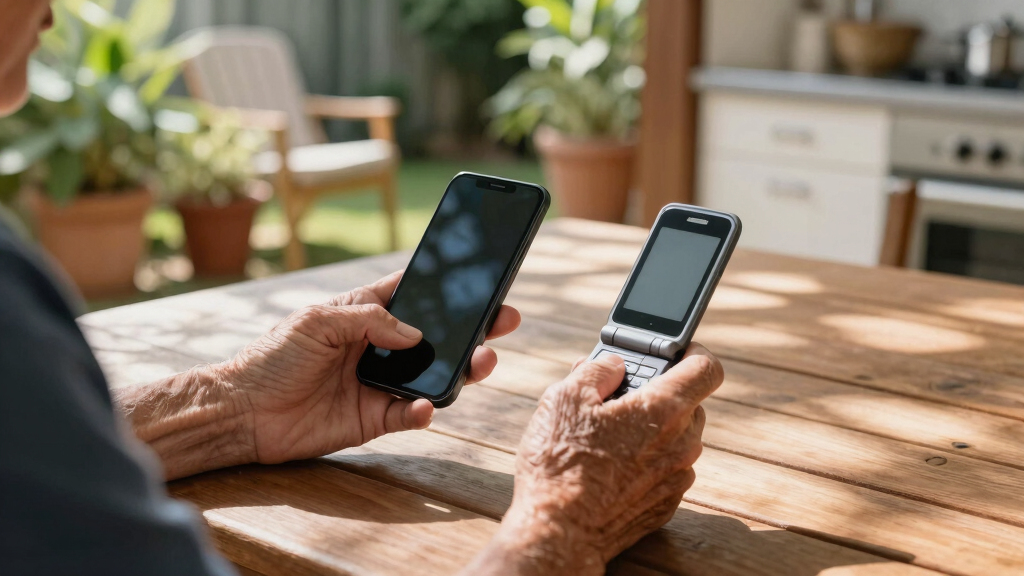
Flip phones are simpler and more straightforward for seniors, but smartphones offer more features for those willing to learn. Recent devices blend these options, making it easier to find a suitable choice.
Imagine handing a senior loved one a sleek smartphone packed with dozens of apps and expecting them to navigate it easily. Many get overwhelmed. Conversely, a flip phone might feel familiar but limits their connectivity. Your choice can make a real difference in daily life, safety, and independence.
This guide walks you through what makes each device type appealing or challenging, with real-world examples and practical tips to help you decide which best supports your loved ones’ needs.
Flip phones are best for simplicity, durability, and quick emergency access.
Smartphones offer a wide range of features but require patience and support to learn.
Recent devices blend the best of both worlds, with senior-friendly interfaces and smartphone capabilities.
Decisions should be based on individual comfort, safety needs, and willingness to adapt.
Providing ongoing support and training makes a big difference in device success.
Why Simplicity Matters: Flip Phones Are Made for Easy Use
When it comes to ease of use, flip phones shine. They feature large, physical buttons and a straightforward interface, perfect for seniors who prefer tactile feedback and minimal fuss.
For example, a grandmother who struggles with tiny touchscreens can simply press big buttons to call her grandkids or turn on her alarm. These phones often have dedicated emergency buttons and a clear display, reducing confusion and frustration.
Many seniors find comfort in the predictability of a flip phone, especially if they’ve used one for years. It’s like holding onto a familiar friend that just works, without the bells and whistles.
However, this simplicity also means limited functionality. While it reduces confusion and makes emergency situations more manageable, it can restrict access to modern conveniences like internet browsing or messaging apps. This tradeoff is crucial: the device becomes a reliable tool for basic communication but may hinder opportunities for social engagement or health management that require internet access.
Popular right now

Dyson V8 Cyclone Cordless Vacuum

Bose QuietComfort Ultra Wireless Noise-Cancelling Headphones with Spatial Audio, Black

TCL QM64L 85-Inch QD-Mini LED 4K Smart Fire TV
As an affiliate, we earn on qualifying purchases.
What Smartphones Offer That Flip Phones Can’t
Smartphones are powerful tools. They connect seniors to the internet, health apps, social media, GPS, and more. This connectivity can significantly enhance independence, safety, and social interaction. For instance, a grandparent using a smartphone to get directions, check medication reminders, or video chat with family can maintain a more active and connected lifestyle.
However, this versatility comes with a learning curve. The array of features, touchscreens, and app ecosystems can be overwhelming, especially for those unfamiliar with technology. If not introduced gradually, it can lead to frustration or abandonment, negating the benefits. The key is to tailor the device to the user’s comfort level, perhaps by disabling unnecessary features or using simplified interfaces. The tradeoff is between empowerment through access to modern tools and the potential for initial confusion or stress. Choosing the right smartphone involves balancing these aspects to maximize benefits while minimizing frustration.
Furthermore, the constant updates and evolving tech mean that the device can become outdated or require ongoing support, which is an important consideration for caregivers and users alike.
Compare These Key Features Side-by-Side
| Feature | Flip Phone | Smartphone |
|---|---|---|
| Ease of Use | Simple buttons, minimal menus | Touchscreen, complex interfaces |
| Connectivity | Calls and texts primarily | Internet, apps, social media |
| Accessibility | Large buttons, basic features | Voice commands, magnification, screen readers |
| Emergency Features | Dedicated emergency button | Emergency apps, GPS tracking |
| Cost | Lower price, cheaper plans | Higher upfront and ongoing costs |
| Future-Proofing | Limited updates, risk of obsolescence | Regular updates, evolving tech |
While this comparison highlights the technical differences, understanding the implications of each feature helps in making a more informed decision. For instance, a device with a dedicated emergency button offers quick access during crises, which is critical for safety. Conversely, a smartphone’s ability to adapt through accessibility features can extend its usefulness as the user’s needs change, but it also requires ongoing support and familiarity with new updates, which might be challenging for some seniors. Weighing these tradeoffs ensures the chosen device aligns with both current and future needs.
Frequently Asked Questions
Is a flip phone safer for seniors than a smartphone?
Generally, flip phones are simpler and often have dedicated emergency buttons, making them easier to operate quickly in an emergency. They reduce the chances of navigation errors during critical moments, which is vital in urgent situations. However, smartphones can also be made safe if equipped with emergency apps, GPS tracking, and simplified interfaces. The key is selecting a device your loved one can operate confidently and comfortably, ensuring safety without adding complexity.
Can seniors learn to use smartphones easily?
Many seniors can learn to use smartphones with patience, support, and tailored settings. Devices with larger icons, voice commands, and step-by-step tutorials help reduce the learning curve. The success depends on the individual’s motivation, physical abilities, and the availability of ongoing assistance. Gradual exposure and positive reinforcement are essential—they help seniors see technology as an aid rather than an obstacle, which can boost confidence and facilitate learning.
Are there devices designed specifically for seniors?
Yes, brands like Jitterbug and others produce phones with large buttons, simple menus, and emergency features, specifically designed for ease of use by seniors. These devices often incorporate hearing aid compatibility and extra durability, addressing common physical and sensory challenges. Selecting a device tailored to their needs can significantly improve usability, safety, and satisfaction, making technology more accessible and less intimidating for older adults.
How much should I expect to spend?
Flip phones tend to cost less upfront—often under $50—and have cheaper monthly plans, making them a budget-friendly option for basic communication. Smartphones, on the other hand, can range from $100 to $800 initially, with higher monthly data and plan costs. While the initial investment is higher, smartphones offer more features that could justify the expense if they enhance safety, social interaction, and independence. Consider not just the purchase price but ongoing costs and the value of features when making your decision.
What’s the best way to help a senior transition to a new device?
Starting with hands-on demonstrations, simplified tutorials, and patient guidance is crucial. Break down the device’s features into manageable steps, and allow ample practice time. Encouragement and positive reinforcement help build confidence, while ongoing support ensures they don’t feel overwhelmed. Creating a supportive environment where questions are welcomed encourages a smoother transition. Remember, patience and understanding are key—making the process positive and stress-free increases the likelihood of long-term success and comfort with the new device.
Conclusion
Choosing between a flip phone and a smartphone isn’t about one being better—it’s about what fits your loved one’s life best. Think of it as finding the right pair of shoes: comfort, support, and confidence matter most.
Remember, the goal is to keep your loved one connected and safe. Sometimes, a simple device that they’re comfortable with is the most powerful tool of all.