When I compared easy-to-use smart home devices for seniors, one truth became clear fast: the best device is the one a senior can actually operate without help. My best overall pick is the DAYTECH WiFi Caregiver Call Button with Wrist Button and Two Receivers, because it combines wearable calling, multiple receivers, and app alerts without a complicated setup. For caregivers who worry about wandering at night, the Smart Caregiver Wireless Floor Mat Alarm offers reliable motion-based alerts, while the LIVELY Jitterbug Smart5 stands out as the simplest smartphone for staying connected. The main tradeoff in this category is between plug-and-play simplicity and advanced features like WiFi alerts and fall detection — the more connected a device gets, the more setup and subscription it usually demands. Read on for the full breakdown, including which systems work without WiFi and which ones justify their higher price.

Turn quiet afternoons into listening time
- Thousands of audiobooks, podcasts and originals
- Listen on your phone, tablet or Echo — also offline
- Cancel anytime
Complete the kit


Key Takeaways
- The DAYTECH WiFi Call Button with wrist button and two receivers earned best overall because it is the only entry-level pick that covers three alert channels at once: receiver chimes, a wearable wrist button, and smartphone notifications.
- Floor mat alarms (the Smart Caregiver mat and the Floor Mat Exit Alarm) are the strongest anti-wandering tools in the lineup, but they only monitor one doorway or bed exit — they are not a substitute for a call button.
- The StackCare system with passive fall detection is the most protective option here, but it requires a subscription and WiFi, which makes it a poor fit for homes without reliable internet.
- Basic pager systems like the Wireless Caregiver Pager and the twin-button Caregiver Pager System beat WiFi models on simplicity — no network, no app, no monthly fees — which is why they rank highly for beginners.
- The VTech SN5147 and Jitterbug Smart5 solve different communication gaps: the VTech handles hearing loss with amplification and photo speed dial, while the Jitterbug targets seniors ready for a simplified smartphone.
| DAYTECH WiFi Caregiver Call Button with Wrist Button and Two Receivers |  | Best Overall | Connectivity: 2.4 GHz WiFi | Included components: 1 call button, 1 wrist button, 2 receivers | App alerts: Shared mobile notifications | VIEW LATEST PRICE | See Our Full Breakdown |
| Smart Caregiver Wireless Floor Mat Alarm and Pager System | 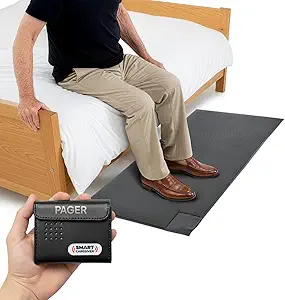 | Best for Wandering and Fall Prevention | Mat dimensions: 24 × 48 × 0.5 in | Color: Grey | Power source: Battery powered | VIEW LATEST PRICE | See Our Full Breakdown |
| PILSAMAS WiFi Caregiver Call Button for Seniors |  | Best Value | Power source: Battery powered | Battery: 1 included lithium polymer battery | Compatible devices: Smartphone | VIEW LATEST PRICE | See Our Full Breakdown |
| VTech SN5147 Amplified Corded/Cordless Senior Phone |  | Best for Hearing and Visibility Needs | Phone type: Corded base with one cordless handset | Ringer volume: Up to 90 dB | Audio assist: Up to 50 dB amplification | VIEW LATEST PRICE | See Our Full Breakdown |
| DAYTECH WiFi Caregiver Call Button System with 2 Buttons, Wrist Watch, and Receiver |  | Best for Multi-Room Coverage | Brand: DAYTECH | Model: CR02TY-CT02WR-WB06WH | Included components: 2 call buttons, 1 wrist watch, 1 receiver | VIEW LATEST PRICE | See Our Full Breakdown |
| Wireless Caregiver Pager with 1 Call Button and 1 Receiver |  | Best Long-Range Coverage | Included components: 1 call button and 1 receiver | Wireless range: Up to 1,500 ft | Expandable capacity: Up to 30 call buttons and multiple receivers | VIEW LATEST PRICE | See Our Full Breakdown |
| CallToU Caregiver Pager and Wireless Alert System with Two-Way Radios |  | Best for Two-Way Communication | Included components: 2 receivers, 2 call buttons, 2 two-way radios | Maximum range: 500 ft open area; under 300 ft recommended indoors | Ringtones: 55 options | VIEW LATEST PRICE | See Our Full Breakdown |
| CallToU Caregiver Pager with 2 Wireless Call Buttons |  | Best Value for Whole-Home Alerting | Receivers: 2 plug-in receivers | Call buttons: 2 | Maximum range: 500 ft (open areas) | VIEW LATEST PRICE | See Our Full Breakdown |
| LIVELY Jitterbug Smartphone for Seniors, No SIM Needed, Smart5 |  | Best All-in-One Safety Phone | Screen size: 6.75 inches | Service compatibility: Lively phone service only | SIM card: Pre-installed | VIEW LATEST PRICE | See Our Full Breakdown |
| Floor Mat Exit Alarm for Fall Prevention and Anti-Wandering |  | Best for Wandering and Nighttime Fall Risk | Included components: 1 economy exit alarm and 1 floor mat | Mat dimensions: 24 x 48 inches | Mat surface: Non-slip with beveled edges | VIEW LATEST PRICE | See Our Full Breakdown |
| Caregiver Pager System with 2 Wireless Call Buttons |  | Best Budget Two-Button Setup | Included components: 2 wireless call buttons, 1 portable pager | Wireless range: Up to 500 feet in open areas | Alert modes: Chime and continuous alarm | VIEW LATEST PRICE | See Our Full Breakdown |
| StackCare Medical Alert System with Passive Fall Detection for Seniors |  | Best for Hands-Off Remote Monitoring | Sensor technology: Motion sensor, contact sensor | Monitoring type: WiFi in-home passive monitoring | Compatible devices: iOS, Android | VIEW LATEST PRICE | See Our Full Breakdown |
| easy-to-use smart home devices for senior | Included components |
|---|---|
| DAYTECH WiFi Caregiver Call Bu | 1 call button, 1 wrist button, 2 receivers |
| Smart Caregiver Wireless Floor | Caregiver Pager (TL-2020P) and Wireless Floor Mat (PTFM-07C) |
| PILSAMAS WiFi Caregiver Call B | — |
| VTech SN5147 Amplified Corded/ | — |
| DAYTECH WiFi Caregiver Call Bu | 2 call buttons, 1 wrist watch, 1 receiver |
| Wireless Caregiver Pager with | 1 call button and 1 receiver |
| CallToU Caregiver Pager and Wi | 2 receivers, 2 call buttons, 2 two-way radios |
| CallToU Caregiver Pager with 2 | — |
| LIVELY Jitterbug Smartphone fo | — |
| Floor Mat Exit Alarm for Fall | 1 economy exit alarm and 1 floor mat |
| Caregiver Pager System with 2 | 2 wireless call buttons, 1 portable pager |
| StackCare Medical Alert System | — |
More Details on Our Top Picks
DAYTECH WiFi Caregiver Call Button with Wrist Button and Two Receivers
This option stands out for layered alerting: a loud in-home receiver alarm plus app notifications that family members can share, so a senior is never depending on a single channel. Compared with the PILSAMAS WiFi Call Button, the DAYTECH trades portability for coverage — its two plug-in receivers blanket a larger home, while PILSAMAS relies on a phone app alone. The included wrist button matters more than it sounds; a wall-mounted button is useless after a fall in the hallway, and a wearable closes that gap. The tradeoff is structural: receivers occupy outlets, WiFi alerts die with the internet, and phone or text alerts sit behind a paid upgrade. For most families, the redundancy justifies those quirks.
Pros:- Dual alert paths: in-home receiver alarms plus shared mobile app notifications
- Wrist button provides protection away from wall-mounted locations
- Two receivers cover larger homes better than single-receiver kits
- 20 ringtones and 5 volume levels let caregivers tune alerts to their hearing
Cons:- Both receivers must occupy wall outlets
- Phone and text alerts require a paid upgrade
Best for: Households where a senior and caregiver share a home and family living elsewhere want app notifications too
Not ideal for: Homes with unreliable WiFi or few free outlets, since both alert paths depend on power and internet
- Connectivity:2.4 GHz WiFi
- Included components:1 call button, 1 wrist button, 2 receivers
- App alerts:Shared mobile notifications
- Ringtones:20 options
- Volume levels:5
- Product dimensions:4.8 x 4.1 x 3.6 inches
- Item weight:10.8 ounces
- Battery:One included 12V battery
Our verdict“The most complete alerting package here for families who want both an in-home alarm and remote app coverage in one system.”
Smart Caregiver Wireless Floor Mat Alarm and Pager System
Every other product in this lineup waits for someone to press a button — this one alerts without any action from the senior. Placed beside a bed or doorway, the 24 × 48-inch mat triggers the pager the moment weight lands on it, which makes it the right tool for dementia care where remembering a button is unrealistic. Compared with a call button system like the DAYTECH kit, this trades on-demand summoning for proactive monitoring, and it works entirely offline with a 300-foot wireless range. The costs are real, though: the pager needs AA batteries you must supply yourself, and building out a fuller system — bed pads, motion sensors, call buttons — means buying each piece separately. As a targeted anti-wandering tool, it earns its place.
Pros:- No action required from the senior — pressure alone triggers the alert
- Works without WiFi or an internet connection
- Pager offers both audible and vibration alerts at up to 300 feet
- Expandable with compatible Smart Caregiver pads and sensors
Cons:- Requires 2 AA batteries that are not included
- Add-on call buttons, motion sensors, and bed or chair pads are sold separately
Best for: Dementia and fall-risk care where the caregiver needs to know the moment someone gets out of bed or approaches an exit
Not ideal for: Seniors who can reliably call for help themselves, since it can’t summon a caregiver on demand like a button system
- Mat dimensions:24 × 48 × 0.5 in
- Color:Grey
- Power source:Battery powered
- Pager batteries:2 AA batteries required (not included)
- Maximum range:300 feet
- Audible noise:70 dB
- Sensor technology:Contact sensor
- Included components:Caregiver Pager (TL-2020P) and Wireless Floor Mat (PTFM-07C)
- Warranty:1 year
Our verdict“The pick for proactive monitoring when a loved one can’t be counted on to press a button.”
PILSAMAS WiFi Caregiver Call Button for Seniors
This is the simplest, most affordable path to app-based alerts with no monthly fee — a single button that pings family phones the instant it’s pressed. Where the DAYTECH systems bundle receivers and wearables for shared households, PILSAMAS skips the hardware extras and goes straight to the people who actually need to know: relatives on their phones. The button can be worn or wall-mounted, and alerts can be shared with multiple family members, which is impressive at this price point. The limitations define the buyer, though. It must sit within 15 meters of the router, only works on 2.4 GHz WiFi, and SMS, phone, or email alerts require a subscription. If the home WiFi is solid and caregivers check their phones, this covers the essentials for less.
Pros:- Real-time app alerts with no monthly fee
- Alerts can be shared with multiple family members
- Flexible placement — wearable or wall-mounted
- Simple single-button setup with no receivers to install
Cons:- Limited to a 15-meter range from the router
- SMS, phone, and email alerts require a paid subscription
- 2.4 GHz WiFi only, which can complicate newer mesh networks
Best for: Budget-conscious families with reliable WiFi whose caregivers keep phones close and check notifications
Not ideal for: Seniors living alone far from the router, or anyone who needs a loud in-room alarm rather than phone-only alerts
- Power source:Battery powered
- Battery:1 included lithium polymer battery
- Compatible devices:Smartphone
- Control method:Touch
- Mounting type:Wall mount
- Maximum range:15 meters from router
- WiFi compatibility:2.4 GHz
- Color:White
Our verdict“The low-cost entry point for remote-family monitoring, provided the home’s WiFi reaches where it’s needed.”
VTech SN5147 Amplified Corded/Cordless Senior Phone
While the call button systems in this roundup handle emergencies, this phone solves the everyday problem they ignore: actually hearing and placing calls. With up to 50 dB audio amplification, a 90 dB ringer, and a large backlit display, it’s built for hearing and vision loss in a way no alert button can be. The corded base is the quiet advantage — it keeps working during power outages, when WiFi-dependent options like the DAYTECH and PILSAMAS systems go silent. Photo speed dial with four picture slots means a senior can call family without remembering a single number, and blocking up to 1,000 numbers keeps scammers at bay. The main restriction is expansion: adding handsets means buying VTech’s specific SN5307 model rather than any generic cordless unit.
Pros:- Up to 50 dB amplified audio and 90 dB ringer with visual alerts
- Large buttons and backlit display for low-vision users
- Corded base functions during power outages
- Photo speed dial removes the need to remember numbers
Cons:- Expansion locked to compatible SN5307 handsets only
- Only four photo speed dial slots despite the large display
Best for: Seniors with hearing or vision loss who need a phone they can actually use, with emergency-ready call blocking
Not ideal for: Caregivers seeking a dedicated fall or emergency alert device, since this is a communication tool rather than a monitoring system
- Phone type:Corded base with one cordless handset
- Ringer volume:Up to 90 dB
- Audio assist:Up to 50 dB amplification
- Call blocking capacity:Up to 1,000 numbers
- Photo speed dial:4 slots
- Answering machine:22 minutes
- Expandable handsets:Up to 4 with SN5307
Our verdict“The best choice when the priority is a phone a hard-of-hearing senior can use confidently every day.”
DAYTECH WiFi Caregiver Call Button System with 2 Buttons, Wrist Watch, and Receiver
This kit reimagines the DAYTECH two-receiver system for homes where the senior moves between rooms: instead of two fixed receivers, it pairs two stationary call buttons with a wrist watch and one receiver. That layout suits a senior who naps in the bedroom, sits in the living room, and still needs a summoning option wherever they wander. Like its sibling, it delivers app notifications that can be shared with family, 20 ringtones, and five volume levels — but the receiver count drops to one, so a large or multi-story home may hear the alarm poorly in far corners. The same constraints apply: 2.4 GHz WiFi only, an outlet consumed by the receiver, and phone/text alerts behind a paid upgrade. Choose this over the two-receiver version when button coverage matters more than alarm coverage.
Pros:- Two call buttons cover multiple rooms, plus a wrist watch for anywhere in the home
- App alerts are shareable with family members
- Customizable ringtones and volume levels
- Combines fixed and wearable triggering in one kit
Cons:- Single receiver limits alarm audibility in larger homes
- Phone and text alerts require a paid upgrade
- Receiver occupies an outlet and depends on 2.4 GHz WiFi
Best for: Seniors who spend time in several rooms and benefit from fixed buttons in each plus a wearable watch
Not ideal for: Large or multi-story homes needing alarms audible everywhere, since only one receiver is included
- Brand:DAYTECH
- Model:CR02TY-CT02WR-WB06WH
- Included components:2 call buttons, 1 wrist watch, 1 receiver
- Wi-Fi:2.4 GHz only
- Ringtones:20 options
- Volume levels:5
- Dimensions:4.8 x 4.1 x 3.6 inches
- Item weight:10.2 ounces
- Battery:1 included 12V battery
Our verdict“A smart pick for multi-room living where having a button within reach everywhere beats maximum alarm volume.”
Wireless Caregiver Pager with 1 Call Button and 1 Receiver
Where most caregiver pagers in this lineup, like the CallToU two-button system, top out around 500 feet, this model claims a range of up to 1,500 feet, which makes it the pick that makes the most sense for larger homes or setups where the caregiver spends time outdoors or in a detached garage. The single-button, single-receiver kit keeps things simple out of the box, but the expandability to 30 buttons and multiple receivers means it can grow into a whole-home system later. The IP55 rating also means the wearable button survives shower use — a common fall-risk location that cheaper pendants can’t handle. The tradeoff is upfront: multi-room coverage requires buying extra components, so small households may pay for range they never use.
Pros:- Claimed 1,500 ft range far exceeds typical 500 ft pagers
- Expandable up to 30 call buttons for growing care needs
- IP55 waterproof and dustproof button safe for bathroom use
- 5 volume levels up to 120 dB cut through household noise
Cons:- Only one button and one receiver included, so multi-room setups require added purchases
- No third-party feedback in the listing to confirm real-world range
Best for: Caregivers in large homes or properties with yards and outbuildings who need alerts across long distances
Not ideal for: Apartment dwellers or single-floor homes — the extended range is wasted, and extras must be purchased for multi-room alerting
- Included components:1 call button and 1 receiver
- Wireless range:Up to 1,500 ft
- Expandable capacity:Up to 30 call buttons and multiple receivers
- Ringtones:58 options
- Volume levels:5, from 0 to 120 dB
- Ingress protection:IP55 waterproof and dustproof
- Operating temperature:-4°F to 140°F
- Warranty:18 months
Our verdict“Buy this if distance between resident and caregiver is your biggest concern; skip it if a compact home makes the extra range unnecessary.”
CallToU Caregiver Pager and Wireless Alert System with Two-Way Radios
This option stands out for something no other pager in this roundup offers: actual two-way conversation. The included pair of two-way radios lets a caregiver answer “I’m coming” instead of just hearing a chime — a genuine difference from one-way systems like the Wireless Caregiver Pager with 1 Call Button, where the resident has no confirmation anyone heard them. With two receivers and two buttons included, it covers two rooms out of the box. The catch is indoor range: 500 feet drops to under 300 feet recommended once walls interfere, and the receivers must occupy wall outlets, which limits placement. Note also that the pager and intercom components can’t be paired with each other, so treat this as two parallel systems rather than one integrated setup.
Pros:- Two-way radios let caregivers respond verbally to calls
- Two receivers and two call buttons included for multi-room coverage
- Buttons double as wearable pendants or wall mounts
- Waterproof and dustproof components throughout
Cons:- Indoor range drops well below the 500 ft open-area figure
- Pager and intercom systems cannot be paired together
- Receivers tie up electrical outlets and limit placement flexibility
Best for: Seniors living with an in-home caregiver who want reassurance that their call was heard, not just a chime
Not ideal for: Homes larger than about 300 feet of indoor distance, and anyone expecting the radios and pagers to work as one unified system
- Included components:2 receivers, 2 call buttons, 2 two-way radios
- Maximum range:500 ft open area; under 300 ft recommended indoors
- Ringtones:55 options
- Volume levels:5, adjustable 0 to 110 dB
- Battery:2 included lithium polymer batteries
- Mounting type:Wall mount, door mount
- Waterproof and dustproof:Yes
- System compatibility:Intercom and pager systems cannot be paired
Our verdict“This is the pick when conversation matters more than raw range, making it ideal for shared households with a live-in caregiver.”
CallToU Caregiver Pager with 2 Wireless Call Buttons
Compared with the long-range single-button pager elsewhere in this list, this CallToU kit takes the opposite approach: shorter 500-foot range, but two buttons and two receivers in the box, so a two-story home gets coverage on day one without buying add-ons. One button can live as a pendant while the second mounts near a bed or bath, and each receiver can sit in a different zone of the house. Compared with the two-way radio version of CallToU, you lose the ability to talk back, but gain a simpler setup with fewer parts to misplace. The honest tradeoff is that the 500-foot figure applies to open air only — expect shorter real-world range through walls, and both receivers need dedicated outlets.
Pros:- Two call buttons and two receivers included without extra purchases
- Buttons work as pendants or fixed mounts for flexible placement
- 55 ringtones and 5 volume levels allow customization for hearing needs
- Waterproof and dustproof buttons handle bathroom and kitchen use
Cons:- 500 ft range is open-air only and shrinks indoors
- Both receivers must occupy electrical outlets
Best for: Budget-minded families covering a two-room or two-floor home who want everything included up front
Not ideal for: Very large properties or those wanting caregiver voice confirmation — the range and feature set fall short of both
- Receivers:2 plug-in receivers
- Call buttons:2
- Maximum range:500 ft (open areas)
- Ringtones:55 options
- Volume:5 levels, 0 to 110 dB
- Battery:Two included 12V alkaline batteries
- Waterproof / dustproof:Yes / Yes
Our verdict“The strongest value pick for typical single-family homes — you trade maximum range for complete out-of-the-box coverage.”
LIVELY Jitterbug Smartphone for Seniors, No SIM Needed, Smart5
This pick makes the most sense for buyers who want one device to replace a pager, a phone, and an emergency button. Unlike the dedicated caregiver pagers in this roundup, which only work within a home’s wireless range, the Jitterbug Smart5 works anywhere there’s cell coverage, pairing a large 6.75-inch screen and simplified menu with an Urgent Response button and 24/7 access to Lively’s support team for health questions or emergencies. Real-time call captioning is a standout for seniors with hearing loss. The tradeoff is real lock-in: the phone only functions with Lively phone service, so you’re committing to a monthly plan, and buyers wanting a standalone device with no subscription should look at the pager options instead.
Pros:- Large 6.75-inch screen with a simplified, easy-to-navigate menu
- Urgent Response button connects to trained help 24/7
- Real-time call captioning supports seniors with hearing difficulties
- Pre-installed SIM and online activation simplify setup
Cons:- Locked to Lively phone service with ongoing plan costs
- A smartphone interface is still more complex than a one-button pager
Best for: Seniors who want a single device combining easy communication, live support, and emergency response both at home and away
Not ideal for: Anyone unwilling to commit to Lively’s required monthly service, or those who only need in-home caregiver alerts
- Screen size:6.75 inches
- Service compatibility:Lively phone service only
- SIM card:Pre-installed
- Key features:Voice calling, real-time call captioning, Urgent Response button
- Support:24/7 access to Lively response team
- Setup:Online activation with phone-based customer support
Our verdict“Choose this if leaving the house is part of the routine and you want safety coverage that travels; stick with a pager for in-home-only needs.”
Floor Mat Exit Alarm for Fall Prevention and Anti-Wandering
This mat solves a problem the call-button systems can’t: residents who can’t or won’t press a button. Where the CallToU pager requires deliberate action from the senior, this pressure-sensing mat triggers automatically the moment someone steps on it beside a bed, chair, or doorway — ideal for dementia care or nighttime wandering. Unlike the Smart Caregiver wireless floor mat in this roundup, it’s fully wired, which means no pairing issues but an 8-foot cord that constrains where the alarm unit sits. The generous 24 x 48-inch non-slip mat with beveled edges reduces trip hazards, yet the power situation is its weak point: it needs three AA batteries you must supply, and it explicitly won’t run on an AC adapter.
Pros:- Automatic triggering requires no action from the resident
- Non-slip mat with beveled edges minimizes trip hazards
- Adjustable volume, variable tones, and blinking visual alerts
- Low-battery warning and status light prevent silent failures
Cons:- Requires 3 AA batteries that are not included, with no AC adapter option
- 8-foot cord limits alarm unit placement to near the mat
Best for: Dementia and fall-risk care where the resident cannot reliably call for help, especially overnight bed exits
Not ideal for: Alert, independent seniors who can use a call button — this mat fires on every footstep, which gets tiresome
- Included components:1 economy exit alarm and 1 floor mat
- Mat dimensions:24 x 48 inches
- Mat surface:Non-slip with beveled edges
- Cord length:8 feet
- Power:3 AA batteries (not included)
- AC adapter compatibility:Not supported
- Alarm features:On/off switch, adjustable volume, variable tones, blinking visual alert, low-battery warning
Our verdict“The right choice when passive monitoring matters more than resident-initiated calls — a complement to, not replacement for, a call button.”
Caregiver Pager System with 2 Wireless Call Buttons
This option stands out for simplicity at a low entry point: two call buttons and one portable pager, with no app, account, or monthly fee required to operate. Compared with the DAYTECH WiFi Caregiver Call Button System, which routes alerts through WiFi to a phone, this system keeps everything local — a real advantage for caregivers who work inside the home and want alerts on a belt-clipped pager rather than a screen. The chime and continuous alarm modes let families tune the urgency of each alert, and the flexible mounting options (lanyard, wall bracket, or bedside placement) make it easy to position one button near the bed and one in the bathroom. The tradeoff is that it depends on the caregiver being physically within range, and the advertised 500-foot range shrinks indoors where walls and appliances interfere.
Pros:- Two call buttons cover separate rooms like a bedroom and bathroom
- No subscription, app, or WiFi needed to function
- Both chime and continuous alarm alert modes for different urgency levels
- Buttons can be worn on lanyards, wall-mounted, or placed within reach
Cons:- Range drops well below 500 feet once walls and floors are in the way
- Battery type and lifespan are unspecified, making replacements a guess
Best for: In-home or live-in caregivers who want a no-fee, no-app way to hear help requests from anywhere in the house
Not ideal for: Long-distance family caregivers — alerts only reach the pager, not a phone, and there’s no remote monitoring
- Included components:2 wireless call buttons, 1 portable pager
- Wireless range:Up to 500 feet in open areas
- Alert modes:Chime and continuous alarm
- Mounting and carrying options:Pager belt clip; call button brackets and lanyards
- Connectivity:Wireless RF (no WiFi or app required)
- Subscription:None
- Product support:12 months
Our verdict“A sensible pick for same-household caregiving where a simple pager — not a smartphone — is the alert hub.”
StackCare Medical Alert System with Passive Fall Detection for Seniors
Where most picks in this roundup — like the Smart Caregiver Wireless Floor Mat Alarm or any call-button system — rely on a senior pressing a button or triggering a sensor, StackCare takes the opposite approach: nothing to wear, press, or remember. Motion and contact sensors quietly learn daily routines and flag unusual patterns that could indicate a fall, sending smartphone alerts and daily summaries to remote family members. This makes it the strongest choice here for long-distance caregivers who can’t be on-site. The tradeoffs are real, though: detection is behavioral, so a sudden collapse may not trigger an immediate alarm the way a wearable fall detector would, and the required $75/month service fee makes it far costlier over time than one-time-purchase pagers like the CallToU systems.
Pros:- No cameras, microphones, or wearables — preserves privacy and dignity
- Daily activity summaries give remote caregivers real insight between visits
- Sensors install without tools, keeping setup simple for non-technical users
- Works with both iOS and Android phones
Cons:- Ongoing $75/month subscription after the first free month adds up quickly
- Pattern-based fall detection can miss sudden incidents that a wearable would catch instantly
Best for: Adult children monitoring an independent-living parent from another city who dislikes wearables and cameras
Not ideal for: Budget-conscious buyers or anyone needing instant, button-press emergency alerts — the subscription cost adds up and detection isn’t immediate
- Sensor technology:Motion sensor, contact sensor
- Monitoring type:WiFi in-home passive monitoring
- Compatible devices:iOS, Android
- Control method:Smartphone app
- Alerts:Unusual activity alerts and daily summaries
- Wearables required:None
- Batteries:8 nonstandard batteries, included
- Subscription:$75/month after first month free
Our verdict“The pick for families who want quiet, continuous remote oversight of a parent’s routine — provided they accept the monthly fee and slower, pattern-based alerts.”

How We Picked
I evaluated every device against the same question: could a senior use it on a difficult day — low vision, shaky hands, confusion — without frustration? That meant prioritizing physical button size, wearable convenience, and setup time. Systems that work out of the box with paired receivers, like the CallToU and basic pager kits, scored higher on ease of use than WiFi-dependent models that require app accounts, router access, and password entry. I also weighed alert range, since a pager is useless if the caregiver is in the garden while the receiver sits in the kitchen.
Beyond usability, I judged versatility (how many alert channels each system offers), ongoing costs (subscription-free versus monitored), and specialization. Devices that do one job extremely well — floor mats for wandering, amplified phones for hearing loss, StackCare for fall detection — were ranked as targeted picks rather than all-rounders. The final ordering reflects a simple philosophy: simplicity first, features second, and monitoring services only when the household genuinely needs them.
Factors to Consider When Choosing Easy-to-use Smart Home Devices For Seniors
Before choosing any single device, it helps to understand what problem you are actually solving. Most senior safety devices fall into three jobs — calling for help, preventing wandering, and detecting falls — and buying the wrong tool for the job is the most common mistake families make.Match the Device to the Actual Risk
The biggest waste of money in this category is buying a fall detector when the real concern is a parent forgetting to call, or buying a call button when the danger is nighttime wandering. Call buttons work only when the senior is conscious and able to press — they do nothing for a fall that leaves someone unresponsive, which is where passive systems like StackCare fill the gap. Floor mats cover exactly one location, so think about which doorway or bedside matters most before ordering. A useful exercise is to write down the two or three moments in a normal day that worry you most, then buy for those moments. Families who skip this step often end up with three devices that overlap and none that address the real risk. Also remember that no device in this price range replaces professional medical monitoring for serious health conditions.
WiFi or No WiFi: The Hidden Complexity Tax
WiFi-enabled devices like the DAYTECH and PILSAMAS call buttons can send alerts to a phone across town, which sounds appealing — until you factor in the setup burden. Connecting a device to a home network usually means entering a long password on a tiny interface, creating an app account, and troubleshooting when the router resets. For many seniors, that setup falls entirely on a visiting family member, and if the connection drops, the device fails silently. Radio-based pager systems trade remote alerts for bulletproof reliability: they work during power cuts, never need updates, and pair in seconds. My advice is to choose WiFi only if a caregiver can realistically respond to a remote alert and maintain the connection. Otherwise, a loud receiver in the house does the same job with far less that can go wrong.
Button Design and Wearability
A call button only works if it is on the person when help is needed. Wrist-worn buttons like the DAYTECH watch-style option outperform tabletop pendants because seniors keep them on through the night. Look for large press surfaces, raised edges that make the button findable by touch, and water resistance — falls happen most often in the bathroom. Water resistance matters more than most families expect, and devices without it effectively leave the riskiest room in the house uncovered. Battery access is another quiet differentiator: replaceable coin cells are simpler for caregivers than rechargeable units that die if nobody remembers the charger. If the senior has arthritis or tremors, avoid anything requiring a firm sustained press, and check whether the button can be pressed with a palm rather than a fingertip.
Caregiver Range and Household Layout
Manufacturers quote impressive open-field ranges, but real homes cut those numbers down sharply — every interior wall, appliance, and metal stud reduces signal. A pager rated for long distances might barely reach from an upstairs bedroom to a basement laundry room in a house with plaster walls. Two-receiver kits solve this by letting you place one unit near the caregiver’s usual spot and another where it will still be heard outdoors or in a workshop. Think honestly about where the caregiver spends time, including the yard and garage, because alerts that arrive only in one room create false security. If the caregiver sleeps in a different wing or floor of the house, prioritize receivers with loud, adjustable volume and vibration or flashing-light options for heavy sleepers.
Subscriptions Versus One-Time Purchases
Most devices in this roundup are one-time purchases, but monitored systems like StackCare’s fall detection and LIVELY’s health-and-safety services carry monthly fees. Those subscriptions buy real value — professional monitoring, emergency dispatch, and features no standalone pager can match — but the cost compounds year after year and often exceeds the hardware price within months. The honest question is whether someone can actually respond to an alert. If a family caregiver lives nearby and checks in daily, a subscription may duplicate coverage you already have. If the senior lives alone with no one within a short drive, monitored coverage earns its cost. Read cancellation terms carefully, because some services lock you into annual contracts that outlast the need.
Hearing, Vision, and Dexterity Accommodations
Generic devices assume average senses, and most seniors do not have average senses. The VTech SN5147 exists precisely because standard phones are unusable with hearing loss — its amplification and large buttons solve problems no smart speaker can. For low vision, look for high-contrast buttons and audible confirmation tones rather than small indicator lights. Dexterity limits make touchscreens a poor match, which is one reason the Jitterbug keeps a list-based menu structure instead of app grids. When evaluating any device, imagine using it in dim light, with glasses off, and with cold or unsteady hands. If that mental test fails, the spec sheet does not matter, because the device will sit unused in a drawer within a month.
Frequently Asked Questions
Do these call button systems work if the senior has dementia?
Partially, and the limits matter. Call buttons rely on the senior remembering what the button is for and pressing it during a problem, which works in early-stage dementia but becomes unreliable as memory declines. For mid-stage dementia, floor mat alarms like the Smart Caregiver mat are usually more dependable because they trigger automatically when the person gets up or approaches a doorway, requiring nothing from the senior. The strongest approach combines both: a mat for nighttime wandering and a wearable button for daytime needs. Avoid WiFi-dependent systems for dementia households unless a caregiver manages the network, since connectivity problems will go unnoticed by the senior.
Can a caregiver pager alert a family member who lives in another house?
Standard pager systems cannot — their radio range covers a single house and maybe a nearby yard, but not another address. If the caregiver lives elsewhere, you need either a WiFi call button like the DAYTECH or PILSAMAS models, which push notifications to a phone app anywhere, or a monitored service like StackCare that connects to a response center. The tradeoff is that remote alerts only help if someone can actually act on them; a notification sent to a phone two towns away does not get anyone through the door faster. If you choose a WiFi model, make sure the home internet is stable and someone local has a key and can respond within minutes.
Is a floor mat alarm or a wearable call button better for fall prevention?
Neither device actually prevents falls — they prevent unassisted movement at risky moments, and they do it in different situations. A floor mat beside the bed alerts the caregiver the moment the senior stands up, which is the highest-risk moment of the night, but it covers only that one spot. A wrist button follows the senior everywhere but depends on them pressing it after a fall, which is not possible if they are unconscious or confused. For genuine fall detection without any action from the senior, only a passive system like StackCare fills that gap. Many families use a mat at night and a wrist button during the day to cover both windows of risk.
Does the LIVELY Jitterbug Smart5 require a special plan or can it use any carrier?
The Jitterbug is tied to LIVELY’s own service, which is part of its simplicity and part of its limitation. You cannot move it to a standard carrier plan, but the bundled service includes urgent response features that ordinary phone plans do not offer, with operators reachable through a dedicated button. That makes it a strong choice for a senior who wants a first smartphone without apps, passwords, and complicated menus. If your senior already handles a regular smartphone comfortably, the Jitterbug’s simplified interface becomes a constraint rather than a benefit. Also note that the optional health and safety packages carry monthly fees on top of the phone plan, so compare total costs before committing.
How many call buttons and receivers do I actually need?
Most households are well served by one wearable button and one or two receivers, which is exactly what the mid-range kits provide. Add a second button only if two people may need help — for example, a couple aging in place together — or if the senior spends time in two distinct zones like a bedroom and a garden. Extra receivers matter more than extra buttons when the house is large or the caregiver moves between floors, because an unheard alert is a failed alert. The two-button DAYTECH and CallToU kits make sense for couples, while single-button systems suit solo seniors. Buying a kit with more pieces than you need just adds pairing steps and batteries to manage.
Conclusion
After comparing all twelve devices, the right choice comes down to who is being protected and who is answering the call. For best overall, the DAYTECH WiFi Caregiver Call Button with Wrist Button and Two Receivers covers the most scenarios with wearable access, multiple receivers, and phone alerts in one affordable kit. For best value, the Wireless Caregiver Pager with 1 Call Button and 1 Receiver delivers dependable alerts with no fees and no setup friction. The StackCare Medical Alert System with Passive Fall Detection takes best premium for households that need protection even when the senior cannot press a button, provided WiFi and a subscription are acceptable. Beginners and anyone wary of apps should start with the CallToU Caregiver Pager with 2 Wireless Call Buttons — pairing takes seconds and nothing needs a password. For specific needs: the Smart Caregiver Floor Mat Alarm for nighttime wandering, the VTech SN5147 for hearing loss, and the LIVELY Jitterbug Smart5 for a senior ready for simplified smartphone communication. Whatever you choose, prioritize the device your loved one will actually wear and use — the safest system is the one that never sits in a drawer.