TL;DR

Turn quiet afternoons into listening time
- Thousands of audiobooks, podcasts and originals
- Listen on your phone, tablet or Echo — also offline
- Cancel anytime
Talking blood pressure monitors announce readings aloud, making home health monitoring accessible for low vision users. They use speech software to read results but rely on accurate cuff placement and validation for precision.
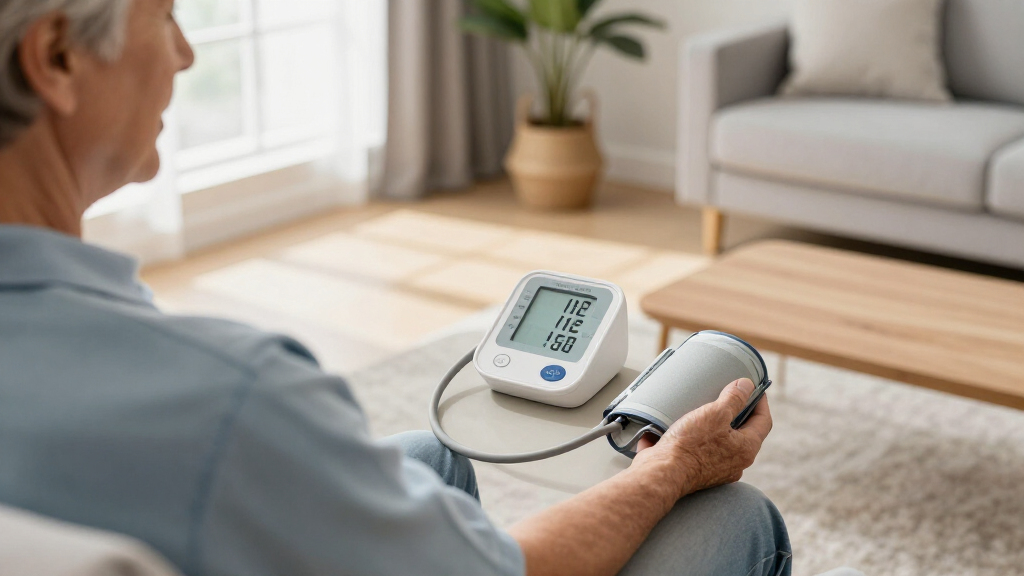
Imagine trying to check your blood pressure when you can’t see the numbers on a screen. Frustrating, right? Now, picture a device that speaks the results aloud, giving you clear, easy-to-understand information. That’s what talking blood pressure monitors do—making health tracking possible, even with low vision.
In this guide, you’ll learn how these devices work, what features to look for, and how they can fit into your daily routine. Whether you’re managing a health condition or just want independence, understanding spoken readings can be a game-changer.
Always choose a clinically validated monitor for accurate readings.
Proper cuff size and placement are crucial—measure your arm and use tactile guides.
Opt for models with adjustable volume, tactile controls, and spoken prompts.
Follow consistent measurement techniques—sit still, support your arm, and relax.
Regularly compare home readings with your doctor’s to track trends accurately.
Talking Blood Pressure Monitors for Low Vision: How Spoken Readings Work
Talking monitors announce blood pressure and pulse aloud, turning an otherwise visual task into a more independent routine. The voice makes results accessible; clinical validation, cuff fit, placement, and consistent technique determine whether those results are trustworthy.
01 · Inside the measurement
From cuff pressure to spoken numbers
Most talking monitors use the oscillometric method. The cuff senses tiny pressure changes created by arterial blood flow; an internal algorithm estimates the result, and speech software translates those calculated numbers into words.
Position & start
Place the cuff on bare skin and press the tactile start control.
Inflate
The cuff tightens around the upper arm and temporarily changes arterial flow.
Sense pulses
Sensors detect pressure oscillations as the cuff slowly releases.
Calculate
The monitor estimates systolic pressure, diastolic pressure, and pulse.
Speak
A synthesized voice announces results and, on some models, warnings or errors.
What the user hears
“Systolic 125. Diastolic 80. Pulse 72.”
02 · Accessibility audit
“Talking” should mean more than one sentence
Some devices speak only the final numbers but still require vision to select a user, change volume, review memory, or understand an error. True accessibility covers setup, measurement, troubleshooting, and history.
Tactile one-button start
Distinct shapes, textures, and spacing make essential controls easy to find and distinguish by touch.
Adjustable, private speech
Look for clear volume steps, a mute option, and ideally a headphone connection for shared spaces.
Spoken prompts & errors
Useful voice guidance identifies movement, poor cuff fit, user selection, and the next corrective action.
Large, high-contrast type
Strong visual contrast supports users with residual sight and helps a family member confirm settings.
Spoken history & averages
Audio access to stored readings and trends matters just as much as hearing the current result.
Settings that stay saved
Simple battery access, mains power, and retained settings reduce sight-dependent reconfiguration.
03 · Buying comparison
What to prioritize before purchase
A monitor should fit both the user and the clinical situation. Pregnancy, children, atrial fibrillation, or unusually large arms may require validation for that specific population.
| Selection factor | Clinically validated upper-arm | Talking but not independently validated | Wrist monitor | Why it matters |
|---|---|---|---|---|
| Independent accuracy evidence | ✓ Strong | ✗ Unclear | ~ Model-specific | Speech cannot compensate for an inaccurate measurement system. |
| Positioning tolerance | ✓ Preferred | ~ Varies | ✗ Heart-level sensitive | Wrist height can materially change the reading. |
| Accessible full workflow | ~ Check features | ~ Check features | ~ Check features | “Talking” may refer only to the final measurement. |
| Correct cuff fit | ✓ Multiple ranges | ~ Verify range | ~ Not applicable | Measure the midpoint of the upper arm before buying. |
| Best role | ✓ Routine home use | ✗ Avoid assumptions | ~ When arm cuff is unsuitable | Match the device to clinical advice and physical needs. |
✓ favorable · ✗ caution · ~ depends on the individual model or situation
04 · Accuracy lives in the routine
Fit, position, rest, repeat
Reliable trends come from repeating the same careful technique. A spoken result can be perfectly clear and still be misleading if the cuff is the wrong size, the arm is unsupported, or the user moves.
The cuff-fit spectrum
Placement cue: position the lower cuff edge about 2–3 cm above the elbow crease, on bare skin, with the tubing or artery marker aligned as the manufacturer directs.
Preparation timeline
Avoid caffeine, smoking, alcohol, and exercise for about 30 minutes · rest quietly for at least 5 minutes · support the cuff at heart level · take two readings about 1 minute apart if advised.
05 · Daily-use checklist
Five habits that make readings meaningful
Blood pressure changes naturally throughout the day. Consistent conditions, recorded averages, and comparison with clinical measurements provide more useful information than reacting to one isolated announcement.
Start with a validated device
Confirm independent clinical validation and any population-specific requirements.
Measure the arm and learn tactile landmarks
Use the stated cuff range and practice finding the elbow crease, cuff edge, and artery marker.
Sit supported, still, and silent
Keep feet flat, legs uncrossed, back supported, and the bare arm at heart level.
Record both numbers and the pulse
Use an accessible log, voice note, app, or spoken-memory function to follow trends.
Compare with the healthcare team
Bring the monitor and home record to appointments to check technique and consistency.
The accessible measurement chain
Important: The first announced number is systolic pressure, the second is diastolic pressure, and pulse is beats per minute. Diagnostic thresholds differ by guideline and setting. Do not change medication based only on home readings; follow your clinician’s instructions and seek urgent medical help for severe symptoms or readings your care plan identifies as an emergency.
How Do Talking Blood Pressure Monitors Announce Results?
Talking blood pressure monitors use text-to-speech technology to relay your measurements aloud. After you place the cuff and press start, the device inflates, measures your blood pressure, and then speaks out the systolic, diastolic, and pulse rate. It’s like having a nurse whisper the results in your ear.
For example, after a quiet moment, you might hear, “Systolic 125, Diastolic 80, Pulse 72.” Some models also warn about irregular rhythms or high readings. The speech is generated by a small computer chip inside the monitor, which turns numbers into words through synthesized voice software.
This spoken output doesn’t influence the accuracy—it’s just a way to make the reading accessible. Think of it as your monitor’s way of speaking your results, instead of showing tiny numbers on a screen.
Popular right now

Samsung 85-Inch QN70H Neo QLED 4K Smart TV (2026)

Ninja Foodi 10-Qt DualZone Smart XL Air Fryer, 6-in-1, DZ550

Vitamix Propel Series 750 Professional-Grade Blender, 4 Programs, Black
As an affiliate, we earn on qualifying purchases.
What Features Make a Talking Monitor Truly Accessible for Low Vision?
Not all talking blood pressure monitors are equally user-friendly. Key features include:
- High-contrast, tactile buttons that can be easily felt and distinguished.
- Adjustable speech volume or a headphone jack for private listening.
- Clear, large display characters to confirm settings visually, if needed.
- Spoken error messages and setup instructions that guide you through every step.
- Simple one-button operation to avoid confusion during measurement.
Imagine a device with a big, red, textured start button, a loud speaker you can turn up, and voice prompts that tell you if the cuff is too loose or if you need to sit still. These features turn a standard device into an accessible health tool.
For example, a user might hear, “Place cuff on bare arm, press start,” and then, after measurement, “Your systolic pressure is 130, diastolic 85, pulse 70.”
How Does Cuff Placement Affect Accuracy for Low Vision Users?
Proper cuff placement is vital for accurate readings. For low vision users, a cuff that fits well and is positioned correctly can be the difference between reliable data and misleading results.
Picture a cuff that’s too small—this can inflate your reading, making your blood pressure seem higher than it really is. Conversely, a cuff that’s too large might underestimate it. The implications are significant because inaccurate readings can lead to unnecessary concerns or missed health issues. Proper cuff size and placement ensure that measurements reflect your true blood pressure, which is crucial for managing conditions like hypertension.
During use, a tactile guide or color-coded markings can help you position the cuff correctly—about 2–3 cm above the elbow. Ensuring the tubing aligns with the artery marker helps the device get a true reading, especially when you can’t see the cuff’s placement. This reduces the risk of errors caused by misplacement, which can otherwise lead to inconsistent or inaccurate readings. For low vision users, mastering cuff placement is a tradeoff: investing time and tactile cues enhances reliability and confidence in each measurement.
For instance, a user might feel the cuff’s edge with their fingers, confirm it’s snug but not tight, and listen for the device’s prompts to keep still. Proper cuff fit minimizes errors and boosts confidence in your readings, which is vital for tracking your health accurately over time.
How Can You Use Spoken Blood Pressure Readings Effectively?
Getting the reading is just the first step. To make health tracking meaningful, you need consistent and correct technique.
Here are some easy tips:
- Rest for five minutes before measuring, to avoid spikes caused by activity or stress. This helps ensure your readings are stable and comparable over time.
- Sit with your back supported and feet flat on the floor, maintaining good posture. Proper positioning reduces variability caused by body movement or discomfort.
- Support your arm at heart level for accurate results. Misalignment can lead to falsely high or low readings, skewing your health data.
- Remain still and silent during measurement to prevent false readings. Movement and talking can cause inaccuracies, which may misrepresent your blood pressure.
- Take two readings about one minute apart and note both, especially if your numbers are high. This practice helps account for fluctuations and provides a more reliable picture of your blood pressure.
Imagine a routine where you sit quietly, press start, listen to the voice guide you, and record each result. Over time, these patterns reveal trends, helping you and your healthcare provider adjust treatments confidently. Consistency in technique ensures that your measurements are comparable and meaningful, reducing the risk of misinterpretation and unnecessary worry.
What Should You Consider When Buying a Talking Blood Pressure Monitor?
When choosing a device, focus on validation, ease of use, and accessibility. Look for models that have been independently tested for accuracy—these are your best bet for reliable readings.
Check that the cuff size suits your arm, and that the device offers adjustable volume or headphone options. Make sure controls are tactile, clearly labeled, and simple to operate with limited vision. Consider how intuitive the setup process is and whether voice prompts are clear and comprehensive. The right device should reduce setup errors and facilitate independent use, offering peace of mind that your readings are trustworthy.
For example, a user might prefer a monitor with a large, textured start button, spoken prompts to guide setup, and a mute option for quiet measurement in public or shared spaces. These features can significantly reduce frustration and increase confidence in daily use.
Also, verify if the device stores multiple readings, offers averages, and if the spoken results can be turned off easily when needed. These features support consistent, private, and accurate health tracking, which is essential for ongoing management of health conditions.
What Are Common Challenges and How To Overcome Them?
Common issues include movement, talking, cuff misplacement, or weak batteries that can mess up readings. For low vision users, a common problem is difficulty setting up or reading error messages.
To avoid errors, always sit still, keep quiet, and ensure the cuff is snug but comfortable. Regularly replace batteries to prevent weak signals. If the monitor announces an error, follow prompts carefully—reposition the cuff, relax, and try again. Understanding the nature of these challenges helps you troubleshoot effectively, minimizing inaccurate readings that could lead to misinterpretation of your health status.
For example, if the device says, “Error: Cuff too loose,” the user can feel the cuff’s position, tighten it slightly, and repeat. Sometimes, a quick check of the batteries or a reset can solve persistent issues. Recognizing these common pitfalls and knowing how to address them ensures your data remains trustworthy and your confidence stays high.
Remember, no device is perfect—regular calibration and comparison with your doctor’s readings help keep your data trustworthy, ensuring you can rely on your home measurements for health decisions.
Latest Innovations in Talking Blood Pressure Monitors
Newer models now blend speech with wireless tech, offering Bluetooth transfer to apps, automatic averaging, and multi-user profiles. They also detect cuff position, monitor irregular heartbeats, and sometimes even announce results in multiple languages.
For example, some devices can store morning and evening readings, then send summarized reports to your healthcare provider. Others can alert you to irregular rhythms that might signal underlying issues.
However, connectivity features can be tricky for low vision users—setup and app navigation might require sighted assistance. The core function—spoken results—should remain clear and accessible without needing a smartphone or internet. While technological advancements expand functionality, they also introduce potential complexity, which can be a tradeoff for users who need simplicity and reliability. Ensuring the core spoken result remains accessible is essential for maintaining independence and confidence in using these devices.
Frequently Asked Questions
Are talking monitors as accurate as regular digital monitors?
Yes, if they are clinically validated. Speech output does not affect measurement accuracy; it simply offers an accessible way to hear the results. Validation, cuff fit, and proper technique are key factors.
Can I turn off the voice if I don’t want it to speak?
Many models include volume controls or mute options, allowing you to silence the speech when needed. Check the product details before purchasing to ensure this feature is available.
Will a wrist monitor be as accurate as an upper-arm device?
Generally, a validated upper-arm monitor is preferred for accuracy. Wrist monitors are more sensitive to positioning and may give less reliable results unless used carefully.
How do I know if a monitor is officially validated?
Look for the exact model listed in recognized validation databases or reports. Independent validation assures the device has been tested for accuracy in real-world conditions.
Can a blind person set up and operate the device alone?
Some models are fully accessible, with spoken setup and tactile controls. Others may require sighted assistance for initial setup. Check product features carefully for independence.
Conclusion
Understanding how spoken readings work transforms blood pressure monitoring from a visual chore into an accessible routine. Focus on validation, cuff fit, and clear speech features to get reliable data with independence.
Imagine a device that not only tells you your numbers but empowers you to stay on top of your health—confidently, quietly, and alone. That’s the promise of the best talking blood pressure monitors.