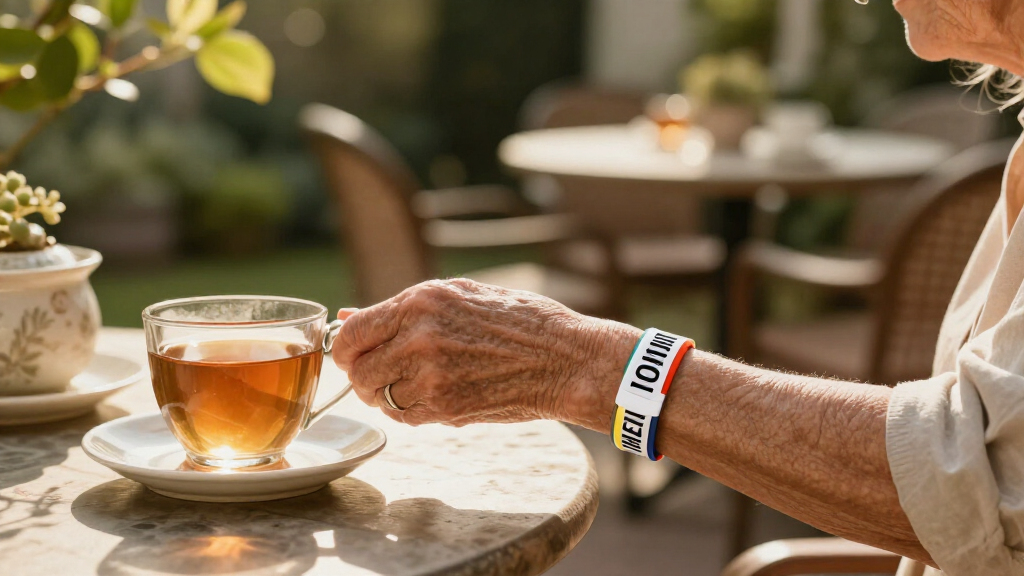

This guide helps you choose and set up a large-print medical alert bracelet so its alert and essential health details are easy to read. It is for anyone buying a bracelet for themselves or helping another person communicate medical information in an emergency. You will decide what to engrave, check readability and fit, and verify the finished bracelet. No specialist skills are needed; allow 30-60 minutes for research and ordering, plus delivery time.

Turn quiet afternoons into listening time
- Thousands of audiobooks, podcasts and originals
- Listen on your phone, tablet or Echo — also offline
- Cancel anytime

Personalized Silicone Medical Alert Bracelet with Stainless Steel Plate
- ✔ Band material: Silicone
- ✔ Plate material: Stainless steel
- ✔ Engraving capacity: Up to 6 lines; 36 characters per line

Custom Engraved Medical Alert Bracelet with Adjustable Braided Nylon Band
- ✔ Materials: Braided nylon and stainless steel
- ✔ Band: Adjustable braided nylon
- ✔ Wrist fit: 5.12–8.66 inches (130–220 mm)

Adjustable Braided Medical Alert Bracelet with Engraved Stainless Steel Tag
- ✔ Materials: Nylon and stainless steel
- ✔ Band: Stretchy, adjustable braid
- ✔ Display length: 20 cm
Difficulty: Beginner | Time: 30-60 minutes to choose and order; allow extra time for delivery and fitting
What You’ll Need
Tools & Materials:
- A flexible tape measure or a strip of paper and a ruler
- A pen and paper or phone for recording health details and wrist size
- Current medical information confirmed with the wearer or their clinician
- Access to a bracelet maker’s ordering page, catalog, or shop
Knowledge:
- The wearer’s key conditions, allergies, and emergency instructions
- How the wearer prefers to put on and remove jewelry, or a helper who can assist
Ask the wearer before sharing personal health information or choosing a style. A medical alert bracelet can supplement, but cannot replace, prescribed treatment or an emergency plan. For details that change often, ask a clinician or pharmacist which information is most useful to display and how to keep it current.
Personalized Silicone Medical Alert Bracelet with Stainless Steel Plate
This is our most defensible first choice for buyers who want to plan a concise, readable engraving. Its stated capacity—up to six lines with 36 characters per line—is more specific than the capacity details for either braided option. That gives us a useful starting point for prioritizing information, although it does not confirm how large the letters can be. Buyers who need large text should ask whether the engraver can use fewer lines or a larger font, then trim the message to fit.The waterproof silicone band is better suited than either nylon band to wear around water or during active routines, and its 5.75–9.5-inch range is the broadest stated fit here. The band can be trimmed, which helps with sizing but makes adjustment less reversible: measure carefully before cutting. Compared with the front-and-back nylon bracelet, this model offers less flexibility for separating information across surfaces, yet it provides a clearer stated line limit and a double-locking accordion clasp. The emergency information card and 12-month PHR trial are extras, not substitutes for readable, current bracelet engraving.We rank it first because it combines the most explicit engraving capacity with practical everyday materials and fit. Its main limitation for this roundup is that large print itself is not specified; six lines could still encourage users to include too much. Keep the inscription short and confirm character spacing and letter height before ordering.
Pros:
- States an engraving capacity of up to six lines and 36 characters per line.
- Lightweight silicone band is described as waterproof for everyday and active wear.
- Fits 5.75–9.5-inch wrists and can be trimmed for adjustment.
- Includes an emergency information card and a 12-month Access PHR trial.
Cons:
- No font size or minimum letter height is specified, so large-print legibility must be confirmed.
- Trimming is less reversible than an adjustable clasp, and engraving space is limited to six lines.
Best for: Wearers who want a waterproof, adjustable band and a clearly stated engraving limit to help plan a short, prioritized medical message.
Not ideal for: People who need confirmed large-font engraving, want to place different information on front and back, or are uncomfortable trimming a band to fit.
Bottom line: We rank this first for its unusually clear engraving limits and broad, practical fit, provided buyers verify the actual letter size before ordering.
“We rank this first for its unusually clear engraving limits and broad, practical fit, provided buyers verify the actual letter size before ordering.”
Custom Engraved Medical Alert Bracelet with Adjustable Braided Nylon Band
When a wearer needs to communicate several kinds of information, this braided model’s defining advantage is customizable engraving on both sides. That can let us reserve one surface for the most urgent condition or allergy and use the other for medications or an emergency contact. Compared with the silicone pick, it offers more ways to organize the message, but it does not state a line or character limit. More available surface is useful only if the resulting letters remain readable, so confirm whether a larger font can be selected before filling both sides.The adjustable nylon band has a listed fit of 5.12–8.66 inches, covering smaller wrists than the silicone bracelet at the lower end but not reaching as large at the upper end. Its braided construction is intended for lightweight everyday wear, while the stainless steel plate is described as corrosion- and rust-resistant. The listing gives conflicting clasp details—both lobster claw and adjustable clasp—so we would verify the closure and adjustment method rather than assume the fit range alone explains how it secures.This is the stronger choice over the single-plate silicone model when information organization matters more than water-ready band material. It is also more explicit than the third bracelet about using both sides for engraving. Still, the unconfirmed font size and clasp description prevent us from placing it first for large-print needs. Short, high-priority wording is likely more useful than trying to use every available engraving area.
Pros:
- Offers customizable engraving on both the front and back.
- Adjustable braided nylon band is designed for lightweight everyday wear.
- Stainless steel plate is described as corrosion- and rust-resistant.
- Stated wrist range of 5.12–8.66 inches includes smaller wrists than the silicone pick.
Cons:
- Engraving capacity and font size are not specified, so large-print suitability is uncertain.
- The description conflicts on whether the clasp is lobster claw or adjustable.
Best for: Wearers who need to organize several medical details and an emergency contact across two engraving surfaces, with a wrist within the stated range.
Not ideal for: Buyers who need a verified large font, a clearly documented clasp, or the wider upper-end fit and waterproof band of the silicone option.
Bottom line: Choose this over the silicone model when two-sided information layout matters, but confirm font size and clasp details before purchase.
“Choose this over the silicone model when two-sided information layout matters, but confirm font size and clasp details before purchase.”
Adjustable Braided Medical Alert Bracelet with Engraved Stainless Steel Tag
This model is the straightforward braided choice: a stretchy, adjustable nylon band paired with a removable stainless steel tag that can carry medical and emergency contact information. Its flexible fit may appeal to wearers who dislike a band that needs trimming, unlike the silicone pick. The description also specifies laser engraving, which it says is intended to preserve legibility over time. That is useful for durability, but it does not tell us how many characters fit or how large the letters can be.For large-print buyers, that missing capacity is the central drawback. The front-and-back nylon model gives a more explicit way to divide information, while this bracelet’s tag is described without a stated engraving area or layout. We would not select it for a long list of conditions or medication details unless the seller confirms that the required wording fits in a readable size. Its 20 cm display length is listed, but that alone does not establish an adjustable wrist range or guarantee a suitable fit for every wearer.The magnetic clasp and removable tag give this option a distinct construction, although the supplied details do not explain how the tag is removed or how the magnetic closure performs during daily activity. Compared with the first-place silicone bracelet, it offers less sizing guidance and less engraving capacity information; compared with the two-sided braided model, it offers less stated room to organize text. We place it third not because a simpler bracelet cannot work, but because the key large-print details are least documented. Ask for the available font size and sample layout before choosing it.
Pros:
- Stretchy, adjustable braided band avoids the silicone model’s trim-to-fit step.
- Removable stainless steel tag can display medical and emergency contact information.
- Laser engraving is described as intended to remain legible over time.
- Nylon and stainless steel construction provides a different feel from the waterproof silicone option.
Cons:
- Engraving capacity, font size, and tag dimensions are not specified.
- A 20 cm display length is listed, but a precise wrist-fit range is not provided.
- The supplied information does not explain magnetic clasp security or tag removal.
Best for: Wearers who prefer a flexible braided band and need a simple medical tag, after confirming that their short message fits at a readable size.
Not ideal for: People who need a defined wrist range, substantial medical text, or documented engraving capacity and font size before buying.
Bottom line: This is a reasonable simple braided alternative, but we rank it third because buyers cannot assess large-print capacity or fit as confidently from the stated details.
“This is a reasonable simple braided alternative, but we rank it third because buyers cannot assess large-print capacity or fit as confidently from the stated details.”
As an Amazon Associate we earn from qualifying purchases.
Before You Start
Large print depends on more than the number of characters in the engraving. The available engraving area, letter style, contrast, and bracelet material all affect readability. Check the maker’s actual font or engraving examples and character limits before ordering; do not assume that selecting “large print” means every line can use the largest size.
Use only accurate, necessary information. Do not guess medication names, dosages, diagnoses, or emergency instructions. If the wearer has a complex treatment plan, confirm what should appear on the bracelet with their healthcare professional. Keep a fuller medication and health record somewhere accessible, such as a wallet card or medical ID on a phone, if appropriate.
Step-by-Step Instructions
Step 1: List the information the bracelet needs to communicate
Write down the medical information most likely to change emergency care. Depending on the wearer, this may include a serious allergy, a condition such as diabetes or epilepsy, an implanted device, or a specific emergency instruction. Include an emergency contact only if there is space and the wearer agrees to share that number.
Put the alert symbol or phrase first, followed by the highest-priority details. Use the wording recommended by the bracelet maker or the wearer’s clinician. Remove information that is outdated, uncertain, or not useful to someone responding in an emergency.
Tip: Medical alert conventions and available symbols differ. Check that the chosen alert marking is recognizable, and ask a clinician if you are unsure how to describe a condition or treatment.
Check: You have a short, verified list of essential details, ordered by priority, with no guessed or obsolete information.
Step 2: Measure the wearer’s wrist
Wrap a flexible tape around the wrist where the bracelet will sit. Keep it comfortably close without pulling tight, then record the measurement. If you do not have a tape, wrap a strip of paper around the wrist, mark where the ends meet, and measure the paper with a ruler.
Check the maker’s sizing directions and compare the measurement with its size chart. Follow its advice about adding room for comfort rather than applying a standard allowance: clasp styles and bracelet designs fit differently. If the wearer has swelling that varies, ask the maker or clinician how to select a fit that remains safe and comfortable.
Tip: Measure the wrist of the person who will wear the bracelet, not a bracelet they already own; existing jewelry may be stretched or sized differently.
Check: You have a wrist measurement and a matching size recommendation from the specific maker.
Step 3: Compare large-print styles and engraving space
Look for a bracelet that combines a recognized medical alert marking with a broad, flat engraving area. Review close-up photos or a sample showing the actual engraving, not only a picture of the blank bracelet. Check whether the text is engraved, printed, or embossed and whether the maker offers a high-contrast finish.
Ask how many lines and characters fit at the largest readable size. Request a proof or sample if available. Compare the sample with the wearer’s vision needs and, if possible, view it under ordinary indoor lighting. A larger band is not automatically easier to read if the lettering is small, crowded, or low contrast.
Tip: Do not rely only on claims such as “easy read.” Ask for the font size, a close-up sample, or a written confirmation of how the maker will fit your text.
Check: You have identified a style with enough space for the alert and essential details in text the wearer can read or a responder can inspect.
Step 4: Prepare and review the engraving text
Draft the exact text using brief, familiar terms. Use standard abbreviations only if the maker and wearer can confirm they are clear. Keep the alert marking prominent; place the most time-sensitive information next. Do not add long explanations that force the maker to shrink the lettering.
Count characters, including spaces and punctuation, using the maker’s stated limits. Send the draft to the wearer and, when medical wording is uncertain, the relevant clinician or pharmacist. Check spelling, phone numbers, and any contact consent before approving the text.
Tip: A short, accurate message in large lettering is usually more useful than a long list in tiny lettering. Put additional records in a separate, accessible medical information source.
Check: The wearer has approved a concise, accurate final draft that fits the maker’s large-print limits.
Step 5: Place the order and confirm the specifications
Enter the measured size, chosen material, preferred closure, and approved engraving exactly as requested by the maker. Select the largest suitable type size and the highest available contrast that remains readable. Before submitting, review every character in the order preview and compare it with your approved draft.
If the website does not show font size or a legible preview, contact the maker before paying. Ask them to confirm in writing that the alert marking and all text will fit at the requested size. Check the return, adjustment, and re-engraving policy, since personalized items may have limited return options.
Tip: Do not approve a preview that silently reduces the text to fit. Ask the maker to remove lower-priority wording or use a larger plate instead.
Check: The order confirmation lists the correct size and engraving, and the maker has confirmed the requested print size or provided an acceptable proof.
Step 6: Fit the bracelet and check comfort
When the bracelet arrives, compare its engraving with the approved proof before the wearer puts it on. Check that every line is present and that no letters, numbers, or contact details are missing or incorrect. Contact the maker before wearing it if the engraving differs.
Fasten the bracelet according to its instructions. Check that it stays in place without pinching, rubbing, or restricting circulation or movement. Confirm the clasp is secure and that the wearer can manage it independently, or arrange help if needed. Follow the maker’s care guidance, especially if the wearer has sensitive skin or the bracelet may be exposed to water.
Tip: Stop using a bracelet that causes pain, skin irritation, or numbness. Ask the maker or a healthcare professional about a safer fit or material.
Check: The bracelet closes securely, sits comfortably, and has correct, complete engraving.
Step 7: Test readability and set a review reminder
Ask the wearer and another person to read the bracelet under normal indoor lighting, without zooming in on a phone photo. Check the alert marking first, then each essential line. If a line is difficult to read at the distance a responder might use, contact the maker about a larger plate, stronger contrast, or shorter wording.
Set a reminder to review the bracelet after a diagnosis, allergy, medication instruction, or emergency contact changes. Check it periodically for fading, damage, loose clasps, and fit changes. Replace or update it when the information is no longer correct or the engraving cannot be read clearly.
Tip: Test the actual bracelet, not just an online rendering. Lighting, glare, eyesight, and metal finish can change how legible the text is.
Check: The wearer and another reader can identify the alert and essential text, and you know when to review the information again.
Common Mistakes to Avoid
- Ordering by guesswork instead of measuring the wrist. — Measure the wearer directly and use the maker’s size chart and fit guidance.
Troubleshooting
Problem: Medical details change after the bracelet arrives.
Solution: Update the engraving rather than relying on an outdated alert. Ask the maker about replacement plates or re-engraving, and use a current medical ID card or other suitable alert method while arranging the update.
What Success Looks Like
The completed bracelet displays a recognizable medical alert marking and accurate, prioritized information in lettering that is clear under ordinary lighting. Its size and closure suit the wearer, the clasp stays secure, and the bracelet causes no discomfort. The wearer or a helper can check the engraving and knows to update it when health information changes.
Next Steps
Store the order details and the final engraving text where the wearer or helper can find them. Keep any fuller medication list or emergency plan current through an appropriate medical ID method, and tell relevant caregivers where that information is kept. Recheck the bracelet after health changes and during routine care; replace it if the engraving fades, the clasp fails, or the fit becomes unsuitable. Ask the wearer’s healthcare professional for guidance if you are unsure which details should appear.
Frequently Asked Questions
What information should go on a large-print medical alert bracelet?
Start with a recognizable alert marking and the few verified details most likely to affect emergency care, such as a serious allergy, key condition, implanted device, or emergency instruction. The right wording depends on the wearer’s health needs. Ask their clinician or pharmacist when the priority is unclear, and keep longer records separately.
How large should the engraving be?
There is no single print size that suits everyone or every bracelet. Ask the maker for the actual font size or a close-up proof, then test the finished text under ordinary lighting with the wearer. If the information is crowded or hard to read, shorten the message or choose a larger engraving area rather than accepting smaller type.
Can I use abbreviations to fit more information?
Use an abbreviation only if the wearer, maker, and relevant healthcare professional agree that it is clear and accurate. Unfamiliar shorthand can be misunderstood. Removing lower-priority text is safer than shrinking the letters or using unclear abbreviations.
What if the wearer’s medical information changes?
Arrange updated engraving as soon as practical, and use another current medical ID method while the bracelet is being replaced or corrected. Do not rely on an alert that lists outdated instructions, allergies, or contact details.
How do I know whether the bracelet fits correctly?
Follow the maker’s sizing instructions. The bracelet should stay secure without pinching, rubbing, restricting movement, or causing skin discomfort. If the wrist size changes or the wearer cannot manage the closure, ask the maker about an adjustment or another style.
Halloween Picks

DomKom 6-Foot Halloween Inflatable Ghosts Roasting Marshmallows

8.5 Foot Halloween Inflatable Haunted House Castle with Skeleton, Ghost & Skulls

HOPOCO Halloween Pumpkin Fog Machine with 12 LED Colors and 4 Light Modes
As an affiliate, we earn on qualifying purchases.