TL;DR

Turn quiet afternoons into listening time
- Thousands of audiobooks, podcasts and originals
- Listen on your phone, tablet or Echo — also offline
- Cancel anytime
Medical alert systems let older adults request help after a fall, sudden illness, or another emergency, usually through a wearable button connected to a response center or chosen contact. Before choosing one, check where it works, how responders handle an alert, whether the person will wear it, what happens when power or service fails, and the full cost. Automatic fall detection can add support, but it can miss falls and does not guarantee help will be summoned.
A help button can be smaller than a watch face, yet it may shape how confidently someone moves through an ordinary day. For an older adult who lives alone, the ability to summon assistance after a fall, sudden illness, or another emergency can bring reassurance to both the wearer and family. Still, a device cannot prevent every injury or promise a particular response time.
This guide explains how medical alert systems work, what separates home coverage from mobile service, and where automatic fall detection helps—and where it can fall short. You’ll also find practical questions about comfort, batteries, privacy, and total cost, so you can compare options around the person’s real routine instead of a long feature list.
A response center’s call sequence matters: find out who speaks with the wearer and who gets contacted if they cannot answer.
Choose home or mobile coverage according to the person’s real routine, and check service in the places they use.
Fall detection can miss a fall or send a false alert, so the user should press the button when able.
Try the wearable for comfort and ease of use; check water guidance, battery alerts, cellular coverage, and outages.
Compare every fee, cancellation term, equipment-return rule, and GPS privacy setting before signing up.
Know what happens after you press the help button
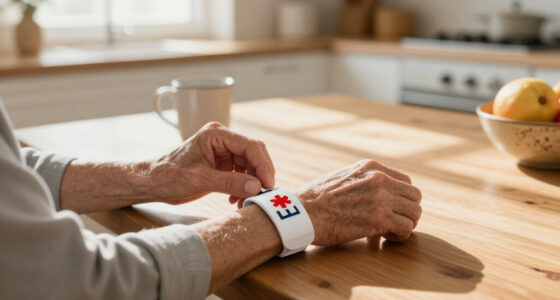
A medical alert system is a wearable button or device that connects a person who needs help with a response center or a chosen contact. The user presses the button, a connection opens, and someone responds according to the service’s process. That process matters because the button itself does not decide what kind of help is needed: a trained operator, a reachable family member, or clear instructions must turn the alert into an appropriate next step. The system can make asking for help simpler, but it does not replace emergency services or medical care.
For example, imagine your father slips near the kitchen table and presses his pendant. The device may connect him to a staffed monitoring center through a base unit or cellular link. An operator can speak with him, ask what happened, and follow the plan on his account—perhaps calling emergency services, then notifying you. If he cannot respond, the operator needs instructions for deciding whether to dispatch help and which contacts to try. The exact sequence depends on the provider and the instructions you set up.
Ask whether the center is staffed around the clock, how the operator communicates if the user doesn’t answer, and whether the company can reach local emergency services. A system that calls family directly may work well if a caregiver is reliably available, but a missed call can delay the next step; a monitored service adds an intermediary who can follow a defined process, often for a recurring fee. A clear response plan tells everyone who is contacted and what happens when the wearer cannot speak. Keep contact details and access instructions current, since even a well-run center may lose time if the information on file is outdated.
Key point: the button is only one link in the chain. When you set up a system, add accurate contacts and instructions, then walk through a test alert so the wearer recognizes the voice, sound, and steps that follow. That practice can also reveal practical problems, such as a speaker that is hard to hear or an operator who cannot understand the user.
Popular right now

Bose QuietComfort Ultra Wireless Noise-Cancelling Headphones with Spatial Audio, Black

TCL QM64L 85-Inch QD-Mini LED 4K Smart Fire TV

TCL T7 Series 85-Inch 4K 144Hz QLED Smart Google TV
As an affiliate, we earn on qualifying purchases.
Choose home or mobile coverage around the person’s routine
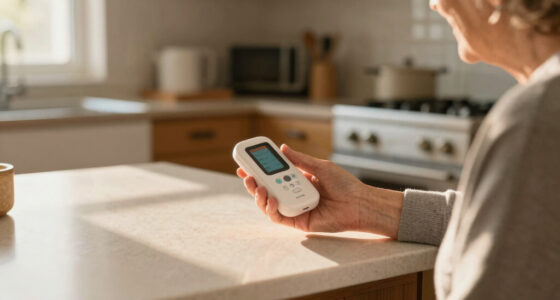
Home medical alert systems connect a wearable to a base unit within a set range, while mobile systems use cellular service and may add GPS for use away from home. The practical choice depends on where the person spends time and whether the device can connect there. A home system can be simpler and may avoid the need to charge a separate mobile unit, but its range ends where the wearable can no longer reach the base. A mobile device can travel farther with the wearer, but depends on cellular coverage and its own battery. GPS location also depends on signal conditions and may be less precise indoors or in areas with poor reception.
Think of a person who mostly reads, cooks, and gardens around the house. A home unit may suit that routine if the wearable reaches all the places they go, including the back patio. Someone who takes the bus to a weekly lunch or walks a dog around the block may want a mobile device that works beyond the home, where cellular coverage is available. The key question is not simply whether the product is labeled “mobile,” but whether it will connect on the route and in the places where help might be needed.
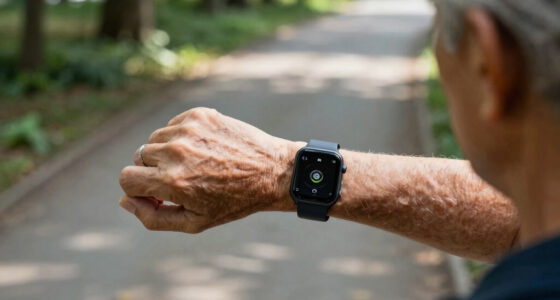
Some systems combine a home base with a wearable for outings; smartwatches and caregiver apps have also widened the range of options. Those added functions can help if the person already uses and charges a watch or if a caregiver needs location or battery information. They can also add charging, setup, and privacy decisions. A feature on a product page does not tell you whether the service reaches a particular building, neighborhood, or favorite walking path. Ask the provider to check the actual service area, and test the device wherever the wearer regularly goes.
Make a routine map: list the rooms, outdoor areas, and regular destinations the person uses. Then ask which parts each system covers and how it connects. Include places with weak cellular reception, such as a basement or a rural route, and consider whether the person will remember to carry and charge a mobile unit. If the wearer seldom leaves home alone, paying for mobile features may add little; if they often go out, a home-only range can leave a real gap. The right fit balances the cost and upkeep of broader coverage against the places the person actually goes.
Treat fall detection as backup, not a guarantee
Automatic fall detection uses sensors in some wearables to try to recognize a fall and place an alert without the wearer pressing the button. It adds a backup for a moment when a person is unable to reach the control, but detection is imperfect: a device may miss a fall or trigger a false alarm. It does not guarantee that help will be summoned. The practical value depends on whether the extra chance of an alert addresses a real difficulty for the wearer, and whether the device is comfortable enough to keep on.
Picture your aunt stumbling on a rug and landing slowly against a sofa. A sensor may not interpret that movement as a fall, even though she needs help. In another case, a quick, forceful movement could trigger an alert when she is safe. A false alert may be a small inconvenience if the wearer can cancel it easily, but repeated alarms can make someone less willing to wear the device. The wearer should still press the help button when able, and the family should learn how the device handles both kinds of alert.
Fall detection commonly costs extra, and accuracy varies by device and situation. Ask what happens after an automatic alert: does an operator try to speak with the wearer, how long do they wait, and who receives the call if no one answers? Also ask whether the user can cancel an alert and how the center distinguishes an accidental trigger from an emergency. Newer products may describe machine-learning features, but marketing language alone does not show how a particular device performs in everyday use. Consider the feature’s added cost alongside its limits and the wearer’s ability to call for help another way.
Use it as an extra layer: if you compare devices with fall detection, look for clear details about its limits and test the alert process. A user who can reliably press a button may value comfort and easy operation more than a feature they find intrusive or difficult to wear. If the user may be unable to press a button, that is a reason to consider fall detection, but also to review the broader response plan with a qualified professional.
Check comfort, sound, water resistance, and charging
A wearable can only help if the person can operate it and wears or keeps it within reach. Comfort, accessible controls, a suitable speaker, water resistance, battery life, and reliable connectivity all shape whether a system fits daily life. These details interact: a device that is easy to wear but hard to hear may not support a useful conversation, and a mobile unit with strong features may be left behind if charging feels like a burden. A device that sits on a dresser because its clasp pinches has little practical value.
Consider someone who removes a pendant before stepping into a steamy shower. If that device is not meant for water, or the wearer does not know its limits, it may be out of reach when a fall happens in the bathroom. Ask which parts can be worn while bathing, and confirm the product’s water-resistance guidance rather than assuming every pendant or watch is suitable. Water resistance is not a promise that every device can be submerged or used in every bathing situation, so match the guidance to the person’s habits.
Home units may use a landline, cellular connection, or both; mobile devices rely on cellular coverage and battery power. Ask how the system signals a low battery, how often a mobile unit needs charging, and what it does during a power or network outage. A backup battery may keep a base unit running temporarily, but it cannot solve a wider connection failure. A charging routine works best when it fits an existing habit, such as placing the device on its charger beside the bed each evening. If that routine is unrealistic, discuss another device or charging arrangement before relying on it.
Try before you commit: have the wearer handle the button, hear the speaker, and put the device on and take it off. If hearing, speech, vision, memory, or dexterity makes that difficult, discuss alternatives with the provider and a qualified professional. Testing can show whether the device’s size, sound, and controls suit the person rather than just looking suitable on a page. A simpler device the person understands may serve them better than one with a longer feature list.
Compare the full cost and privacy terms before choosing
The real price of a medical alert system includes all required charges and the terms for ending service, not only a monthly monitoring fee. Ask about equipment, activation, monitoring, shipping, and optional features such as fall detection. Also check the trial period, warranty, cancellation rules, and whether you must return equipment. These terms affect the cost if needs change, the wearer stops using the device, or the family wants to switch providers.
For instance, a family comparing two monthly plans may find that one includes a device while another adds an upfront equipment charge and a separate fee for fall detection. Without asking for the total over a year, the lower advertised monthly price can look less expensive than it is. Request a written breakdown, and confirm whether prices or features vary by service area. If a plan requires a long commitment or charges for unreturned equipment, include that potential cost in the comparison rather than treating it as fine print.
Privacy deserves the same attention as cost. A GPS-enabled device may share location with its monitoring service or designated contacts, and some providers offer caregiver apps or portals that show location, battery, or alert information. Those features can help a caregiver respond to an issue, but they also change who can see information about the wearer’s movements and device use. Before turning those features on, ask what data is collected, who can see it, and how the wearer can change sharing choices. Agree on access with the wearer so reassurance does not come at the expense of their comfort or trust.
Use this five-step check:
- List every fee, including optional features and equipment.
- Read cancellation, trial, warranty, and return terms.
- Ask what the device records and who can access that information.
- Confirm coverage, battery alerts, and outage behavior.
- Review the response plan with the wearer and chosen contacts.
Coverage through Medicare or insurance can depend on the plan and circumstances, so check directly with the specific insurer rather than assuming the service is covered. A written quote and a clear explanation of location sharing make it easier to compare providers calmly. Taken together, the cost and privacy details show what the service asks of the wearer and family over time, not just what it promises at sign-up.
Match the system to the person, not the longest feature list
The best-fitting system is one the person can use consistently, with service where they spend time and a response plan they understand. A long list of features cannot make up for a device that is uncomfortable, hard to hear, difficult to charge, or rarely carried. Suitability depends on the wearer’s routine and abilities as well as the product. A simpler setup may be more dependable if the person can use it easily; a more capable device may be useful if its extra coverage addresses a real gap and the wearer can manage it.
Imagine two neighbors: one spends most afternoons in a familiar home and can easily press a large pendant button; the other walks daily and prefers a wrist device. Their needs point toward different setups, even if one product advertises more features. Try each device in real conditions—at home, on a walk, and during the usual charging routine—before deciding. Those trials can expose tradeoffs that a brochure cannot, such as a mobile unit losing signal on a regular route or a wrist device feeling uncomfortable after several hours.
Caregivers can help older adults compare options and practice using the system, while leaving room for the wearer’s preferences. Ask the person whether the device feels comfortable and whether they understand who will answer. If cognitive changes, hearing loss, speech limitations, or reduced hand strength affect use, ask a qualified professional and the provider about accessible designs and a workable emergency plan. Planning around those needs early can prevent a mismatch between what a device offers and what the wearer can reliably do with it.
Keep the goal simple: make it easier to ask for help in the situations that matter to this person. A medical alert system can support independence and reassure family members, but it works alongside a broader safety plan, ordinary medical care, and emergency services—not in place of them. Revisit the choice if the person’s routine, abilities, or support network changes, since a system that fit well before may no longer cover the same needs.
Frequently Asked Questions
What happens when someone presses the help button?
The device connects to a response center or a chosen contact, depending on the service. Ask whether an operator will speak with the wearer, contact emergency services, notify caregivers, or follow a specific sequence if no one answers.
Can a medical alert system work away from home?
Mobile systems use cellular service and may include GPS, so they can work outside the home where coverage is available. Confirm coverage in the person’s usual destinations; GPS can be less precise indoors or where reception is poor.
Can automatic fall detection miss a fall?
Yes. Sensors may miss some falls and may trigger false alarms, so the feature does not guarantee that help will be summoned. The wearer should still press the help button when able.
Can someone wear a medical alert device in the shower?
Some options are designed to be water resistant, but that does not mean every device can be used in every bathing situation. Check the specific product’s water guidance and choose a wearable the person will keep on when appropriate.
Does Medicare or insurance cover medical alert systems?
Coverage depends on the person’s plan and circumstances. Check with the specific insurer or plan administrator before assuming equipment or monitoring costs will be covered.
What should I check before signing up?
Compare where the system works, how alerts are handled, ease of use, battery and outage behavior, water resistance, fall-detection limits, total cost, cancellation terms, and privacy controls. Ask for the terms in writing and test the device with the wearer.
Conclusion
Choose the system the wearer can comfortably keep close, connect to, and use, then make sure everyone knows what happens after an alert. Check the coverage, response plan, battery routine, and full cost together; each one affects whether the device fits daily life.
A help button is a small tool with a clear job: make the next step easier when someone needs assistance. Set it up, practice once, and let it become as familiar as the keys by the door.